
浏览器与 Web API / 系统课时
Document、Element 与 Node
Document、Element 与 Node
DOM 中的页面并不是一组孤立标签,而是一棵由不同节点类型组成的对象树。本课将区分 Document、Element、Text、Comment 与 Node,并通过可运行示例判断节点类型、读取公共属性,避免把元素专属 API 误用到普通节点上。
学习目标
- 说明
Node与常见 DOM 类型之间的继承关系。 - 使用
nodeType、nodeName和instanceof判断节点身份。 - 根据对象类型选择
childNodes、children、classList等合适 API。
DOM 类型的共同基础
Node 是 DOM 节点的公共基础接口。Document 表示整个文档,Element 表示标签元素,Text 表示文本内容,Comment 表示注释。它们都能使用 parentNode、childNodes、textContent 等 Node 层能力,但并不共享所有元素操作方法。
继承关系可以概括为:Document 直接继承 Node;Element 直接继承 Node;Text 与 Comment 先继承 CharacterData,再间接继承 Node。HTML 页面中的具体标签对象通常还是 HTMLElement 的实例,而 HTMLElement 又继承自 Element。
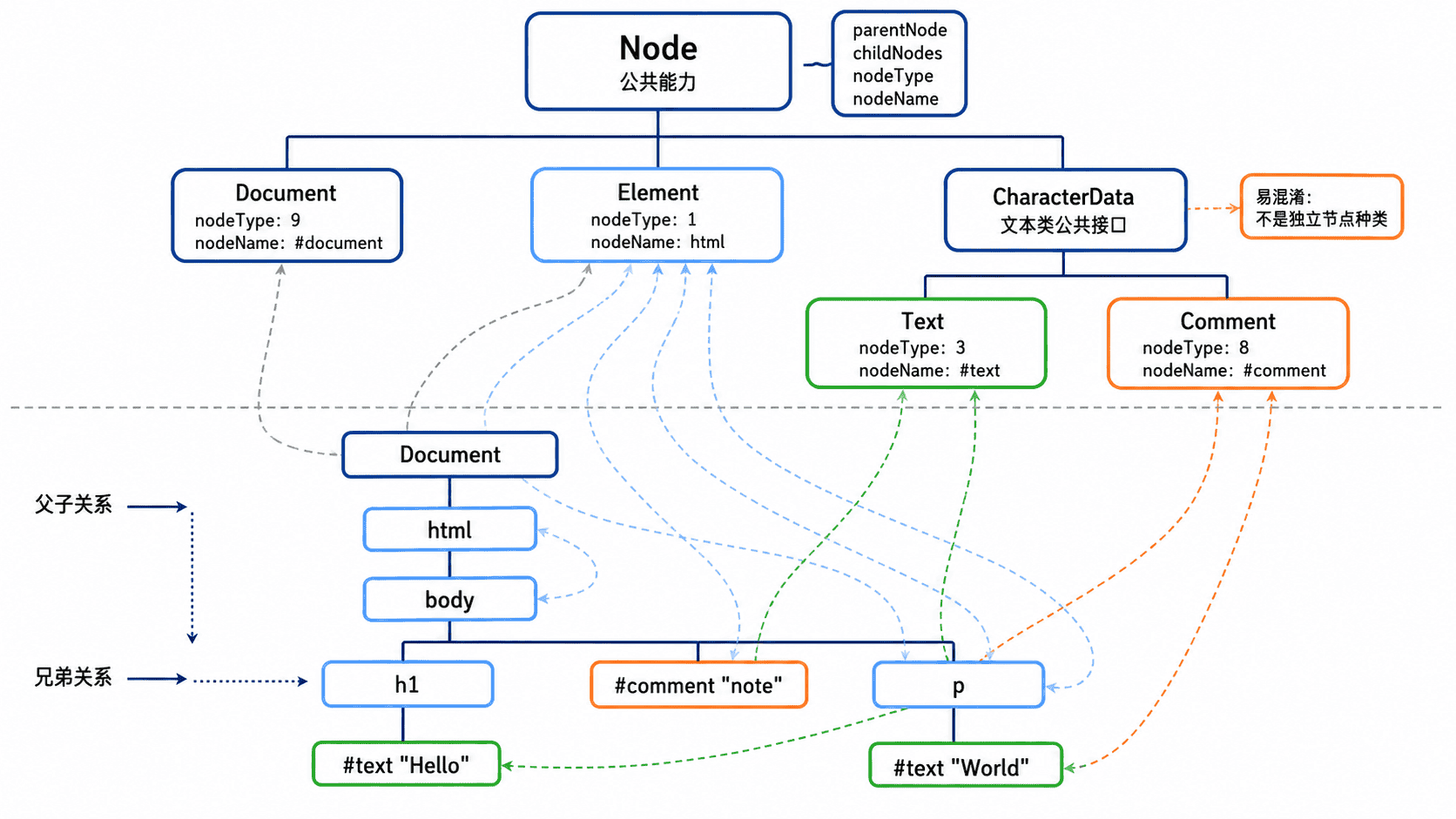
常见节点可以用下表快速区分:
| 类型 | nodeType |
常见 nodeName |
主要职责 |
|---|---|---|---|
Document |
9 | #document |
代表整个页面,也是全局查询入口 |
Element |
1 | 标签名,如 P |
保存属性、类名及子节点 |
Text |
3 | #text |
保存元素内部的文本数据 |
Comment |
8 | #comment |
保存注释数据,不参与页面展示 |
通过节点树观察差异
下面的完整 HTML 同时取得文档、段落元素、文本节点和注释节点,再输出它们的名称、类型编号以及是否属于 Node。将代码保存为 index.html 后直接用浏览器打开,并查看开发者工具控制台。
<!doctype html>
<html lang="zh-CN">
<head>
  <meta charset="UTF-8">
  <title>DOM 节点类型</title>
</head>
<body>
  <!-- 课程状态 -->
  <p id="course">DOM 入门</p>

  <script>
    const paragraph = document.querySelector("#course");
    const text = paragraph.firstChild;
    const comment = [...document.body.childNodes].find(
      (node) => node.nodeType === Node.COMMENT_NODE
    );

    // 使用同一组公共属性比较四种节点
    const nodes = [
      ["document", document],
      ["paragraph", paragraph],
      ["text", text],
      ["comment", comment]
    ];

    for (const [name, node] of nodes) {
      console.log(
        `${name}: ${node.nodeName}, type=${node.nodeType}, instanceof Node=${node instanceof Node}`
      );
    }
  </script>
</body>
</html>
预期输出:
document: #document, type=9, instanceof Node=true
paragraph: P, type=1, instanceof Node=true
text: #text, type=3, instanceof Node=true
comment: #comment, type=8, instanceof Node=true
结果说明 instanceof Node 只能确认对象属于节点体系,不能说明它一定是元素。需要元素能力时,应继续判断 nodeType === Node.ELEMENT_NODE 或 node instanceof Element。
根据类型选择 API
Node 层适合处理树关系,例如读取 parentNode、遍历 childNodes、复制 cloneNode()。Element 层才提供 classList、attributes、matches()、closest() 等元素能力;具体 HTML 元素还可能提供 value、disabled 等专属属性。
最常见的差异是 childNodes 与 children。前者返回所有子节点,换行和缩进也可能形成 Text 节点;后者只返回元素子节点。因此遍历页面结构时先明确是否需要文本与注释,不能仅凭数组位置猜测节点类型。
另一个易错点是把 firstChild 当作第一个元素。由于空白文本也属于节点,firstChild 可能返回 Text;只想取得第一个元素时应使用 firstElementChild。同理,修改类名之前先确认对象是 Element,否则调用 classList 会产生类型错误。