
浏览器与 Web API / 系统课时
动态表单与字段联动
动态表单与字段联动
动态表单的难点不在于隐藏一个区域,而在于让可见性、可编辑性、校验规则、提交数据和重置行为始终一致。本课将实现配送方式、地区选择和发票字段联动,并用统一渲染函数避免事件处理器之间相互覆盖状态。
学习目标
- 根据上游字段切换下游字段的显示、禁用和必填状态
- 动态创建与移除字段,并实现依赖选项刷新
- 在提交与重置时保持界面状态和表单数据一致
先明确字段依赖关系
字段联动应从依赖关系出发,而不是在每个事件中零散修改 DOM。示例中,配送方式决定地址区域是否启用,省份决定城市选项,是否开发票决定发票抬头字段是否存在。每条依赖都由一个独立渲染函数负责,事件处理器只触发渲染。
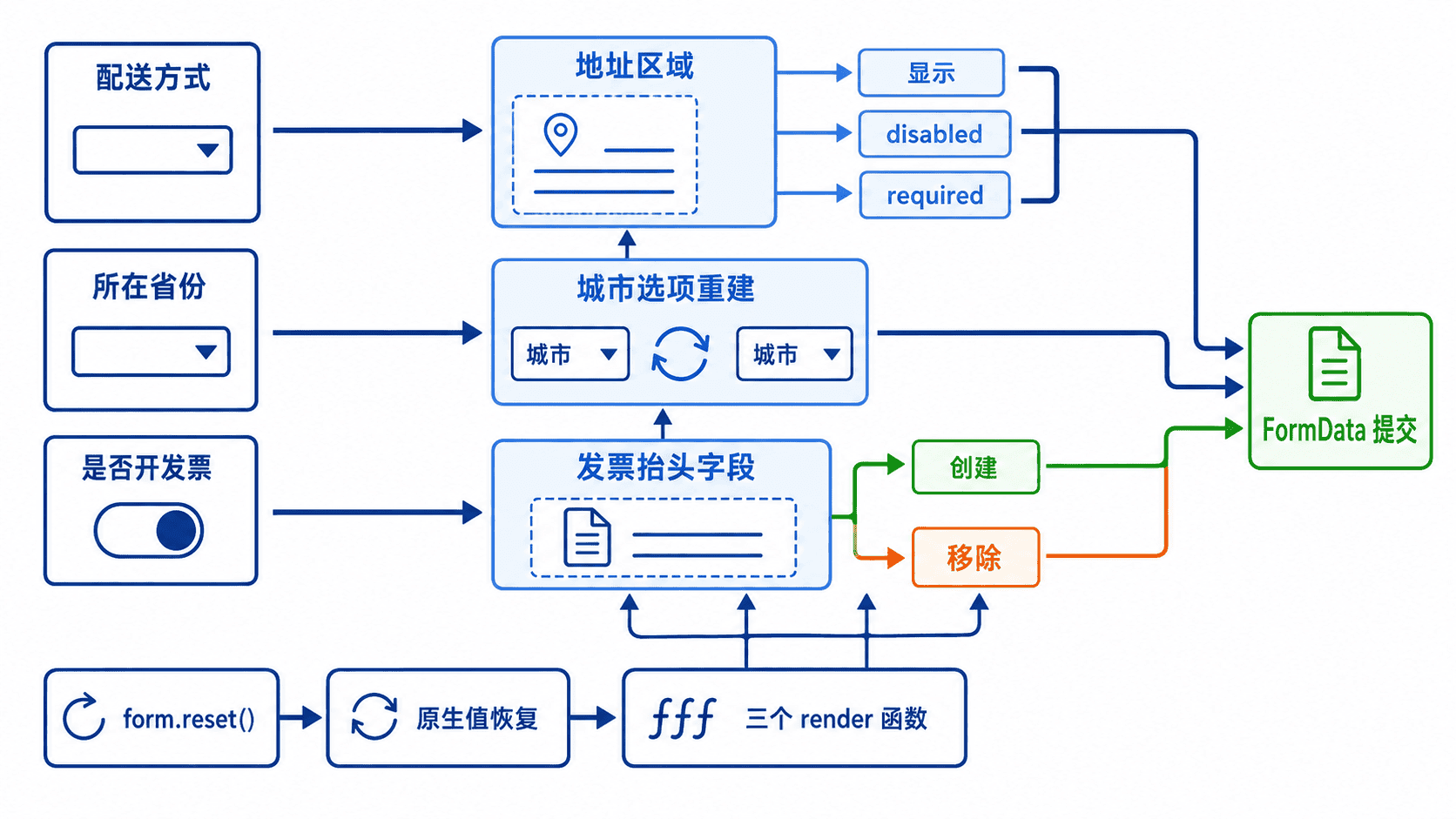
把暂时不参与表单的控件设置为 disabled 很重要:禁用控件不会进入约束验证,也不会被 FormData 收集。仅使用 hidden 隐藏区域但保留启用状态,可能出现“用户看不到字段,却无法提交”的问题。
完整示例:配送、地区与发票联动
下面的完整页面支持门店自提和快递配送。选择快递后才启用省市字段;城市列表根据省份重建;勾选发票后动态创建必填的发票抬头输入框;重置按钮会恢复默认值并重新渲染全部依赖状态。
<!doctype html>
<html lang="zh-CN">
<head>
  <meta charset="utf-8">
  <title>动态表单联动</title>
</head>
<body>
  <form id="orderForm">
    <label>
      配送方式
      <select id="mode" name="mode">
        <option value="pickup">门店自提</option>
        <option value="delivery">快递配送</option>
      </select>
    </label>

    <section id="addressSection" hidden>
      <label>
        省份
        <select id="province" name="province">
          <option value="">请选择</option>
          <option value="zhejiang">浙江</option>
          <option value="guangdong">广东</option>
        </select>
      </label>

      <label>
        城市
        <select id="city" name="city">
          <option value="">请先选择省份</option>
        </select>
      </label>
    </section>

    <label>
      <input id="invoiceToggle" type="checkbox">
      需要发票
    </label>

    <div id="invoiceHost"></div>

    <button type="submit">提交</button>
    <button type="reset">重置</button>
  </form>

  <pre id="result" aria-live="polite"></pre>

  <script>
    const cityMap = {
      zhejiang: [
        ['hangzhou', '杭州'],
        ['ningbo', '宁波']
      ],
      guangdong: [
        ['guangzhou', '广州'],
        ['shenzhen', '深圳']
      ]
    };

    const form = document.querySelector('#orderForm');
    const mode = document.querySelector('#mode');
    const addressSection = document.querySelector('#addressSection');
    const province = document.querySelector('#province');
    const city = document.querySelector('#city');
    const invoiceToggle = document.querySelector('#invoiceToggle');
    const invoiceHost = document.querySelector('#invoiceHost');
    const result = document.querySelector('#result');

    function setSectionEnabled(section, enabled) {
      section.hidden = !enabled;
      section.querySelectorAll('select, input').forEach((control) => {
        control.disabled = !enabled;
        control.required = enabled;
      });
    }

    function renderDelivery() {
      const enabled = mode.value === 'delivery';
      setSectionEnabled(addressSection, enabled);

      if (!enabled) province.value = '';
      renderCities();
    }

    function renderCities() {
      city.replaceChildren(new Option('请选择', ''));

      for (const [value, label] of cityMap[province.value] ?? []) {
        city.add(new Option(label, value));
      }

      city.disabled = province.disabled || province.value === '';
    }

    function renderInvoiceField() {
      invoiceHost.replaceChildren();

      if (!invoiceToggle.checked) return;

      const label = document.createElement('label');
      label.textContent = '发票抬头 ';

      const input = document.createElement('input');
      input.name = 'invoiceTitle';
      input.required = true;
      label.append(input);
      invoiceHost.append(label);
    }

    mode.addEventListener('change', renderDelivery);
    province.addEventListener('change', renderCities);
    invoiceToggle.addEventListener('change', renderInvoiceField);

    form.addEventListener('submit', (event) => {
      event.preventDefault();

      if (!form.checkValidity()) {
        form.reportValidity();
        return;
      }

      const data = Object.fromEntries(new FormData(form));
      result.textContent = JSON.stringify(data, null, 2);
    });

    form.addEventListener('reset', () => {
      // reset 事件触发后再等待浏览器恢复控件默认值。
      requestAnimationFrame(() => {
        renderDelivery();
        renderInvoiceField();
        result.textContent = '表单已恢复默认状态';
      });
    });

    renderDelivery();
    renderInvoiceField();
  </script>
</body>
</html>
预期结果
默认选择“门店自提”并提交:
{
  "mode": "pickup"
}

选择“快递配送”、浙江、杭州,勾选发票并填写 Anystack:
{
  "mode": "delivery",
  "province": "zhejiang",
  "city": "hangzhou",
  "invoiceTitle": "Anystack"
}

点击“重置”:
表单已恢复默认状态
把代码保存为 dynamic-form.html 后直接用浏览器打开。实际选项较多时,可以把 cityMap 替换为接口数据,但仍应在数据返回后调用同一个 renderCities(),不要另写一套 DOM 更新逻辑。
重置与异步联动的边界
reset 事件发生时,控件默认值的恢复与事件回调处于同一次操作中。示例使用 requestAnimationFrame(),确保读取的是重置后的值,再重新计算显示、禁用和动态字段。若省市数据来自接口,还应给每次请求分配序号或使用 AbortController,避免较早的响应覆盖用户后来选择的省份。
动态移除字段时,旧元素上的监听器会随节点失去引用而不可再用。若字段需要频繁切换且内部状态应保留,可以改为固定节点加 hidden 与 disabled;若每次显示都应是全新状态,创建和移除节点更直接。两种方案都必须保证不可见字段不会继续参与验证或提交。
验收检查
完成动态表单后,应逐项验证:自提模式不会提交地址字段;配送模式在省市缺失时不能提交;切换省份后旧城市不会残留;关闭发票后 invoiceTitle 不再进入 FormData;点击重置后,界面、校验规则和提交数据同时回到默认状态。