
浏览器与 Web API / 系统课时
封装可复用 DOM 组件
封装可复用 DOM 组件
本课把零散的 DOM 查询、状态修改和事件监听收进一个可复用组件。完成后,你将得到明确的初始化、更新与销毁接口,并能在同一页面创建多个互不干扰的实例。
学习目标
- 划分组件的输入、内部状态、渲染逻辑和公开接口。
- 让事件只绑定一次,并由统一渲染函数同步界面。
- 在组件卸载时移除监听器、释放节点并阻止失效调用。
设计组件边界
可复用组件不应依赖页面中的全局选择器。调用方只提供挂载根节点和初始参数,组件内部负责创建结构、维护状态和处理交互;外部只能通过公开方法更新状态或执行清理。这样,同一组件即使创建多个实例,也不会争用节点或覆盖彼此的数据。
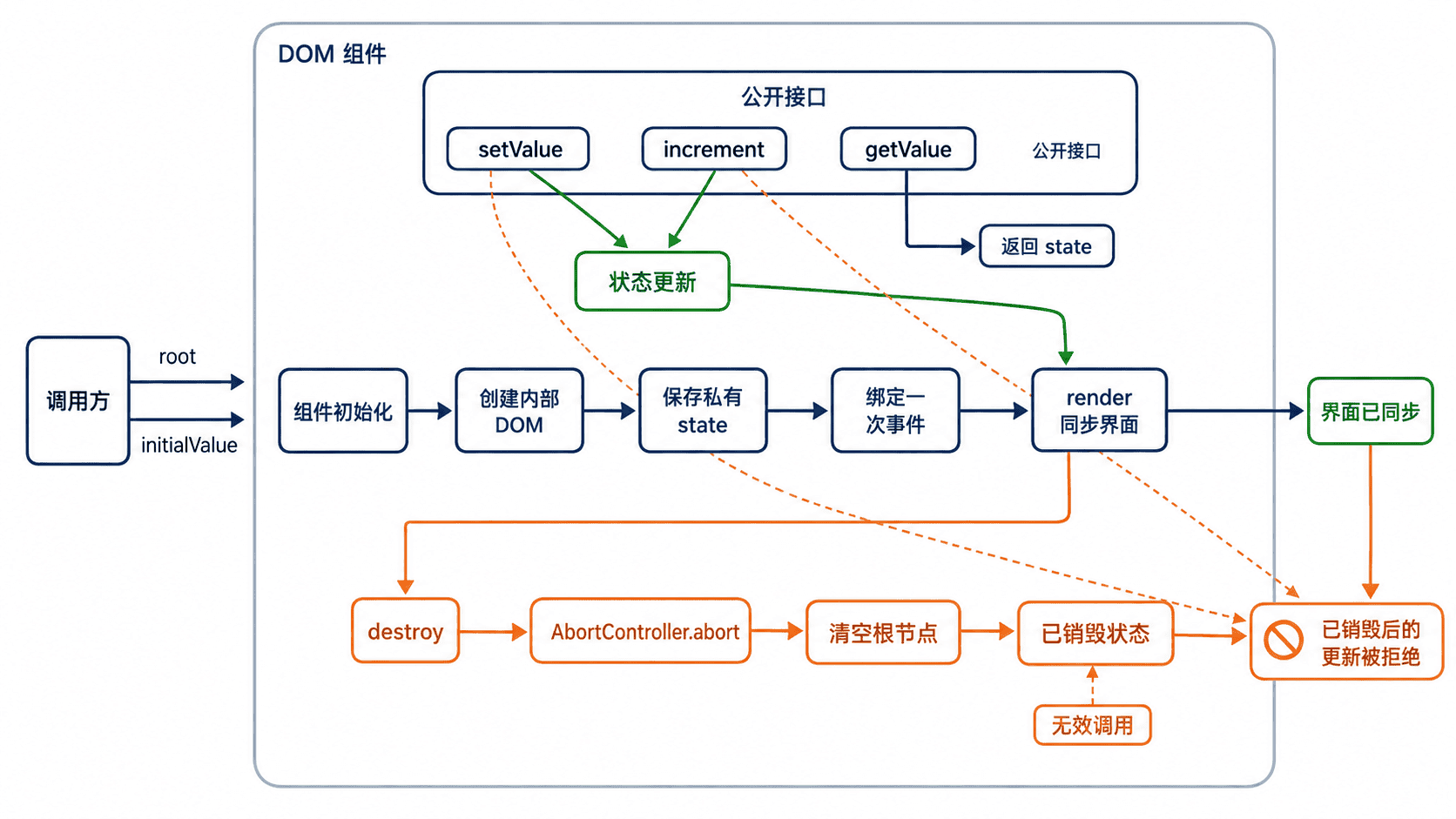
接口设计应尽量小。示例组件只暴露 increment()、setValue()、getValue() 和 destroy():前三个方法描述可用能力,destroy() 则明确组件生命周期的终点。内部的按钮、状态对象和事件控制器都不泄露给调用方。
实现初始化、更新与清理
下面的完整页面创建两个计数器实例。组件使用闭包保存私有状态,所有界面变化都经过 render();事件监听共享同一个 AbortSignal,销毁时一次性解除。
html
<!doctype html>
<html lang="zh-CN">
<head>
  <meta charset="utf-8">
  <title>可复用 DOM 组件</title>
</head>
<body>
  <div id="counter-a"></div>
  <div id="counter-b"></div>
  <button id="reset-a" type="button">把 A 设为 10</button>
  <button id="destroy-b" type="button">销毁 B</button>

  <script>
    function createCounter(root, { initialValue = 0 } = {}) {
      if (!(root instanceof HTMLElement)) {
        throw new TypeError("root 必须是 HTMLElement");
      }

      const controller = new AbortController();
      const state = { value: initialValue, destroyed: false };

      root.innerHTML = `
        <section>
          <output class="value"></output>
          <button class="increase" type="button">加 1</button>
        </section>
      `;

      const valueNode = root.querySelector(".value");
      const increaseButton = root.querySelector(".increase");

      function assertActive() {
        if (state.destroyed) {
          throw new Error("组件已经销毁");
        }
      }

      function render() {
        valueNode.textContent = String(state.value);
      }

      increaseButton.addEventListener("click", () => {
        state.value += 1;
        render();
      }, { signal: controller.signal });

      render();

      return {
        increment() {
          assertActive();
          state.value += 1;
          render();
        },
        setValue(nextValue) {
          assertActive();
          if (!Number.isFinite(nextValue)) {
            throw new TypeError("nextValue 必须是有限数字");
          }
          state.value = nextValue;
          render();
        },
        getValue() {
          assertActive();
          return state.value;
        },
        destroy() {
          if (state.destroyed) return;
          state.destroyed = true;
          controller.abort();
          root.replaceChildren();
        }
      };
    }

    const counterA = createCounter(
      document.querySelector("#counter-a"),
      { initialValue: 2 }
    );
    const counterB = createCounter(
      document.querySelector("#counter-b"),
      { initialValue: 5 }
    );

    document.querySelector("#reset-a").addEventListener("click", () => {
      counterA.setValue(10);
    });

    document.querySelector("#destroy-b").addEventListener("click", () => {
      counterB.destroy();
    });
  </script>
</body>
</html>
预期结果
text
页面初始显示 A=2、B=5。
点击任一组件的“加 1”,只更新该实例。
点击“把 A 设为 10”,A 更新为 10。
点击“销毁 B”,B 的内容消失,内部监听器被移除。
验证组件契约与边界
组件是否真正可复用,可从四点检查:创建两个实例时状态互不影响;重复更新不会重复绑定事件;传入非法值会立即报错;多次调用 destroy() 不产生异常。示例中的静态模板可以使用 innerHTML,但来自用户或接口的数据应通过 textContent 写入,避免把不可信字符串解析成 HTML。
销毁后继续调用更新方法会抛出错误,这是刻意设计的失败信号。另一种策略是静默忽略,但容易掩盖调用顺序错误。无论选择哪种方式,都应在组件契约中保持一致,并由调用方在卸载后丢弃实例引用。
按自己的节奏,确认真正理解。