
容器与云原生 / 系统课时
让 Nginx 代理应用服务
让 Nginx 代理应用服务
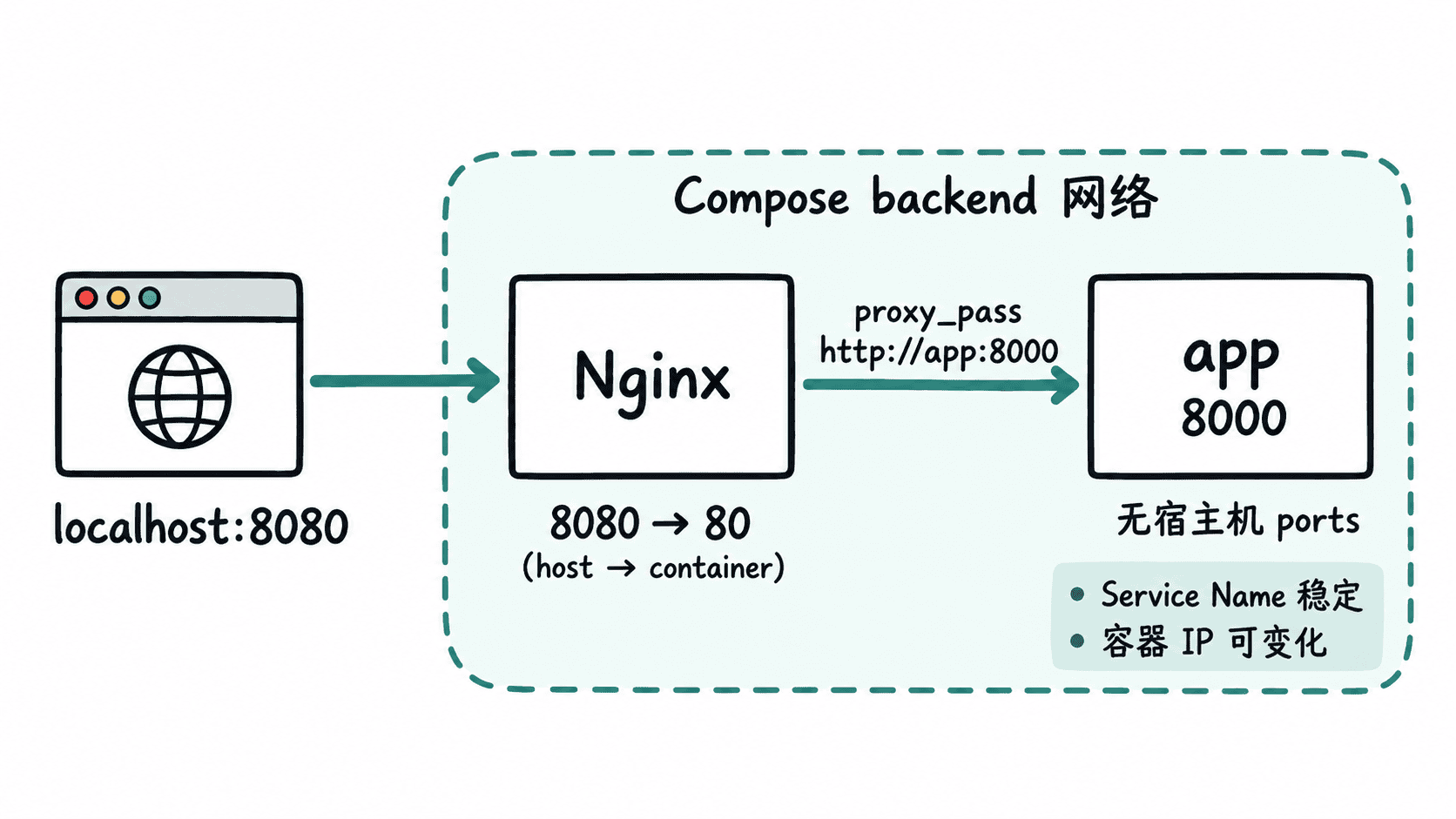
这一节把 Nginx 设为系统唯一对外入口:浏览器只访问宿主机映射的 Nginx 端口,再由 Nginx 通过 Compose 网络中的 Service Name app 转发请求。应用无需暴露宿主机端口,也不依赖会变化的容器 IP。
学习目标
- 使用 Compose Service Name 作为 Nginx 上游地址。
- 只为 Nginx 配置宿主机端口映射,保持应用服务在内部网络中。
- 通过一次 HTTP 请求验证“客户端→Nginx→app”的代理链路。
把统一入口放在 Nginx
Compose 会让同一网络中的服务通过 Service Name 相互发现,因此 Nginx 可以把上游写成 app:8000。请求从宿主机进入 nginx:80 后,再走 Compose 内部网络访问应用;app 不需要 ports,也就不会直接绑定宿主机端口。
准备一个最小应用服务
为了让代理链路可以独立验证,先创建 public/index.html,文件内容只有一行:
hello from appCompose 中的 app 使用 Python 自带的静态 HTTP 服务监听容器内 8000 端口。这里没有给 app 配置 ports;同一 Compose 网络中的 Nginx 仍然可以直接访问它。
配置 Nginx 上游
在项目目录创建 nginx.conf:
server {
    listen 80;
    server_name _;

    location / {
        proxy_pass http://app:8000;
        proxy_set_header Host $host;
        proxy_set_header X-Real-IP $remote_addr;
        proxy_set_header X-Forwarded-For $proxy_add_x_forwarded_for;
        proxy_set_header X-Forwarded-Proto $scheme;
    }
}
proxy_pass 使用的是 Service Name app,而不是某个容器 IP。这样 Compose 重建服务时不需要手工追踪 IP。转发的几个请求头用于把原始 Host、客户端地址和协议传给上游,便于应用记录日志或生成正确的外部 URL。
只暴露 Nginx 端口
将下面内容保存为 compose.yaml。app 与 nginx 都加入 backend 网络,只有 nginx 声明 ports。健康检查保证 Nginx 启动前应用已经能够响应 HTTP 请求。
services:
  app:
    image: python:3.13-alpine
    working_dir: /srv
    command: ["python", "-m", "http.server", "8000", "--bind", "0.0.0.0"]
    volumes:
      - ./public:/srv:ro
    healthcheck:
      test:
        - CMD
        - python
        - -c
        - "import urllib.request; urllib.request.urlopen('http://127.0.0.1:8000/').read()"
      interval: 2s
      timeout: 2s
      retries: 15
    networks:
      - backend

  nginx:
    image: nginx:1.29-alpine
    depends_on:
      app:
        condition: service_healthy
    ports:
      - "8080:80"
    volumes:
      - ./nginx.conf:/etc/nginx/conf.d/default.conf:ro
    networks:
      - backend

networks:
  backend:
这里的 8080:80 表示宿主机访问 8080,请求进入 Nginx 容器的 80。Nginx 转发到 app:8000 时使用的是容器网络端口,不会绕回宿主机的 localhost。
启动并验证代理链路
确认 public/index.html、nginx.conf 与 compose.yaml 已放在上述位置后执行:
docker compose up -d --wait
curl -sS http://localhost:8080/
预期输出:
hello from app能够得到这行内容,说明外部请求已经先到 Nginx,再由 Nginx 解析 app 这个 Service Name 并访问应用的 8000 端口。此时不要再给 app 增加类似 8000:8000 的端口映射,否则会重新出现绕过统一入口直接访问应用的路径。
如果以后只替换 app 容器而 Nginx 暂时出现 502 Bad Gateway,先检查应用健康状态,并重新加载或重启 Nginx 让上游名称重新解析;不要通过固定容器 IP 来规避问题,因为容器重建后 IP 本来就可能变化。