
Web 图形与 3D / 系统课时
镜头轨迹如何计算平滑转场
镜头轨迹如何计算平滑转场
产品展示的相机如果直接改写位置和旋转,画面会瞬间跳到新视角。这里用位置线性插值、四元数球面插值和时间缓动,让镜头在 1.8 秒内从正面移动到侧面,并支持用户在转场途中再次切换。
学习目标
- 用
Vector3.lerp与Quaternion.slerp分别计算相机位置和朝向。 - 用归一化时间及三次缓动控制转场的起步、加速和停止。
- 实现可重复触发的转场,并验证终点、重入及相机控制冲突。
镜头位置与朝向为什么分开计算
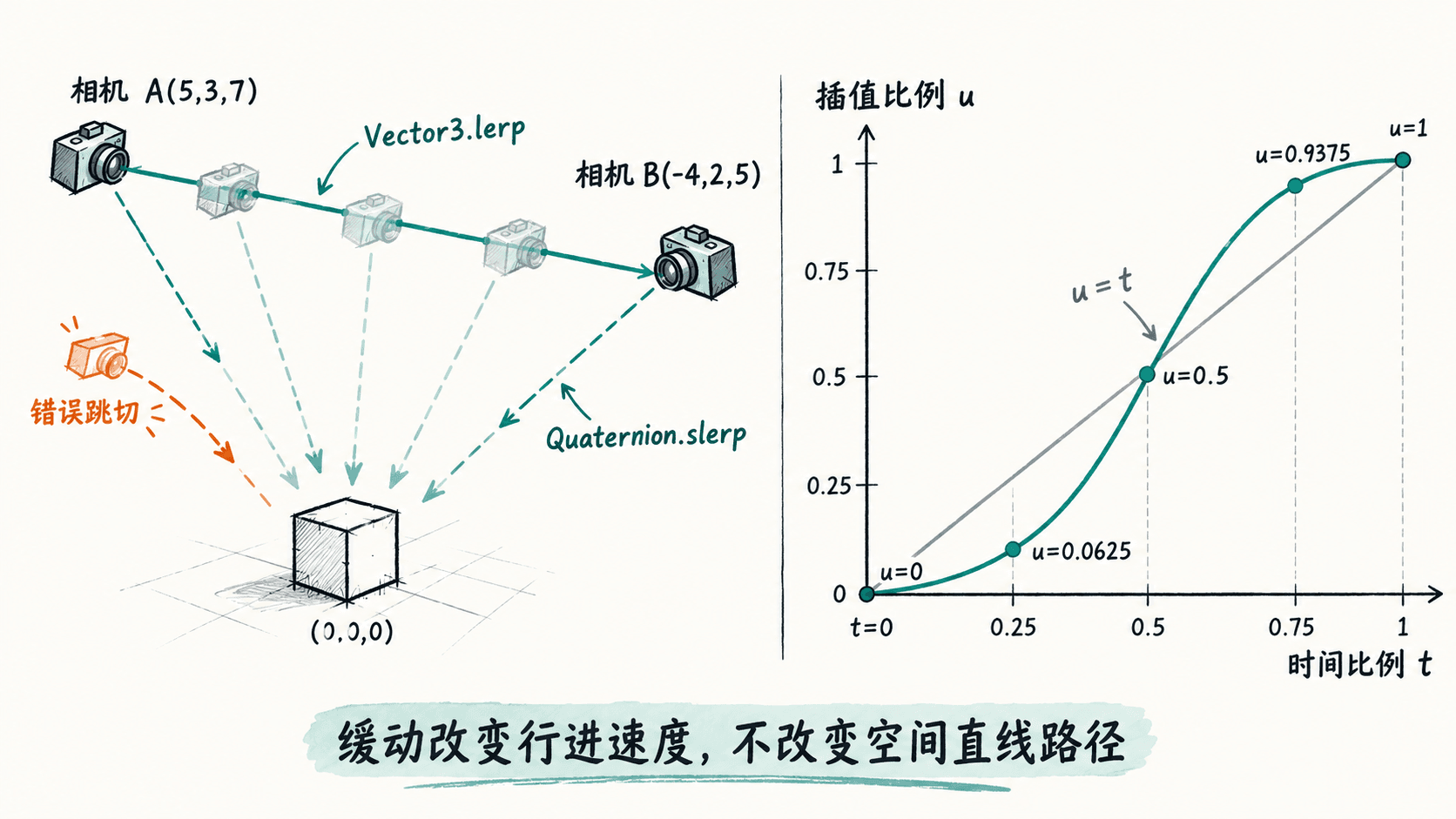
一帧相机状态至少包含位置 camera.position 和朝向 camera.quaternion。假设起点为 (5, 3, 7)、终点为 (-4, 2, 5),线性插值比例为 0.5 时,位置恰好是 (0.5, 2.5, 6);Vector3.lerp 沿两点之间的直线移动,不会自动生成圆弧。
朝向则用 Quaternion.slerp,在起止旋转之间做球面插值。若直接对三个欧拉角分别插值,可能遇到跨越 ±180° 的突转。两种方法都会修改调用它们的对象,因此每帧要先 copy 保存的起点状态,不能持续从上一帧结果再插值。
归一化时间与三次缓动
转场应由真实经过时间驱动,而不是每帧固定加 0.01:否则 60 Hz 与 144 Hz 屏幕的完成时间不同。设持续时间 durationMs = 1800,用 (now - startMs) / durationMs 求进度,再限制到 [0, 1]。
三次缓动 easeInOutCubic 在时间比例 t 为 0.25、0.5、0.75 时,分别返回 0.0625、0.5、0.9375。这样前后移动较慢、中段较快,位置与旋转必须使用同一个缓动结果,否则相机朝向会比位置先到或后到。
可运行的镜头转场页面
下面是完整的 index.html,使用 Three.js 0.186.1 的 ES 模块版本,不依赖模型文件。将文件保存到空目录,在该目录执行 python3 -m http.server 8000,再用浏览器打开 http://localhost:8000/;需要联网加载 CDN 模块。
<!doctype html>
<html lang="zh-CN">
<head>
  <meta charset="utf-8">
  <meta name="viewport" content="width=device-width, initial-scale=1">
  <title>相机平滑转场</title>
  <style>
    body { margin: 0; overflow: hidden; }
    #switch { position: fixed; top: 16px; left: 16px; z-index: 1; padding: 10px; }
  </style>
  <script type="importmap">
    {"imports":{"three":"https://cdn.jsdelivr.net/npm/three@0.186.1/build/three.module.js"}}
  </script>
</head>
<body>
  <button id="switch">切换镜头</button>
  <script type="module">
    import * as THREE from 'three';

    const scene = new THREE.Scene();
    scene.background = new THREE.Color(0xf3f6fa);
    const camera = new THREE.PerspectiveCamera(50, innerWidth / innerHeight, 0.1, 100);
    const renderer = new THREE.WebGLRenderer({ antialias: true });
    renderer.setPixelRatio(Math.min(devicePixelRatio, 2));
    renderer.setSize(innerWidth, innerHeight);
    document.body.appendChild(renderer.domElement);

    const product = new THREE.Mesh(
      new THREE.BoxGeometry(2, 1.4, 1.2),
      new THREE.MeshStandardMaterial({ color: 0x36a3a2, metalness: 0.2, roughness: 0.35 })
    );
    scene.add(product, new THREE.AmbientLight(0xffffff, 2));
    const light = new THREE.DirectionalLight(0xffffff, 3);
    light.position.set(4, 6, 5);
    scene.add(light);

    const viewpoints = [new THREE.Vector3(5, 3, 7), new THREE.Vector3(-4, 2, 5)];
    const focus = new THREE.Vector3(0, 0, 0);
    const probeCamera = new THREE.PerspectiveCamera();
    function orientationAt(position) {
      // 用相机而非普通 Object3D 计算 lookAt,确保朝向符合相机的 -Z 轴。
      probeCamera.position.copy(position);
      probeCamera.lookAt(focus);
      return probeCamera.quaternion.clone();
    }

    camera.position.copy(viewpoints[0]);
    camera.quaternion.copy(orientationAt(viewpoints[0]));
    const fromPos = new THREE.Vector3(), toPos = new THREE.Vector3();
    const fromQuat = new THREE.Quaternion(), toQuat = new THREE.Quaternion();
    const durationMs = 1800;
    let startMs = 0, moving = false, nextView = 1;

    function beginTransition() {
      // 每次点击都从当前画面状态出发,避免转场中途重启时跳回旧起点。
      fromPos.copy(camera.position);
      fromQuat.copy(camera.quaternion);
      toPos.copy(viewpoints[nextView]);
      toQuat.copy(orientationAt(toPos));
      nextView = 1 - nextView;
      startMs = performance.now();
      moving = true;
    }
    document.querySelector('#switch').addEventListener('click', beginTransition);

    function easeInOutCubic(t) {
      return t < 0.5 ? 4 * t * t * t : 1 - Math.pow(-2 * t + 2, 3) / 2;
    }
    function animate(now) {
      if (moving) {
        const t = Math.min(Math.max((now - startMs) / durationMs, 0), 1);
        const u = easeInOutCubic(t);
        camera.position.copy(fromPos).lerp(toPos, u);
        camera.quaternion.copy(fromQuat).slerp(toQuat, u);
        if (t === 1) {
          // 终点精确落位,避免累计数值误差。
          camera.position.copy(toPos);
          camera.quaternion.copy(toQuat);
          moving = false;
        }
      }
      renderer.render(scene, camera);
      requestAnimationFrame(animate);
    }
    requestAnimationFrame(animate);

    addEventListener('resize', () => {
      camera.aspect = innerWidth / innerHeight;
      camera.updateProjectionMatrix();
      renderer.setSize(innerWidth, innerHeight);
    });
  </script>
</body>
</html>
预期结果:页面显示一个青绿色长方体和“切换镜头”按钮。每次点击,相机约用 1.8 秒从一个视角平滑转到另一个视角;开始与结束慢,中段快,模型在两个端点都朝向画面中央。持续点击不会突然回跳到上一次保存的起点。
检查终点及容易遗漏的边界
先点击一次并等待约两秒,确认转场结束后位置为 (-4, 2, 5);再点击返回 (5, 3, 7)。在第一次转场进行到一半时再点击,画面应从当前姿态继续移动,而不是瞬移。改变浏览器窗口大小,画面不应被拉伸。
如果项目同时使用 OrbitControls,转场中继续调用 controls.update() 或让用户拖动控制器,可能覆盖本例计算的相机姿态。实际集成时可在转场期间暂时禁用控制器,完成后再恢复,并同步控制器的目标点。此例的两端都对准原点,但中途使用四元数插值不保证每帧都严格对准原点;如果要求模型始终居中,应改为插值相机位置后每帧 lookAt(focus),不要再用 slerp 覆盖它。