
编码与格式 / 系统课时
解析进度与运行日志
解析进度与运行日志
本课实现一个可用于应用集成的 FFmpeg 进度监控器:先用 FFprobe 获取总时长,再读取 -progress 输出的键值数据计算百分比,同时把标准错误流保存为排障日志。
学习目标
- 使用
-progress pipe:1 -nostats获取稳定的机器可读进度。 - 根据总时长和
out_time_us计算处理百分比。 - 分离进度流与诊断日志,并正确处理失败退出码。
进度数据从哪里来
FFmpeg 默认状态行面向终端显示,字段位置和刷新方式不适合程序解析。启用 -progress pipe:1 后,标准输出会按 key=value 形式周期性发送数据块,并以 progress=continue 或 progress=end 结束当前块。
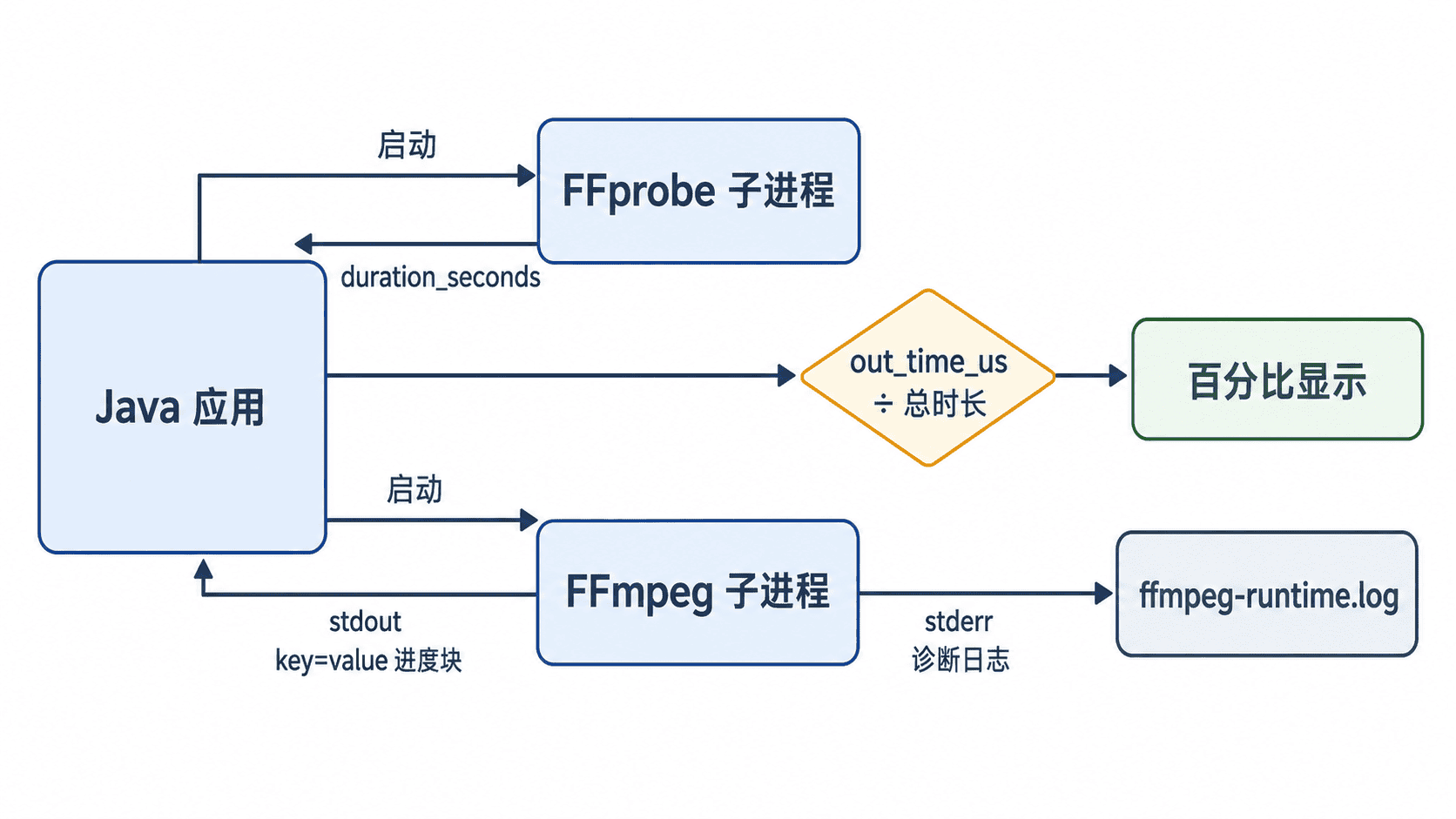
百分比可按“已处理微秒数 ÷ 总时长微秒数 × 100”计算,并把结果限制在 0 到 100 之间。总时长应由 FFprobe 获取,不要从人类可读日志中截取。
完整 Java 示例
下面的 Java 17 程序接收 FFmpeg、FFprobe、输入文件和输出文件四个参数。主线程解析标准输出中的进度,独立线程持续读取标准错误流,避免两路管道互相阻塞。
java
import java.io.BufferedReader;
import java.io.IOException;
import java.io.UncheckedIOException;
import java.nio.charset.StandardCharsets;
import java.nio.file.Files;
import java.nio.file.Path;
import java.nio.file.StandardOpenOption;
import java.util.List;
import java.util.stream.Collectors;

public final class FfmpegProgressMonitor {
    public static void main(String[] args) throws Exception {
        if (args.length != 4) {
            System.err.println(
                    "Usage: java FfmpegProgressMonitor "
                    + "<ffmpeg-path> <ffprobe-path> <input> <output>");
            System.exit(2);
        }

        double durationSeconds = probeDuration(args[1], args[2]);
        if (!Double.isFinite(durationSeconds) || durationSeconds <= 0) {
            throw new IllegalStateException("Invalid media duration");
        }

        List<String> command = List.of(
                args[0],
                "-y",
                "-hide_banner",
                "-i", args[2],
                "-c:v", "libx264",
                "-c:a", "aac",
                "-progress", "pipe:1",
                "-nostats",
                args[3]
        );

        Process process = new ProcessBuilder(command).start();
        StringBuilder runtimeLog = new StringBuilder();

        // stderr 保留给诊断日志,stdout 专门解析进度键值。
        Thread stderrReader = new Thread(() -> {
            try (BufferedReader reader =
                         process.errorReader(StandardCharsets.UTF_8)) {
                String line;
                while ((line = reader.readLine()) != null) {
                    runtimeLog.append(line)
                              .append(System.lineSeparator());
                }
            } catch (IOException e) {
                throw new UncheckedIOException(e);
            }
        }, "ffmpeg-stderr-reader");
        stderrReader.start();

        long outTimeUs = 0L;
        String speed = "N/A";

        try (BufferedReader progressReader =
                     process.inputReader(StandardCharsets.UTF_8)) {
            String line;
            while ((line = progressReader.readLine()) != null) {
                int separator = line.indexOf('=');
                if (separator <= 0) {
                    continue;
                }

                String key = line.substring(0, separator);
                String value = line.substring(separator + 1);

                if ("out_time_us".equals(key)) {
                    outTimeUs = Long.parseLong(value);
                } else if ("speed".equals(key)) {
                    speed = value;
                } else if ("progress".equals(key)) {
                    double percent = "end".equals(value)
                            ? 100.0
                            : Math.min(
                                    100.0,
                                    outTimeUs
                                            / (durationSeconds * 1_000_000.0)
                                            * 100.0
                            );
                    System.out.printf(
                            "\rProgress: %5.1f%%, speed=%s",
                            percent,
                            speed
                    );
                }
            }
        }

        int exitCode = process.waitFor();
        stderrReader.join();

        Path logPath = Path.of("ffmpeg-runtime.log");
        Files.writeString(
                logPath,
                runtimeLog,
                StandardCharsets.UTF_8,
                StandardOpenOption.CREATE,
                StandardOpenOption.TRUNCATE_EXISTING
        );

        System.out.println();
        if (exitCode != 0) {
            System.err.printf(
                    "FFmpeg failed, exitCode=%d. Log: %s%n",
                    exitCode,
                    logPath
            );
            System.exit(exitCode);
        }

        System.out.println(
                "Transcoding completed. Log: " + logPath);
    }

    private static double probeDuration(
            String ffprobePath,
            String inputPath) throws Exception {

        Process probe = new ProcessBuilder(
                ffprobePath,
                "-v", "error",
                "-show_entries", "format=duration",
                "-of", "default=noprint_wrappers=1:nokey=1",
                inputPath
        ).redirectErrorStream(true).start();

        String result;
        try (BufferedReader reader =
                     probe.inputReader(StandardCharsets.UTF_8)) {
            result = reader.lines()
                           .collect(Collectors.joining(
                                   System.lineSeparator()));
        }

        int exitCode = probe.waitFor();
        if (exitCode != 0 || result.isBlank()) {
            throw new IllegalStateException(
                    "FFprobe failed, exitCode=" + exitCode);
        }

        return Double.parseDouble(result.trim());
    }
}
运行与预期结果
编译后传入两个可执行文件和输入、输出路径。FFmpeg 与 FFprobe 通常位于同一安装目录;也可以直接使用已加入 PATH 的命令名。
bash
javac FfmpegProgressMonitor.java
java FfmpegProgressMonitor ffmpeg ffprobe input.mp4 output.mp4
javac 编译成功时不输出内容,随后程序的预期输出为:
text
Progress: 100.0%, speed=<SPEED>
Transcoding completed. Log: ffmpeg-runtime.log
<SPEED> 是动态值,例如 1.35x,实际结果会随机器性能和编码参数变化。运行期间同一行会被反复刷新,任务结束后才输出完成信息。
日志保存与失败判断
进度数据只用于展示状态,不能替代退出码。只有进程退出码为 0 时,任务才应标记为成功;若退出码非 0,应把任务状态设为失败,并展示 ffmpeg-runtime.log 的末尾错误。
生产环境还应为日志设置大小上限和保留周期,并避免记录包含令牌、签名地址或用户隐私的完整输入 URL。对于直播或未知总时长输入,应改为展示已处理时长、帧数和速度,而不是百分比。
按自己的节奏,确认真正理解。