
服务注册与分布式协调 / 系统课时
测试服务器与集群
测试服务器与集群
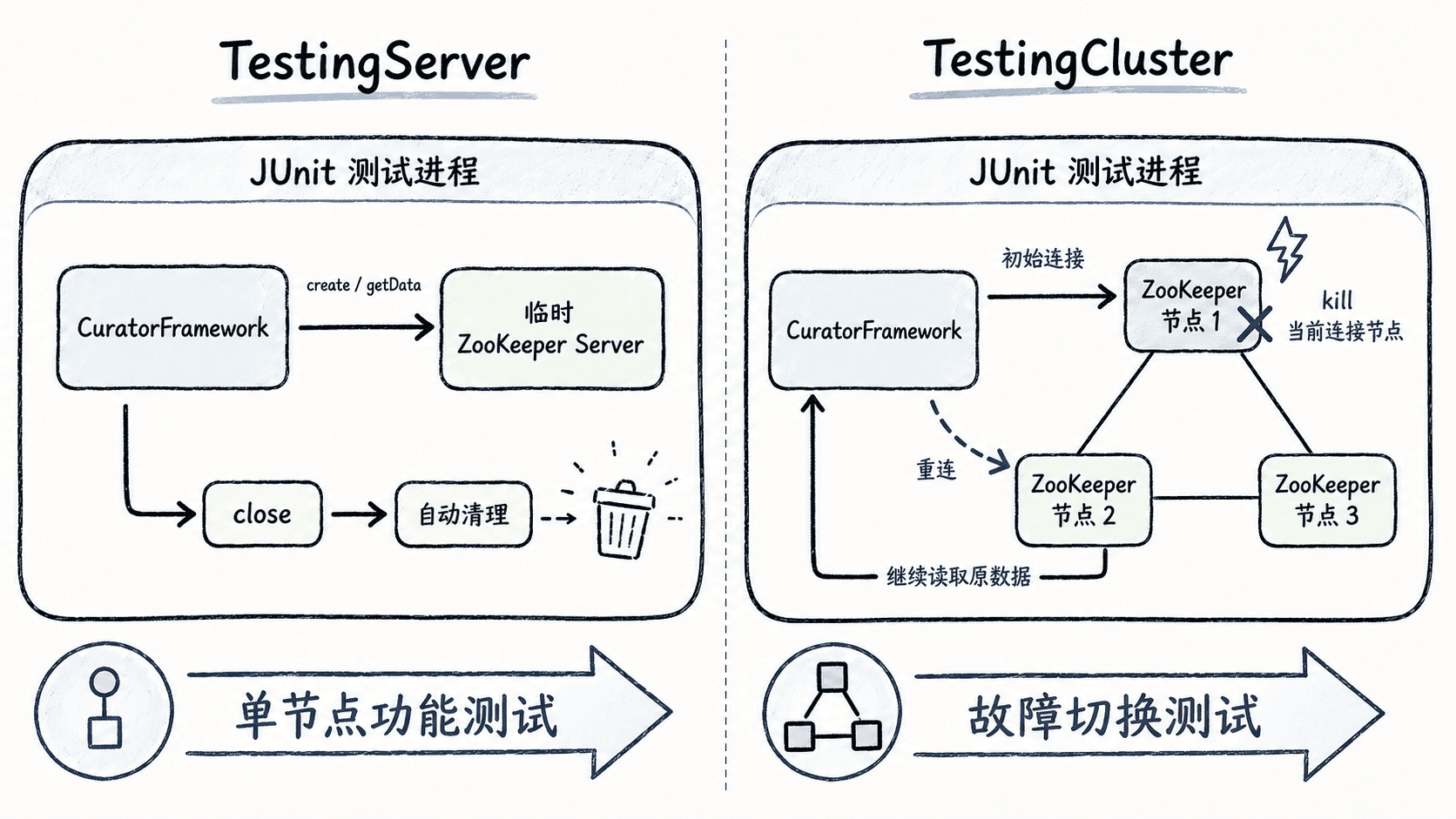
Curator 自带 TestingServer 和 TestingCluster,可以在测试进程内启动临时 ZooKeeper,而不依赖开发机上的常驻服务。本篇分别验证单节点客户端读写和三节点故障切换,让协调代码在自动化测试里可重复执行。
学习目标
- 使用
TestingServer为普通 Curator 客户端测试提供临时单节点 ZooKeeper - 使用
TestingCluster构造多节点 ensemble 并模拟单节点故障 - 在 JUnit 中正确启动、等待连接、断言结果并释放测试资源
选择 TestingServer 还是 TestingCluster
TestingServer 管理一个进程内 ZooKeeper 实例,启动快、端口和数据目录可自动分配,适合验证节点创建、数据读写、监听器或大多数 Recipe 的基础行为。
TestingCluster 管理一组 ZooKeeper 服务器,适合测试连接迁移、单节点宕机、选主后的继续服务等依赖 ensemble 行为的场景。它比 TestingServer 更重,因此不必把所有单元测试都升级成集群测试。
准备测试依赖
示例使用 Apache Curator 5.9.0。curator-test 应只放在测试作用域,并与项目里的 curator-framework 使用同一版本;JUnit 版本可以跟随现有项目依赖管理。
<properties>
    <curator.version>5.9.0</curator.version>
    <junit.version>5.11.4</junit.version>
</properties>

<dependencies>
    <dependency>
        <groupId>org.apache.curator</groupId>
        <artifactId>curator-framework</artifactId>
        <version>${curator.version}</version>
    </dependency>
    <dependency>
        <groupId>org.apache.curator</groupId>
        <artifactId>curator-test</artifactId>
        <version>${curator.version}</version>
        <scope>test</scope>
    </dependency>
    <dependency>
        <groupId>org.junit.jupiter</groupId>
        <artifactId>junit-jupiter</artifactId>
        <version>${junit.version}</version>
        <scope>test</scope>
    </dependency>
</dependencies>

<build>
    <plugins>
        <plugin>
            <groupId>org.apache.maven.plugins</groupId>
            <artifactId>maven-surefire-plugin</artifactId>
            <version>3.5.2</version>
        </plugin>
    </plugins>
</build>
生效后,测试源码应能导入 org.apache.curator.test.TestingServer、TestingCluster 和 JUnit 5 API。若项目统一使用 BOM,应由 BOM 管理版本,不要再在单个模块里重复固定 Curator 版本。
编写单节点与集群测试
下面两个测试各自拥有并关闭测试服务器。第一个测试只验证客户端读写;第二个测试先定位当前客户端连接的 ZooKeeper 节点,再杀掉该节点,等待 Curator 报告 RECONNECTED 后重新读取原数据。
import static java.nio.charset.StandardCharsets.UTF_8;
import static org.junit.jupiter.api.Assertions.assertEquals;
import static org.junit.jupiter.api.Assertions.assertNotNull;
import static org.junit.jupiter.api.Assertions.assertTrue;

import java.util.concurrent.CountDownLatch;
import java.util.concurrent.TimeUnit;

import org.apache.curator.framework.CuratorFramework;
import org.apache.curator.framework.CuratorFrameworkFactory;
import org.apache.curator.framework.state.ConnectionState;
import org.apache.curator.retry.RetryOneTime;
import org.apache.curator.test.InstanceSpec;
import org.apache.curator.test.TestingCluster;
import org.apache.curator.test.TestingServer;
import org.junit.jupiter.api.Test;

class CuratorTestingSupportTest {
    @Test
    void testingServerSupportsClientRoundTrip() throws Exception {
        try (TestingServer server = new TestingServer();
             CuratorFramework client = CuratorFrameworkFactory.newClient(
                     server.getConnectString(), new RetryOneTime(100))) {
            client.start();
            assertTrue(client.blockUntilConnected(5, TimeUnit.SECONDS));

            client.create().forPath("/case", "ok".getBytes(UTF_8));
            String value = new String(client.getData().forPath("/case"), UTF_8);

            assertEquals("ok", value);
        }
    }

    @Test
    void testingClusterSurvivesOneConnectedServerFailure() throws Exception {
        try (TestingCluster cluster = new TestingCluster(3)) {
            cluster.start();

            try (CuratorFramework client = CuratorFrameworkFactory.newClient(
                    cluster.getConnectString(), new RetryOneTime(200))) {
                client.start();
                assertTrue(client.blockUntilConnected(5, TimeUnit.SECONDS));
                client.create().forPath("/ha", "v1".getBytes(UTF_8));

                CountDownLatch reconnected = new CountDownLatch(1);
                client.getConnectionStateListenable().addListener((c, state) -> {
                    if (state == ConnectionState.RECONNECTED) {
                        reconnected.countDown();
                    }
                });

                InstanceSpec connected = cluster.findConnectionInstance(
                        client.getZookeeperClient().getZooKeeper());
                assertNotNull(connected);

                // 只杀掉当前连接节点,剩余两个节点仍能形成多数派。
                assertTrue(cluster.killServer(connected));
                assertTrue(reconnected.await(10, TimeUnit.SECONDS));

                String value = new String(client.getData().forPath("/ha"), UTF_8);
                assertEquals("v1", value);
            }
        }
    }
}
运行测试
mvn -Dtest=CuratorTestingSupportTest test预期输出
Tests run: 2, Failures: 0, Errors: 0, Skipped: 0
BUILD SUCCESS
Maven 插件版本、耗时和日志前缀会因项目而异,核心验收是两个测试均通过且构建成功。
测试中的时序与资源边界
测试客户端必须在断言前等待连接建立,否则偶发的连接延迟会被误判成业务失败。故障切换测试则应等待明确的连接状态变化,而不是写死 Thread.sleep(...);固定睡眠既拖慢测试,也会在慢机器上产生随机失败。
TestingServer.stop() 可以暂时停止服务器而保留测试目录,restart() 可再次启动;TestingCluster 则提供 killServer() 和 restartServer() 来模拟单节点故障与恢复。测试结束时优先使用 try-with-resources 调用 close(),让临时端口、线程和数据目录可靠释放。
这两类测试工具适合验证 Curator 客户端与协调组件的行为,但不能替代真实网络、磁盘抖动、安全认证和跨主机部署条件下的集成测试;生产级故障演练仍应放到独立环境完成。