
Java 后端 / 系统课时
配置健康检查与告警
配置健康检查与告警
本课将把 Spring Boot 健康端点从“能访问”提升为“可用于生产值班”:区分存活、就绪和依赖状态,实现带超时的健康指示器,并把持续失败转换成包含影响、实例和处置入口的告警。
学习目标
- 区分 liveness、readiness 与业务依赖健康,避免错误重启或错误摘流
- 编写有超时、低开销且不泄露敏感信息的自定义健康指示器
- 为不同持续时间设置告警阈值,并组织值班人员可直接行动的告警内容
先划分三类健康信号
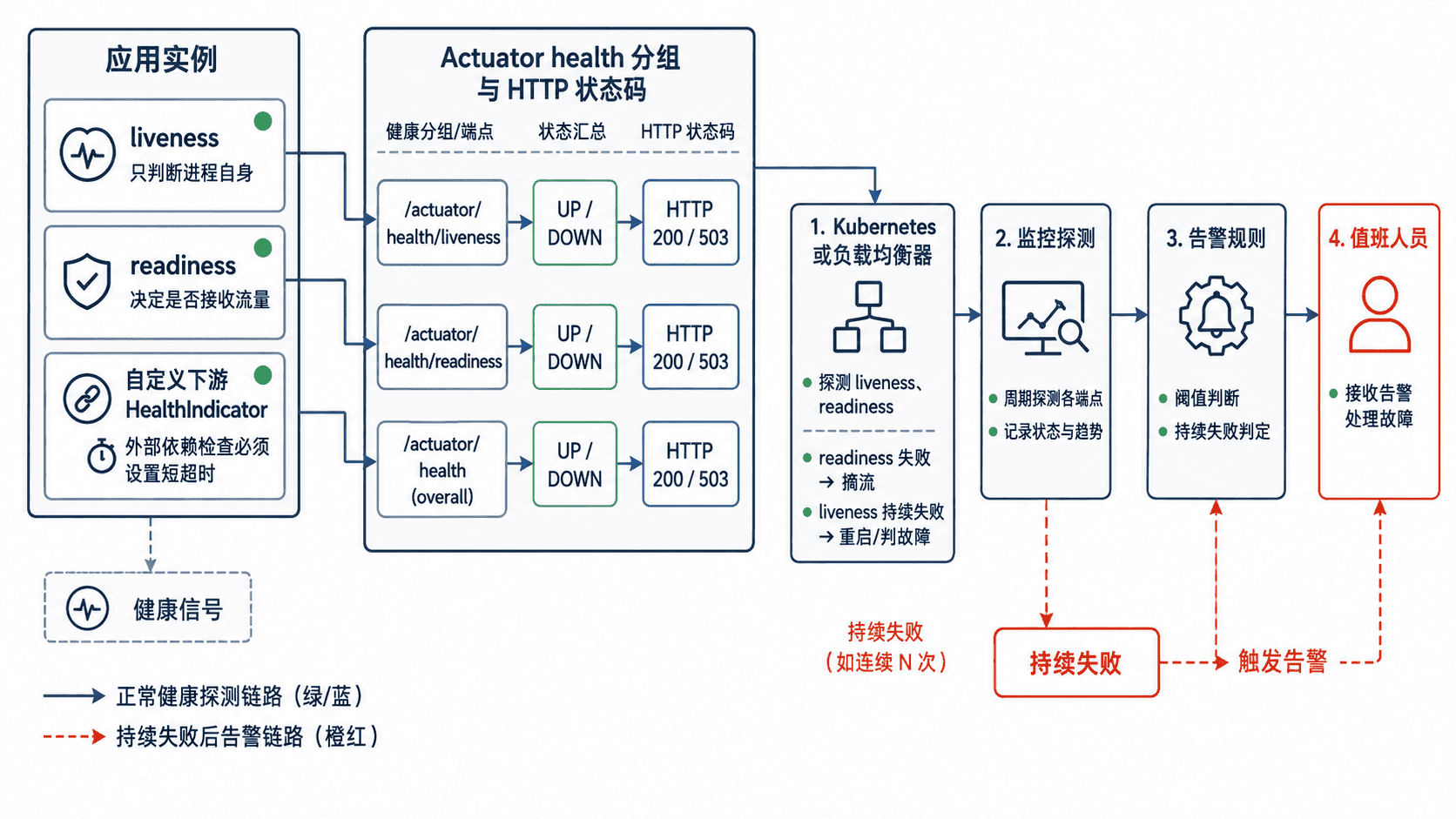
存活检查回答“进程是否还能继续工作”。它只应依赖应用自身状态,例如线程是否死锁、内部状态是否损坏;若把数据库或下游接口放入 liveness,外部短暂故障会触发容器重启,反而放大事故。
就绪检查回答“实例当前能否接收流量”。数据库不可用、关键配置未加载或必需下游持续失败时,可以让 readiness 变为 DOWN,由负载均衡器暂时摘除实例。非关键依赖应降级处理,而不是直接让整个实例退出服务。
实现有边界的健康指示器
下面是片段示例,放入已引入 spring-boot-starter-actuator 的 Spring Boot 3 项目。检查请求设置 300 毫秒连接超时和 500 毫秒总超时,避免健康端点被慢下游长期占住。
package com.example.order.monitoring;

import java.net.URI;
import java.net.http.HttpClient;
import java.net.http.HttpRequest;
import java.net.http.HttpResponse;
import java.time.Duration;

import org.springframework.beans.factory.annotation.Value;
import org.springframework.boot.actuate.health.Health;
import org.springframework.boot.actuate.health.HealthIndicator;
import org.springframework.stereotype.Component;

@Component("orderDownstream")
public class OrderDownstreamHealthIndicator implements HealthIndicator {

    private final URI healthUri;
    private final HttpClient client = HttpClient.newBuilder()
            .connectTimeout(Duration.ofMillis(300))
            .build();

    public OrderDownstreamHealthIndicator(
            @Value("${downstream.order.health-url}") URI healthUri) {
        this.healthUri = healthUri;
    }

    @Override
    public Health health() {
        long started = System.nanoTime();
        HttpRequest request = HttpRequest.newBuilder(healthUri)
                .timeout(Duration.ofMillis(500))
                .GET()
                .build();

        try {
            HttpResponse<Void> response = client.send(
                    request, HttpResponse.BodyHandlers.discarding());
            long latencyMs = Duration.ofNanos(
                    System.nanoTime() - started).toMillis();

            if (response.statusCode() >= 200 && response.statusCode() < 300) {
                return Health.up()
                        .withDetail("latencyMs", latencyMs)
                        .build();
            }
            return Health.down()
                    .withDetail("statusCode", response.statusCode())
                    .withDetail("latencyMs", latencyMs)
                    .build();
        } catch (InterruptedException ex) {
            Thread.currentThread().interrupt();
            return Health.down()
                    .withDetail("reason", "interrupted")
                    .build();
        } catch (Exception ex) {
            return Health.down()
                    .withDetail("reason", ex.getClass().getSimpleName())
                    .build();
        }
    }
}
该实现只记录状态码、耗时和异常类型,不把令牌、完整地址或堆栈暴露给未授权调用者。健康检查必须保持轻量,不执行写操作,也不要串行检查大量依赖。
配置健康分组与访问范围
将进程自身状态放入 liveness,将接流所必需的数据库和订单下游放入 readiness。show-details: when-authorized 让探测器仍可依据 HTTP 状态工作,同时限制详细信息的公开范围。
management:
  endpoint:
    health:
      probes:
        enabled: true
      show-details: when-authorized
      group:
        liveness:
          include: livenessState
        readiness:
          include: readinessState,db,orderDownstream
  endpoints:
    web:
      exposure:
        include: health,prometheus

downstream:
  order:
    health-url: http://order-service:<PORT>/actuator/health
实际端口可能不同。若订单下游不是接收请求的硬依赖,应从 readiness 中移除,并在业务调用层采用超时、重试、熔断或降级。
把失败转换成可行动告警
监控系统可以通过 HTTP 探测 /actuator/health/readiness。以下 Prometheus 规则假设 Blackbox Exporter 已生成 probe_success 指标;持续两分钟失败才触发,避免把一次发布抖动直接升级为事故。
groups:
  - name: order-service-health
    rules:
      - alert: OrderServiceReadinessFailed
        expr: probe_success{job="order-service-readiness"} == 0
        for: 2m
        labels:
          severity: critical
          service: order-service
        annotations:
          summary: "order-service 就绪检查持续失败"
          description: "实例 {{ $labels.instance }} 连续 2 分钟未通过 readiness"
          runbook: "<RUNBOOK_URL>"
阈值应结合发布时长、探测周期和业务容忍度确定。常见分层是:单次失败只记录,连续 1~2 分钟发出警告,连续 5 分钟或可用实例低于冗余下限时升级为严重告警。
一条面向值班人员的告警至少应包含服务与环境、失败实例、开始时间、用户影响、最近发布版本、仪表盘入口、运行手册入口和当前负责人。不要只发送“服务异常”,也不要把原始日志整段塞进通知。
验证健康端点
应用启动后执行:
curl -i http://localhost:<PORT>/actuator/health/readiness预期输出:
HTTP/1.1 200
Content-Type: application/vnd.spring-boot.actuator.v3+json

{"status":"UP"}
当数据库或 orderDownstream 失败时,预期 HTTP 状态变为 503,响应状态为 DOWN。实际响应头、端口和可见详情会因安全配置不同而变化。