
Java 后端 / 系统课时
测试 Controller 接口
测试 Controller 接口
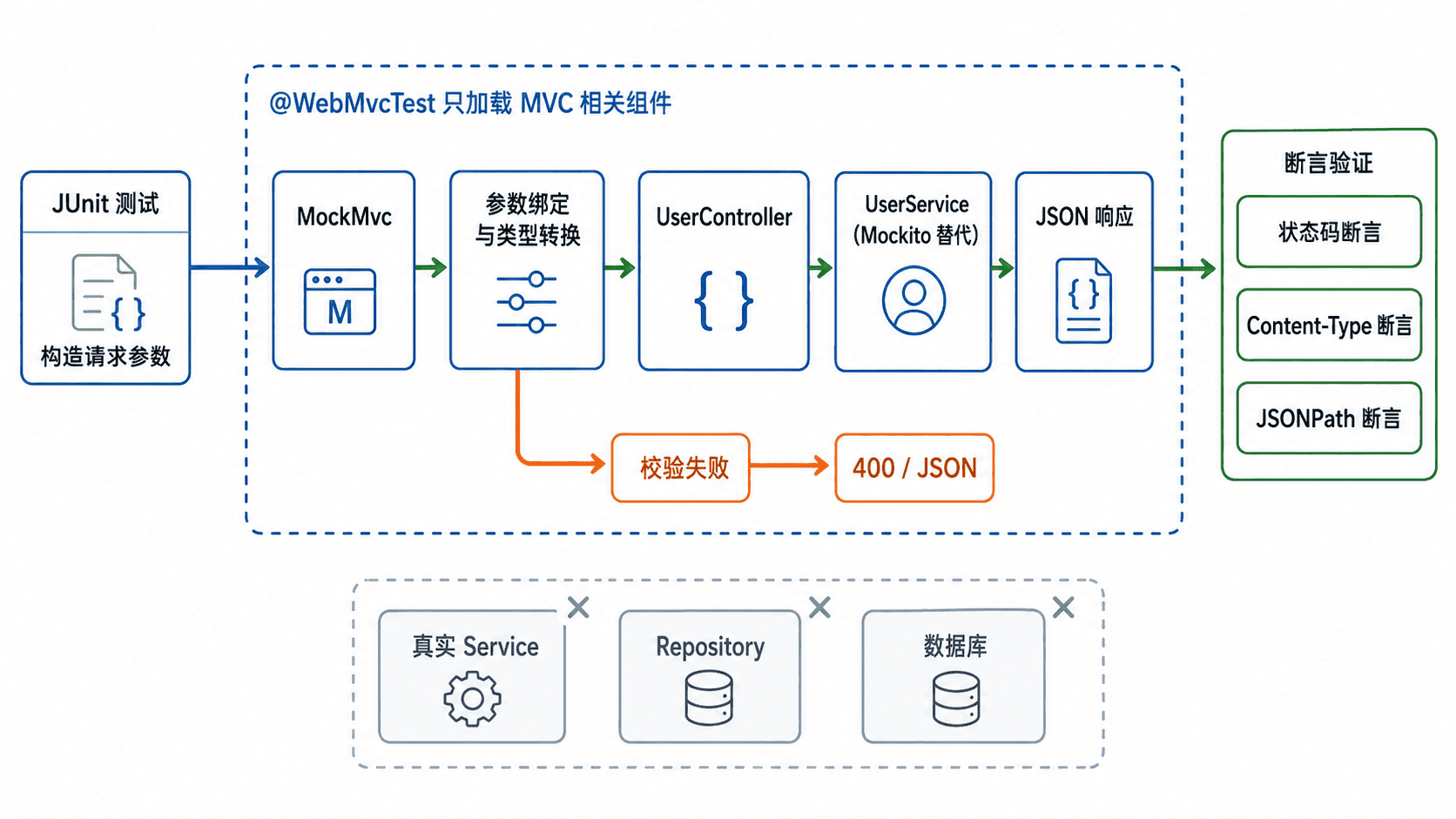
本课用一个可运行的查询接口示例,演示如何通过 @WebMvcTest 只加载 MVC 测试切片,再用 MockMvc 验证请求参数绑定、校验失败状态码以及返回 JSON 的关键结构。
学习目标
- 理解
@WebMvcTest的加载范围以及业务依赖为何需要替身。 - 使用
MockMvc构造查询参数并断言状态码、内容类型和 JSONPath。 - 能定位参数绑定、Spring Security 与测试上下文相关的常见失败。
测试切片解决什么问题
Controller 测试关注的是 HTTP 契约,而不是数据库和完整业务流程。@WebMvcTest(UserController.class) 会围绕指定 Controller 建立 MVC 环境并自动配置 MockMvc,Service、Repository 等普通业务 Bean 不会自动加入,因此要用 Mockito 提供可控返回值。
准备被测接口
下面的接口接收 keyword 与 page 两个查询参数。缺少必填关键词或页码无法转换为整数时,应在进入业务方法前返回 400;参数合法时,Service 的结果会被序列化为固定 JSON 结构。
package com.example.user;

import org.springframework.web.bind.annotation.GetMapping;
import org.springframework.web.bind.annotation.RequestMapping;
import org.springframework.web.bind.annotation.RequestParam;
import org.springframework.web.bind.annotation.RestController;

import java.util.List;

@RestController
@RequestMapping("/api/users")
public class UserController {

    private final UserService userService;

    public UserController(UserService userService) {
        this.userService = userService;
    }

    @GetMapping
    public UserPage search(
            @RequestParam String keyword,
            @RequestParam(defaultValue = "0") int page) {
        return userService.search(keyword, page);
    }
}

interface UserService {
    UserPage search(String keyword, int page);
}

record UserItem(long id, String name) {
}

record UserPage(List<UserItem> items, int page, long total) {
}
该代码是项目内的完整生产侧最小示例,保存为 UserController.java。记录类型和接口保持包级可见,测试类放在同一包即可直接引用。
编写 WebMvcTest
测试一条成功路径和一条参数非法路径。成功路径同时验证查询参数是否传给 Service,以及 JSON 数组、字段值和分页元数据;失败路径确认参数转换在调用 Service 前终止请求。
package com.example.user;

import org.junit.jupiter.api.Test;
import org.springframework.beans.factory.annotation.Autowired;
import org.springframework.boot.test.autoconfigure.web.servlet.WebMvcTest;
import org.springframework.boot.test.mock.mockito.MockBean;
import org.springframework.test.web.servlet.MockMvc;

import java.util.List;

import static org.mockito.BDDMockito.given;
import static org.mockito.Mockito.verifyNoInteractions;
import static org.springframework.test.web.servlet.request.MockMvcRequestBuilders.get;
import static org.springframework.test.web.servlet.result.MockMvcResultMatchers.content;
import static org.springframework.test.web.servlet.result.MockMvcResultMatchers.jsonPath;
import static org.springframework.test.web.servlet.result.MockMvcResultMatchers.status;

@WebMvcTest(UserController.class)
class UserControllerTest {

    @Autowired
    private MockMvc mockMvc;

    @MockBean
    private UserService userService;

    @Test
    void shouldReturnPageWhenParametersAreValid() throws Exception {
        given(userService.search("tom", 2))
                .willReturn(new UserPage(
                        List.of(new UserItem(7L, "Tom")),
                        2,
                        1));

        mockMvc.perform(get("/api/users")
                        .param("keyword", "tom")
                        .param("page", "2"))
                .andExpect(status().isOk())
                .andExpect(content().contentTypeCompatibleWith("application/json"))
                .andExpect(jsonPath("$.items").isArray())
                .andExpect(jsonPath("$.items[0].id").value(7))
                .andExpect(jsonPath("$.items[0].name").value("Tom"))
                .andExpect(jsonPath("$.page").value(2))
                .andExpect(jsonPath("$.total").value(1));
    }

    @Test
    void shouldReturnBadRequestWhenPageIsNotANumber() throws Exception {
        mockMvc.perform(get("/api/users")
                        .param("keyword", "tom")
                        .param("page", "not-a-number"))
                .andExpect(status().isBadRequest());

        verifyNoInteractions(userService);
    }
}
为兼容较早的 Spring Boot 3 项目,示例使用 @MockBean。采用 Spring Boot 3.4 及以上版本时,也可以按项目规范迁移到 Spring Framework 的 @MockitoBean。
运行与验证
在包含 spring-boot-starter-test 的 Maven 项目根目录执行指定测试类:
mvn -Dtest=UserControllerTest test预期输出:
[INFO] Tests run: 2, Failures: 0, Errors: 0, Skipped: 0
[INFO] BUILD SUCCESS
实际日志中的耗时与路径可能不同。通过测试说明请求映射、参数绑定、状态码和响应 JSON 契约均符合预期,但不代表真实 Service 或数据库已经验证。
边界与常见失败
当测试启动时报“缺少 Bean”时,先确认缺失对象是否属于 Controller 的构造依赖;业务依赖应使用 Mock,MVC 转换器或异常处理器则可通过 @Import 加入。项目启用 Spring Security 后,401 或 403 通常来自安全过滤链,应使用 @WithMockUser 构造身份,而不是为了让测试通过就无条件关闭过滤器。
JSON 断言应优先检查对外契约字段,不要把所有内部字段都写死。仅检查状态码会漏掉响应结构回归;整段字符串完全相等又容易被无关字段顺序影响,JSONPath 更适合定位关键节点。