
Java 后端 / 系统课时
使用 Actuator 管理端点
使用 Actuator 管理端点
Actuator 为应用提供健康、版本、指标和配置诊断入口。本课将完成依赖接入、端点白名单、敏感值脱敏与分级认证,并用 HTTP 请求验证公开端点和管理员端点的访问边界。
学习目标
- 区分端点启用、Web 暴露与安全授权三个独立环节。
- 只开放健康、信息、指标和必要的配置诊断端点。
- 使用 Spring Security 验证匿名访问与管理员访问结果。
暴露和授权是两道独立控制
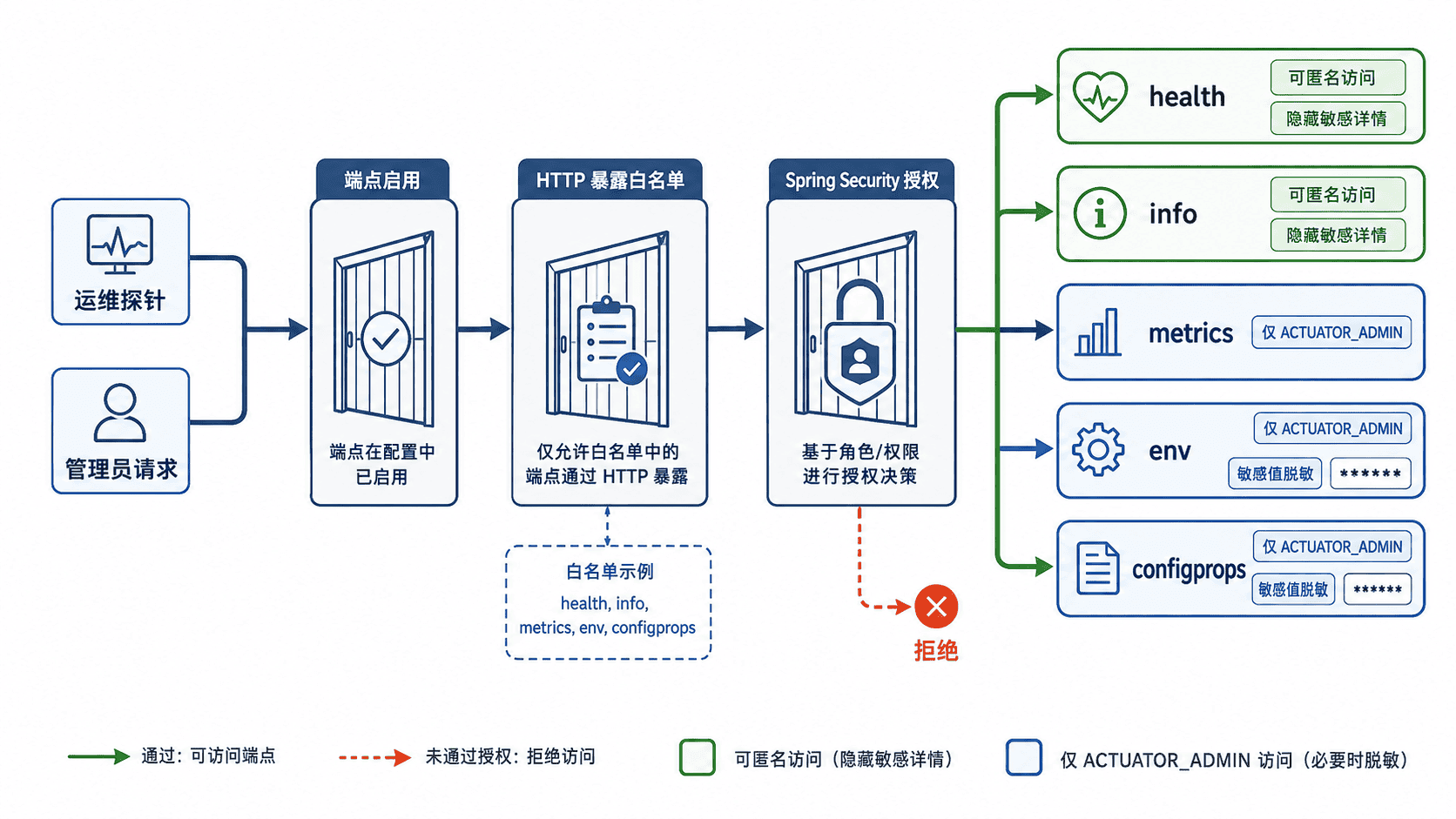
Actuator 端点存在不等于可以从网络访问。应用先决定端点是否可用,再由 management.endpoints.web.exposure.include 决定哪些端点映射到 HTTP,最后由 Spring Security 判断请求者是否有权限。
health 适合交给负载均衡器或编排平台探测,但匿名响应通常只保留总体状态;info 只应放置可公开的构建信息;metrics、env 和 configprops 可能暴露运行细节,应限制为运维角色访问。配置值即使允许访问,也应继续保持脱敏。
配置并保护端点
在 Maven 工程中加入 Actuator 和 Spring Security。版本由 Spring Boot 父工程或 BOM 统一管理,不要在单个依赖上重复指定版本。
<dependencies>
    <dependency>
        <groupId>org.springframework.boot</groupId>
        <artifactId>spring-boot-starter-actuator</artifactId>
    </dependency>
    <dependency>
        <groupId>org.springframework.boot</groupId>
        <artifactId>spring-boot-starter-security</artifactId>
    </dependency>
</dependencies>
下面的配置只暴露五个端点,并让健康详情、环境值和配置属性仅对授权用户显示。示例账号只用于本地验证,生产环境应接入统一身份系统或外部化密钥。
spring:
  security:
    user:
      name: ops
      password: change-me
      roles: ACTUATOR_ADMIN

management:
  endpoints:
    web:
      exposure:
        include: health,info,metrics,env,configprops
  endpoint:
    health:
      show-details: when_authorized
    env:
      show-values: when_authorized
      roles: ACTUATOR_ADMIN
    configprops:
      show-values: when_authorized
      roles: ACTUATOR_ADMIN
  info:
    env:
      enabled: true

info:
  app:
    name: order-service
    version: 1.0.0
以下是依赖现有 Spring Boot 3 Web 工程的安全配置片段。第一条过滤链只处理 Actuator:health 和 info 可匿名访问,其余端点要求 ACTUATOR_ADMIN;第二条过滤链负责普通业务请求。
package com.example.monitoring;

import org.springframework.boot.actuate.autoconfigure.security.servlet.EndpointRequest;
import org.springframework.boot.actuate.health.HealthEndpoint;
import org.springframework.boot.actuate.info.InfoEndpoint;
import org.springframework.context.annotation.Bean;
import org.springframework.context.annotation.Configuration;
import org.springframework.core.annotation.Order;
import org.springframework.security.config.Customizer;
import org.springframework.security.config.annotation.web.builders.HttpSecurity;
import org.springframework.security.web.SecurityFilterChain;

@Configuration(proxyBeanMethods = false)
public class SecurityConfig {

    @Bean
    @Order(1)
    SecurityFilterChain actuatorSecurity(HttpSecurity http) throws Exception {
        http.securityMatcher(EndpointRequest.toAnyEndpoint())
                .authorizeHttpRequests(auth -> auth
                        .requestMatchers(EndpointRequest.to(
                                HealthEndpoint.class, InfoEndpoint.class))
                        .permitAll()
                        .anyRequest()
                        .hasRole("ACTUATOR_ADMIN"))
                .httpBasic(Customizer.withDefaults());
        return http.build();
    }

    @Bean
    @Order(2)
    SecurityFilterChain applicationSecurity(HttpSecurity http) throws Exception {
        http.authorizeHttpRequests(auth -> auth
                        .anyRequest()
                        .authenticated())
                .httpBasic(Customizer.withDefaults());
        return http.build();
    }
}
该片段生效后,端点路径仍由 Actuator 配置解析,避免在安全规则中硬编码 /actuator/**。若某个端点没有暴露,请求不会因为认证成功而自动变为可访问。
验证访问结果与上线边界
启动应用后,用状态码同时验证公开端点、匿名受限端点和管理员端点。示例使用默认端口 8080;实际端口不同时应替换命令中的地址。
curl -s -o /dev/null -w "health=%{http_code}\n" http://localhost:8080/actuator/health
curl -s -o /dev/null -w "info=%{http_code}\n" http://localhost:8080/actuator/info
curl -s -o /dev/null -w "env-anonymous=%{http_code}\n" http://localhost:8080/actuator/env
curl -s -u ops:change-me -o /dev/null -w "env-admin=%{http_code}\n" http://localhost:8080/actuator/env
curl -s http://localhost:8080/actuator/health
预期输出
health=200
info=200
env-anonymous=401
env-admin=200
{"status":"UP"}上线前还要确认管理端点没有被公网直接暴露,账号密码不在仓库中,env 与 configprops 保持脱敏,且只开放监控系统真正需要的端点。不要用 include: "*" 代替端点白名单,也不要把 shutdown、heapdump 等高风险能力作为常规远程接口开放。