
Java 后端 / 系统课时
使用 Testcontainers
使用 Testcontainers
本课解决集成测试依赖本机数据库、消息队列而导致结果不一致的问题。你将用 Testcontainers 在测试运行时启动真实 PostgreSQL 容器,并把随机端口和连接信息动态注入 Spring Boot,最终获得可重复、可在 CI 中执行的测试。
学习目标
- 理解 Testcontainers 相比内存数据库的适用价值
- 使用容器声明和
@DynamicPropertySource注入数据源配置 - 运行测试并定位 Docker、镜像与容器生命周期问题
为什么用真实依赖测试
H2 等内存数据库启动快,但它们的 SQL 方言、索引行为、事务隔离和约束实现可能与生产数据库不同。Testcontainers 直接启动指定版本的 PostgreSQL,使测试覆盖真实驱动、真实协议和真实数据库行为,同时不要求开发者预先创建固定测试库。
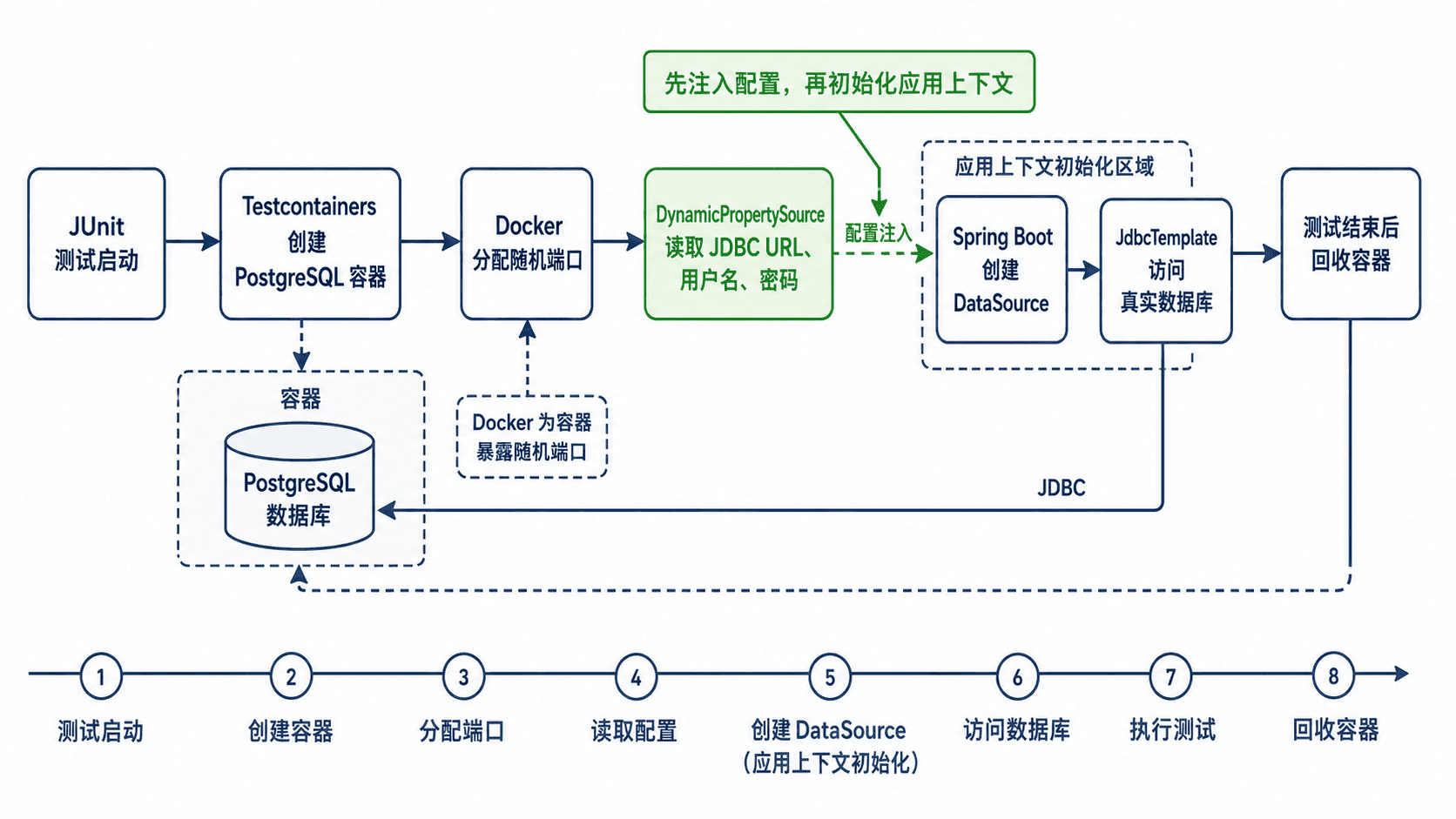
测试启动时,JUnit 创建容器并映射随机宿主机端口;Spring Boot 在应用上下文初始化前读取容器生成的 JDBC 地址、用户名和密码,再创建数据源。测试结束后容器被回收,不会污染下一次运行。
配置并编写测试
在使用 Spring Boot 父工程或依赖管理的项目中,可以让 Spring Boot 统一管理 Testcontainers 版本。测试至少需要 JDBC、PostgreSQL 驱动、测试框架和 PostgreSQL 容器模块。
<dependencies>
    <dependency>
        <groupId>org.springframework.boot</groupId>
        <artifactId>spring-boot-starter-jdbc</artifactId>
    </dependency>
    <dependency>
        <groupId>org.postgresql</groupId>
        <artifactId>postgresql</artifactId>
        <scope>runtime</scope>
    </dependency>
    <dependency>
        <groupId>org.springframework.boot</groupId>
        <artifactId>spring-boot-starter-test</artifactId>
        <scope>test</scope>
    </dependency>
    <dependency>
        <groupId>org.testcontainers</groupId>
        <artifactId>junit-jupiter</artifactId>
        <scope>test</scope>
    </dependency>
    <dependency>
        <groupId>org.testcontainers</groupId>
        <artifactId>postgresql</artifactId>
        <scope>test</scope>
    </dependency>
</dependencies>
下面的测试类会启动 PostgreSQL 16,动态注册数据源属性,然后创建表、写入数据并查询结果。静态容器在当前测试类中只启动一次,减少重复启动成本。
package com.example.demo;

import org.junit.jupiter.api.Test;
import org.springframework.beans.factory.annotation.Autowired;
import org.springframework.boot.test.context.SpringBootTest;
import org.springframework.jdbc.core.JdbcTemplate;
import org.springframework.test.context.DynamicPropertyRegistry;
import org.springframework.test.context.DynamicPropertySource;
import org.testcontainers.containers.PostgreSQLContainer;
import org.testcontainers.junit.jupiter.Container;
import org.testcontainers.junit.jupiter.Testcontainers;

import static org.assertj.core.api.Assertions.assertThat;

@Testcontainers(disabledWithoutDocker = true)
@SpringBootTest
class PostgreSqlContainerTest {

    @Container
    static final PostgreSQLContainer<?> POSTGRES =
            new PostgreSQLContainer<>("postgres:16-alpine")
                    .withDatabaseName("app_test")
                    .withUsername("app")
                    .withPassword("secret");

    @DynamicPropertySource
    static void registerDataSource(DynamicPropertyRegistry registry) {
        // 使用容器实际映射出的地址,避免写死端口。
        registry.add("spring.datasource.url", POSTGRES::getJdbcUrl);
        registry.add("spring.datasource.username", POSTGRES::getUsername);
        registry.add("spring.datasource.password", POSTGRES::getPassword);
    }

    @Autowired
    JdbcTemplate jdbcTemplate;

    @Test
    void shouldReadDataFromRealPostgres() {
        jdbcTemplate.execute("""
                create table if not exists customer (
                    id bigint primary key,
                    email varchar(100) not null unique
                )
                """);
        jdbcTemplate.update("delete from customer");
        jdbcTemplate.update(
                "insert into customer(id, email) values (?, ?)",
                1L,
                "alice@example.com"
        );

        String email = jdbcTemplate.queryForObject(
                "select email from customer where id = ?",
                String.class,
                1L
        );

        assertThat(email).isEqualTo("alice@example.com");
    }
}
预期结果:测试上下文连接容器中的 PostgreSQL,插入并查询 alice@example.com,断言通过且测试结束后容器被自动回收。
配置生效后,Spring Boot 不再读取固定的本地数据库端口,而是连接当前容器暴露的地址。若项目已使用 Flyway 或 Liquibase,迁移也会在该真实数据库上执行,可以进一步验证生产迁移脚本。
运行与验证
确保 Docker 服务可用,然后只运行当前测试类。
./mvnw -Dtest=PostgreSqlContainerTest test预期输出:
[INFO] Tests run: 1, Failures: 0, Errors: 0, Skipped: 0
[INFO] BUILD SUCCESS
首次运行需要拉取镜像,耗时通常高于后续运行。镜像下载进度、容器名称和执行时间属于动态信息,实际输出可能不同。
生命周期与常见失败
Could not find a valid Docker environment 表示测试进程无法连接 Docker,应先验证 docker info,并检查当前用户权限或 CI 的 Docker 服务配置。镜像拉取超时通常与仓库网络或代理有关,可先手动执行 docker pull postgres:16-alpine 验证链路。
容器字段必须为 static,才能在同一测试类的 Spring 上下文创建前完成启动并复用。不要把容器映射端口写入 application-test.yml,因为宿主机端口由 Docker 动态分配。需要跨多个测试类复用时,应优先复用 Spring 测试上下文,而不是手工维护一个长期运行的共享数据库。