
Java 后端 / 系统课时
应用方法级安全
应用方法级安全
本课把授权从 URL 边界下沉到服务方法,使同一业务能力无论被控制器、定时任务还是其他服务调用,都必须经过统一的数据权限检查。
学习目标
- 使用
@EnableMethodSecurity启用方法拦截 - 使用
@PreAuthorize和@PostAuthorize编写授权表达式 - 识别后置授权与代理调用的关键边界
启用方法级安全
Spring Boot 的安全 Starter 不会默认启用方法授权,需要在配置类上添加 @EnableMethodSecurity。启用后,Spring Security 可以在 Spring Bean 方法调用前后处理 @PreAuthorize、@PostAuthorize、@PreFilter 和 @PostFilter。
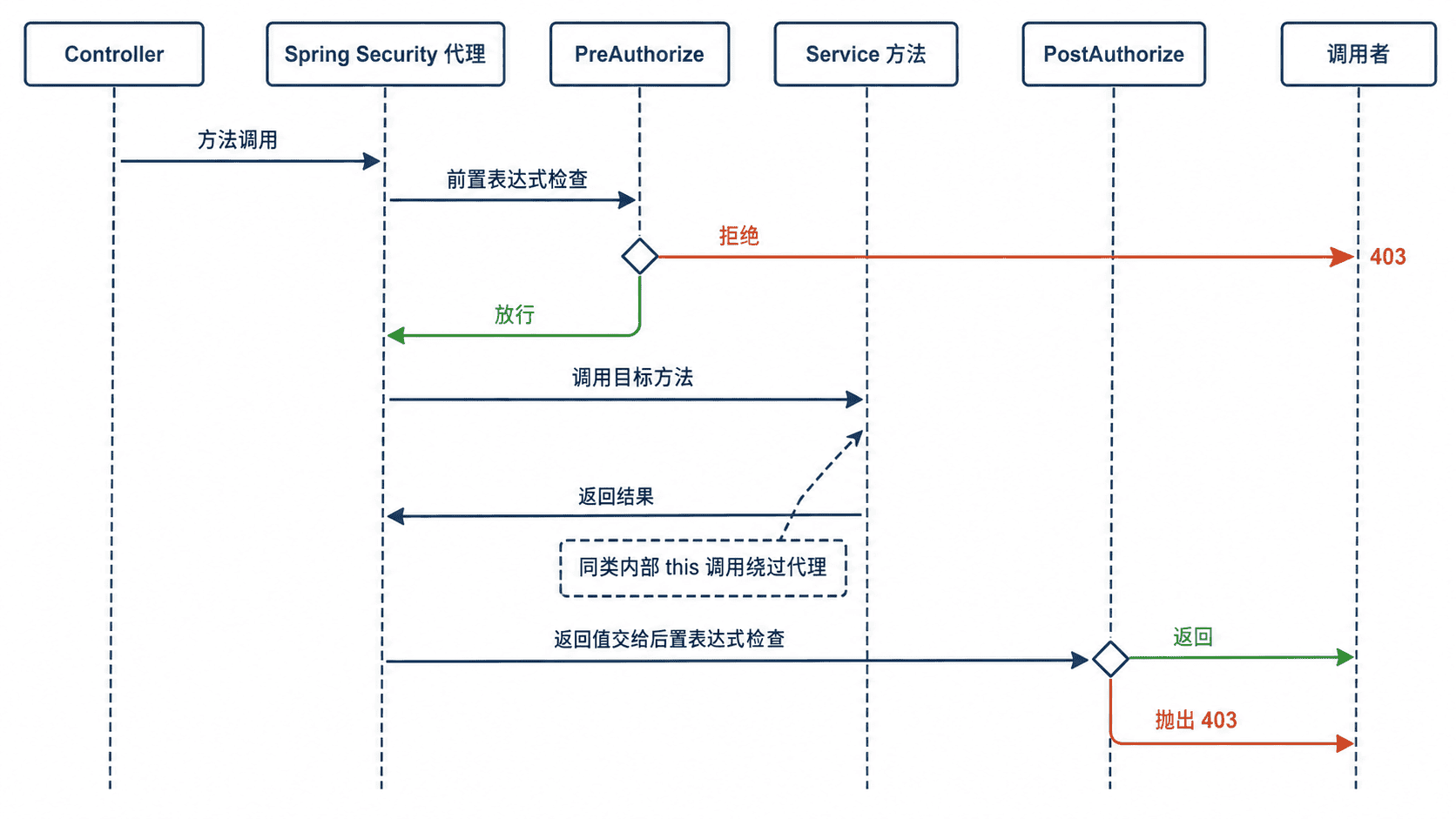
方法级安全通过代理拦截调用:调用先到安全代理,前置表达式通过后才执行目标方法;后置表达式可以检查返回值,再决定是否把结果交给调用者。
用表达式保护服务方法
下面的单文件示例使用三种规则:创建文档需要 document:write,读取文档在返回后检查所有者,删除文档在执行前调用自定义 Bean 判断当前用户是否为所有者,管理员角色可越过所有者限制。
package com.example.methodsecurity;

import java.util.Map;
import java.util.Optional;
import java.util.concurrent.ConcurrentHashMap;

import org.springframework.boot.SpringApplication;
import org.springframework.boot.autoconfigure.SpringBootApplication;
import org.springframework.context.annotation.Bean;
import org.springframework.context.annotation.Configuration;
import org.springframework.http.HttpStatus;
import org.springframework.security.config.Customizer;
import org.springframework.security.config.annotation.method.configuration.EnableMethodSecurity;
import org.springframework.security.config.annotation.web.builders.HttpSecurity;
import org.springframework.security.config.annotation.web.configurers.AbstractHttpConfigurer;
import org.springframework.security.core.Authentication;
import org.springframework.security.core.userdetails.User;
import org.springframework.security.core.userdetails.UserDetailsService;
import org.springframework.security.provisioning.InMemoryUserDetailsManager;
import org.springframework.security.access.prepost.PostAuthorize;
import org.springframework.security.access.prepost.PreAuthorize;
import org.springframework.security.web.SecurityFilterChain;
import org.springframework.stereotype.Component;
import org.springframework.stereotype.Service;
import org.springframework.web.bind.annotation.DeleteMapping;
import org.springframework.web.bind.annotation.GetMapping;
import org.springframework.web.bind.annotation.PathVariable;
import org.springframework.web.bind.annotation.PostMapping;
import org.springframework.web.bind.annotation.RequestMapping;
import org.springframework.web.bind.annotation.RequestParam;
import org.springframework.web.bind.annotation.ResponseStatus;
import org.springframework.web.bind.annotation.RestController;
import org.springframework.web.server.ResponseStatusException;

@SpringBootApplication
@EnableMethodSecurity
public class MethodSecurityDemoApplication {

    public static void main(String[] args) {
        SpringApplication.run(MethodSecurityDemoApplication.class, args);
    }
}

@Configuration
class SecurityConfig {

    @Bean
    SecurityFilterChain securityFilterChain(HttpSecurity http)
            throws Exception {
        http
            .csrf(AbstractHttpConfigurer::disable)
            .authorizeHttpRequests(authorize ->
                authorize.anyRequest().authenticated())
            .httpBasic(Customizer.withDefaults());
        return http.build();
    }

    @Bean
    UserDetailsService users() {
        return new InMemoryUserDetailsManager(
            User.withUsername("alice")
                .password("{noop}password")
                .authorities("document:read", "document:write")
                .build(),
            User.withUsername("bob")
                .password("{noop}password")
                .authorities("document:read")
                .build(),
            User.withUsername("admin")
                .password("{noop}password")
                .authorities(
                    "ROLE_ADMIN", "document:read", "document:write")
                .build()
        );
    }
}

record DocumentView(String id, String owner, String content) {
}

@Component
class DocumentStore {

    private final Map<String, DocumentView> documents =
        new ConcurrentHashMap<>();

    DocumentStore() {
        documents.put("d1",
            new DocumentView("d1", "alice", "Alice plan"));
        documents.put("d2",
            new DocumentView("d2", "bob", "Bob plan"));
    }

    public DocumentView get(String id) {
        return Optional.ofNullable(documents.get(id))
            .orElseThrow(() ->
                new ResponseStatusException(HttpStatus.NOT_FOUND));
    }

    public void put(DocumentView document) {
        documents.put(document.id(), document);
    }

    public void delete(String id) {
        documents.remove(id);
    }
}

@Component("documentAuth")
class DocumentAuthorization {

    private final DocumentStore store;

    DocumentAuthorization(DocumentStore store) {
        this.store = store;
    }

    public boolean isOwner(Authentication authentication, String id) {
        try {
            return store.get(id).owner().equals(authentication.getName());
        } catch (ResponseStatusException exception) {
            return false;
        }
    }
}

@Service
class DocumentService {

    private final DocumentStore store;

    DocumentService(DocumentStore store) {
        this.store = store;
    }

    @PreAuthorize("hasAuthority('document:write')")
    public DocumentView create(
            String id, String content, Authentication authentication) {
        DocumentView document =
            new DocumentView(id, authentication.getName(), content);
        store.put(document);
        return document;
    }

    @PostAuthorize(
        "returnObject.owner() == authentication.name or hasRole('ADMIN')")
    public DocumentView findById(String id) {
        return store.get(id);
    }

    @PreAuthorize(
        "@documentAuth.isOwner(authentication, #id) or hasRole('ADMIN')")
    public void delete(String id) {
        store.delete(id);
    }
}

@RestController
@RequestMapping("/documents")
class DocumentController {

    private final DocumentService service;

    DocumentController(DocumentService service) {
        this.service = service;
    }

    @PostMapping
    DocumentView create(
            @RequestParam String id,
            @RequestParam String content,
            Authentication authentication) {
        return service.create(id, content, authentication);
    }

    @GetMapping("/{id}")
    DocumentView findById(@PathVariable String id) {
        return service.findById(id);
    }

    @DeleteMapping("/{id}")
    @ResponseStatus(HttpStatus.NO_CONTENT)
    void delete(@PathVariable String id) {
        service.delete(id);
    }
}
预期输出(启动日志关键行,时间可能不同):
Started MethodSecurityDemoApplication in <TIME> seconds#id 依赖编译器保留方法参数名;标准 Spring Boot 构建通常已启用该能力。若自定义构建关闭了参数名保留,应启用 Java 编译参数 -parameters。
运行并验证数据权限
把 <PORT> 替换为实际端口后执行以下请求。测试顺序先验证拒绝,再执行删除,避免前一个操作改变后续数据。
curl -i -u alice:password http://localhost:<PORT>/documents/d1
curl -i -u alice:password http://localhost:<PORT>/documents/d2
curl -i -u bob:password -X DELETE http://localhost:<PORT>/documents/d1
curl -i -u alice:password -X DELETE http://localhost:<PORT>/documents/d1
预期结果:
HTTP/1.1 200
Content-Type: application/json
{"id":"d1","owner":"alice","content":"Alice plan"}

HTTP/1.1 403

HTTP/1.1 403

HTTP/1.1 204
第一条通过后置所有者检查;第二条虽然读取方法已经返回对象,但 @PostAuthorize 发现所有者不匹配,最终拒绝响应;第三条在删除前被自定义所有者规则阻止;第四条允许 Alice 删除自己的文档。
避免代理与后置检查陷阱
@PostAuthorize 在方法执行后判断,因此适合保护只读返回值,不适合带有写库、发消息或扣款等副作用的方法;这类操作应使用 @PreAuthorize 在执行前拒绝。官方文档也将后置授权用于检查返回对象和防止越权读取。
方法安全依赖 Spring AOP 代理。同一个 Bean 内部通过 this 调用另一个受保护方法时,调用不会经过代理,相关安全拦截可能失效;应拆分到另一个 Bean,或确保调用从代理外部进入。
授权表达式应保持短小:角色、权限和简单参数判断可以直接写在注解中;需要查询数据库、解析组织关系或复用复杂策略时,抽取为具名 Bean 方法,并为允许与拒绝路径分别编写测试。