
Java 后端 / 系统课时
使用 RestClient 调用 HTTP 服务
使用 RestClient 调用 HTTP 服务
本课完成一个可测试的同步 HTTP 客户端:使用 RestClient 组织地址、查询参数和请求头,将 JSON 响应转换为 Java 对象,并把非成功状态统一转换为业务可识别的异常。
学习目标
- 使用
RestClient.Builder创建并复用 HTTP 客户端 - 传递路径变量、查询参数和请求头,并解析 JSON 响应
- 使用
onStatus处理 4xx、5xx 等非成功状态
建立 RestClient 调用链
RestClient 适合传统 Spring MVC 应用中的同步调用。Spring Boot 3.2 及以上可以注入容器提供的 RestClient.Builder,再设置目标服务的基础地址。实际请求依次经过 URI 构造、消息转换器、底层请求工厂和远端服务;成功响应进入反序列化,错误响应进入状态处理器。
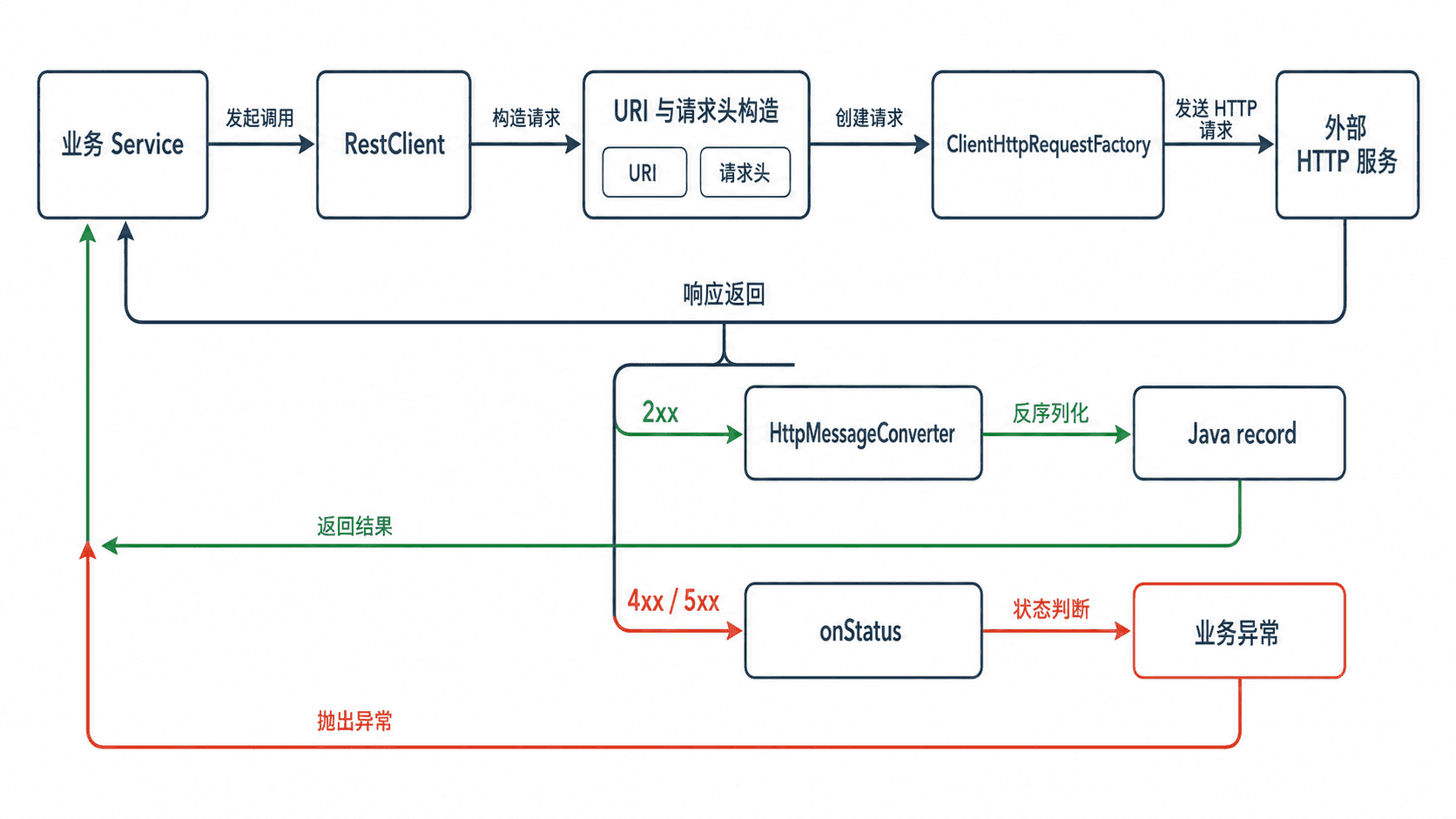
项目需要 spring-boot-starter-web,测试示例还需要 spring-boot-starter-test。这两个依赖通常已经存在于 Web 项目中,不需要为 RestClient 单独引入第三方 HTTP SDK。
编写可验证的请求
下面的测试通过 MockRestServiceServer 模拟合作方接口,不依赖公网。它同时验证了路径变量、查询参数、请求头、JSON 解析和状态处理。将文件保存为 src/test/java/com/example/integration/RestClientTest.java。
package com.example.integration;

import org.junit.jupiter.api.Test;
import org.springframework.http.HttpMethod;
import org.springframework.http.HttpStatusCode;
import org.springframework.http.MediaType;
import org.springframework.test.web.client.MockRestServiceServer;
import org.springframework.web.client.RestClient;

import static org.assertj.core.api.Assertions.assertThat;
import static org.springframework.test.web.client.match.MockRestRequestMatchers.header;
import static org.springframework.test.web.client.match.MockRestRequestMatchers.method;
import static org.springframework.test.web.client.match.MockRestRequestMatchers.requestTo;
import static org.springframework.test.web.client.response.MockRestResponseCreators.withSuccess;

class RestClientTest {

    @Test
    void shouldQueryOrderAndParseResponse() {
        RestClient.Builder builder = RestClient.builder();
        MockRestServiceServer server =
                MockRestServiceServer.bindTo(builder).build();
        RestClient client = builder
                .baseUrl("https://partner.example")
                .build();

        server.expect(requestTo(
                        "https://partner.example/orders/42?detail=true"))
                .andExpect(method(HttpMethod.GET))
                .andExpect(header("X-Trace-Id", "trace-001"))
                .andRespond(withSuccess(
                        "{\"id\":42,\"status\":\"PAID\"}",
                        MediaType.APPLICATION_JSON));

        OrderResponse response = client.get()
                .uri(uriBuilder -> uriBuilder
                        .path("/orders/{id}")
                        .queryParam("detail", true)
                        .build(42))
                .header("X-Trace-Id", "trace-001")
                .retrieve()
                .onStatus(HttpStatusCode::isError, (request, remoteResponse) -> {
                    throw new PartnerApiException(
                            remoteResponse.getStatusCode().value());
                })
                .body(OrderResponse.class);

        assertThat(response)
                .isEqualTo(new OrderResponse(42L, "PAID"));
        server.verify();
        System.out.printf("order=%d,status=%s%n",
                response.id(), response.status());
    }

    record OrderResponse(long id, String status) {
    }

    static final class PartnerApiException extends RuntimeException {
        PartnerApiException(int statusCode) {
            super("Partner API returned HTTP " + statusCode);
        }
    }
}
执行测试:
./mvnw -q -Dtest=RestClientTest test预期输出:
order=42,status=PAID选择响应读取方式
只需要响应体时使用 body(OrderResponse.class);同时需要状态码和响应头时使用 toEntity(OrderResponse.class)。响应是 List<OrderResponse> 等泛型结构时,应改用 ParameterizedTypeReference,否则运行时无法保留完整泛型信息。
retrieve() 默认会把 4xx 和 5xx 转换为 RestClientException。示例通过 onStatus 提前映射成领域异常,使上层代码不依赖底层客户端异常。生产项目还应在异常中保留合作方名称、状态码和追踪编号,但不要记录令牌、密码或完整敏感响应体。
控制客户端边界
同一个外部服务应复用一个 RestClient,不要每次调用都重新创建。基础地址、认证头和通用状态处理可以放在 Builder 配置中;订单编号、分页条件等调用级参数保留在具体方法内。同步客户端会占用当前线程,长耗时、流式或高并发异步场景应评估 WebClient。