
Java 后端 / 系统课时
实现账号与密码认证
实现账号与密码认证
本课完成一条可验证的账号密码认证链路:由 UserDetailsService 加载用户,PasswordEncoder 校验密码,AuthenticationManager 统一执行认证,并通过接口返回成功或失败结果。
学习目标
- 理解认证管理器、用户加载器和密码编码器的职责边界
- 配置一条适用于 Spring Boot 3 的账号密码认证链路
- 使用 HTTP 请求验证成功认证与失败响应
认证链路如何协作
客户端提交用户名和密码后,AuthenticationManager 不直接查询数据库,而是把认证任务交给合适的 AuthenticationProvider。默认的 DaoAuthenticationProvider 会调用 UserDetailsService 取得用户,再用 PasswordEncoder 比较明文密码与已存储的密码摘要。
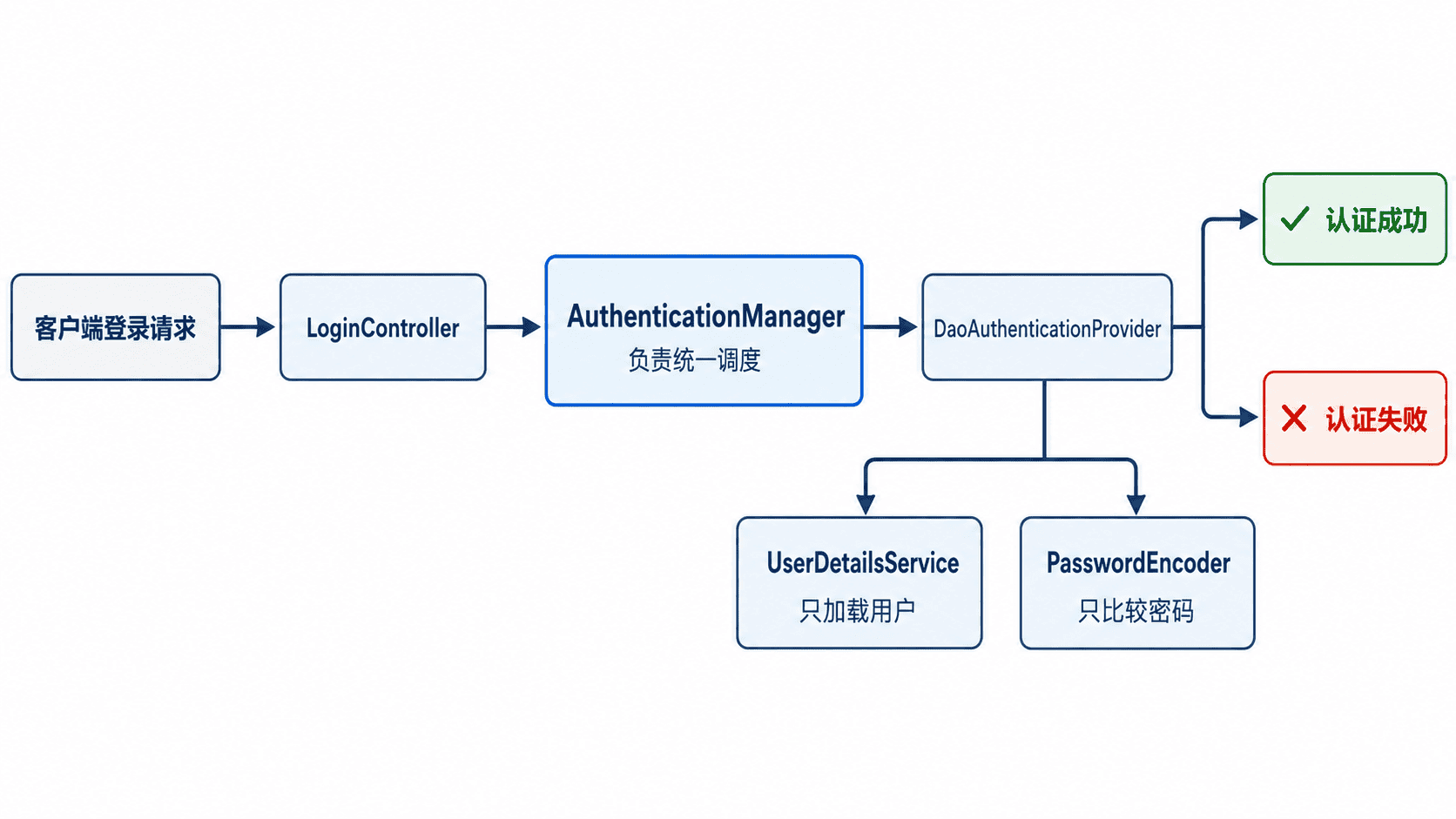
这个分工使控制器不需要了解密码算法或用户存储方式。将来把内存用户替换成数据库查询时,只需更换 UserDetailsService 的实现,认证入口和密码校验规则可以保持不变。
配置认证组件
下面是可独立运行的最小示例。项目需要已引入 spring-boot-starter-web 与 spring-boot-starter-security,示例使用内存用户模拟数据库中的账号记录。
package com.example.auth;

import java.util.Map;

import org.springframework.boot.SpringApplication;
import org.springframework.boot.autoconfigure.SpringBootApplication;
import org.springframework.context.annotation.Bean;
import org.springframework.http.HttpStatus;
import org.springframework.http.ResponseEntity;
import org.springframework.security.authentication.AuthenticationManager;
import org.springframework.security.authentication.UsernamePasswordAuthenticationToken;
import org.springframework.security.config.annotation.authentication.configuration.AuthenticationConfiguration;
import org.springframework.security.config.annotation.web.builders.HttpSecurity;
import org.springframework.security.config.http.SessionCreationPolicy;
import org.springframework.security.core.Authentication;
import org.springframework.security.core.AuthenticationException;
import org.springframework.security.core.GrantedAuthority;
import org.springframework.security.core.userdetails.User;
import org.springframework.security.core.userdetails.UserDetailsService;
import org.springframework.security.crypto.bcrypt.BCryptPasswordEncoder;
import org.springframework.security.crypto.password.PasswordEncoder;
import org.springframework.security.provisioning.InMemoryUserDetailsManager;
import org.springframework.security.web.SecurityFilterChain;
import org.springframework.web.bind.annotation.PostMapping;
import org.springframework.web.bind.annotation.RequestBody;
import org.springframework.web.bind.annotation.RequestMapping;
import org.springframework.web.bind.annotation.RestController;

@SpringBootApplication
public class AccountPasswordApplication {

    public static void main(String[] args) {
        SpringApplication.run(AccountPasswordApplication.class, args);
    }

    @Bean
    PasswordEncoder passwordEncoder() {
        return new BCryptPasswordEncoder();
    }

    @Bean
    UserDetailsService userDetailsService(PasswordEncoder encoder) {
        var alice = User.withUsername("alice")
                .password(encoder.encode("S3curePass!"))
                .roles("USER")
                .build();
        return new InMemoryUserDetailsManager(alice);
    }

    @Bean
    AuthenticationManager authenticationManager(
            AuthenticationConfiguration configuration) throws Exception {
        return configuration.getAuthenticationManager();
    }

    @Bean
    SecurityFilterChain securityFilterChain(HttpSecurity http) throws Exception {
        http
                .csrf(csrf -> csrf.disable())
                .sessionManagement(session -> session
                        .sessionCreationPolicy(SessionCreationPolicy.STATELESS))
                .authorizeHttpRequests(auth -> auth
                        .requestMatchers("/api/auth/login").permitAll()
                        .anyRequest().authenticated());
        return http.build();
    }

    @RestController
    @RequestMapping("/api/auth")
    static class LoginController {
        private final AuthenticationManager authenticationManager;

        LoginController(AuthenticationManager authenticationManager) {
            this.authenticationManager = authenticationManager;
        }

        @PostMapping("/login")
        ResponseEntity<Map<String, Object>> login(
                @RequestBody LoginRequest request) {
            try {
                Authentication authentication = authenticationManager.authenticate(
                        new UsernamePasswordAuthenticationToken(
                                request.username(), request.password()));

                var authorities = authentication.getAuthorities().stream()
                        .map(GrantedAuthority::getAuthority)
                        .toList();

                return ResponseEntity.ok(Map.<String, Object>of(
                        "username", authentication.getName(),
                        "authorities", authorities));
            } catch (AuthenticationException ex) {
                return ResponseEntity.status(HttpStatus.UNAUTHORIZED)
                        .body(Map.<String, Object>of(
                                "code", "INVALID_CREDENTIALS",
                                "message", "用户名或密码错误"));
            }
        }
    }

    record LoginRequest(String username, String password) {
    }
}
BCryptPasswordEncoder 每次编码都会生成不同盐值,因此不能通过重新编码后比较字符串;必须调用编码器的匹配逻辑。DaoAuthenticationProvider 会自动完成这一步。
运行并验证
启动应用后执行请求。示例使用默认端口,并把端口放入变量,实际项目修改变量即可。
PORT=8080
curl -i -X POST "http://localhost:$PORT/api/auth/login" \
  -H "Content-Type: application/json" \
  -d '{"username":"alice","password":"S3curePass!"}'
预期输出
HTTP/1.1 200
Content-Type: application/json

{"username":"alice","authorities":["ROLE_USER"]}
把密码改错后,接口应返回 401 Unauthorized,响应体中的错误信息保持统一,不暴露“账号不存在”还是“密码错误”,避免帮助攻击者枚举有效账号。
替换为数据库用户
生产项目通常在 UserDetailsService 中按用户名查询用户表,并把账号状态映射为 enabled、accountNonLocked 等安全属性。数据库只保存密码摘要,不保存明文密码;注册或重置密码时使用同一个 PasswordEncoder 编码后再落库。
认证成功只说明本次凭据有效。无状态 API 还需要把认证结果转换为可携带的令牌,并在后续请求中恢复认证上下文,这正是 JWT 层要解决的问题。