
Java 后端 / 系统课时
处理文件上传与下载
处理文件上传与下载
本课将完成一个可直接运行的文件接口:客户端以 multipart/form-data 上传文件,服务端安全落盘;下载时使用流式响应避免一次性把大文件读入内存,并通过响应头保留原始文件名。
学习目标
- 使用
MultipartFile接收并校验上传文件 - 正确设置下载响应头并输出文件内容
- 理解大文件流式传输的内存优势与安全边界
上传与下载链路
上传和下载都经过控制器,但数据方向相反。上传时请求体中的文件流写入磁盘;下载时磁盘文件通过响应输出流持续发送给客户端。两条链路都必须校验最终路径,防止文件名越过存储目录。
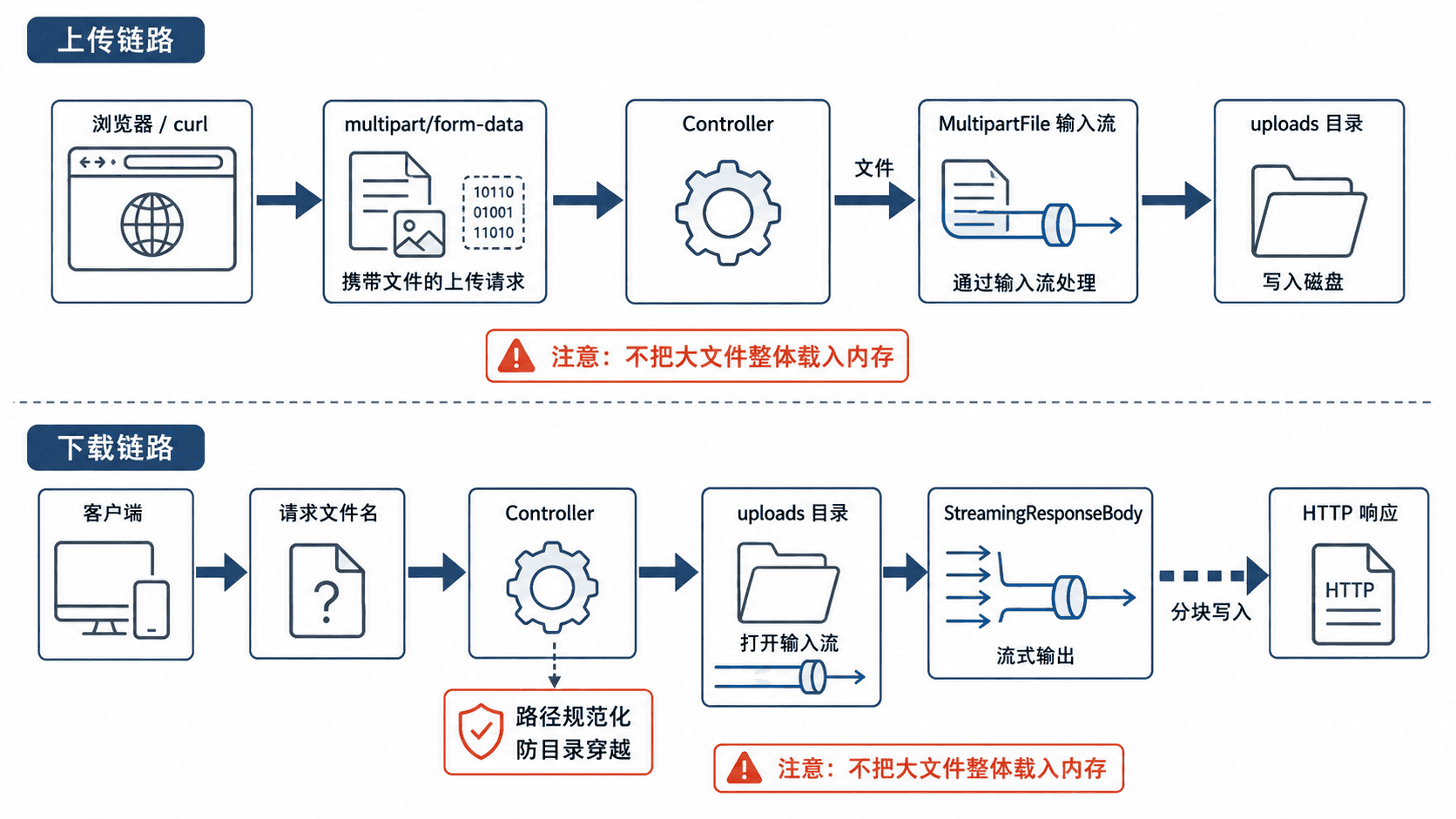
MultipartFile 适合接收表单文件;StreamingResponseBody 则把输出工作交给响应流。文件大小上限应由配置控制,业务代码还要限制空文件、非法文件名和不存在的目标文件。
实现完整接口
下面示例可直接放入一个已引入 spring-boot-starter-web 的 Spring Boot 3 项目。应用启动时会创建 uploads 目录,上传接口返回保存后的文件名和字节数,下载接口按流复制文件。
package com.example.filetransfer;

import java.io.IOException;
import java.io.InputStream;
import java.nio.charset.StandardCharsets;
import java.nio.file.Files;
import java.nio.file.Path;
import java.nio.file.StandardCopyOption;
import java.util.Map;

import org.springframework.boot.SpringApplication;
import org.springframework.boot.autoconfigure.SpringBootApplication;
import org.springframework.http.ContentDisposition;
import org.springframework.http.HttpHeaders;
import org.springframework.http.MediaType;
import org.springframework.http.ResponseEntity;
import org.springframework.util.StringUtils;
import org.springframework.web.bind.annotation.GetMapping;
import org.springframework.web.bind.annotation.PathVariable;
import org.springframework.web.bind.annotation.PostMapping;
import org.springframework.web.bind.annotation.RequestMapping;
import org.springframework.web.bind.annotation.RequestParam;
import org.springframework.web.bind.annotation.RestController;
import org.springframework.web.multipart.MultipartFile;
import org.springframework.web.servlet.mvc.method.annotation.StreamingResponseBody;

@SpringBootApplication
public class FileTransferApplication {

    public static void main(String[] args) {
        SpringApplication.run(FileTransferApplication.class, args);
    }
}

@RestController
@RequestMapping("/files")
class FileController {

    private final Path storageRoot = Path.of("uploads").toAbsolutePath().normalize();

    FileController() throws IOException {
        Files.createDirectories(storageRoot);
    }

    @PostMapping(consumes = MediaType.MULTIPART_FORM_DATA_VALUE)
    Map<String, Object> upload(@RequestParam("file") MultipartFile file) throws IOException {
        if (file.isEmpty()) {
            throw new IllegalArgumentException("上传文件不能为空");
        }

        String originalName = StringUtils.cleanPath(
                file.getOriginalFilename() == null ? "unnamed.bin" : file.getOriginalFilename());
        Path target = storageRoot.resolve(originalName).normalize();

        // 规范化后仍必须位于存储目录内,避免 ../ 目录穿越。
        if (!target.startsWith(storageRoot)) {
            throw new IllegalArgumentException("非法文件名");
        }

        try (InputStream input = file.getInputStream()) {
            Files.copy(input, target, StandardCopyOption.REPLACE_EXISTING);
        }

        return Map.of("filename", originalName, "size", file.getSize());
    }

    @GetMapping("/{filename:.+}")
    ResponseEntity<StreamingResponseBody> download(@PathVariable String filename) throws IOException {
        Path target = storageRoot.resolve(filename).normalize();

        if (!target.startsWith(storageRoot) || !Files.isRegularFile(target)) {
            return ResponseEntity.notFound().build();
        }

        StreamingResponseBody body = output -> {
            // transferTo 持续复制字节,不需要把整个文件读入堆内存。
            try (InputStream input = Files.newInputStream(target)) {
                input.transferTo(output);
            }
        };

        String disposition = ContentDisposition.attachment()
                .filename(target.getFileName().toString(), StandardCharsets.UTF_8)
                .build()
                .toString();

        return ResponseEntity.ok()
                .contentLength(Files.size(target))
                .contentType(MediaType.APPLICATION_OCTET_STREAM)
                .header(HttpHeaders.CONTENT_DISPOSITION, disposition)
                .body(body);
    }
}
预期输出
Tomcat started on port <PORT> (http)
Started FileTransferApplication in <TIME> seconds实际端口和启动耗时可能不同;未修改配置时,<PORT> 通常为 8080。
配置上传限制
Spring Boot 会在解析 multipart 请求前检查大小。下面配置把单文件上限设为 100 MB,并把整次请求上限设为 120 MB。
spring:
  servlet:
    multipart:
      max-file-size: 100MB
      max-request-size: 120MB
配置生效后,超过限制的请求会在进入控制器前失败。生产环境还应同步检查反向代理或网关的请求体上限,否则请求可能先被代理层拒绝。
调用并验证
先上传一个本地文件,其中 <PATH> 替换为真实目录,<PORT> 替换为应用端口。
curl -F "file=@<PATH>/demo.pdf" http://localhost:<PORT>/files预期结果
{"filename":"demo.pdf","size":<SIZE>}随后下载同一文件,并把响应保存到当前目录。
curl -OJ http://localhost:<PORT>/files/demo.pdf预期结果
文件下载完成,当前目录出现 demo.pdf;文件大小与上传前一致。可再执行系统校验和命令对比上传前后的摘要。流式传输只降低 Java 堆占用,并不自动解决限速、断点续传、病毒扫描和对象存储鉴权,这些属于后续工程能力。
关键边界
不要直接信任客户端文件名,也不要用文件名拼接任意磁盘路径。覆盖同名文件是否允许、哪些扩展名可以上传、单用户占用空间上限,以及下载接口是否需要权限校验,都应由业务规则明确决定。
大文件接口还应考虑异步线程池容量。
StreamingResponseBody会占用执行线程持续写出数据,线程池过小会造成排队,过大则可能放大磁盘和网络压力。