
容器与云原生 / 系统课时
构造 DNS 解析故障
构造 DNS 解析故障
本课通过两个可回滚实验,分别制造 Pod 端 DNS 配置错误和“DNS Service 有地址但没有后端”的局部链路故障,并按客户端、Service、EndpointSlice、CoreDNS Pod 与日志逐层收敛证据,全程不关闭集群 CoreDNS。
学习目标
- 能从 Pod 的
/etc/resolv.conf判断查询是否发往预期 DNS 入口。 - 能根据 Service、EndpointSlice 和 CoreDNS Pod 状态区分客户端故障与服务链路故障。
- 能在不影响其他工作负载的前提下完成故障注入、恢复与闭环验证。
建立正常解析基线
先创建独立命名空间和 DNS 测试 Pod。示例使用包含 nslookup 的 dnsutils 镜像,业务 Pod 不参与演练,因此应用自身的缓存、重试和连接池不会干扰判断。
kubectl create namespace dns-lab --dry-run=client -o yaml | kubectl apply -f -
cat > dns-debug.yaml <<'EOF'
apiVersion: v1
kind: Pod
metadata:
  name: dns-debug
  namespace: dns-lab
spec:
  containers:
    - name: dnsutils
      image: registry.k8s.io/e2e-test-images/dnsutils:1.3
      command: ["sleep", "3600"]
  restartPolicy: Always
EOF
kubectl apply -f dns-debug.yaml
kubectl -n dns-lab wait --for=condition=Ready pod/dns-debug --timeout=<TIME>
kubectl -n dns-lab exec dns-debug -- cat /etc/resolv.conf
kubectl -n dns-lab exec dns-debug -- nslookup kubernetes.default
预期结果
namespace/dns-lab <VALUE>
pod/dns-debug <VALUE>
pod/dns-debug condition met
search dns-lab.svc.cluster.local svc.cluster.local cluster.local
nameserver <DNS_ENTRY_IP>
options ndots:5
Server: <DNS_ENTRY_IP>
Address: <DNS_ENTRY_IP>
Name: kubernetes.default.svc.cluster.local
Address: <KUBERNETES_SERVICE_IP>
搜索域和 nslookup 的显示格式可能因集群域、工具版本以及 NodeLocal DNSCache 等部署方式不同而变化。关键是记录实际 nameserver,并确认 kubernetes.default 能解析成功;该地址可能直接是 kube-dns Service ClusterIP,也可能是节点本地 DNS 缓存地址。
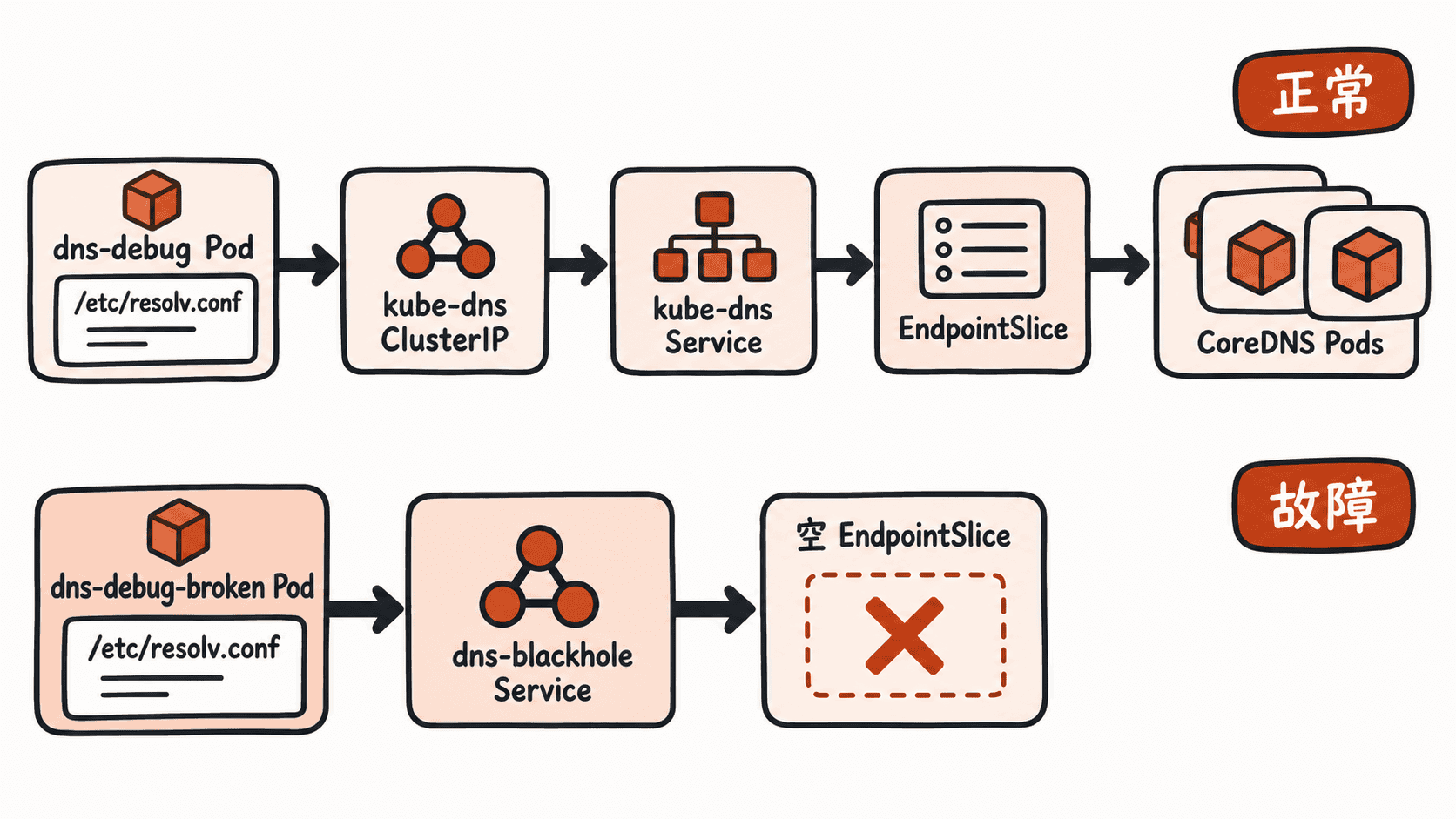
构造客户端配置故障
客户端故障最容易被误判成 CoreDNS 故障。下面创建第二个 Pod,显式使用文档测试网段中的地址 192.0.2.53 作为 DNS 服务器。故障只发生在这个 Pod 内,不会改动集群 DNS。
cat > dns-debug-client-broken.yaml <<'EOF'
apiVersion: v1
kind: Pod
metadata:
  name: dns-debug-client-broken
  namespace: dns-lab
spec:
  dnsPolicy: None
  dnsConfig:
    nameservers:
      - 192.0.2.53
    searches:
      - broken.test
  containers:
    - name: dnsutils
      image: registry.k8s.io/e2e-test-images/dnsutils:1.3
      command: ["sleep", "3600"]
  restartPolicy: Always
EOF
kubectl apply -f dns-debug-client-broken.yaml
kubectl -n dns-lab wait --for=condition=Ready pod/dns-debug-client-broken --timeout=<TIME>
kubectl -n dns-lab exec dns-debug-client-broken -- cat /etc/resolv.conf
if kubectl -n dns-lab exec dns-debug-client-broken -- nslookup kubernetes.default; then
  echo "unexpected: lookup succeeded"
else
  echo "expected: lookup failed"
fi
预期结果
pod/dns-debug-client-broken <VALUE>
pod/dns-debug-client-broken condition met
search broken.test
nameserver 192.0.2.53
<DNS_LOOKUP_ERROR>
expected: lookup failed
此时证据已经指向客户端:查询没有发送到基线中记录的 DNS 入口,所以没有必要先重启、缩容或修改 CoreDNS。
构造局部服务链路故障
不要通过 scale deployment/coredns --replicas=0 关闭整个集群 DNS。那会同时影响其他依赖集群 DNS 的 Pod,而且如果事先没有记录原副本数,恢复命令无法保证回到演练前状态。更安全的做法是创建只供故障 Pod 使用的“黑洞 DNS Service”:Service 有 ClusterIP,但关联的 EndpointSlice 明确为空。
cat > dns-blackhole.yaml <<'EOF'
apiVersion: v1
kind: Service
metadata:
  name: dns-blackhole
  namespace: dns-lab
spec:
  ports:
    - name: dns-udp
      port: 53
      protocol: UDP
    - name: dns-tcp
      port: 53
      protocol: TCP
---
apiVersion: discovery.k8s.io/v1
kind: EndpointSlice
metadata:
  name: dns-blackhole
  namespace: dns-lab
  labels:
    kubernetes.io/service-name: dns-blackhole
addressType: IPv4
ports:
  - name: dns-udp
    protocol: UDP
    port: 53
  - name: dns-tcp
    protocol: TCP
    port: 53
endpoints: []
EOF
kubectl apply -f dns-blackhole.yaml
kubectl -n dns-lab get svc dns-blackhole -o jsonpath='clusterIP={.spec.clusterIP}{"\n"}'
kubectl -n dns-lab get endpointslice dns-blackhole -o jsonpath='{.endpoints}{"\n"}'
预期结果
service/dns-blackhole created
endpointslice.discovery.k8s.io/dns-blackhole created
clusterIP=<BLACKHOLE_DNS_IP>
[]
现在只让新的故障 Pod 指向这个 ClusterIP,同时保留正常的 dns-debug 作为对照组。
BLACKHOLE_DNS_IP="$(kubectl -n dns-lab get svc dns-blackhole -o jsonpath='{.spec.clusterIP}')"
cat <<EOF | kubectl apply -f -
apiVersion: v1
kind: Pod
metadata:
  name: dns-debug-server-broken
  namespace: dns-lab
spec:
  dnsPolicy: None
  dnsConfig:
    nameservers:
      - ${BLACKHOLE_DNS_IP}
    searches:
      - dns-lab.svc.cluster.local
      - svc.cluster.local
      - cluster.local
  containers:
    - name: dnsutils
      image: registry.k8s.io/e2e-test-images/dnsutils:1.3
      command: ["sleep", "3600"]
  restartPolicy: Always
EOF
kubectl -n dns-lab wait --for=condition=Ready pod/dns-debug-server-broken --timeout=<TIME>
if kubectl -n dns-lab exec dns-debug-server-broken -- nslookup kubernetes.default; then
  echo "unexpected: blackhole lookup succeeded"
else
  echo "expected: blackhole lookup failed"
fi
kubectl -n dns-lab exec dns-debug -- nslookup kubernetes.default
预期结果
pod/dns-debug-server-broken <VALUE>
pod/dns-debug-server-broken condition met
<DNS_LOOKUP_ERROR>
expected: blackhole lookup failed
Server: <DNS_ENTRY_IP>
Address: <DNS_ENTRY_IP>
Name: kubernetes.default.svc.cluster.local
Address: <KUBERNETES_SERVICE_IP>
故障 Pod 失败而对照 Pod 仍成功,说明真实 CoreDNS 没有被演练破坏。这里模拟的是“DNS Service 存在,但 EndpointSlice 没有可用后端”的服务链路症状,不应把它描述成真实 CoreDNS 已宕机。
按证据定位真实 CoreDNS 故障
真实故障中,先记录测试 Pod 的 DNS 入口,再检查 kube-dns Service、EndpointSlice 和 CoreDNS Pod。若 Pod 直接使用 kube-dns ClusterIP,可从 Service 开始继续向后检查;若 Pod 使用 NodeLocal DNSCache,还需要先确认节点本地缓存到 kube-dns 的转发链路。
kubectl -n dns-lab exec dns-debug -- cat /etc/resolv.conf
kubectl -n kube-system get svc kube-dns -o wide
kubectl -n kube-system get endpointslice -l kubernetes.io/service-name=kube-dns
kubectl -n kube-system get pods -l k8s-app=kube-dns -o wide
kubectl -n kube-system logs -l k8s-app=kube-dns --tail=50
预期结果
nameserver <DNS_ENTRY_IP>
<RESOLV_CONF_REMAINDER>
NAME       TYPE        CLUSTER-IP         EXTERNAL-IP   PORT(S)         AGE   SELECTOR
kube-dns   ClusterIP   <CLUSTER_DNS_IP>   <none>        53/UDP,53/TCP   <AGE> <VALUE>
NAME              ADDRESSTYPE   PORTS   ENDPOINTS           AGE
<ENDPOINTSLICE>   IPv4          53      <COREDNS_POD_IPS>   <AGE>
NAME          READY   STATUS    RESTARTS   AGE   IP
coredns-<ID>  1/1     Running   <VALUE>    <AGE> <IP>
<COREDNS_LOG_LINES>
如果 Service 存在而 EndpointSlice 没有地址,优先检查 CoreDNS Pod 是否 Ready、标签是否仍能被 Service 选择,以及调度或探针是否失败;如果 EndpointSlice 有后端但查询仍失败,再结合 CoreDNS 日志判断上游 DNS、插件配置或权限问题。不同发行版的 Pod 标签可能不同,若标签选择命令返回空结果,应先查看 CoreDNS Deployment 的实际标签再继续。
恢复与验收
局部演练不需要保存或恢复 CoreDNS 副本数,因为整个过程没有修改真实 CoreDNS。删除本课创建的故障 Pod、EndpointSlice 和 Service 后,再用对照 Pod 验证正常解析,最后删除实验命名空间。
kubectl -n dns-lab delete pod dns-debug-client-broken dns-debug-server-broken --ignore-not-found
kubectl -n dns-lab delete endpointslice dns-blackhole --ignore-not-found
kubectl -n dns-lab delete svc dns-blackhole --ignore-not-found
kubectl -n dns-lab exec dns-debug -- nslookup kubernetes.default
kubectl delete namespace dns-lab
预期结果
pod "dns-debug-client-broken" deleted
pod "dns-debug-server-broken" deleted
endpointslice.discovery.k8s.io "dns-blackhole" deleted
service "dns-blackhole" deleted
Server: <DNS_ENTRY_IP>
Address: <DNS_ENTRY_IP>
Name: kubernetes.default.svc.cluster.local
Address: <KUBERNETES_SERVICE_IP>
namespace "dns-lab" deleted
最终定位顺序应固定为:先确认 Pod 查询目标,再确认 DNS Service 是否存在,再确认 EndpointSlice 是否有后端,最后进入 CoreDNS Pod 与日志。故障注入同样应优先选择局部、可对照、可删除的资源,避免为了演练 DNS 而先制造一次全局 DNS 中断。