
游戏引擎 / 系统课时
把一局游戏拆成明确状态
把一局游戏拆成明确状态
本课把一局游戏组织为准备、进行中、暂停、结束和重开五个互斥状态,并让按钮、倒计时和胜负事件只能触发合法转换。这样既能避免暂停期间倒计时继续走,也能阻止结束后的重复输入和重开操作。
学习目标
- 明确各状态允许的操作与转换条件。
- 用一个状态控制器同时更新 UI 和计时逻辑。
- 验证暂停恢复、胜负结束和重新加载的完整路径。
先规定状态转换的边界
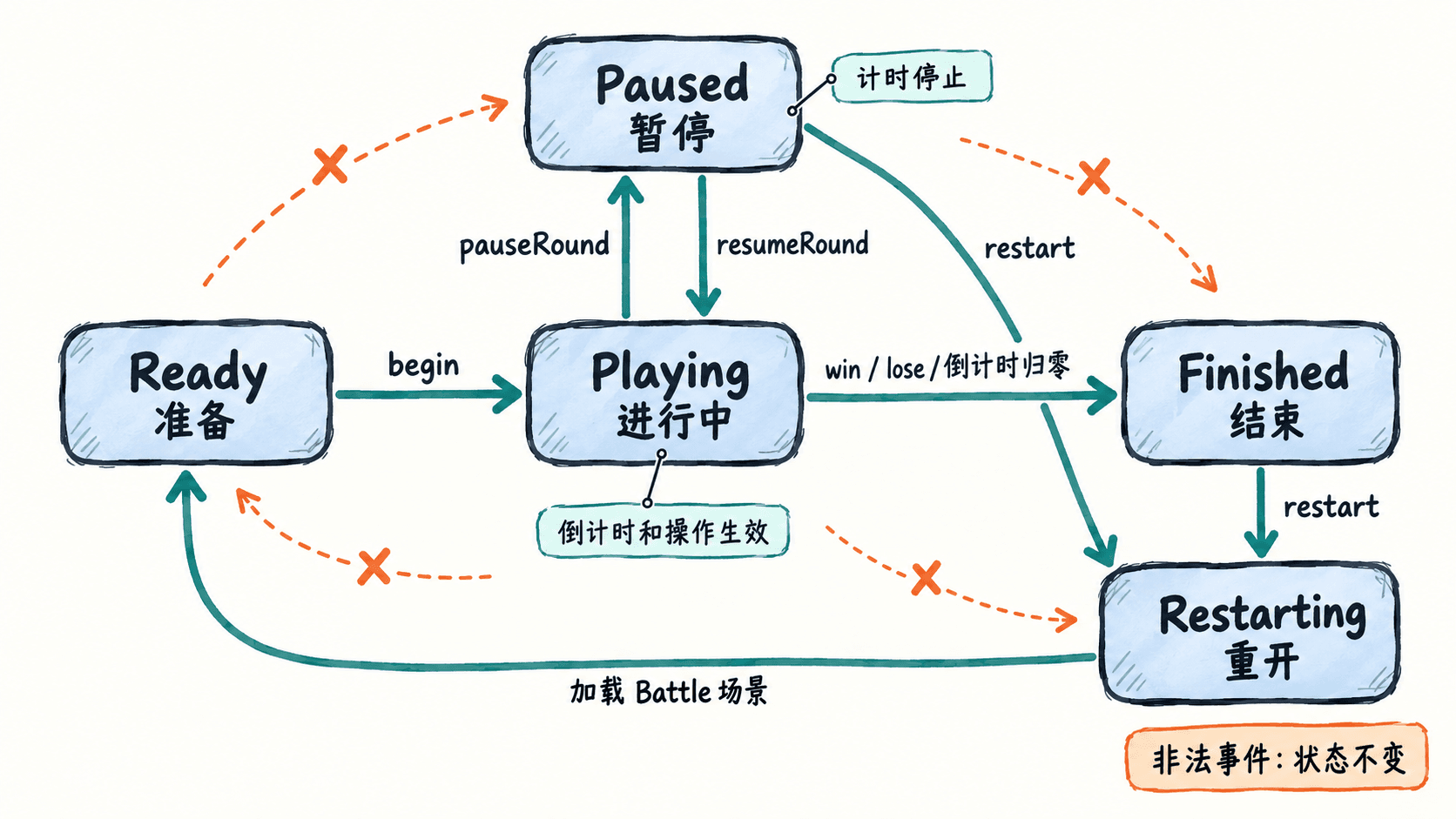
准备态 Ready 只接受开始;Playing 可以暂停,也可以因胜利、失败或时间耗尽结束;Paused 可以恢复或重开;Finished 只接受重开;Restarting 不再接收任何操作。每次事件先检查当前状态,不合法便直接返回。
这样设计比多个 isStarted、isPaused、isGameOver 布尔量更稳妥:三个布尔量可能组合出“已暂停且已结束”等矛盾状态,而单个枚举值在任一时刻只有一种解释。
让状态控制界面与计时
在名为 Battle 的场景内创建常驻的 FlowManager,并在 Canvas 下放置 ReadyPanel、PausePanel、ResultPanel、计时 Label 与结果 Label。三个面板分别用于“开始”“继续/重新开始”“本局结果/重新开始”;游戏 HUD 可另放“暂停”按钮。
控制器负责维护唯一状态和剩余时间,UI 只是该状态的投影。把计时放进 update(dt),仅在 Playing 状态扣减 dt;倒计时到零时统一调用结束入口。dt 是本帧间隔秒数,不应误当毫秒使用。
实现状态驱动的组件
新建 MatchFlow.ts 并挂载到 FlowManager。在检查器中绑定三个面板及两个 Label;Battle 场景须加入构建列表,以便重开时能够按名称加载。
import { _decorator, Component, Node, Label, director } from 'cc';

const { ccclass, property } = _decorator;

enum MatchState {
    Ready = 'ready',
    Playing = 'playing',
    Paused = 'paused',
    Finished = 'finished',
    Restarting = 'restarting',
}

@ccclass('MatchFlow')
export class MatchFlow extends Component {
    @property({ type: Node }) readyPanel: Node | null = null;
    @property({ type: Node }) pausePanel: Node | null = null;
    @property({ type: Node }) resultPanel: Node | null = null;
    @property({ type: Label }) timeLabel: Label | null = null;
    @property({ type: Label }) resultLabel: Label | null = null;

    private state = MatchState.Ready;
    private secondsLeft = 30;

    start(): void { this.enter(MatchState.Ready); }

    update(dt: number): void {
        if (!this.isPlaying()) return;
        this.secondsLeft = Math.max(0, this.secondsLeft - dt);
        this.showTime();
        if (this.secondsLeft === 0) this.finish('失败:时间耗尽');
    }

    public isPlaying(): boolean {
        return this.state === MatchState.Playing;
    }

    public begin(): void {
        if (this.state !== MatchState.Ready) return;
        this.secondsLeft = 30; // 新一局从初始时间开始
        this.enter(MatchState.Playing);
    }

    public pauseRound(): void {
        if (this.isPlaying()) this.enter(MatchState.Paused);
    }

    public resumeRound(): void {
        if (this.state === MatchState.Paused) this.enter(MatchState.Playing);
    }

    public win(): void { this.finish('胜利'); }
    public lose(): void { this.finish('失败'); }

    private finish(message: string): void {
        // 结束事件只可从进行中进入,防止重复结算。
        if (!this.isPlaying()) return;
        if (this.resultLabel) this.resultLabel.string = message;
        this.enter(MatchState.Finished);
    }

    public restart(): void {
        if (this.state !== MatchState.Paused &&
            this.state !== MatchState.Finished) return;
        const previous = this.state;
        this.enter(MatchState.Restarting);
        if (!director.loadScene('Battle')) this.enter(previous);
    }

    private enter(next: MatchState): void {
        this.state = next;
        // 面板显隐总是由当前状态统一决定。
        if (this.readyPanel) this.readyPanel.active = next === MatchState.Ready;
        if (this.pausePanel) this.pausePanel.active = next === MatchState.Paused;
        if (this.resultPanel) this.resultPanel.active = next === MatchState.Finished;
        this.showTime();
    }

    private showTime(): void {
        if (this.timeLabel) {
            this.timeLabel.string = `剩余 ${Math.ceil(this.secondsLeft)} 秒`;
        }
    }
}
预期结果:首次进入 Battle 只显示准备面板,倒计时为 30 秒。点击开始后准备面板关闭,计时逐帧减少;暂停时计时数字保持不变,恢复后继续递减。倒计时归零后出现“失败:时间耗尽”;如果进行中先触发 win(),则显示“胜利”,不会再因时间变化而覆盖结果。重开会回到新场景的准备态。
绑定事件并逐条验收
在各 Button 的 Click Events 中选择 FlowManager 的 MatchFlow 组件:“开始”调用 begin,“暂停”调用 pauseRound,“继续”调用 resumeRound,“重新开始”调用 restart。为测试胜负,可在常显 HUD 上临时放置两个按钮,分别绑定 win、lose。
- 开始后暂停,观察计时不再递减;恢复后同一个倒计时继续。
- 暂停时触发胜负测试,界面仍停在暂停态;恢复后触发胜利,应进入结束态。
- 结束后重复触发胜负,结果不变;点击重开后回到准备态,剩余时间恢复为 30 秒。
- 准备态直接点击重开、结束态点击恢复,均不应改变状态。
在规模较大的项目中,可继续把状态转换封装成统一事件,供 HUD、音乐和战斗系统订阅。但状态的最终写入权应始终集中在同一控制器,避免多个模块同时宣布“当前处于什么阶段”。