
游戏引擎 / 系统课时
让音效跟随游戏事件触发
让音效跟随游戏事件触发
按键一按就播音效,会让取消的攻击、重复碰撞和未成功的拾取也发声。本课将“动作已确认”转为游戏事件,由专门的音频组件映射攻击、拾取和受击音效,并通过短时间限流与循环音效停止事件,得到可预测的声音反馈。
学习目标
- 选择真正代表攻击、拾取、受击成立的事件时机。
- 用节点事件连接玩法逻辑与
AudioSource,避免直接耦合。 - 控制短音效重复触发,以及持续脚步声的开始和停止。
先把触发时机放对
声音应该回应已经发生的游戏事实,而非未经确认的输入。攻击音效可以在出招动作确认后发出;命中音效则应等命中判定成功。拾取音效必须在道具实际进入背包后发出,受击音效要跟随有效伤害事件,不能放在每帧执行的碰撞停留回调里。
| 事件 | 推荐发送时机 | 常见误用 |
|---|---|---|
game:attack |
攻击被接受或到达指定动作帧 | 长按期间每帧发送 |
game:pickup |
道具拾取成功 | 进入范围立即播放 |
game:hurt |
伤害生效 | 每次碰撞检测均播放 |
game:move-start 与 game:move-stop |
移动状态发生变化 | 每帧反复 play() |
以上事件名是项目自定义字符串,不是引擎内置事件。业务模块只需向约定的事件节点 emit,音频组件用 on 订阅;游戏规则无需知道采用哪一个声音文件。
理解事件到声音的两条路径
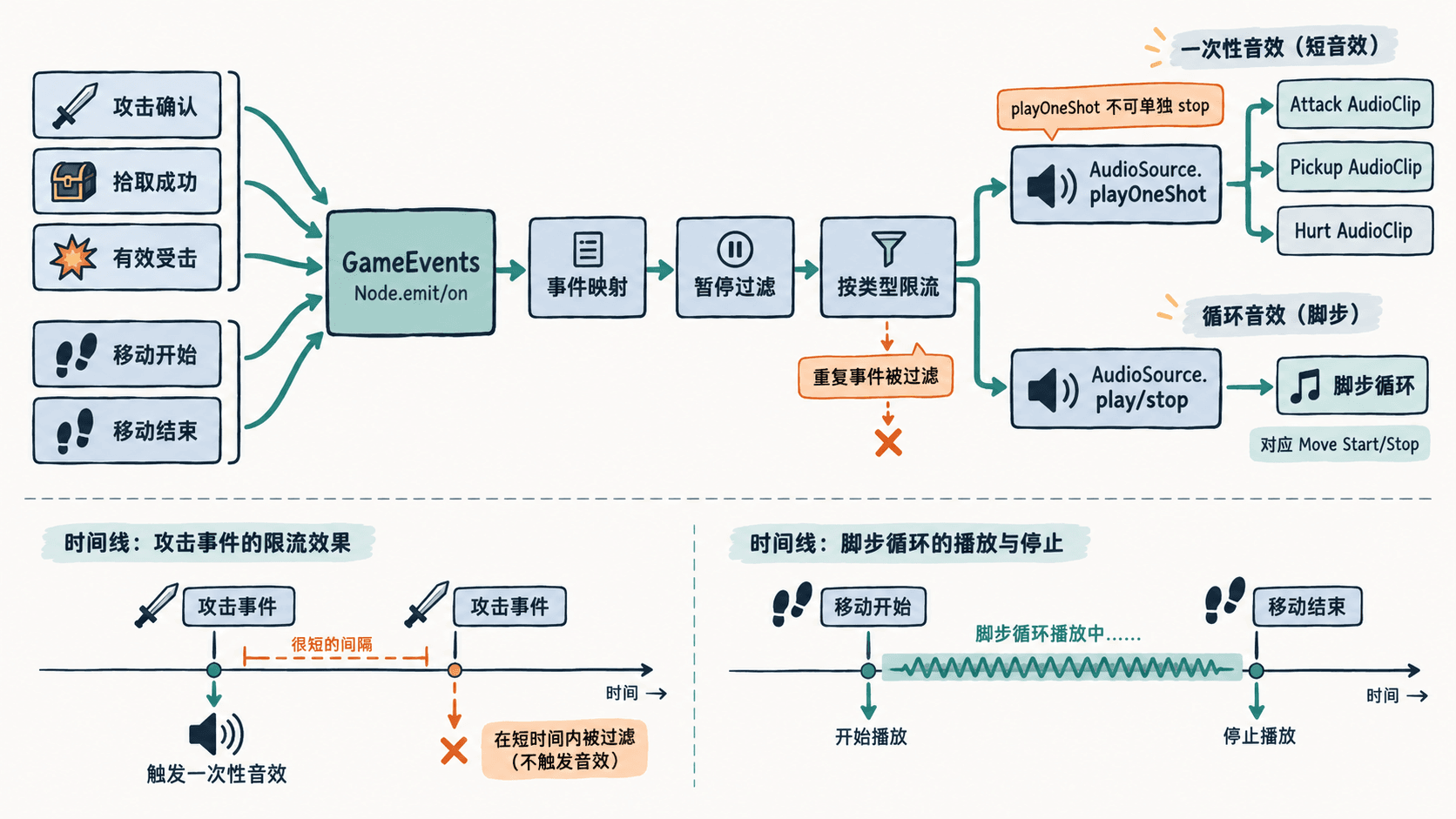
短促的攻击、拾取、受击声适合 AudioSource.playOneShot(clip, volumeScale),可以重叠播放,但单次播放实例不能再单独暂停或停止。脚步、引擎运转等持续声音应使用另一只 AudioSource,通过 play() 启动、stop() 结束。不要为了阻止重复播放而对所有短音效一律调用 stop(),这并不能精确控制已经发出的 playOneShot。
在场景里绑定音效资源
建立 GameEvents 节点并挂载 GameSfxRouter 组件。另设 OneShots 和 Footsteps 子节点,各添加一只 AudioSource;把前者拖到脚本的 One Shot Source,后者拖到 Walking Source。导入三段短 AudioClip 赋给攻击、拾取、受击字段,给脚步声 AudioSource 的 Clip 指定循环素材,所有音源的 PlayOnAwake 设为关闭。
业务组件保存 GameEvents 节点引用,在相应逻辑成功后调用 gameEvents.emit('game:pickup') 等。演示阶段可让一个 UI 按钮的 Click Events 指向下面脚本的 runDemo,它会自动发出事件用于验收。Web 浏览器首次播放通常需要用户手势,按钮点击也可满足这一前置条件。
编写集中式音频路由
以下脚本保存为 GameSfxRouter.ts。三个短音效分别限流,连续脚步声只在开始事件播放,结束事件停止;监听器在组件停用时清理,防止场景重入后重复响应。
import {
  _decorator, AudioClip, AudioSource,
  Component, director, log,
} from 'cc';

const { ccclass, property } = _decorator;

@ccclass('GameSfxRouter')
export class GameSfxRouter extends Component {
  @property(AudioSource) oneShotSource: AudioSource | null = null;
  @property(AudioSource) walkingSource: AudioSource | null = null;
  @property(AudioClip) attackClip: AudioClip | null = null;
  @property(AudioClip) pickupClip: AudioClip | null = null;
  @property(AudioClip) hurtClip: AudioClip | null = null;

  private lastAt = new Map<string, number>();

  onEnable(): void {
    this.node.on('game:attack', this.onAttack, this);
    this.node.on('game:pickup', this.onPickup, this);
    this.node.on('game:hurt', this.onHurt, this);
    this.node.on('game:move-start', this.onMoveStart, this);
    this.node.on('game:move-stop', this.onMoveStop, this);
  }

  onDisable(): void {
    this.node.off('game:attack', this.onAttack, this);
    this.node.off('game:pickup', this.onPickup, this);
    this.node.off('game:hurt', this.onHurt, this);
    this.node.off('game:move-start', this.onMoveStart, this);
    this.node.off('game:move-stop', this.onMoveStop, this);
    this.walkingSource?.stop();
  }

  private playOnce(key: string, clip: AudioClip | null, gapMs: number): void {
    if (director.isPaused() || !clip || !this.oneShotSource) return;
    const now = Date.now();
    const last = this.lastAt.get(key);
    // 只过滤同类事件,避免连续接触或长按造成声音堆叠。
    if (last !== undefined && now - last < gapMs) return;
    this.lastAt.set(key, now);
    this.oneShotSource.playOneShot(clip, 1);
    log(`播放一次: ${key}`);
  }

  private onAttack(): void { this.playOnce('attack', this.attackClip, 120); }
  private onPickup(): void { this.playOnce('pickup', this.pickupClip, 80); }
  private onHurt(): void { this.playOnce('hurt', this.hurtClip, 200); }

  private onMoveStart(): void {
    if (director.isPaused() || !this.walkingSource ||
        this.walkingSource.playing) return;
    this.walkingSource.loop = true;
    this.walkingSource.play();
    log('脚步循环开始');
  }

  private onMoveStop(): void {
    if (!this.walkingSource?.playing) return;
    this.walkingSource.stop();
    log('脚步循环停止');
  }

  public runDemo(): void {
    // 同一帧重复攻击应被限流,脚步声一秒后停止。
    this.node.emit('game:attack');
    this.node.emit('game:attack');
    this.node.emit('game:pickup');
    this.node.emit('game:hurt');
    this.node.emit('game:move-start');
    this.scheduleOnce(() => this.node.emit('game:move-stop'), 1);
  }
}
预期结果:点击演示按钮,攻击、拾取和受击音效各触发一次;虽然发送了两次攻击事件,但控制台只记录一次 attack。脚步循环约一秒后停止,关键日志依次为:
播放一次: attack
播放一次: pickup
播放一次: hurt
脚步循环开始
脚步循环停止
验证边界并控制声音数量
检查连续快速点击、重复触发碰撞、停走切换和暂停场景四种情况。限流是听觉保护,不是修复重复业务事件的借口:拾取仍应确保每个道具只完成一次,攻击和受击仍应由玩法状态确定是否成立。示例按音效类型限流,若同一时刻多名角色各有独立反馈需求,应把角色标识纳入限流键,或使用各自的音源。
关卡暂停时需要明确处理已开始的持续声音:可由暂停管理器暂停或停止脚步 AudioSource,恢复后再根据实际移动状态决定是否重播;单次 playOneShot 不保证可中途停止。离开场景时清理订阅并停止循环音源,才能避免“画面已切换,上一场景仍在响”的问题。