
AI Agent / 系统课时
连接 MCP Server
连接 MCP Server
连接分为传输、协议兼容和业务调用三层。本课用 MCP Python SDK 2.3.0 启动本地服务进程,列出工具并调用。安装后使用同一个虚拟环境解释器运行。
bash
python -m pip install "mcp==2.3.0"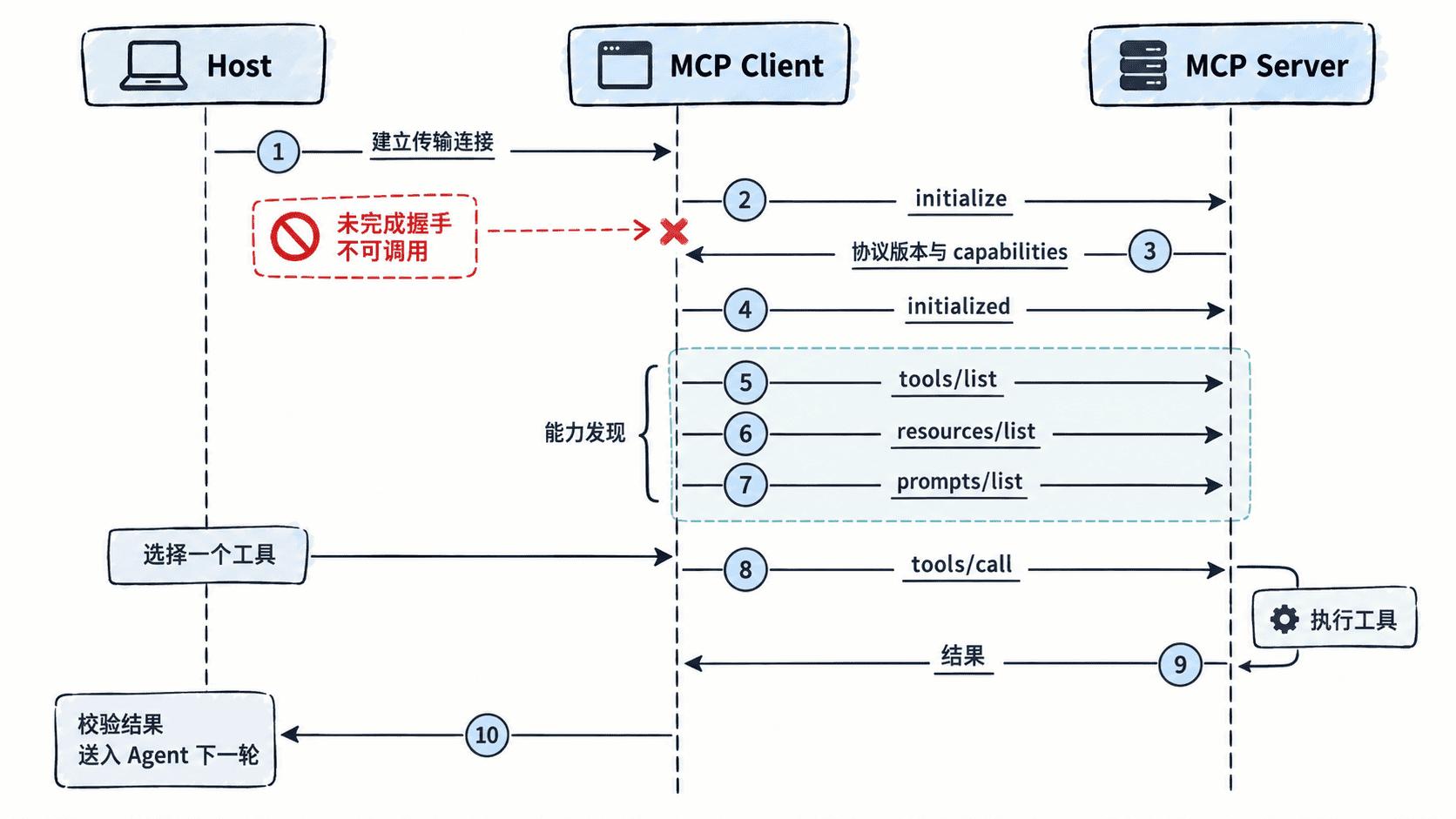
先选传输和协议版本
本地 stdio 通常由 Client 启动服务子进程,使用标准输入输出传输协议消息。远程 Streamable HTTP 则使用网络端点,需核对 URL、TLS、认证和部署方要求。stdio 的普通日志应写到标准错误,避免污染协议输出。只启动来自可信来源的命令和脚本。
2025-11-25 等旧版使用 initialize 请求,协商完成后发送 notifications/initialized。2026-07-28 版通过请求元数据携带协议版本,并提供 server/discover。SDK 可处理兼容路径。调试时以连接实际使用的协议为准,SDK 包版本不等同于协议版本。
运行最小客户端
将下面两个文件放在同一目录。第一个保存为 demo_server.py。
python
from mcp.server.mcpserver import MCPServer

server = MCPServer("mcp-demo")

@server.tool()
def hello(name: str) -> str:
    """返回一条本地问候。"""
    return f"你好,{name}"

if __name__ == "__main__":
    server.run(transport="stdio")
第二个保存为 probe.py。后两课可以复用这个脚本来检查工具和资源。
python
import argparse
import asyncio
import json
from pathlib import Path
import sys

from mcp import Client, StdioServerParameters
from mcp.shared.exceptions import MCPError

async def probe(path, tool=None, arguments=None, resource=None):
    settings = StdioServerParameters(command=sys.executable, args=[str(Path(path).resolve())])
    async with Client(settings, read_timeout_seconds=5) as client:
        print("protocol:", client.protocol_version)
        if resource is not None:
            templates = await client.list_resource_templates()
            print("templates:", [item.uri_template for item in templates.resource_templates])
            try:
                result = await client.read_resource(resource)
            except MCPError as error:
                print(f"resource_error: {error.code}", file=sys.stderr)
                return False
            for item in result.contents:
                if hasattr(item, "text"):
                    print("resource:", item.text)
            return True
        page = await client.list_tools()
        print("tools:", [item.name for item in page.tools])
        if tool is not None:
            result = await client.call_tool(tool, arguments)
            print("tool_error:", bool(result.is_error))
            if not result.is_error:
                for item in result.content:
                    if item.type == "text":
                        print("text:", item.text)

def main():
    parser = argparse.ArgumentParser()
    parser.add_argument("server")
    actions = parser.add_mutually_exclusive_group()
    actions.add_argument("--tool")
    actions.add_argument("--resource")
    parser.add_argument("--arguments", default="{}")
    options = parser.parse_args()
    arguments = json.loads(options.arguments)
    if not isinstance(arguments, dict):
        parser.error("--arguments 必须是 JSON 对象")
    if asyncio.run(probe(options.server, options.tool, arguments, options.resource)) is False:
        sys.exit(1)

if __name__ == "__main__":
    main()
从该目录运行以下命令。引号内是一个 JSON 对象。
bash
python probe.py demo_server.py --tool hello --arguments '{"name":"学习者"}'输出包含连接实际使用的协议版本、tools: ['hello']、tool_error: False 和 text: 你好,学习者。工具列表可能分页,完整目录需要继续读取游标;此处服务只有一项。若服务返回结构化内容,还应按工具输出模式核对相应字段。
传输成功仅表示进程或连接打开。列表正常后再验证目标工具。协议错误和 is_error 表示的工具失败要分别处理。工具返回的文本仍是外部数据,由 Host 决定是否进入模型上下文。
按自己的节奏,确认真正理解。