
AI Agent / 系统课时
校验并修复模型结果
校验并修复模型结果
模型返回 JSON 并不等于结果可用。应用将通过完成状态检查的模型文本作为外部数据解析,核对字段、类型、枚举和本次请求的关联 ID。只有可修复的格式错误进入有限的生成修复流程。
学习目标
- 区分 JSON 解析失败、字段缺失、类型错误和非法枚举
- 实现可复用的结果校验函数,并生成可操作的修复提示
- 为模型重试设置上限,避免错误结果进入工具调用或业务写入
把模型结果当作外部输入
结构化输出最常见的误区,是只判断 JSON.parse() 是否成功。语法正确只能证明它是合法 JSON,不能证明字段齐全、类型正确,更不能证明枚举值属于业务允许范围。
例如期望结果包含 taskId、priority 和 action。模型可能返回缺少 taskId 的对象,也可能把 priority 写成字符串 "3",或生成未定义的 action: "archive"。这三类问题都应在进入业务逻辑前被拒绝。
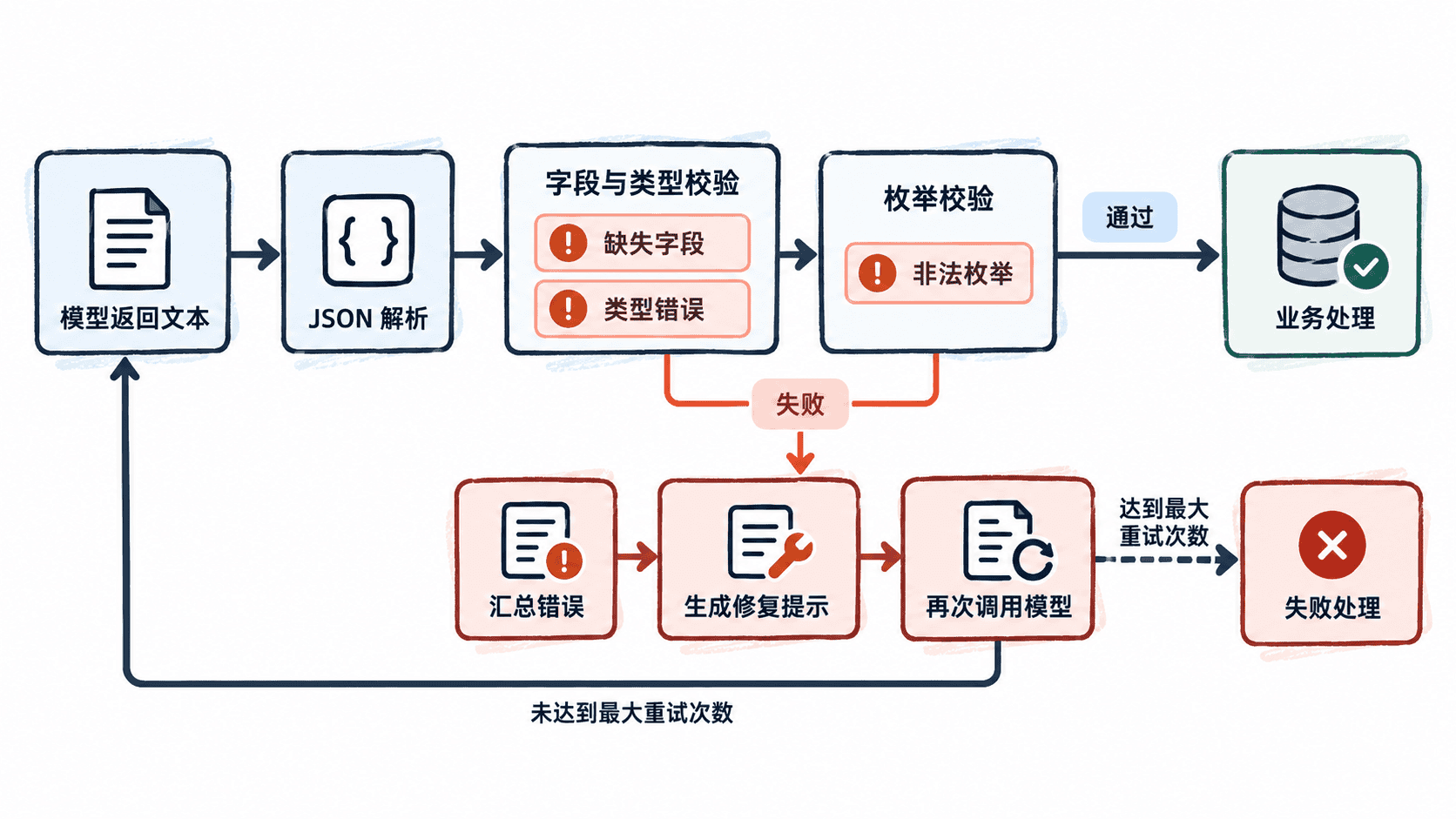
用一套校验同时捕获三类错误
下面的 TypeScript 示例不访问模型。模拟适配器先给出字段错误,再返回修复版本。真实请求优先在适配器层判断拒绝、截断和工具调用状态。示例中的业务关联 ID 由调用方提供。
ts
type Priority = 1 | 2 | 3;
type Action = "reply" | "escalate";
type AgentResult = { taskId: string; priority: Priority; action: Action };
type ModelReply =
  | { kind: "complete"; text: string }
  | { kind: "refused" | "incomplete" };

function validateResult(value: unknown, expectedTaskId: string):
  { ok: true; data: AgentResult } | { ok: false; errors: string[] } {
  if (typeof value !== "object" || value === null || Array.isArray(value)) {
    return { ok: false, errors: ["结果必须是 JSON 对象"] };
  }
  const { taskId, priority, action, ...extras } = value as Record<string, unknown>;
  if (typeof taskId === "string" && taskId !== expectedTaskId) {
    throw new Error("响应关联到另一个任务");
  }
  const errors: string[] = [];
  if (Object.keys(extras).length) errors.push("只能使用已定义字段");
  if (taskId !== expectedTaskId) errors.push("taskId 必须匹配当前任务");
  if (priority !== 1 && priority !== 2 && priority !== 3) {
    errors.push("priority 必须是数字 1、2 或 3");
  }
  if (action !== "reply" && action !== "escalate") {
    errors.push("action 必须是 reply 或 escalate");
  }
  return errors.length
    ? { ok: false, errors }
    : { ok: true, data: { taskId, priority, action } as AgentResult };
}

async function runWithRepair(
  expectedTaskId: string,
  callModel: (repairHint?: string) => Promise<ModelReply>,
  maxAttempts = 2,
): Promise<AgentResult> {
  if (!expectedTaskId.trim() || !Number.isInteger(maxAttempts) || maxAttempts < 1 || maxAttempts > 3) {
    throw new Error("invalid repair configuration");
  }
  let repairHint: string | undefined;
  for (let attempt = 1; attempt <= maxAttempts; attempt++) {
    const reply = await callModel(repairHint);
    if (reply.kind !== "complete") throw new Error(reply.kind);
    let value: unknown;
    try {
      value = JSON.parse(reply.text);
    } catch {
      repairHint = "返回内容不是合法 JSON,只返回一个 JSON 对象";
      continue;
    }
    const checked = validateResult(value, expectedTaskId);
    if (checked.ok) return checked.data;
    repairHint = "请修复:" + checked.errors.join(";");
  }
  throw new Error("校验未通过,已用完修复次数");
}

async function main() {
  const result = await runWithRepair("task-42", async (hint) => {
    if (hint) console.log("repair:", hint);
    const candidate = hint
      ? { taskId: "task-42", priority: 3, action: "escalate" }
      : { priority: "3", action: "archive" };
    return { kind: "complete", text: JSON.stringify(candidate) };
  });
  console.log("accepted:", JSON.stringify(result));
}

main().catch((error: Error) => console.error(error.message));
预期输出
text
repair: 请修复:taskId 必须匹配当前任务;priority 必须是数字 1、2 或 3;action 必须是 reply 或 escalate
accepted: {"taskId":"task-42","priority":3,"action":"escalate"}
重试只修复可修复的问题
修复提示从程序固定的错误信息组装,附上原任务和字段契约。完整文本存在语法或字段错误时,才尝试重新生成。若回复带有另一个任务的 ID,停止并检查请求与响应的关联。模型明确拒绝时交给拒绝分支。遇到截断,应重新审视输出预算或缩小任务。网络异常则按第 02 章的传输错误策略处理。这些情况各自占用预算,生产环境还要限制总截止时间及成本。
示例使用 JSON.parse()。遇到重复对象键时它保留最后的值,无法在解析后可靠还原。若接口必须拒绝重复键,需要在解码阶段使用能检查重复键的解析器。若下游会修改业务数据,执行前还需核验用户权限与最新状态,使用调用方生成的关联 ID,并根据外部接口约定处理幂等。生成修复本身不执行工具或写入数据库。
按自己的节奏,确认真正理解。