
AI Agent / 系统课时
处理流式响应
处理流式响应
流式输出的难点不在“边生成边显示”,而在于正确处理数据块、正常结束、传输异常和用户中断。本节用统一事件模型消费 ReadableStream,让 UI 或 Agent 调度层只接收明确的 chunk、done、error 和 aborted 事件。
学习目标
- 正确读取
ReadableStream,持续解码跨块文本 - 区分正常结束、异常失败和主动中断三种终止路径
- 避免把网络分块误认为完整 token、JSON 或 SSE 事件
先把终止状态设计清楚
传输层可以正常到达 EOF、发生读取异常,或被调用方取消。消费层给三种路径分别发出 eof、error 和 aborted。EOF 只说明字节流关闭,模型输出是否完整需要在协议层另行判断。
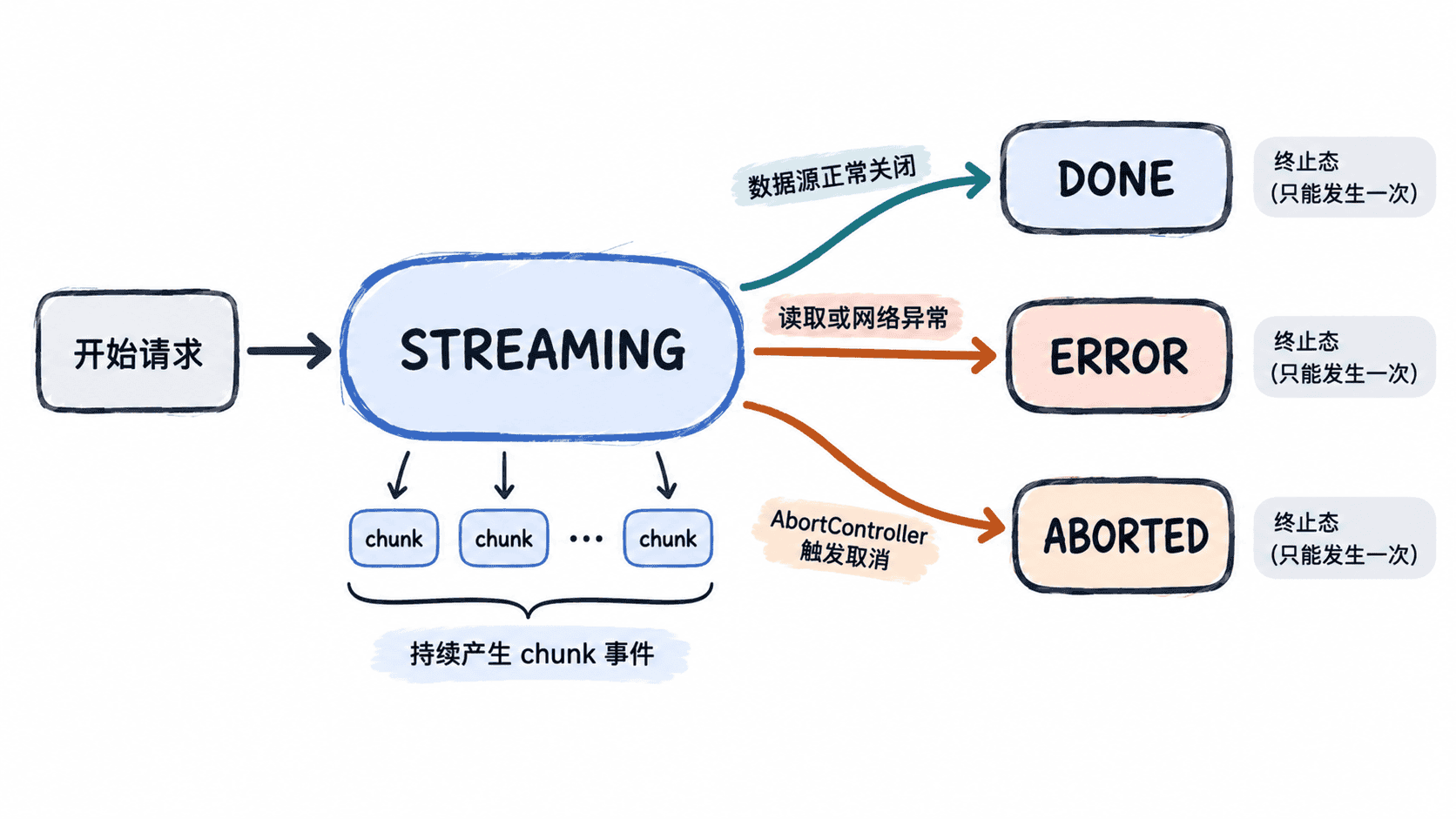
用统一事件消费字节流
下面的 TypeScript 示例可用 Node.js 24 的 node stream-demo.ts 直接运行。流式 TextDecoder 会暂存跨块的 UTF-8 字节。取消监听器直接取消 reader,使等待中的 read() 也能退出。发起真实请求时,还应把同一 AbortSignal 传给请求层。
type Terminal =
  | { type: "eof" }
  | { type: "error"; error: Error }
  | { type: "aborted" };
type StreamEvent = { type: "chunk"; text: string } | Terminal;

async function consumeTextStream(
  stream: ReadableStream<Uint8Array>,
  signal: AbortSignal,
  onEvent: (event: StreamEvent) => void,
): Promise<void> {
  const reader = stream.getReader();
  const decoder = new TextDecoder("utf-8", { fatal: true });
  let cancelling = false;
  const cancel = () => {
    if (cancelling) return;
    cancelling = true;
    void reader.cancel(signal.reason).catch(() => {
      // 原因由 signal 保留。清理失败不会产生第二个终止事件。
    });
  };
  signal.addEventListener("abort", cancel, { once: true });
  if (signal.aborted) cancel();

  let terminal: Terminal = { type: "aborted" };
  try {
    while (!signal.aborted) {
      let text: string;
      let done: boolean;
      try {
        const part = await reader.read();
        if (signal.aborted) break;
        done = part.done;
        text = done ? decoder.decode() : decoder.decode(part.value, { stream: true });
      } catch (cause) {
        const error = cause instanceof Error ? cause : new Error("stream read failed");
        terminal = { type: "error", error };
        break;
      }
      if (text) onEvent({ type: "chunk", text });
      if (done) {
        terminal = { type: "eof" };
        break;
      }
    }
  } finally {
    signal.removeEventListener("abort", cancel);
    if (terminal.type !== "eof") cancel();
    reader.releaseLock();
  }
  onEvent(signal.aborted ? { type: "aborted" } : terminal);
}

const log = (event: StreamEvent) => {
  if (event.type === "chunk") console.log("chunk:", event.text);
  else if (event.type === "error") console.log("error:", event.error.message);
  else console.log(event.type);
};

async function main() {
  const bytes = new TextEncoder().encode("中文");
  const split = new ReadableStream<Uint8Array>({
    start(controller) {
      controller.enqueue(bytes.slice(0, 2));
      controller.enqueue(bytes.slice(2));
      controller.close();
    },
  });
  await consumeTextStream(split, new AbortController().signal, log);

  const abort = new AbortController();
  const pending = new ReadableStream<Uint8Array>();
  const reading = consumeTextStream(pending, abort.signal, log);
  abort.abort();
  await reading;

  const failed = new ReadableStream<Uint8Array>({
    start(controller) { controller.error(new Error("socket reset")); },
  });
  await consumeTextStream(failed, new AbortController().signal, log);
}

main().catch((error: Error) => console.error(error.message));
预期输出
chunk: 中文
eof
aborted
error: socket reset
数据块不是消息边界
SSE 解析器先流式解码 UTF-8,再按行收集事件。一个事件由空行分隔,解析器需处理 CRLF、CR 和 LF,忽略注释行,并按规范以换行连接同一事件的多个 data: 行。读块边界可落在任意字节、行或事件中间。NDJSON 则按协议规定逐行解析。
判断 Chat Completions 是否真正完成
沿用第 02 章的 Chat Completions 协议时,流式请求需要发送 stream: true。读取 SSE 的数据字段时,单独识别 [DONE] 结束标记,其余数据再尝试解析 JSON。候选的 finish_reason 说明生成以何种状态结束。正常提交最终结果前要验证结束标记、候选结束原因及业务契约。若只收到 EOF 或候选被截断,部分文本只能作为预览。工具参数需汇总完整的增量,并在执行前解析、校验和鉴权。
若设置 stream_options: {"include_usage": true},请求正常结束时会在 [DONE] 之前多收到一个含总用量的 chunk,此时 choices 为空。不能固定读取 choices[0]。若连接中断,可能收不到该用量块,统计时将其标记为缺失。
下一次调试流式问题时,分别记录传输终止、协议终止和业务验收状态。这样可以区分连接中断、模型长度截断和应用校验失败。