
Web 图形与 3D / 系统课时
让片元着色器输出颜色
让片元着色器输出颜色
只清空画布还不能画出有颜色的图形:必须让片元着色器为三角形覆盖的位置提供颜色。本课用一份独立运行的 WebGPU 页面,把红、绿、蓝三个顶点颜色插值成渐变,并学会切换为常量颜色以及检查颜色附件的连接是否正确。
学习目标
- 识别 WGSL 中
@fragment、@location(0)和vec4f的职责。 - 将顶点插值颜色写入画布的第一个颜色附件。
- 用固定颜色和清屏颜色排查渲染结果。
颜色怎样抵达画布
顶点着色器负责给出三角形顶点的裁剪空间位置,并通过 @location(0) 输出每个顶点的 RGB 值。光栅化阶段决定三角形覆盖哪些片元,并在内部对三个顶点的颜色进行插值;片元着色器读到的是当前片元的颜色,不再是某一个顶点的原值。
片元入口用 @fragment 声明;返回类型 @location(0) vec4f 表示把 RGBA 颜色交给第一个颜色目标。这里 RGB 和 Alpha 分别用 0.0~1.0 表示;例如 vec4f(1.0, 0.0, 0.0, 1.0) 是不透明红色。顶点输出、片元输入的 @location(0) 属于跨阶段接口;片元返回值的 @location(0) 则对应颜色附件,不能混为一谈。
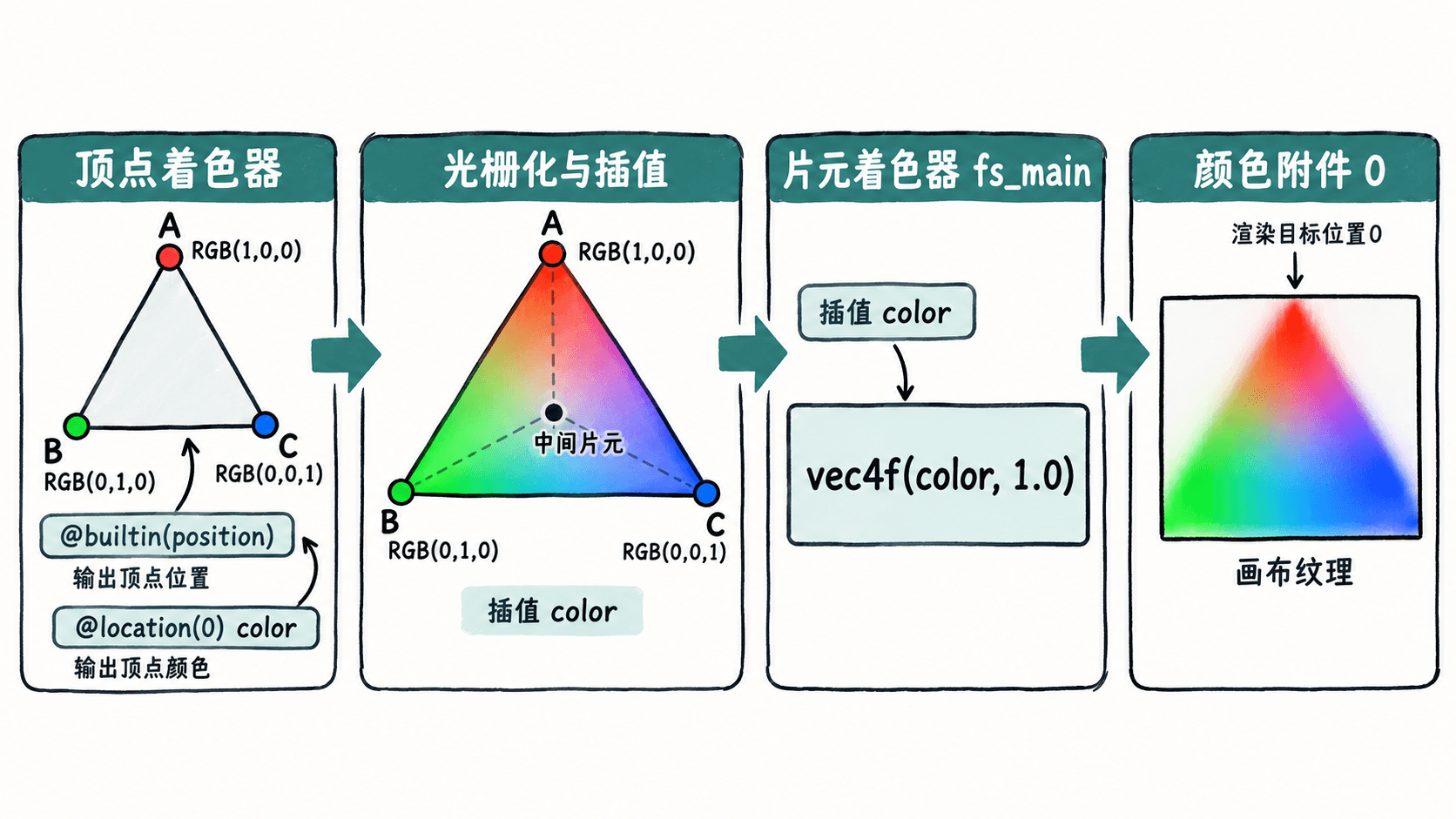
跑通渐变三角形
准备支持 WebGPU 的桌面浏览器和 Python 3。将以下内容保存为 index.html,在该文件所在目录执行 python -m http.server 8000,访问 http://localhost:8000。localhost 通常视为安全上下文;普通远程 HTTP 页面不满足 WebGPU 的安全上下文要求。
<!doctype html>
<html lang="zh-CN">
<meta charset="utf-8">
<title>WebGPU 片元颜色</title>
<canvas id="view" width="640" height="360"></canvas>
<script type="module">
  const canvas = document.querySelector("#view");
  if (!navigator.gpu) throw new Error("需要 WebGPU 和安全上下文");
  const adapter = await navigator.gpu.requestAdapter();
  if (!adapter) throw new Error("没有可用的 GPU 适配器");
  const device = await adapter.requestDevice();
  const context = canvas.getContext("webgpu");
  if (!context) throw new Error("无法取得 WebGPU 画布上下文");
  const format = navigator.gpu.getPreferredCanvasFormat();
  context.configure({ device, format, alphaMode: "opaque" });

  const shader = device.createShaderModule({
    code: `
struct VertexOut {
  @builtin(position) position: vec4f,
  @location(0) color: vec3f,
};

@vertex
fn vs_main(@builtin(vertex_index) i: u32) -> VertexOut {
  let positions = array<vec2f, 3>(
    vec2f(-0.8, -0.7),
    vec2f(0.8, -0.7),
    vec2f(0.0, 0.8)
  );
  let colors = array<vec3f, 3>(
    vec3f(1.0, 0.0, 0.0),
    vec3f(0.0, 1.0, 0.0),
    vec3f(0.0, 0.0, 1.0)
  );
  var out: VertexOut;
  out.position = vec4f(positions[i], 0.0, 1.0);
  out.color = colors[i]; // 每个顶点提交自己的颜色
  return out;
}

@fragment
fn fs_main(@location(0) color: vec3f) -> @location(0) vec4f {
  // 将插值后的 RGB 补为不透明 RGBA
  return vec4f(color, 1.0);
}
`
  });
  const pipeline = device.createRenderPipeline({
    layout: "auto",
    vertex: { module: shader, entryPoint: "vs_main" },
    fragment: {
      module: shader,
      entryPoint: "fs_main",
      targets: [{ format }]
    },
    primitive: { topology: "triangle-list" }
  });

  const encoder = device.createCommandEncoder();
  const pass = encoder.beginRenderPass({
    colorAttachments: [{
      view: context.getCurrentTexture().createView(),
      clearValue: { r: 0.06, g: 0.09, b: 0.16, a: 1 },
      loadOp: "clear",
      storeOp: "store"
    }]
  });
  pass.setPipeline(pipeline);
  pass.draw(3); // 三个顶点组装为一个三角形
  pass.end();
  device.queue.submit([encoder.finish()]);
</script>
</html>
预期结果:640×360 的画布呈深蓝灰色背景,中央有三角形,左下角偏红、右下角偏绿、顶部偏蓝,内部平滑过渡;三角形外仍是 clearValue 指定的底色。这里绘制一次即可,不需要动画循环。
换成常量颜色
在 WGSL 的 fs_main 中,仅把返回语句改成 return vec4f(0.10, 0.80, 0.35, 1.0);,保存并刷新页面。预期结果是整个三角形变为同一种绿色,背景保持不变。此时片元着色器不再使用插值参数 color,但绘制顶点和光栅化流程仍然存在。
颜色附件是否得到写入还取决于管线和渲染通道:fragment.targets[0].format 必须与 context.configure 的画布格式一致,colorAttachments[0].view 必须指向当前画布纹理。示例没有配置混合,且 alphaMode 为 opaque;不能只把返回颜色的 Alpha 改成 0.5,就期待三角形和背景自动半透明混合。
没有颜色时逐项核对
如果整张画布只有深蓝灰色,先在浏览器开发者工具的 Console 中查看错误,再按以下顺序检查:
navigator.gpu是否存在,requestAdapter()是否返回非空;否则确认浏览器支持情况和页面安全上下文。vs_main是否输出@location(0) color: vec3f,fs_main是否使用同类型的@location(0)接收;位置编号或类型不一致会导致着色器接口验证失败。- 管线的
fragment.entryPoint是否为fs_main,targets是否含与画布匹配的format。 - 渲染通道是否指定
loadOp: "clear"和storeOp: "store",是否调用pass.setPipeline(pipeline)、pass.draw(3),最后是否提交命令缓冲。
如果只看到纯色三角形,则检查 fs_main 是否仍返回常量。恢复 return vec4f(color, 1.0); 后,三个顶点各自的颜色才会重新参与插值。