
Web 图形与 3D / 系统课时
用鼠标力场控制粒子运动
用鼠标力场控制粒子运动
让 WebGPU 粒子跟随鼠标聚集,按住 Shift 则向外散开。我们会把指针的屏幕位置换算成模拟坐标,每帧写入 Uniform,再由计算着色器修改粒子速度;渲染通道直接读取更新后的 GPU 缓冲区,无需逐帧回读到 CPU。
学习目标
- 将鼠标位置映射到与粒子一致的二维模拟坐标,并正确处理 Y 轴方向与画布宽高比。
- 使用
queue.writeBuffer()更新鼠标、力场强度和帧间隔等 Uniform 参数。 - 串联 Compute Pass 与 Render Pass,验证吸引、排斥、阻尼和边界反弹。
统一鼠标与粒子的坐标
示例画布为 800×450,宽高比 。粒子存储在模拟空间:X 范围为 ,Y 范围为 ;渲染时将 X 除以 ,得到裁剪空间坐标。这样力场半径与粒子形状不会因宽屏画布被横向拉伸。
先用 getBoundingClientRect() 得到画布在页面上的位置和显示尺寸。令 、,则模拟坐标为 、。这里的 Y 翻转不可省略:浏览器指针坐标向下增加,而模拟空间向上增加。
Uniform 使用一个 32 字节缓冲区。mouse: vec2f 占偏移 0~7,strength、dt、aspect 依次位于偏移 8、12、16,active、count 位于 20、24,最后 4 字节用于填充。JavaScript 用 Float32Array 和 Uint32Array 共享同一个 ArrayBuffer,避免将整数标志写成浮点位模式。
看清每帧的计算与渲染顺序
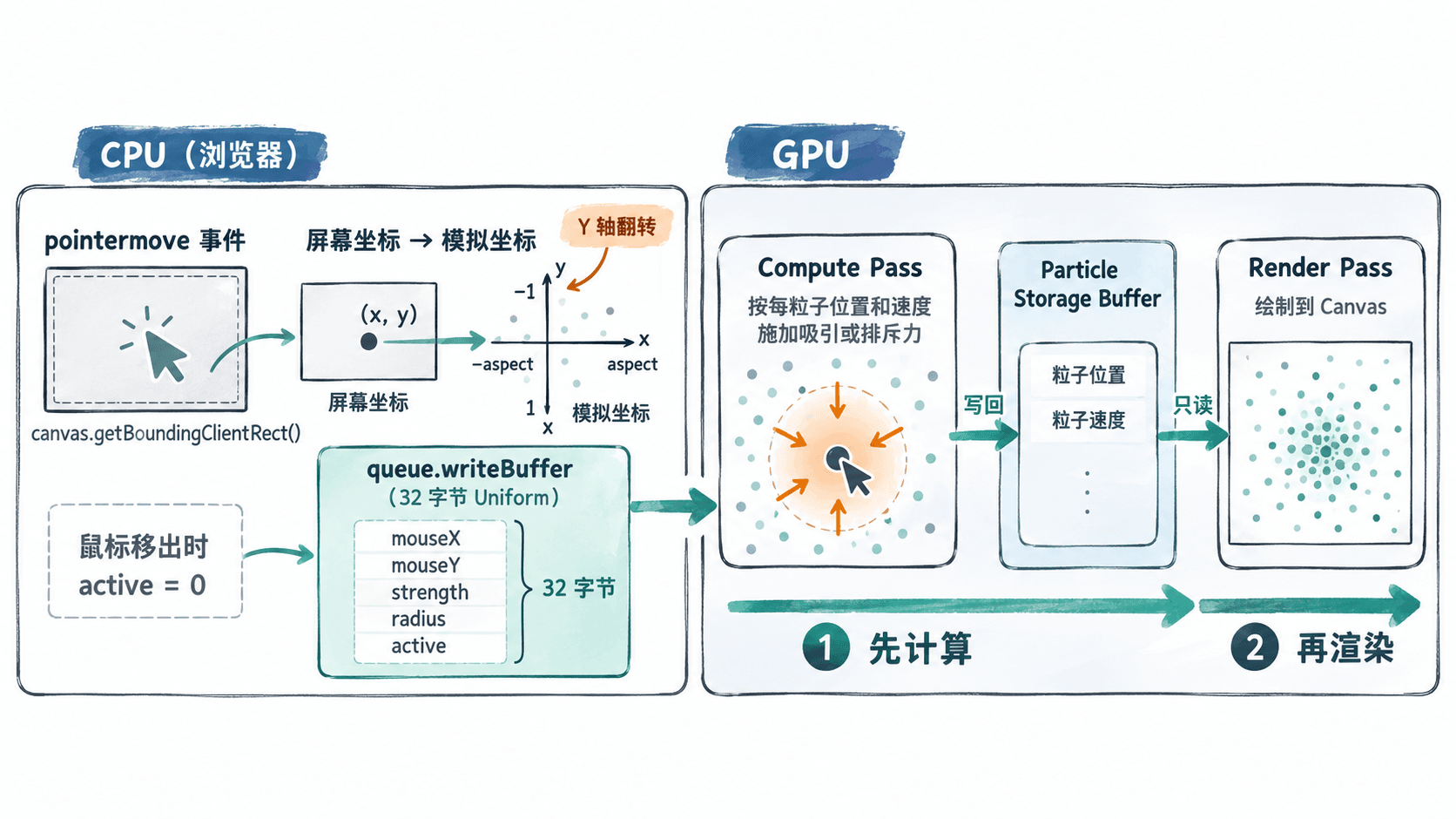
Compute Pass 只读参数并更新每个粒子自己的 pos、vel;Render Pass 在同一个命令编码器里随后读取这些结果。由于示例不读取其他粒子的状态,可原地更新同一个 Storage Buffer;如果未来加入邻居相互作用,应考虑双缓冲以隔离同帧读写。
实现完整的鼠标力场
把下面代码保存为 index.html。它创建 1000 个粒子,使用 @workgroup_size(64) 派发 16 个工作组;多出的 24 个调用通过 count 边界判断跳过。吸引强度为 5.0,按住 Shift 切为 -5.0,分母加上 0.06 防止鼠标靠近粒子时加速度过大。
<!doctype html>
<html lang='zh-CN'>
<meta charset='utf-8'>
<title>WebGPU 鼠标力场</title>
<style>
  body { margin: 20px; font: 16px sans-serif; }
  canvas { width: min(800px, 95vw); height: auto; display: block; }
</style>
<p>移动鼠标:吸引|按住 Shift 移动:排斥|移出画布:关闭力场</p>
<canvas id='view' width='800' height='450'></canvas>
<script type='module'>
const canvas = document.querySelector('#view');
if (!navigator.gpu) throw new Error('需要支持 WebGPU 的安全上下文');
const adapter = await navigator.gpu.requestAdapter();
if (!adapter) throw new Error('无法获取 WebGPU 适配器');
const device = await adapter.requestDevice();
const context = canvas.getContext('webgpu');
const format = navigator.gpu.getPreferredCanvasFormat();
context.configure({ device, format, alphaMode: 'opaque' });

const count = 1000;
const aspect = canvas.width / canvas.height;
const initial = new Float32Array(count * 4);
// 每个粒子依次存放 pos.xy 与 vel.xy,共 16 字节。
for (let i = 0; i < count; i++) {
  const j = i * 4;
  initial[j] = (Math.random() * 2 - 1) * aspect * 0.85;
  initial[j + 1] = (Math.random() * 2 - 1) * 0.85;
  initial[j + 2] = (Math.random() * 2 - 1) * 0.16;
  initial[j + 3] = (Math.random() * 2 - 1) * 0.16;
}
const particleBuffer = device.createBuffer({
  size: initial.byteLength,
  usage: GPUBufferUsage.STORAGE | GPUBufferUsage.COPY_DST
});
device.queue.writeBuffer(particleBuffer, 0, initial);
const uniformBuffer = device.createBuffer({
  size: 32,
  usage: GPUBufferUsage.UNIFORM | GPUBufferUsage.COPY_DST
});

const shared = `
struct Particle { pos: vec2f, vel: vec2f }
struct Params {
  mouse: vec2f,
  strength: f32,
  dt: f32,
  aspect: f32,
  active: u32,
  count: u32,
  padding: u32
}
@group(0) @binding(1) var<uniform> u: Params;
`;
const computeModule = device.createShaderModule({ code: shared + `
@group(0) @binding(0) var<storage, read_write> particles: array<Particle>;
@compute @workgroup_size(64)
fn main(@builtin(global_invocation_id) gid: vec3u) {
  let i = gid.x;
  if (i >= u.count) { return; }
  var p = particles[i];
  if (u.active != 0u) {
    let delta = u.mouse - p.pos;
    let r2 = dot(delta, delta) + 0.06;
    p.vel += delta * (u.strength / r2) * u.dt;
  }
  p.vel *= max(0.0, 1.0 - 1.5 * u.dt);
  p.pos += p.vel * u.dt;
  if (abs(p.pos.x) > u.aspect) {
    p.pos.x = clamp(p.pos.x, -u.aspect, u.aspect);
    p.vel.x *= -0.7;
  }
  if (abs(p.pos.y) > 1.0) {
    p.pos.y = clamp(p.pos.y, -1.0, 1.0);
    p.vel.y *= -0.7;
  }
  particles[i] = p;
}
` });
const drawModule = device.createShaderModule({ code: shared + `
@group(0) @binding(0) var<storage, read> particles: array<Particle>;
struct VertexOut {
  @builtin(position) position: vec4f,
  @location(0) local: vec2f
}
@vertex
fn vs(@builtin(vertex_index) vid: u32,
      @builtin(instance_index) iid: u32) -> VertexOut {
  let corners = array<vec2f, 6>(
    vec2f(-1.0, -1.0), vec2f(1.0, -1.0), vec2f(-1.0, 1.0),
    vec2f(-1.0, 1.0), vec2f(1.0, -1.0), vec2f(1.0, 1.0)
  );
  let local = corners[vid];
  let world = particles[iid].pos + local * 0.012;
  var out: VertexOut;
  out.position = vec4f(world.x / u.aspect, world.y, 0.0, 1.0);
  out.local = local;
  return out;
}
@fragment
fn fs(input: VertexOut) -> @location(0) vec4f {
  if (dot(input.local, input.local) > 1.0) { discard; }
  return vec4f(0.25, 0.86, 0.74, 1.0);
}
` });
const computePipeline = device.createComputePipeline({
  layout: 'auto', compute: { module: computeModule, entryPoint: 'main' }
});
const drawPipeline = device.createRenderPipeline({
  layout: 'auto',
  vertex: { module: drawModule, entryPoint: 'vs' },
  fragment: { module: drawModule, entryPoint: 'fs', targets: [{ format }] },
  primitive: { topology: 'triangle-list' }
});
function bindFor(pipeline) {
  return device.createBindGroup({
    layout: pipeline.getBindGroupLayout(0),
    entries: [
      { binding: 0, resource: { buffer: particleBuffer } },
      { binding: 1, resource: { buffer: uniformBuffer } }
    ]
  });
}
const computeBind = bindFor(computePipeline);
const drawBind = bindFor(drawPipeline);
const pointer = { x: 0, y: 0, active: false, repel: false };
canvas.addEventListener('pointermove', event => {
  const rect = canvas.getBoundingClientRect();
  pointer.x = (2 * (event.clientX - rect.left) / rect.width - 1) * aspect;
  pointer.y = 1 - 2 * (event.clientY - rect.top) / rect.height;
  pointer.active = true;
  pointer.repel = event.shiftKey;
});
canvas.addEventListener('pointerleave', () => { pointer.active = false; });

const bytes = new ArrayBuffer(32);
const f32 = new Float32Array(bytes);
const u32 = new Uint32Array(bytes);
let previous = 0;
function frame(time) {
  // 限制后台切回后的大步长,避免粒子瞬间跃迁。
  const dt = previous ? Math.min((time - previous) / 1000, 0.033) : 1 / 60;
  previous = time;
  f32.set([pointer.x, pointer.y, pointer.repel ? -5 : 5, dt, aspect]);
  u32[5] = pointer.active ? 1 : 0;
  u32[6] = count;
  device.queue.writeBuffer(uniformBuffer, 0, bytes);

  const encoder = device.createCommandEncoder();
  const compute = encoder.beginComputePass();
  compute.setPipeline(computePipeline);
  compute.setBindGroup(0, computeBind);
  compute.dispatchWorkgroups(Math.ceil(count / 64));
  compute.end();

  const render = encoder.beginRenderPass({
    colorAttachments: [{
      view: context.getCurrentTexture().createView(),
      clearValue: { r: 0.04, g: 0.07, b: 0.11, a: 1 },
      loadOp: 'clear', storeOp: 'store'
    }]
  });
  render.setPipeline(drawPipeline);
  render.setBindGroup(0, drawBind);
  render.draw(6, count);
  render.end();
  device.queue.submit([encoder.finish()]);
  requestAnimationFrame(frame);
}
requestAnimationFrame(frame);
</script>
</html>
预期结果:页面出现深色画布和约 1000 个浅青色粒子;鼠标移动时附近粒子朝指针弯曲并聚集,按住 Shift 移动时轨迹改为向外散开,鼠标移出后粒子保留惯性并逐渐减速,碰到画布边界时反弹。
运行检查与问题定位
在 index.html 所在目录执行 python3 -m http.server 8000,然后用支持 WebGPU 的浏览器打开 http://localhost:8000/;若本机只有 Windows Python 启动器,可用 py -m http.server 8000。本地 localhost 属于可用的安全上下文;普通远程 HTTP 页面不满足要求。
- 将鼠标放在画布中央,观察粒子向
(0,0)附近靠拢;移到右上角,应朝右上方弯曲而不是右下方。 - 按住 Shift 并移动,粒子应远离指针;若方向未改变,检查
strength是否真的写入偏移 8。 - 将鼠标移出画布,确认
active=0后不再受到力场加速;剩余运动由阻尼与反弹决定。 - 改成
count=1001,保持Math.ceil(count/64);计算结果仍应正常,证明越界调用被跳过。
如果画面全黑,先检查 navigator.gpu、浏览器控制台的 WGSL 编译或管线验证错误,再确认 particleBuffer 同时绑定了计算阶段的 read_write 和渲染阶段的 read 用途。若粒子突然飞散,检查 dt 是否以秒计、分母是否保留 0.06 的软化项。示例只在固定画布逻辑尺寸下运行;要支持动态调整画布内部分辨率,应同步更新 aspect、鼠标映射和边界参数。