
架构与系统设计 / 系统课时
渠道回调接收
渠道回调接收
渠道支付完成后,结果通常通过异步 HTTP 通知送达平台。本课实现一个可落地的接收入口:完整保存原始报文与请求头,只在持久化成功后快速返回渠道确认,并把耗时的订单处理留给后台任务。
学习目标
- 设计稳定的渠道回调入口与快速响应边界
- 原样记录请求头、请求体和接收时间,便于验签与追查
- 使用回调收件箱隔离网络接收与业务处理
接收链路与响应边界
回调入口只承担“接收、落库、确认”三件事。订单查询、状态更新、通知商户和记账都可能访问多个服务,不应阻塞渠道请求,否则渠道会因超时重试,进一步放大流量。
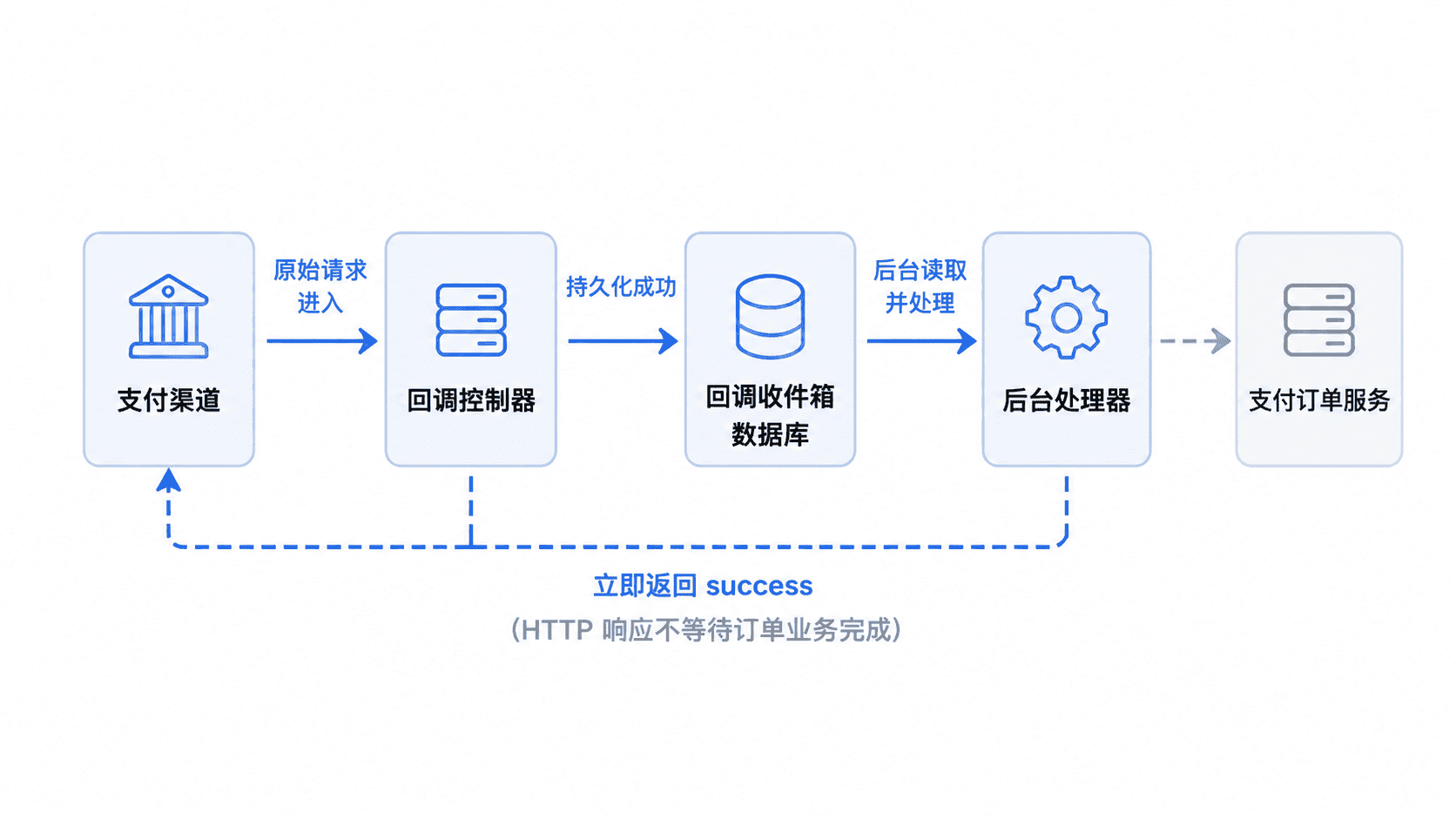
可靠边界应放在“原始通知已持久化”之后。只有数据库写入成功才返回成功;写入失败则返回非成功状态,让渠道按其规则重试。这样即使应用随后重启,后台仍可从收件箱继续处理。
实现持久化与接收接口
建立原始报文收件箱
原始请求体建议使用二进制字段保存,避免字符集转换或 JSON 重新序列化改变字节内容。请求头保存为 JSON,后续验签、审计和问题复现都可使用同一份证据。
CREATE TABLE callback_inbox (
    id BIGINT NOT NULL AUTO_INCREMENT,
    channel VARCHAR(32) NOT NULL,
    notification_id VARCHAR(128) NULL,
    request_headers JSON NOT NULL,
    raw_body MEDIUMBLOB NOT NULL,
    process_status VARCHAR(16) NOT NULL DEFAULT 'PENDING',
    retry_count INT NOT NULL DEFAULT 0,
    received_at DATETIME(3) NOT NULL,
    processed_at DATETIME(3) NULL,
    last_error VARCHAR(500) NULL,
    PRIMARY KEY (id),
    KEY idx_status_received (process_status, received_at)
) ENGINE=InnoDB DEFAULT CHARSET=utf8mb4;
预期结果
callback_inbox 表创建成功;待处理记录可通过 process_status=PENDING 与 received_at 索引顺序读取。notification_id 暂时允许为空,因为不同渠道的通知编号字段并不统一。下一课会把渠道编号或稳定业务字段转换为幂等键,并增加唯一约束。
实现快速接收接口
下面是 Spring Boot 3 与 Spring JDBC 的片段示例,依赖已创建的 callback_inbox 表。控制器接收 byte[],服务在事务中保存原始内容,提交成功后立即返回渠道约定的确认文本。
package com.example.payment.callback;

import com.fasterxml.jackson.core.JsonProcessingException;
import com.fasterxml.jackson.databind.ObjectMapper;
import java.sql.Timestamp;
import java.time.Instant;
import java.util.Map;
import org.springframework.http.HttpHeaders;
import org.springframework.http.MediaType;
import org.springframework.http.ResponseEntity;
import org.springframework.jdbc.core.JdbcTemplate;
import org.springframework.stereotype.Service;
import org.springframework.transaction.annotation.Transactional;
import org.springframework.web.bind.annotation.PathVariable;
import org.springframework.web.bind.annotation.PostMapping;
import org.springframework.web.bind.annotation.RequestBody;
import org.springframework.web.bind.annotation.RequestHeader;
import org.springframework.web.bind.annotation.RequestMapping;
import org.springframework.web.bind.annotation.RestController;

@RestController
@RequestMapping("/callbacks")
public class ChannelCallbackController {
    private final CallbackInboxService inboxService;

    public ChannelCallbackController(CallbackInboxService inboxService) {
        this.inboxService = inboxService;
    }

    @PostMapping(value = "/{channel}", consumes = MediaType.ALL_VALUE)
    public ResponseEntity<String> receive(
            @PathVariable String channel,
            @RequestHeader HttpHeaders headers,
            @RequestBody byte[] rawBody) {
        inboxService.capture(channel, headers.toSingleValueMap(), rawBody);
        return ResponseEntity.ok("success");
    }
}

@Service
class CallbackInboxService {
    private final JdbcTemplate jdbcTemplate;
    private final ObjectMapper objectMapper;

    CallbackInboxService(JdbcTemplate jdbcTemplate, ObjectMapper objectMapper) {
        this.jdbcTemplate = jdbcTemplate;
        this.objectMapper = objectMapper;
    }

    @Transactional
    public void capture(String channel, Map<String, String> headers, byte[] rawBody) {
        if (rawBody.length == 0) {
            throw new IllegalArgumentException("callback body must not be empty");
        }
        jdbcTemplate.update(
                "INSERT INTO callback_inbox " +
                "(channel, request_headers, raw_body, received_at) VALUES (?, ?, ?, ?)",
                channel,
                toJson(headers),
                rawBody,
                Timestamp.from(Instant.now()));
    }

    private String toJson(Map<String, String> headers) {
        try {
            return objectMapper.writeValueAsString(headers);
        } catch (JsonProcessingException exception) {
            throw new IllegalArgumentException("invalid callback headers", exception);
        }
    }
}
接口启动后可发送一条模拟通知。实际端口可能不同,请把 <PORT> 替换为应用监听端口。
curl -i -X POST "http://localhost:<PORT>/callbacks/demo" -H "Content-Type: application/json" -H "X-Notification-Id: N1001" --data-binary '{"notificationId":"N1001","status":"SUCCESS"}'预期输出
HTTP/1.1 200
Content-Type: text/plain;charset=UTF-8

success同时,callback_inbox 中应新增一条 PENDING 记录,raw_body 与发送字节一致。HTTP 日期、连接头等动态响应头可能因服务器配置不同而变化。
失败处理与验收
入口层应限制请求体大小、记录追踪标识,并为数据库写入设置短超时。不要在日志中直接打印完整银行卡号、密钥或个人信息;排查需要原文时,应通过受控审计查询读取收件箱。
验收时分别模拟正常请求、空请求体、数据库不可用和重复通知。正常请求应快速返回并留下记录;空请求应被拒绝;数据库写入失败不得返回成功;重复通知即使暂时产生多条原始记录,也不能在后续业务处理中重复改写订单。