
消息队列 / 系统课时
设计订单消息的交换机拓扑
设计订单消息的交换机拓扑
订单异步链路的关键不是“建几个队列”,而是先把业务事件、消费者职责和路由关系拆开。本节用 topic 交换机设计订单创建、库存处理和通知三个环节,并通过实际发布消息验证 Routing Key 是否进入预期队列。
学习目标
- 能为订单事件选择 Exchange、Routing Key、Queue 和 Binding
- 能解释为什么生产者只面向交换机发布,而不是直接依赖消费者队列
- 能用最小脚本声明并验证订单消息拓扑
从业务事件反推路由关系
把订单服务、库存服务和通知服务直接绑定在一起,会让生产者知道过多下游细节。更合适的做法是让订单服务只发布“发生了什么”,由 Exchange 根据 Routing Key 决定哪些 Queue 接收。
本练习使用一个持久化 topic 交换机 order.events。订单创建后发布 order.created;库存服务消费后,再发布 inventory.reserved 或 inventory.failed。库存队列只关心订单创建,通知队列只关心库存结果。
| 对象 | 名称 | 作用 |
|---|---|---|
| Exchange | order.events |
接收订单域事件并按 Routing Key 路由 |
| Queue | order.inventory.q |
接收 order.created,由库存服务消费 |
| Queue | order.notification.q |
接收库存成功或失败事件,由通知服务消费 |
| Binding | order.created |
order.events → order.inventory.q |
| Binding | inventory.reserved、inventory.failed |
order.events → order.notification.q |
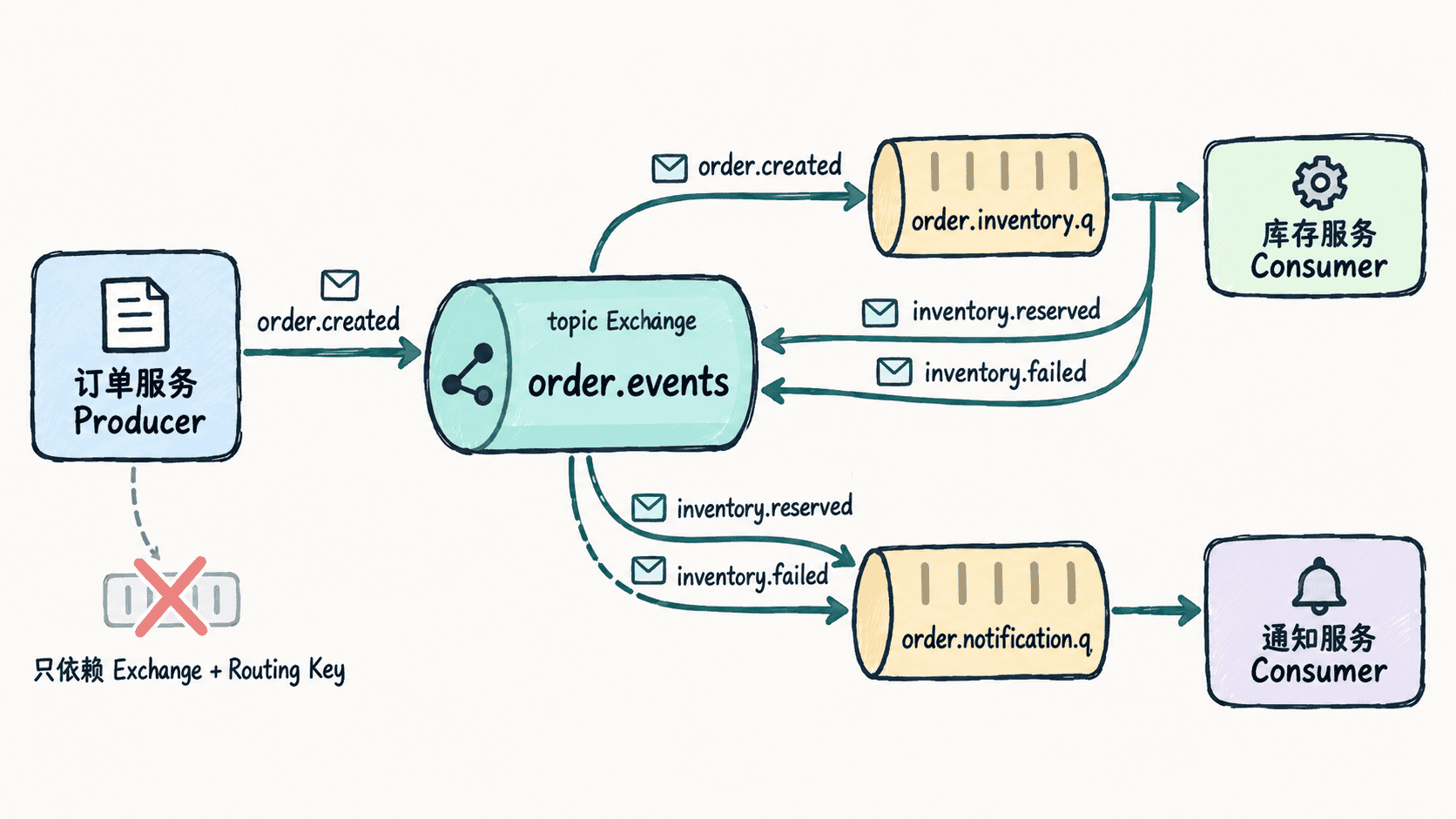
声明并验证拓扑
前提是本机 RabbitMQ 已运行,并已安装 Python 包 pika。下面脚本会声明 Exchange、Queue、Binding,然后分别发布订单创建和库存成功事件,再从目标队列读取一次验证路由结果。
python
import json
import pika

connection = pika.BlockingConnection(pika.ConnectionParameters("localhost"))
channel = connection.channel()

channel.exchange_declare(
    exchange="order.events",
    exchange_type="topic",
    durable=True,
)

for queue_name in ("order.inventory.q", "order.notification.q"):
    channel.queue_declare(queue=queue_name, durable=True)

channel.queue_bind(
    exchange="order.events",
    queue="order.inventory.q",
    routing_key="order.created",
)
channel.queue_bind(
    exchange="order.events",
    queue="order.notification.q",
    routing_key="inventory.reserved",
)
channel.queue_bind(
    exchange="order.events",
    queue="order.notification.q",
    routing_key="inventory.failed",
)

messages = [
    ("order.created", {"orderId": "demo-1001"}),
    ("inventory.reserved", {"orderId": "demo-1001", "status": "reserved"}),
]
for routing_key, payload in messages:
    channel.basic_publish(
        exchange="order.events",
        routing_key=routing_key,
        body=json.dumps(payload).encode(),
    )

_, _, inventory_body = channel.basic_get(queue="order.inventory.q", auto_ack=True)
_, _, notification_body = channel.basic_get(queue="order.notification.q", auto_ack=True)

print("inventory:", inventory_body.decode())
print("notification:", notification_body.decode())
connection.close()
预期输出:
text
inventory: {"orderId": "demo-1001"}
notification: {"orderId": "demo-1001", "status": "reserved"}
若队列中原本已有消息,读取到的内容可能不同;验证前应使用空队列或独立测试环境。
设计时避免把 Routing Key 当队列名
Routing Key 表达的是事件分类,不是物理队列地址。order.created 可以绑定到多个队列,例如未来增加风控或审计消费者时,只需增加新的 Binding,不需要修改订单服务的发布代码。
当一个事件需要被多个独立业务同时处理时,为每个业务准备自己的 Queue;不要让多个业务消费者竞争同一个 Queue,否则一条消息只会被其中一个消费者拿到。
按自己的节奏,确认真正理解。