
AI Agent / 系统课时
查看状态快照与历史版本
查看状态快照与历史版本
智能体出现“为什么会走到这一步”时,只看最终状态往往不够。LangGraph 会把线程执行过程保存成一系列 StateSnapshot,本篇通过 get_state() 与 get_state_history() 读取当前快照和历史版本,并根据 values、next 与 metadata.writes 定位某一步发生了什么。
学习目标
- 读取线程最新的
StateSnapshot并识别关键字段 - 按时间倒序查看历史快照,判断每一步写入值与后续节点
- 从历史记录中定位某个 checkpoint,并再次读取该版本状态
StateSnapshot 记录的不只是最终值
启用 checkpointer 后,LangGraph 会在 super-step 边界保存检查点。get_state(config) 返回指定线程最新的 StateSnapshot;如果配置里同时带有 checkpoint_id,则返回对应历史版本。常用字段包括当前通道值 values、下一批待执行节点 next、检查点配置 config、执行元数据 metadata、创建时间与父检查点信息。([Docs by LangChain][1])
调试时最值得先看三处:values 回答“当时状态是什么”,next 回答“如果从这里继续,下一步准备执行什么”,metadata.writes 回答“刚才是哪一个节点写入了哪些值”。
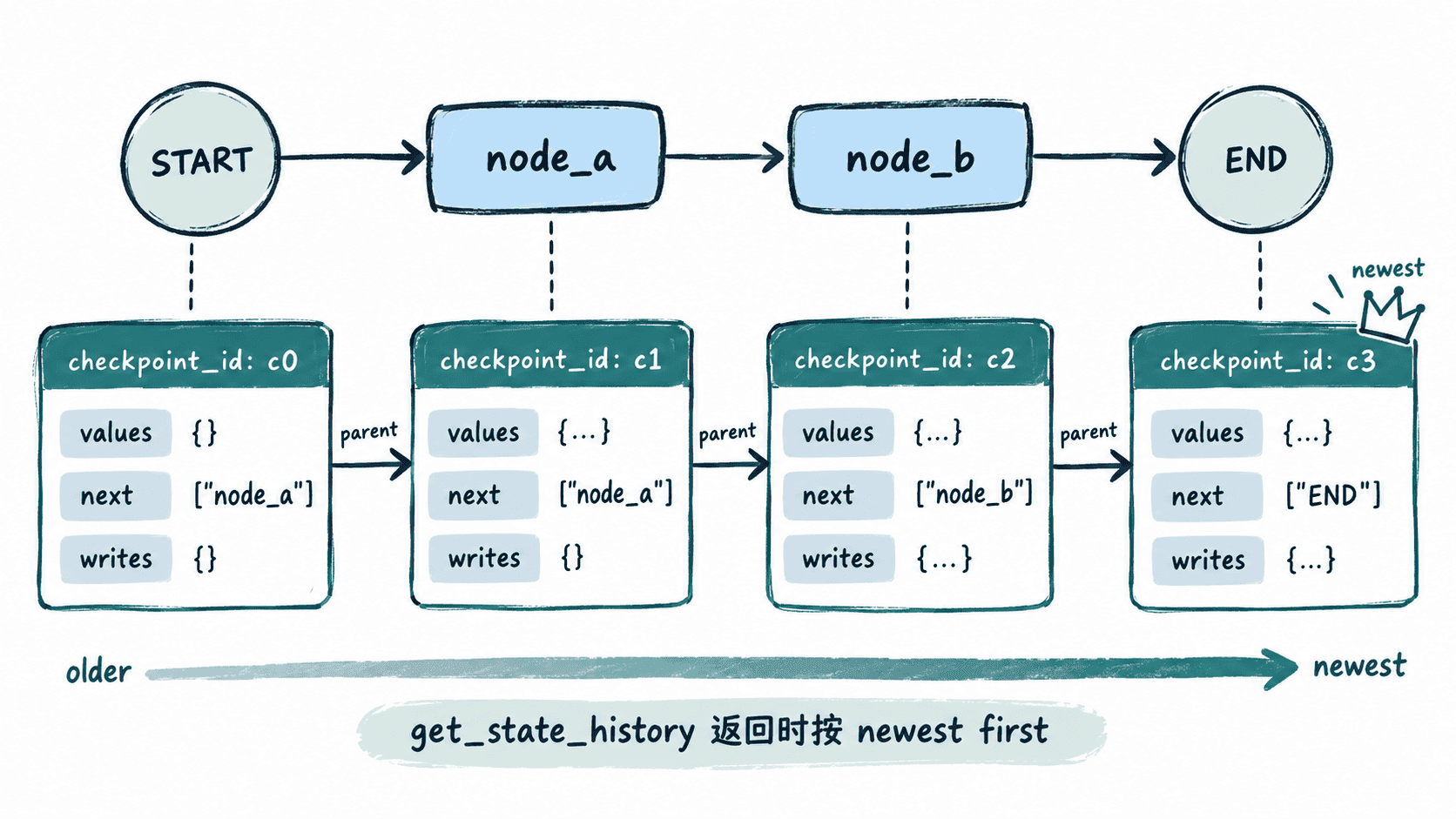
运行一个可检查的两节点图
下面用纯函数节点构造 START -> node_a -> node_b -> END。bar 使用列表加法作为 reducer,因此可以清楚看到各节点写入如何累积。
from operator import add
from typing import Annotated
from typing_extensions import TypedDict

from langgraph.checkpoint.memory import InMemorySaver
from langgraph.graph import END, START, StateGraph


class State(TypedDict):
    foo: str
    bar: Annotated[list[str], add]


def node_a(state: State):
    return {"foo": "a", "bar": ["a"]}


def node_b(state: State):
    return {"foo": "b", "bar": ["b"]}


def format_next(snapshot):
    return ",".join(snapshot.next) if snapshot.next else "END"


builder = StateGraph(State)
builder.add_node("node_a", node_a)
builder.add_node("node_b", node_b)
builder.add_edge(START, "node_a")
builder.add_edge("node_a", "node_b")
builder.add_edge("node_b", END)

graph = builder.compile(checkpointer=InMemorySaver())
config = {"configurable": {"thread_id": "inspect-001"}}
graph.invoke({"foo": "input", "bar": []}, config)

current = graph.get_state(config)
print(
    f"current foo={current.values['foo']} bar={current.values['bar']} "
    f"next={format_next(current)}"
)

# 只打印 source=loop 的快照,避开输入前的空快照,让节点执行链更直观。
history = [
    snapshot
    for snapshot in graph.get_state_history(config)
    if snapshot.metadata.get("source") == "loop"
]

for snapshot in history:
    writes = snapshot.metadata.get("writes") or {}
    writer = ",".join(writes.keys()) if writes else "-"
    print(
        f"step={snapshot.metadata['step']} foo={snapshot.values.get('foo')} "
        f"bar={snapshot.values.get('bar')} next={format_next(snapshot)} "
        f"writes={writer}"
    )

# 找到 node_b 执行前的历史版本,再用其中的 checkpoint_id 精确读取。
target = next(snapshot for snapshot in history if snapshot.next == ("node_b",))
same = graph.get_state(target.config)
print(f"target checkpoint matches={same.config == target.config}")
预期输出:
current foo=b bar=['a', 'b'] next=END
step=2 foo=b bar=['a', 'b'] next=END writes=node_b
step=1 foo=a bar=['a'] next=node_b writes=node_a
step=0 foo=input bar=[] next=node_a writes=-
target checkpoint matches=True
这里的 step 是 super-step 计数;具体 checkpoint_id 与创建时间属于动态值,每次运行都可能不同,因此排障日志里看到不同 <ID> 或 <TIME> 是正常现象。
从历史记录定位问题步骤
get_state_history(config) 返回该线程的历史 StateSnapshot,最新快照排在最前。上面的输出中,step=1 时 foo=a、bar=['a'],next=node_b,同时 writes=node_a,这说明 node_a 已完成写入,而 node_b 还没有执行。官方文档也明确说明历史结果按最新检查点优先返回。([Docs by LangChain][1])
因此排查异常时可以沿着历史从新到旧寻找第一次出现错误值的快照,再检查这一快照的 metadata.writes。如果错误值第一次出现在 node_a 的写入中,应优先检查 node_a;如果某个快照的 next 指向意外节点,则应继续检查路由条件或前一步产生的控制状态。
精确读取历史 checkpoint
每个快照的 config 都携带线程和 checkpoint 标识。把历史快照自己的 config 传给 get_state(),就能精确读取那个版本,而不是再次获取线程最新状态。调试代码最好直接复用 snapshot.config,避免手工复制动态 checkpoint_id 时写错。
当你能同时回答“这一版状态是什么、刚才谁写了它、下一步原本要去哪”,大多数状态污染、错误路由和恢复位置问题就能从模糊的最终结果,收敛到具体 checkpoint 与具体节点。