
UI 视觉设计 / 系统课时
为 Token 编写类型与引用测试
为 Token 编写类型与引用测试
设计 Token 即使顺利生成 CSS,也可能含有非法颜色、悬空别名或暗色主题漏项。这里通过一个可执行的 Node.js 断言脚本,对导出后的颜色对象、引用链和 light/dark 覆盖做构建前校验,并用故意损坏的数据验证失败分支。
学习目标
- 识别
$type、$value与主题索引各自需要的检查。 - 验证 sRGB 色彩结构、引用目标、循环引用和两套主题的完整性。
- 将校验前置到构建任务,并用负例确认错误会使执行失败。
准备真实可检验的数据契约
示例使用 Node.js 20+,在同一目录准备 tokens.check.json 和 token.test.mjs。前者是导出器产出的扁平测试索引:把 DTCG 的嵌套路径整理为 palette.blue600 等键,分别保存 base、light 和 dark。它是本项目的中间格式,并非 DTCG 标准主题文件。
这里的项目契约只接受不透明 sRGB:$type 为 color,$value 可以是颜色对象或 {palette.blue600} 别名。颜色对象必须提供三个 0~1 范围的通道及六位 hex。按照 DTCG Color Module 2025.10,hex 原本可选,强制提供是本项目额外的校验要求。
保存以下示例数据为 tokens.check.json:
{
  "base": {
    "palette.blue600": {"$type":"color","$value":{"colorSpace":"srgb","components":[0.1451,0.3882,0.9216],"hex":"#2563EB"}},
    "palette.blue400": {"$type":"color","$value":{"colorSpace":"srgb","components":[0.3765,0.6471,0.9804],"hex":"#60A5FA"}},
    "palette.white": {"$type":"color","$value":{"colorSpace":"srgb","components":[1,1,1],"hex":"#FFFFFF"}},
    "palette.gray900": {"$type":"color","$value":{"colorSpace":"srgb","components":[0.0667,0.0941,0.1529],"hex":"#111827"}}
  },
  "light": {
    "semantic.action": {"$type":"color","$value":"{palette.blue600}"},
    "semantic.surface": {"$type":"color","$value":"{palette.white}"}
  },
  "dark": {
    "semantic.action": {"$type":"color","$value":"{palette.blue400}"},
    "semantic.surface": {"$type":"color","$value":"{palette.gray900}"}
  }
}
该配置的可检验结果是 Light 的 semantic.action 解析为 #2563EB,Dark 解析为 #60A5FA;两个模式都提供 semantic.surface。
按主题解析别名并检查覆盖
对每种主题先合并 base 和对应模式,再解析全部 Token。{palette.blue600} 必须指向已定义的颜色;同一解析链重复访问某个键视为循环引用。Light 与 Dark 的语义键集合必须相同,不能只在一侧新增 semantic.warning。
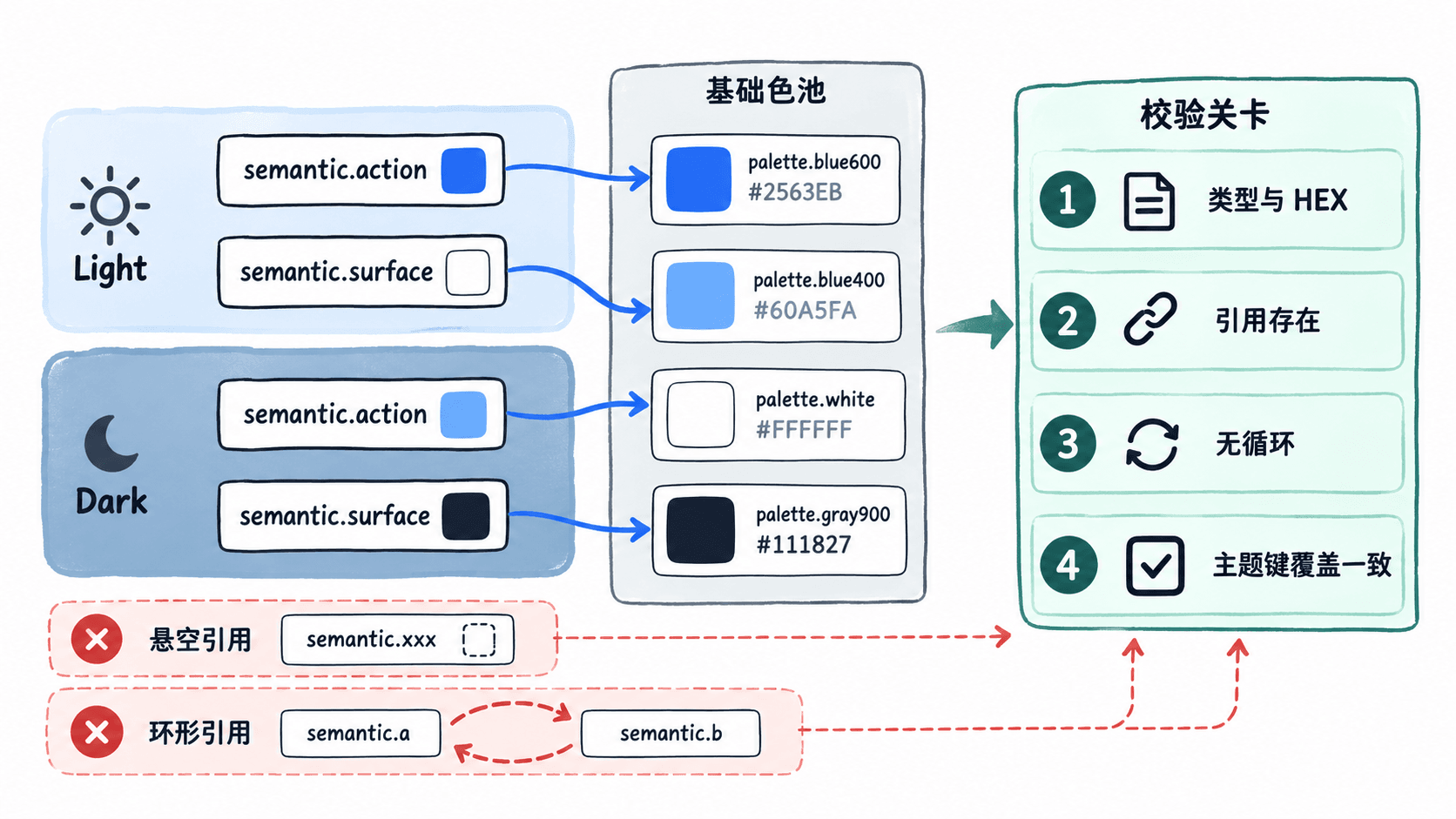
对于主题数超过两种的项目,须把所有模式都加入检查,而不是只验证默认模式成功。这个校验同时覆盖未被组件直接使用、但仍可能被打包发布的基础色。
编写正向断言与故障注入测试
将下面内容保存为 token.test.mjs。脚本先检查真实索引的所有颜色与引用,再分别制造类型错误、HEX 错误、悬空引用、循环引用和主题缺项,确保每类错误会被拒绝。
import assert from 'node:assert/strict';
import { readFileSync } from 'node:fs';

// 输入是导出器产出的扁平索引,非 DTCG 原始主题文件。
const data = JSON.parse(readFileSync(new URL('./tokens.check.json', import.meta.url), 'utf8'));
const required = ['semantic.action', 'semantic.surface'];

function resolve(index, key, seen = new Set()) {
  const token = index[key];
  assert.ok(token, `引用不存在: ${key}`);
  assert.ok(!seen.has(key), `循环引用: ${key}`);
  assert.equal(token.$type, 'color', `类型错误: ${key}`);
  const value = token.$value;
  if (typeof value === 'string') {
    const alias = /^\{([A-Za-z0-9_-]+(?:\.[A-Za-z0-9_-]+)*)\}$/.exec(value);
    assert.ok(alias, `引用语法错误: ${key}`);
    return resolve(index, alias[1], new Set([...seen, key]));
  }
  // 此项目只接受不透明 sRGB;DTCG 允许更多色彩空间及可选 hex。
  assert.ok(value && typeof value === 'object' && !Array.isArray(value), `颜色对象错误: ${key}`);
  assert.equal(value.colorSpace, 'srgb', `色彩空间错误: ${key}`);
  assert.ok(Array.isArray(value.components) && value.components.length === 3 &&
    value.components.every(n => typeof n === 'number' && Number.isFinite(n) && n >= 0 && n <= 1),
    `颜色通道错误: ${key}`);
  assert.ok(value.alpha === undefined || value.alpha === 1, `透明度错误: ${key}`);
  assert.ok(typeof value.hex === 'string' && /^#[0-9a-fA-F]{6}$/.test(value.hex),
    `HEX 格式错误: ${key}`);
  const hex = '#' + value.components.map(n =>
    Math.round(n * 255).toString(16).padStart(2, '0')).join('');
  assert.equal(hex.toLowerCase(), value.hex.toLowerCase(), `HEX 与通道不一致: ${key}`);
  return value;
}

function validate(doc) {
  assert.deepEqual(Object.keys(doc.light).sort(), Object.keys(doc.dark).sort(), '两种主题键集合不一致');
  for (const mode of ['light', 'dark']) {
    for (const key of required) {
      assert.ok(Object.hasOwn(doc[mode], key), `模式漏项: ${mode}/${key}`);
    }
    const index = { ...doc.base, ...doc[mode] };
    for (const key of Object.keys(index)) resolve(index, key);
  }
}

validate(data);
assert.equal(resolve({ ...data.base, ...data.light }, 'semantic.action').hex, '#2563EB');
assert.equal(resolve({ ...data.base, ...data.dark }, 'semantic.action').hex, '#60A5FA');
console.log('PASS 正常主题与别名');

const wrongType = structuredClone(data);
wrongType.base['palette.blue600'].$type = 'dimension';
assert.throws(() => validate(wrongType), /类型错误/);
const wrongHex = structuredClone(data);
wrongHex.base['palette.blue600'].$value.hex = '#2563E';
assert.throws(() => validate(wrongHex), /HEX 格式错误/);
console.log('PASS 拦截类型与色彩格式错误');

const dangling = structuredClone(data);
dangling.dark['semantic.action'].$value = '{palette.missing}';
assert.throws(() => validate(dangling), /引用不存在/);
const cyclic = structuredClone(data);
cyclic.dark['semantic.action'].$value = '{semantic.surface}';
cyclic.dark['semantic.surface'].$value = '{semantic.action}';
assert.throws(() => validate(cyclic), /循环引用/);
console.log('PASS 拦截悬空与循环引用');

const incomplete = structuredClone(data);
delete incomplete.dark['semantic.surface'];
assert.throws(() => validate(incomplete), /两种主题键集合不一致/);
console.log('PASS 拦截主题缺项');
执行 node token.test.mjs,预期输出:
PASS 正常主题与别名
PASS 拦截类型与色彩格式错误
PASS 拦截悬空与循环引用
PASS 拦截主题缺项
任一真实输入触发断言,Node.js 将输出错误并以非零退出码结束;上面的四行 PASS 则证明正常数据通过、错误夹具被成功拦截,不表示错误夹具也通过了校验。
在跨端产物生成前设置门禁
把这段测试放在令牌导出与平台构建之间,按下列顺序执行:
- 每次提交都重新从 Figma 导出或 DTCG Resolver 的 Light/Dark 解析结果生成
tokens.check.json,不要只检查仓库内固定的示例。 - CI 运行
node token.test.mjs;只有退出码为 0,才允许 Style Dictionary 或各平台的生成器写入 CSS、Swift、Android 资源。 - 验收时删除
dark下的semantic.surface键,确认任务失败且不进入产物生成;恢复后重新得到四条 PASS。
此脚本刻意限定在不透明 sRGB 与当前必填语义键。增加语义 Token 时更新 required;需要透明度、Display P3 或 OKLCH 时应扩展类型验证,不能把它当作支持所有 DTCG 色彩格式的通用解析器。