
UI 视觉设计 / 系统课时
生成 iOS 的颜色与字体资源
生成 iOS 的颜色与字体资源
本课把经过别名解析的设计令牌转换为 iOS 可直接消费的资源:颜色生成支持明暗模式的 Asset Catalog,文字标度映射为 SwiftUI 字体样式。完成后可以按语义名称调用颜色和字体,并在 Xcode 中验证外观切换与动态字号。
学习目标
- 为语义颜色确定
.colorset名称和明暗外观数据。 - 用脚本生成颜色资源及 SwiftUI 字体访问入口。
- 在 iOS 应用中验证资源加载、深色模式和 Dynamic Type。
确定 iOS 的资源边界
颜色优先输出到 Assets.xcassets:每个语义名称对应一个 .colorset/Contents.json,其中默认值放在 Any 外观,深色值标记为 Dark。SwiftUI 用 Color("ActionPrimary"),UIKit 用 UIColor(named: "ActionPrimary"),系统依据当前外观选择颜色。
文字不放进颜色资源目录。采用系统字体时,将设计稿的「正文」「标题」映射到 iOS 的 .body、.title2 等文本样式,再分别附加字重。系统样式的实际字号受系统设置影响,不应将设计稿的 16、22 像素强制当成永远不变的 iOS 字号;iOS 文字尺寸单位是 pt。
| 语义令牌 | 输出位置或接口 | 本例映射 |
|---|---|---|
color.action.primary |
ActionPrimary.colorset |
浅色 #2563EB,深色 #60A5FA |
color.text.primary |
TextPrimary.colorset |
浅色 #111827,深色 #F9FAFB |
typography.body |
DSTypography.body |
.body + .regular |
typography.title |
DSTypography.title |
.title2 + .semibold |
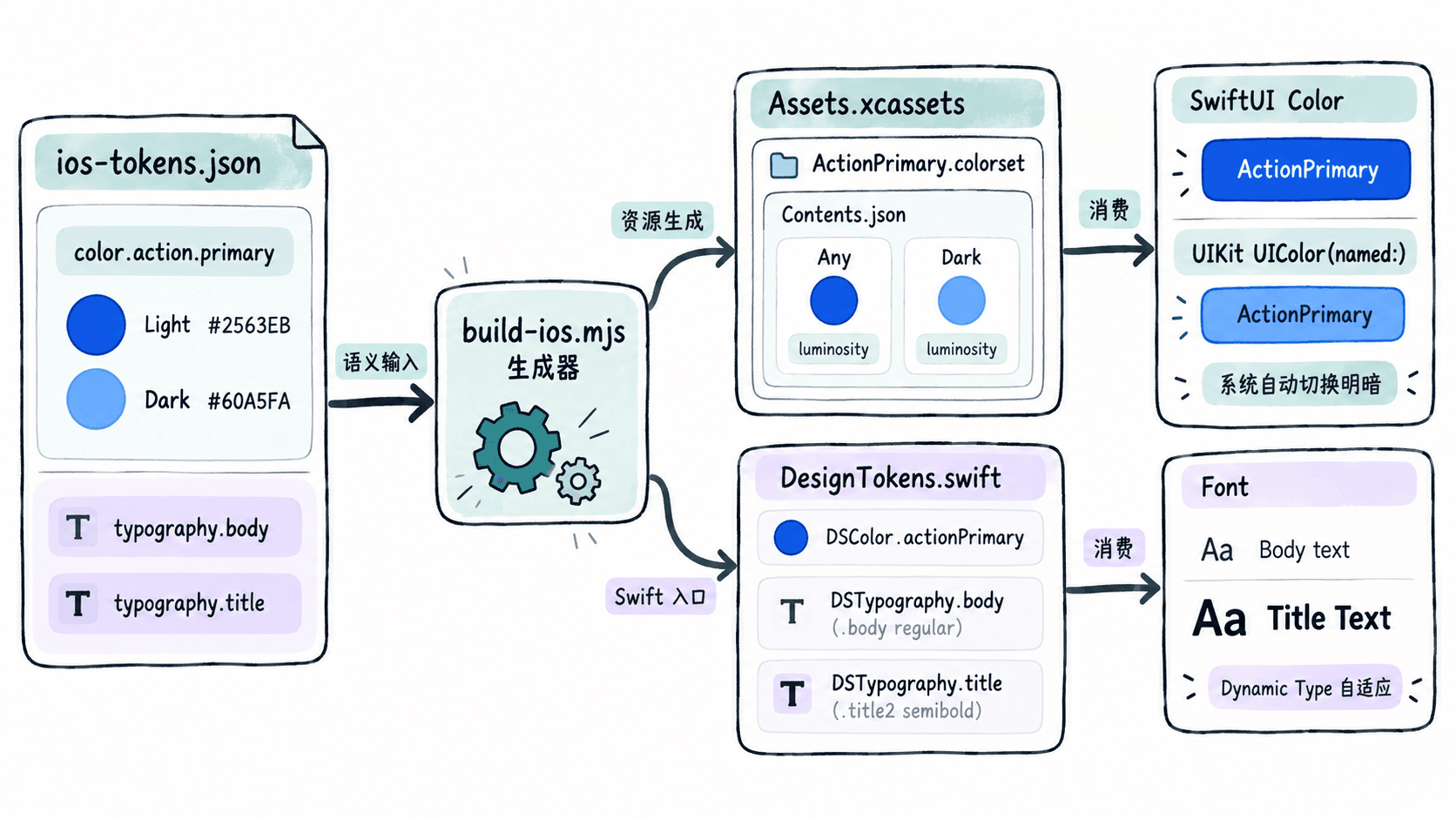
生成 Asset Catalog 与 Swift 文件
准备 Node.js 18 或更新版本。先将下方内容保存为 ios-tokens.json。这是从 DTCG 数据完成别名解析、模式展开后的 iOS 专用中间格式,并非直接的 DTCG 原始规范;生产流水线要保证它由同一份令牌源生成,避免手工维护双份真值。
{
  "colors": {
    "ActionPrimary": { "light": "#2563EB", "dark": "#60A5FA" },
    "TextPrimary": { "light": "#111827", "dark": "#F9FAFB" }
  },
  "typography": {
    "body": { "textStyle": "body", "weight": "regular" },
    "title": { "textStyle": "title2", "weight": "semibold" }
  }
}
将以下脚本保存为同级的 build-ios.mjs。脚本校验六位十六进制颜色,将每个 RGB 通道除以 255 并保留四位小数;为深色外观写入 luminosity=dark,并生成集中使用的 SwiftUI 访问常量。
import { readFileSync, mkdirSync, writeFileSync } from 'node:fs';
import { join } from 'node:path';

const tokens = JSON.parse(readFileSync('ios-tokens.json', 'utf8'));
const output = 'Generated';
const assets = join(output, 'Assets.xcassets');
mkdirSync(assets, { recursive: true });

function rgba(hex) {
  if (!/^#[0-9a-fA-F]{6}$/.test(hex)) {
    throw new Error(`Invalid #RRGGBB color: ${hex}`);
  }
  const [red, green, blue] = [1, 3, 5].map((i) =>
    Number((parseInt(hex.slice(i, i + 2), 16) / 255).toFixed(4))
  );
  return { red, green, blue, alpha: 1 };
}

for (const [name, modes] of Object.entries(tokens.colors)) {
  if (!/^[A-Z][A-Za-z0-9]*$/.test(name)) {
    throw new Error(`Invalid color name: ${name}`);
  }
  const variant = (hex, dark = false) => ({
    idiom: 'universal',
    ...(dark ? { appearances: [{ appearance: 'luminosity', value: 'dark' }] } : {}),
    color: { 'color-space': 'srgb', components: rgba(hex) }
  });
  const dir = join(assets, `${name}.colorset`);
  mkdirSync(dir, { recursive: true });
  const contents = {
    colors: [variant(modes.light), variant(modes.dark, true)],
    info: { author: 'xcode', version: 1 }
  };
  writeFileSync(join(dir, 'Contents.json'), JSON.stringify(contents, null, 2) + '\n');
  console.log(`${name}.colorset`);
}

// 白名单阻止不合法样式或标识符混入生成的 Swift 代码。
const textStyles = new Set(['body', 'title2']);
const weights = new Set(['regular', 'medium', 'semibold', 'bold']);
const typeLines = Object.entries(tokens.typography).map(([name, spec]) => {
  if (!/^[a-z][A-Za-z0-9]*$/.test(name) ||
      !textStyles.has(spec.textStyle) || !weights.has(spec.weight)) {
    throw new Error(`Invalid typography token: ${name}`);
  }
  return `    static let ${name}: Font = .system(.${spec.textStyle}, design: .default, weight: .${spec.weight})`;
});
const colorLines = Object.keys(tokens.colors).map((name) =>
  `    static let ${name[0].toLowerCase() + name.slice(1)} = Color("${name}")`
);
const swift = [
  'import SwiftUI', '', 'enum DSColor {', ...colorLines, '}',
  '', 'enum DSTypography {', ...typeLines, '}', ''
].join('\n');
writeFileSync(join(output, 'DesignTokens.swift'), swift);
console.log('DesignTokens.swift');
在包含这两个文件的目录执行:
node build-ios.mjs预期输出:
ActionPrimary.colorset
TextPrimary.colorset
DesignTokens.swift
此时 Generated/Assets.xcassets 中应有两个带 Contents.json 的颜色集,Generated/DesignTokens.swift 中应有 DSColor.actionPrimary、DSColor.textPrimary、DSTypography.body 和 DSTypography.title。运行输出只是生成成功的证据,还不代表已被 Xcode 编译和打包。
将生成结果接入 iOS 工程
- 在 Xcode 项目导航中找到应用目标的
Assets.xcassets,将两个生成的.colorset文件夹复制进现有资源目录;不要同时保留同名颜色集,以免重复。 - 将
Generated/DesignTokens.swift添加到 Xcode 工程,检查 File Inspector 中的 Target Membership 已包含应用目标。生成文件使用import SwiftUI,适用于引入 SwiftUI 的 iOS 13 及以上工程。 - 在 SwiftUI 视图中使用
Text("提交订单").foregroundStyle(DSColor.actionPrimary).font(DSTypography.body)。其中.foregroundStyle的颜色写法建议用于 iOS 15 及以上;较早部署目标可改为.foregroundColor(DSColor.actionPrimary)。 - 若由 UIKit 消费颜色,使用
UIColor(named: "ActionPrimary"),并检查返回值不是nil。UIKit 的系统正文样式可使用UIFont.preferredFont(forTextStyle: .body);当必须指定 16pt 自定义基准字号时,用UIFontMetrics(forTextStyle: .body).scaledFont(for: UIFont.systemFont(ofSize: 16)),并为UILabel设置adjustsFontForContentSizeCategory = true。
字体的 .body 和 .title2 会随 Dynamic Type 调整,不能把它们当成精确固定的 16pt、22pt。如果设计要求精确的初始字阶,同时又要响应辅助功能字号,可在 SwiftUI 视图内以 @ScaledMetric(relativeTo: .body) 缩放基准大小,而不是直接写死 .system(size: 16)。
验证明暗外观和大字号
在 iOS 模拟器或真机上按以下顺序验收,建议同时检查一个主按钮和一段可换行正文:
- 将设备外观切换为 Light,再切换为 Dark;检查主色分别接近
#2563EB、#60A5FA,正文主色分别接近#111827、#F9FAFB。若不切换,先确认.colorset/Contents.json中第二个颜色条目带有appearances和luminosity: dark。 - 在系统的“设置 → 辅助功能 → 显示与文字大小 → 更大字体”相关文字大小设置中提高字号;检查标题、正文是否放大且没有被截断,尤其关注多行标签与按钮布局。
- 在 Xcode 中执行 Product → Build;如果颜色未出现,检查
.colorset是否位于应用目标实际使用的 Asset Catalog、名称大小写是否相同,Swift 文件是否加入了正确 Target。
这套产物把颜色的外观选择交给 Asset Catalog,把文字的动态缩放交给 iOS 文本样式。每次上游令牌变更后重新运行生成脚本,并将 Xcode 构建与明暗、大字号检查纳入回归流程。