
UI 视觉设计 / 系统课时
把变量别名和模式转换为 JSON
把变量别名和模式转换为 JSON
把 Figma 中分散在不同集合的变量、Light/Dark 模式和别名引用整理为可提交仓库的 Token JSON。本篇会实现一个只读取当前文件的开发插件:保留引用路径,额外计算默认模式下的实际值,并在导出时拦截断链、重名和循环引用。
学习目标
- 区分集合默认模式、逐模式取值和跨集合别名。
- 使用 Figma Plugin API 生成排序稳定、保留来源关系的 JSON。
- 根据示例核对导出结果,并设置仓库提交前的检查条件。
先确定 JSON 契约
先在 Figma 变量视图中准备以下数据。Primitives 只有 Default 模式;Semantic 有 Light、Dark,其中 Light 是默认模式。
| 集合 | 模式 | 变量 | 值或别名 |
|---|---|---|---|
| Primitives | Default | color/blue/600 | #2563EB |
| Primitives | Default | color/blue/400 | #60A5FA |
| Semantic | Light | color/action/primary | 指向 Primitives/color/blue/600 |
| Semantic | Dark | color/action/primary | 指向 Primitives/color/blue/400 |
输出以集合为单位,每个 Token 带 name、type、defaultValue 和 values。values 使用模式名作键:直接值用 value,别名用 ref,同时写入仅供核对的 resolved。集合的 defaultMode 必须取自 Figma 的 defaultModeId,不能假定第一个排序后的模式就是默认模式。
这是一份团队自定义的中间 JSON 契约,不直接冒充 DTCG 标准格式;后续可以据此生成 Web、Android 或 iOS 使用的令牌包。Figma 的 FLOAT 不携带 CSS 单位,不能在导出阶段擅自全部补成 px。
追踪模式与跨集合引用
别名在 Plugin API 中是形如 {type: 'VARIABLE_ALIAS', id: '...'} 的对象,valuesByMode 则以模式 ID 为键。若直接 JSON.stringify 原始对象,仓库里只会看到难以审核的内部 ID;若立即把别名替换为颜色值,又会丢失修改基础色后向上传播的依赖关系。
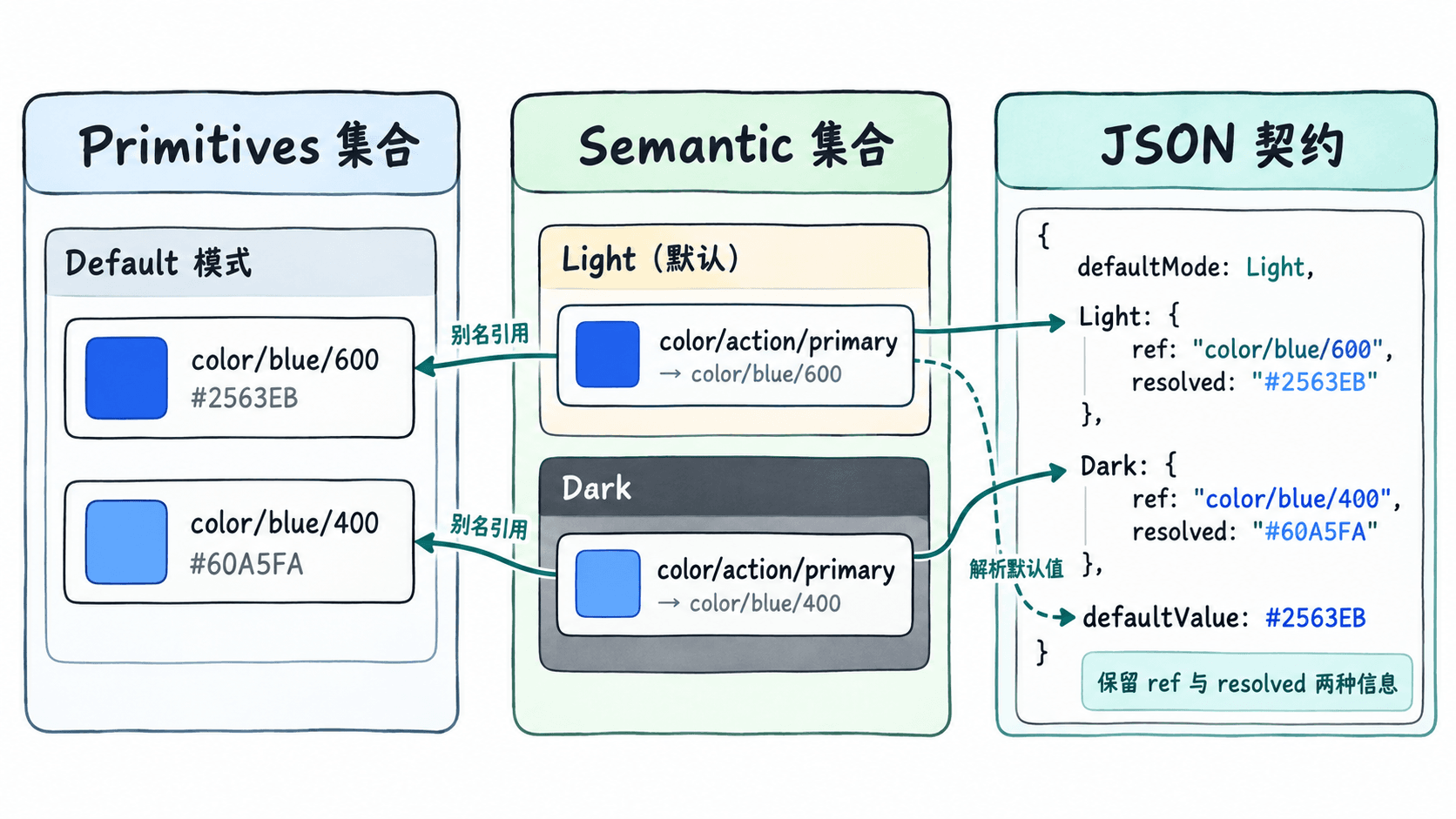
导出时按变量 ID 找到目标,再把引用写成 集合名/变量名。同集合内沿用当前模式;跨集合计算 resolved 时采用目标集合的默认模式。这个计算结果只是确定的基线快照,不等于画布上任意节点的最终显示值:节点若显式选择其他集合模式,真实结果可能不同,因此 JSON 必须保留 ref,不能只留快照。
在 Figma 开发插件中导出
适用于支持异步 Variables Plugin API 的 Figma Design。通过 Plugins → Development → New plugin 创建开发插件,保留 Figma 自动分配的插件 ID;让 manifest.json 的 main 指向 code.js,并设置 documentAccess 为 dynamic-page。将以下完整脚本存成 code.js,从 Development 菜单运行。
(async () => {
  const collections = await figma.variables.getLocalVariableCollectionsAsync();
  const variables = await figma.variables.getLocalVariablesAsync();
  if (collections.some(c => c.isExtension)) {
    throw new Error("此示例不支持扩展集合及继承覆盖值");
  }

  const byCollection = new Map(collections.map(c => [c.id, c]));
  const byId = new Map(variables.map(v => [v.id, v]));
  const byName = (a, b) => a.name < b.name ? -1 : a.name > b.name ? 1 : 0;
  const has = (obj, key) => Object.prototype.hasOwnProperty.call(obj, key);
  const pathOf = v => `${byCollection.get(v.variableCollectionId).name}/${v.name}`;
  const isAlias = x => x && typeof x === "object" && x.type === "VARIABLE_ALIAS";

  if (new Set(collections.map(c => c.name)).size !== collections.length) {
    throw new Error("集合名称重复");
  }
  const paths = new Set();
  for (const v of variables) {
    if (!byCollection.has(v.variableCollectionId)) continue;
    const path = pathOf(v);
    if (paths.has(path)) throw new Error(`Token 路径冲突:${path}`);
    paths.add(path);
  }

  function read(v, modeId) {
    if (!has(v.valuesByMode, modeId)) {
      throw new Error(`模式缺少值:${pathOf(v)} @ ${modeId}`);
    }
    return v.valuesByMode[modeId];
  }

  function scalar(v, raw) {
    if (v.resolvedType === "COLOR") {
      if (!raw || typeof raw.r !== "number" ||
          typeof raw.g !== "number" || typeof raw.b !== "number") {
        throw new Error(`不支持的颜色值:${pathOf(v)}`);
      }
      const byte = n => {
        if (!Number.isFinite(n) || n < 0 || n > 1) throw new Error("颜色通道越界");
        return Math.round(n * 255).toString(16).padStart(2, "0").toUpperCase();
      };
      const rgb = "#" + [raw.r, raw.g, raw.b].map(byte).join("");
      return raw.a === undefined || raw.a === 1 ? rgb : rgb + byte(raw.a);
    }
    const types = {FLOAT: "number", STRING: "string", BOOLEAN: "boolean"};
    if (typeof raw !== types[v.resolvedType]) {
      throw new Error(`值类型不匹配:${pathOf(v)}`);
    }
    return raw;
  }

  // 沿别名链求基线快照;跨集合只选目标集合的默认模式。
  function resolve(v, modeId, seen = new Set()) {
    const stamp = `${v.id}@${modeId}`;
    if (seen.has(stamp)) throw new Error(`别名循环:${pathOf(v)}`);
    const nextSeen = new Set(seen);
    nextSeen.add(stamp);
    const raw = read(v, modeId);
    if (!isAlias(raw)) return scalar(v, raw);
    const target = byId.get(raw.id);
    if (!target || !byCollection.has(target.variableCollectionId)) {
      throw new Error(`引用了未导出的变量:${pathOf(v)}`);
    }
    if (target.resolvedType !== v.resolvedType) {
      throw new Error(`别名类型不一致:${pathOf(v)}`);
    }
    const nextMode = target.variableCollectionId === v.variableCollectionId
      ? modeId : byCollection.get(target.variableCollectionId).defaultModeId;
    return resolve(target, nextMode, nextSeen);
  }

  const result = {
    schemaVersion: "1.0",
    collections: collections.slice().sort(byName).map(c => {
      const modes = c.modes.slice().sort(byName);
      const defaultMode = c.modes.find(m => m.modeId === c.defaultModeId);
      if (!defaultMode || new Set(modes.map(m => m.name)).size !== modes.length) {
        throw new Error(`模式名称或默认模式无效:${c.name}`);
      }
      const tokens = variables.filter(v => v.variableCollectionId === c.id)
        .sort(byName).map(v => {
          const values = {};
          for (const mode of modes) {
            const raw = read(v, mode.modeId);
            const resolved = resolve(v, mode.modeId);
            values[mode.name] = isAlias(raw)
              ? {ref: pathOf(byId.get(raw.id)), resolved}
              : {value: resolved};
          }
          return {
            name: v.name,
            type: v.resolvedType,
            defaultValue: resolve(v, c.defaultModeId),
            values
          };
        });
      return {name: c.name, defaultMode: defaultMode.name,
        modes: modes.map(m => m.name), tokens};
    })
  };

  // 把导出内容交给插件窗口,复制后保存为 tokens.json。
  figma.showUI(
    `<textarea id="out" readonly style="width:100%;height:100%;box-sizing:border-box"></textarea>
<script>onmessage=e=>{const m=e.data.pluginMessage;if(m&&m.type==="export")document.getElementById("out").value=m.json;}</script>`,
    {width: 620, height: 450}
  );
  figma.ui.postMessage({type: "export", json: JSON.stringify(result, null, 2)});
})().catch(error => {
  console.error(error);
  figma.closePlugin(`导出失败:${error.message}`);
});
预期结果:插件弹窗显示格式化 JSON。若文件按前述表格建立变量,导出内容为:
{
  "schemaVersion": "1.0",
  "collections": [
    {
      "name": "Primitives",
      "defaultMode": "Default",
      "modes": ["Default"],
      "tokens": [
        {
          "name": "color/blue/400",
          "type": "COLOR",
          "defaultValue": "#60A5FA",
          "values": {"Default": {"value": "#60A5FA"}}
        },
        {
          "name": "color/blue/600",
          "type": "COLOR",
          "defaultValue": "#2563EB",
          "values": {"Default": {"value": "#2563EB"}}
        }
      ]
    },
    {
      "name": "Semantic",
      "defaultMode": "Light",
      "modes": ["Dark", "Light"],
      "tokens": [
        {
          "name": "color/action/primary",
          "type": "COLOR",
          "defaultValue": "#2563EB",
          "values": {
            "Dark": {
              "ref": "Primitives/color/blue/400",
              "resolved": "#60A5FA"
            },
            "Light": {
              "ref": "Primitives/color/blue/600",
              "resolved": "#2563EB"
            }
          }
        }
      ]
    }
  ]
}
验证后提交到仓库
在弹窗内点击文本区域,使用 Ctrl+A、Ctrl+C(macOS 用 Cmd+A、Cmd+C),将内容保存为仓库根目录下的 tokens.json。用 Node.js 18 或更高版本在仓库根目录运行下列命令,检查 JSON 语法、默认模式和全部引用目标。
node -e "const d=require('./tokens.json');const keys=new Set(d.collections.flatMap(c=>c.tokens.map(t=>c.name+'/'+t.name)));for(const c of d.collections){if(!c.modes.includes(c.defaultMode))throw Error('defaultMode: '+c.name);for(const t of c.tokens)for(const m of c.modes){const x=t.values[m];if(!x)throw Error('mode: '+t.name);if(x.ref&&!keys.has(x.ref))throw Error('ref: '+x.ref);}}console.log('PASS:',keys.size,'tokens')"预期输出(上述三变量示例):
PASS: 3 tokens再次运行插件并替换同一个文件,执行 git diff -- tokens.json;未修改 Figma 变量时应没有内容差异。排序固定了集合、变量和模式的输出顺序,可避免纯粹因遍历顺序引起的变更。
遇到无法解析的输入怎么办
这份最小实现只导出普通本地集合。别名指向外部库变量、扩展集合的继承覆盖、组合颜色对象均不应静默当成默认值;需要先扩展对应的读取逻辑,或者明确把它们排除在当前交付范围之外。循环引用、类型冲突、缺少模式值或 集合名/变量名 路径重名会直接中止导出。
提交前确认:默认模式和 Figma 一致;切换 Semantic 的 Dark 后仅对应模式内容变化;修改 Primitives/color/blue/600 后,语义变量的 ref 保持原样,而相关 resolved 与 defaultValue 随之更新。