
计算机视觉 / 系统课时
检查标注质量
检查标注质量
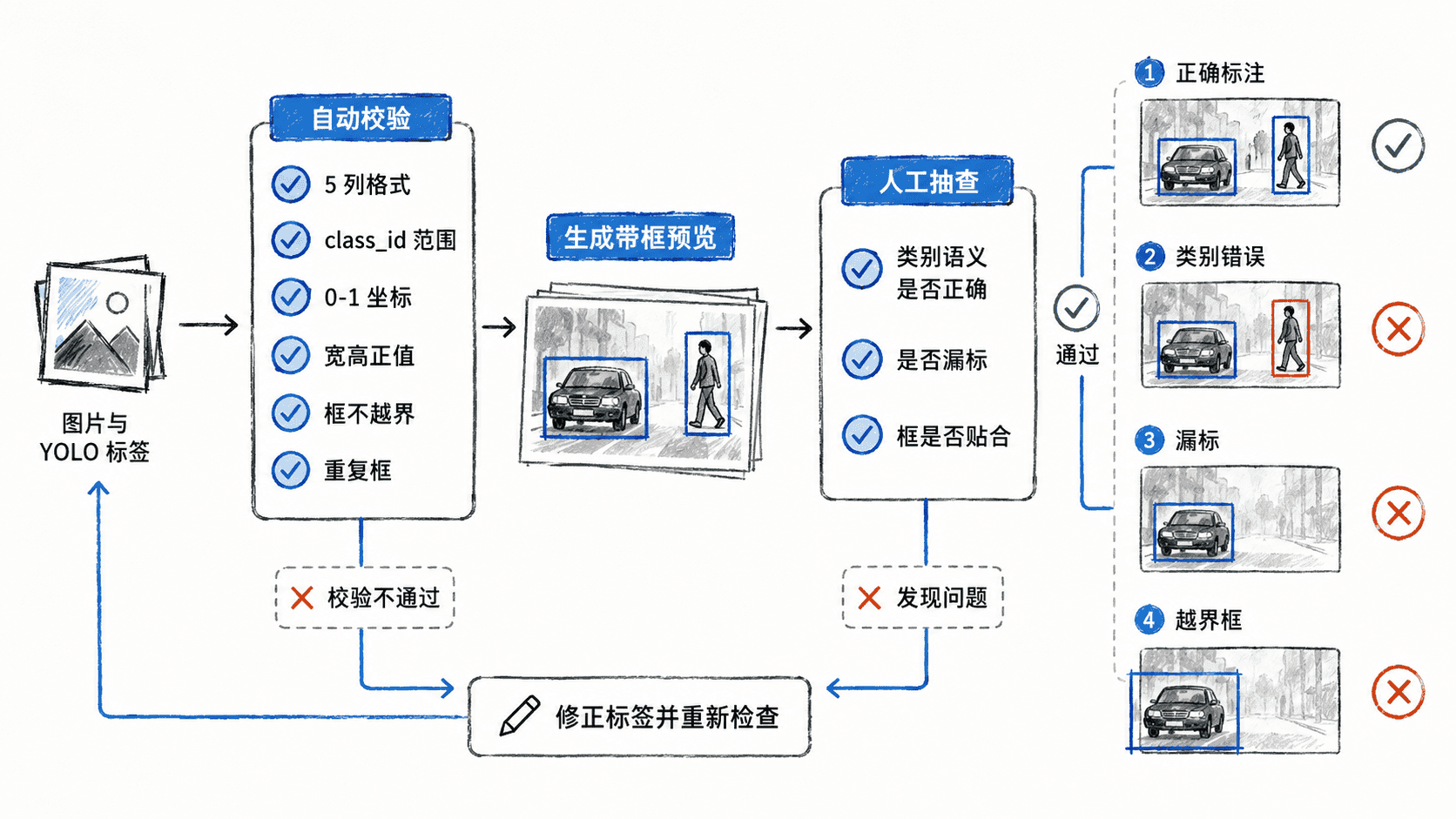
标注质量检查要同时解决两类问题:自动规则能发现格式错误、越界框和非法类别,可视化才能发现“框合法但语义错”的类别误标、漏标和框偏移。本节建立一套可重复流程,并生成带框预览图用于人工抽查。
学习目标
- 用自动规则定位非法类别、坏坐标、重复框和缺失标签
- 将 YOLO 归一化坐标还原到图片并生成可视化预览
- 区分自动校验能发现的问题与必须人工判断的问题
按错误类型选择检查手段
格式类错误适合自动检查,例如一行不是 5 列、类别 ID 超出范围、宽高小于等于 0、边界框超出图片。重复框也可以按坐标近似自动发现。
类别语义错误、漏标、目标框是否贴合,则需要看图。一个框即使五个数都合法,也可能把“狗”标成“猫”,或者漏掉画面中的第二个目标,因此不能只依赖脚本通过率。
运行自动校验并生成预览
下面的脚本读取图片目录、同名 YOLO 标签目录和类别名称文件,检查常见结构问题,同时把合法框画到预览图。示例依赖 Pillow,运行前需确保环境中已有 PIL 模块。
python
import argparse
from pathlib import Path

from PIL import Image, ImageDraw

IMAGE_SUFFIXES = {".jpg", ".jpeg", ".png", ".bmp", ".webp"}

def parse_label_line(line, line_no, num_classes):
    parts = line.split()
    if len(parts) != 5:
        return None, f"line {line_no}: expected 5 fields"

    try:
        class_id = int(parts[0])
        cx, cy, bw, bh = map(float, parts[1:])
    except ValueError:
        return None, f"line {line_no}: invalid numeric value"

    if not 0 <= class_id < num_classes:
        return None, f"line {line_no}: class_id out of range"
    if bw <= 0 or bh <= 0:
        return None, f"line {line_no}: width/height must be > 0"
    if not all(0.0 <= value <= 1.0 for value in (cx, cy, bw, bh)):
        return None, f"line {line_no}: normalized value out of range"

    x1, y1 = cx - bw / 2, cy - bh / 2
    x2, y2 = cx + bw / 2, cy + bh / 2
    if x1 < 0 or y1 < 0 or x2 > 1 or y2 > 1:
        return None, f"line {line_no}: box crosses image boundary"

    return (class_id, cx, cy, bw, bh), None

def audit_image(image_path, label_path, out_path, class_names):
    image = Image.open(image_path).convert("RGB")
    draw = ImageDraw.Draw(image)
    width, height = image.size
    issues = []

    if not label_path.exists():
        return ["missing label file"]

    raw_lines = [
        line.strip()
        for line in label_path.read_text(encoding="utf-8").splitlines()
        if line.strip()
    ]
    seen = set()

    for line_no, line in enumerate(raw_lines, start=1):
        item, error = parse_label_line(line, line_no, len(class_names))
        if error:
            issues.append(error)
            continue

        # 用舍入后的键检测几乎完全相同的重复标注。
        duplicate_key = tuple(
            round(value, 6) if isinstance(value, float) else value
            for value in item
        )
        if duplicate_key in seen:
            issues.append(f"line {line_no}: duplicate box")
        seen.add(duplicate_key)

        class_id, cx, cy, bw, bh = item
        x1 = int((cx - bw / 2) * width)
        y1 = int((cy - bh / 2) * height)
        x2 = int((cx + bw / 2) * width)
        y2 = int((cy + bh / 2) * height)
        draw.rectangle((x1, y1, x2, y2), outline="red", width=3)
        draw.text((x1 + 4, y1 + 4), class_names[class_id], fill="red")

    out_path.parent.mkdir(parents=True, exist_ok=True)
    image.save(out_path)
    return issues

def main():
    parser = argparse.ArgumentParser()
    parser.add_argument("--images", required=True)
    parser.add_argument("--labels", required=True)
    parser.add_argument("--names", required=True)
    parser.add_argument("--out", required=True)
    args = parser.parse_args()

    images_dir = Path(args.images)
    labels_dir = Path(args.labels)
    out_dir = Path(args.out)
    class_names = [
        line.strip()
        for line in Path(args.names).read_text(encoding="utf-8").splitlines()
        if line.strip()
    ]
    total_images = 0
    issue_count = 0

    for image_path in sorted(images_dir.iterdir()):
        if image_path.suffix.lower() not in IMAGE_SUFFIXES:
            continue
        total_images += 1
        label_path = labels_dir / f"{image_path.stem}.txt"
        out_path = out_dir / image_path.name
        issues = audit_image(image_path, label_path, out_path, class_names)
        for issue in issues:
            issue_count += 1
            print(f"{image_path.name}: {issue}")

    print(f"checked_images={total_images}")
    print(f"issues={issue_count}")
    print(f"preview_dir={out_dir}")

if __name__ == "__main__":
    main()
运行检查:
bash
python audit_yolo.py --images <PATH>/images/train --labels <PATH>/labels/train --names <PATH>/classes.txt --out <PATH>/audit-preview预期输出会随数据集变化;若某张图存在问题,会先打印具体原因,最后给出汇总:
text
<IMAGE>.jpg: line 2: box crosses image boundary
<IMAGE>.jpg: line 5: duplicate box
checked_images=<VALUE>
issues=<VALUE>
preview_dir=<PATH>/audit-preview<PATH>、<IMAGE> 和 <VALUE> 是动态值,实际结果可能不同。
用预览图找自动规则发现不了的问题
打开 <PATH>/audit-preview 后,优先抽查目标密集图、小目标、边缘目标和遮挡目标。这些样本最容易暴露漏标、框偏移以及类别语义错误。
人工查看时不要只判断“有没有框”,还要确认框内目标与显示的类别名称一致。若数据由多人标注,优先抽查不同标注人员、不同日期或不同来源的数据,能更快发现标准不一致。
建立可执行的质量门槛
一次性抽查无法保证后续新增数据仍然稳定。更可靠的流程是每次合并标注数据前都执行:全量自动校验、按风险抽取预览图、人工复核、回修标签、重新检查。
门槛可以定义得很明确:非法类别、坏坐标、越界框和重复框必须为 0;漏标与类别语义错误通过人工抽检控制。这样“能被训练器读取”只是最低要求,真正进入训练集的数据还要同时满足几何正确、类别正确和覆盖完整。
按自己的节奏,确认真正理解。