
Vue / 系统课时
编写业务流程测试
编写业务流程测试
本课使用 Playwright 把登录、用户查询和资料编辑串成一条可重复执行的浏览器测试。完成后,你将能验证页面跳转、接口交互和关键反馈,降低核心业务在迭代中的回归风险。
学习目标
- 配置 Playwright 启动并访问 Vue 3 管理后台
- 用稳定选择器串联登录、查询和编辑流程
- 通过网络桩和结果断言定位流程失败环节
明确一条可验收流程
业务流程测试关注多个页面和模块能否协同完成用户目标。本课的验收链路是:提交登录表单后进入用户列表,输入关键字得到目标记录,打开编辑表单并保存,最后看到成功反馈。
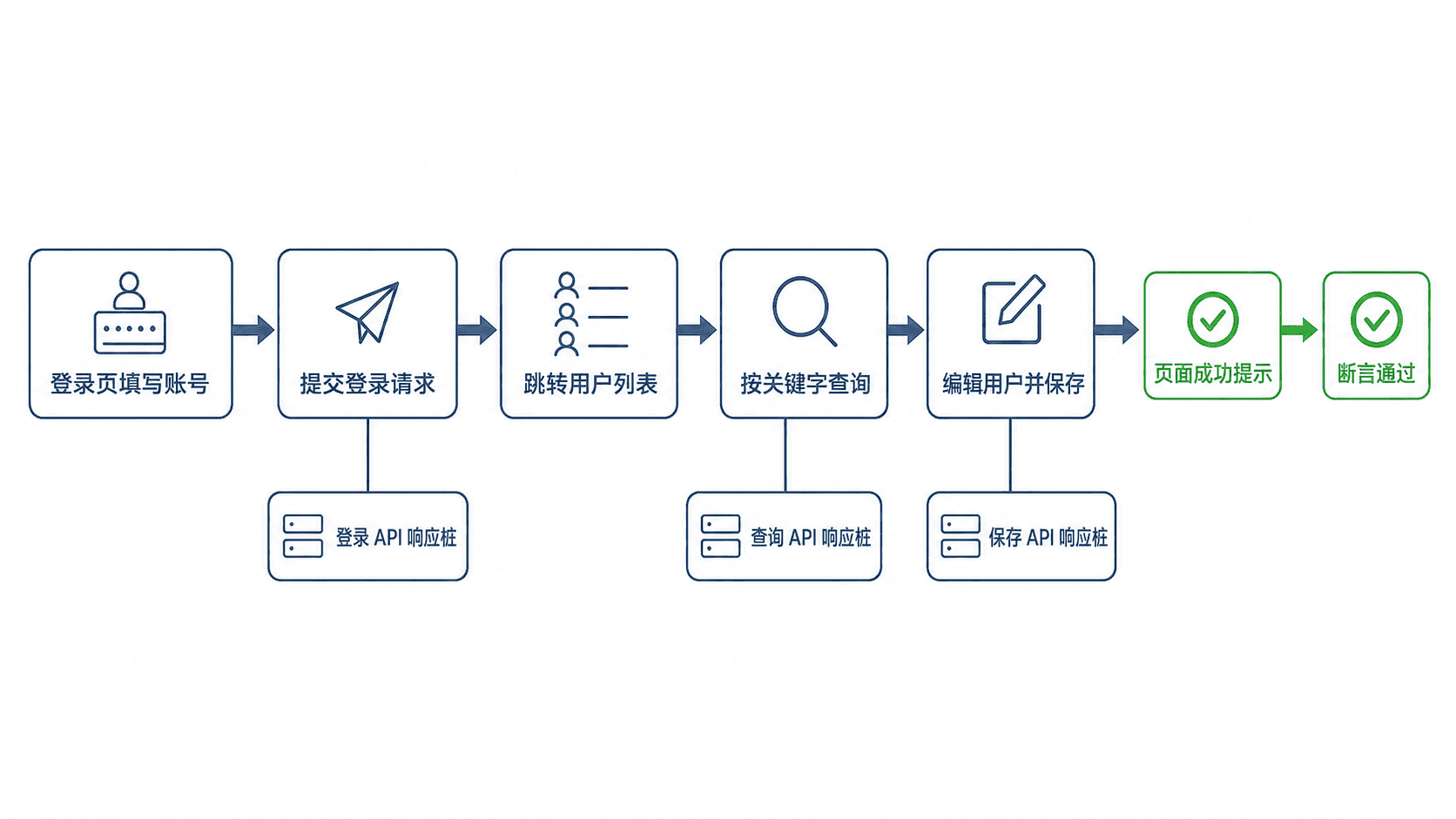
为了让示例稳定运行,页面需提供这些测试定位点:username、password、login-submit、search-keyword、search-submit、user-row-1、edit-user-1、edit-name、edit-save 和 save-toast。这些值应绑定到对应元素的 data-testid。
安装并配置 Playwright
安装测试包和 Chromium 浏览器:
npm install -D @playwright/test
npx playwright install chromium
预期结果:
两条命令均以退出码 0 结束;项目可执行 npx playwright test,且 Chromium 浏览器已安装。在项目根目录创建 playwright.config.ts。以下为片段示例:
import { defineConfig, devices } from '@playwright/test'

export default defineConfig({
  testDir: './e2e',
  fullyParallel: true,
  retries: process.env.CI ? 2 : 0,
  reporter: 'list',
  use: {
    baseURL: 'http://127.0.0.1:4173',
    trace: 'on-first-retry',
  },
  projects: [
    {
      name: 'chromium',
      use: { ...devices['Desktop Chrome'] },
    },
  ],
  webServer: {
    command: 'npm run dev -- --host 127.0.0.1 --port 4173',
    url: 'http://127.0.0.1:4173',
    reuseExistingServer: !process.env.CI,
  },
})
该配置会在测试前启动开发服务器,并在 CI 失败时自动重试和保留跟踪信息。若项目启动命令不同,只需调整 webServer.command,不要在测试代码里手工启动服务。
编写核心流程用例
以下为片段示例。用例通过统一的 /api/** 路由处理器模拟后端,使前端流程在本地和 CI 中都得到确定结果。响应字段需与项目现有接口契约保持一致。
import { expect, test } from '@playwright/test'

test('登录后查询并编辑用户', async ({ page }) => {
  let lastQuery = ''
  let updatedName = ''

  await page.route('**/api/**', async route => {
    const request = route.request()
    const url = new URL(request.url())

    if (url.pathname === '/api/login' && request.method() === 'POST') {
      await route.fulfill({
        status: 200,
        contentType: 'application/json',
        body: JSON.stringify({
          code: 0,
          data: { token: 'e2e-token', user: { id: 1, name: 'Admin' } },
        }),
      })
      return
    }

    if (url.pathname === '/api/users' && request.method() === 'GET') {
      lastQuery = url.searchParams.get('keyword') ?? ''
      await route.fulfill({
        status: 200,
        contentType: 'application/json',
        body: JSON.stringify({
          code: 0,
          data: {
            list: [{ id: 1, name: 'Alice', role: 'admin' }],
            total: 1,
          },
        }),
      })
      return
    }

    if (url.pathname === '/api/users/1' && request.method() === 'PUT') {
      const body = request.postDataJSON() as { name: string }
      updatedName = body.name
      await route.fulfill({
        status: 200,
        contentType: 'application/json',
        body: JSON.stringify({
          code: 0,
          data: { id: 1, name: updatedName, role: 'admin' },
        }),
      })
      return
    }

    await route.fallback()
  })

  await page.goto('/login')
  await page.getByTestId('username').fill('admin')
  await page.getByTestId('password').fill('123456')
  await page.getByTestId('login-submit').click()
  await expect(page).toHaveURL(/\/users$/)

  await page.getByTestId('search-keyword').fill('Alice')
  await page.getByTestId('search-submit').click()
  await expect(page.getByTestId('user-row-1')).toContainText('Alice')
  expect(lastQuery).toBe('Alice')

  await page.getByTestId('edit-user-1').click()
  await page.getByTestId('edit-name').fill('Alice Chen')
  await page.getByTestId('edit-save').click()

  expect(updatedName).toBe('Alice Chen')
  await expect(page.getByTestId('save-toast')).toContainText('保存成功')
})
这是项目级测试文件,保存为 e2e/user-flow.spec.ts。如果项目使用不同的接口路径或响应包装结构,应同步修改网络桩,但页面操作和断言顺序不应被接口细节打乱。
运行并读取结果
执行单个业务流程测试:
npx playwright test e2e/user-flow.spec.ts --project=chromium预期输出:
Running 1 test using 1 worker
✓ [chromium] › e2e/user-flow.spec.ts:<LINE>:<COLUMN> › 登录后查询并编辑用户 (<TIME>)
1 passed (<TIME>)
<TIME> 是动态耗时。失败时先看第一个未通过的断言:URL 失败通常表示登录或路由守卫异常,列表断言失败通常表示查询参数或渲染时机异常,保存提示失败则重点检查更新请求和提交后的状态刷新。
控制稳定性与覆盖范围
流程测试应覆盖高价值主路径,而不是复制全部组件测试。输入校验、按钮禁用等细节留给单元测试;流程测试只确认关键页面、接口和状态能连通。
优先使用 data-testid、可访问角色和明确文本定位,避免依赖第几个按钮或复杂 CSS 层级。测试数据必须可重复,网络桩或专用测试环境中的初始化脚本都应保证每次运行从相同状态开始。
当本地通过而 CI 偶发失败时,不要直接增加固定等待时间。应使用 Playwright 的自动等待断言,并结合失败时生成的 trace 检查请求、DOM 和跳转顺序。