
Vue / 系统课时
加载动态菜单
加载动态菜单
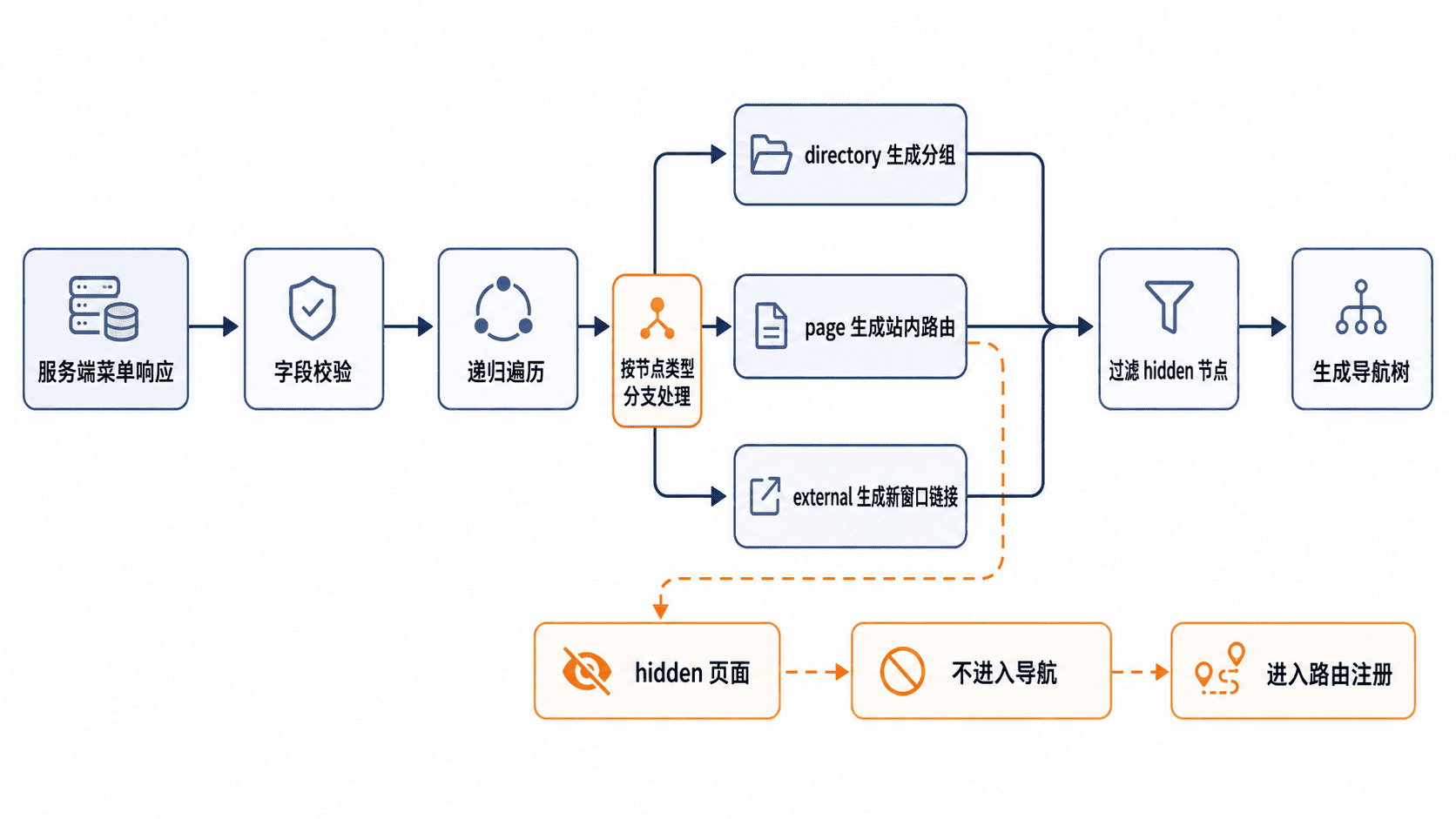
动态菜单的关键不是把接口数组直接塞进组件,而是先建立稳定协议,再把服务端节点转换为前端导航结构。本课将实现递归转换,正确处理目录、页面、外链和隐藏菜单,并说明导航与路由注册的分工。
学习目标
- 定义服务端菜单节点与前端导航节点的字段职责
- 使用递归转换目录、页面、外链和隐藏节点
- 正确分离导航过滤、路由注册、异常处理和缓存刷新
约定服务端菜单协议
服务端菜单至少需要提供唯一标识、标题、节点类型和排序后的子节点。页面节点提供路由路径,外链节点提供完整 URL,目录节点只负责组织层级。hidden 表示“不出现在导航中”,不等于“禁止注册路由”。
| 字段 | 适用节点 | 作用 |
|---|---|---|
id、title |
全部 | 生成稳定键和显示文字 |
type |
全部 | 区分 directory、page、external |
path |
页面 | 指向站内路由 |
url |
外链 | 指向站外地址 |
hidden |
全部 | 控制是否显示在导航中 |
children |
目录或页面 | 保存下一层节点 |
编写递归转换器
下面的完整 TypeScript 示例把服务端菜单转换为导航节点。目录没有可见子项时会被移除,隐藏节点不会进入导航,外链会增加新窗口打开信息。
type ServerMenuType = "directory" | "page" | "external";

interface ServerMenu {
  id: string;
  title: string;
  type: ServerMenuType;
  path?: string;
  url?: string;
  hidden?: boolean;
  children?: ServerMenu[];
}

interface NavItem {
  key: string;
  label: string;
  kind: "group" | "route" | "link";
  to?: string;
  href?: string;
  target?: "_blank";
  children?: NavItem[];
}

function toNavItems(nodes: ServerMenu[]): NavItem[] {
  return nodes.flatMap((node) => {
    if (node.hidden) {
      return [];
    }

    if (node.type === "external") {
      if (!node.url) {
        throw new Error(`外链菜单 ${node.id} 缺少 url`);
      }

      return [{
        key: node.id,
        label: node.title,
        kind: "link",
        href: node.url,
        target: "_blank",
      }];
    }

    const children = toNavItems(node.children ?? []);

    if (node.type === "directory") {
      // 空目录不应占据导航空间
      return children.length === 0
        ? []
        : [{
            key: node.id,
            label: node.title,
            kind: "group",
            children,
          }];
    }

    if (!node.path) {
      throw new Error(`页面菜单 ${node.id} 缺少 path`);
    }

    return [{
      key: node.id,
      label: node.title,
      kind: "route",
      to: node.path,
      ...(children.length > 0 ? { children } : {}),
    }];
  });
}

const serverMenus: ServerMenu[] = [
  {
    id: "system",
    title: "系统管理",
    type: "directory",
    children: [
      {
        id: "users",
        title: "用户管理",
        type: "page",
        path: "/system/users",
      },
      {
        id: "audit",
        title: "审计详情",
        type: "page",
        path: "/system/audit/:id",
        hidden: true,
      },
    ],
  },
  {
    id: "docs",
    title: "帮助文档",
    type: "external",
    url: "https://example.com/docs",
  },
];

console.log(JSON.stringify(toNavItems(serverMenus), null, 2));
预期输出
[
  {
    "key": "system",
    "label": "系统管理",
    "kind": "group",
    "children": [
      {
        "key": "users",
        "label": "用户管理",
        "kind": "route",
        "to": "/system/users"
      }
    ]
  },
  {
    "key": "docs",
    "label": "帮助文档",
    "kind": "link",
    "href": "https://example.com/docs",
    "target": "_blank"
  }
]
实际运行时可将代码保存为 dynamic-menu.ts,再使用项目已有的 TypeScript 执行环境验证。输出中的 audit 被过滤,是因为它只用于详情页跳转,不应出现在侧边导航。
分离导航生成与路由注册
同一份服务端菜单通常需要两次转换:导航转换会过滤 hidden 节点;路由转换则应保留隐藏页面,否则用户从列表页进入详情页时会匹配不到路由。不要先删除隐藏节点再把结果同时用于导航和路由。
目录节点通常不直接对应业务页面,可以映射到布局组件或仅作为导航分组。页面节点负责生成站内路由,外链节点通常只进入导航,不应交给 Vue Router 解析。若后端返回组件标识,应在前端维护白名单映射,禁止把任意字符串直接拼成动态导入路径。
处理异常、刷新与缓存
接口返回后先校验节点类型和必填字段,遇到未知类型、页面缺少 path、外链缺少 url 时应停止构建并记录明确错误。外链还应限制为允许的 http 或 https 协议,避免把不可信内容直接变成可点击地址。
菜单可以在登录完成后加载并缓存在状态管理中,但用户切换、角色变更或服务端返回权限版本变化时必须重新获取。路由已经注册过时,要先移除旧的动态路由,再注册新路由,避免旧权限页面仍可访问。
验收动态菜单
- 目录、页面和外链都能生成正确的导航节点
- 隐藏页面不显示在导航中,但对应路由仍可访问
- 空目录不会留下无效分组
- 缺失
path或url时能得到明确错误 - 退出登录或权限变化后,旧菜单和旧动态路由都会被清理