
Vue / 系统课时
处理异常路由
处理异常路由
本课为管理后台补齐异常访问出口:根路径自动进入默认首页,未登录用户回到登录页,无权限用户进入 403 页面,未知地址进入 404 页面,从而避免空白布局、死循环跳转和无法返回的错误状态。
学习目标
- 配置根路径默认重定向和 Vue Router 4 的兜底路由
- 在全局守卫中区分未登录与无权限两类状态
- 按固定用例验证正常、403、404 和登录重定向结果
明确路由处理顺序
异常路由不是统一跳到 404。路由先判断地址能否匹配,再判断访问者是否满足登录和权限条件;根路径则直接重定向到默认工作台。
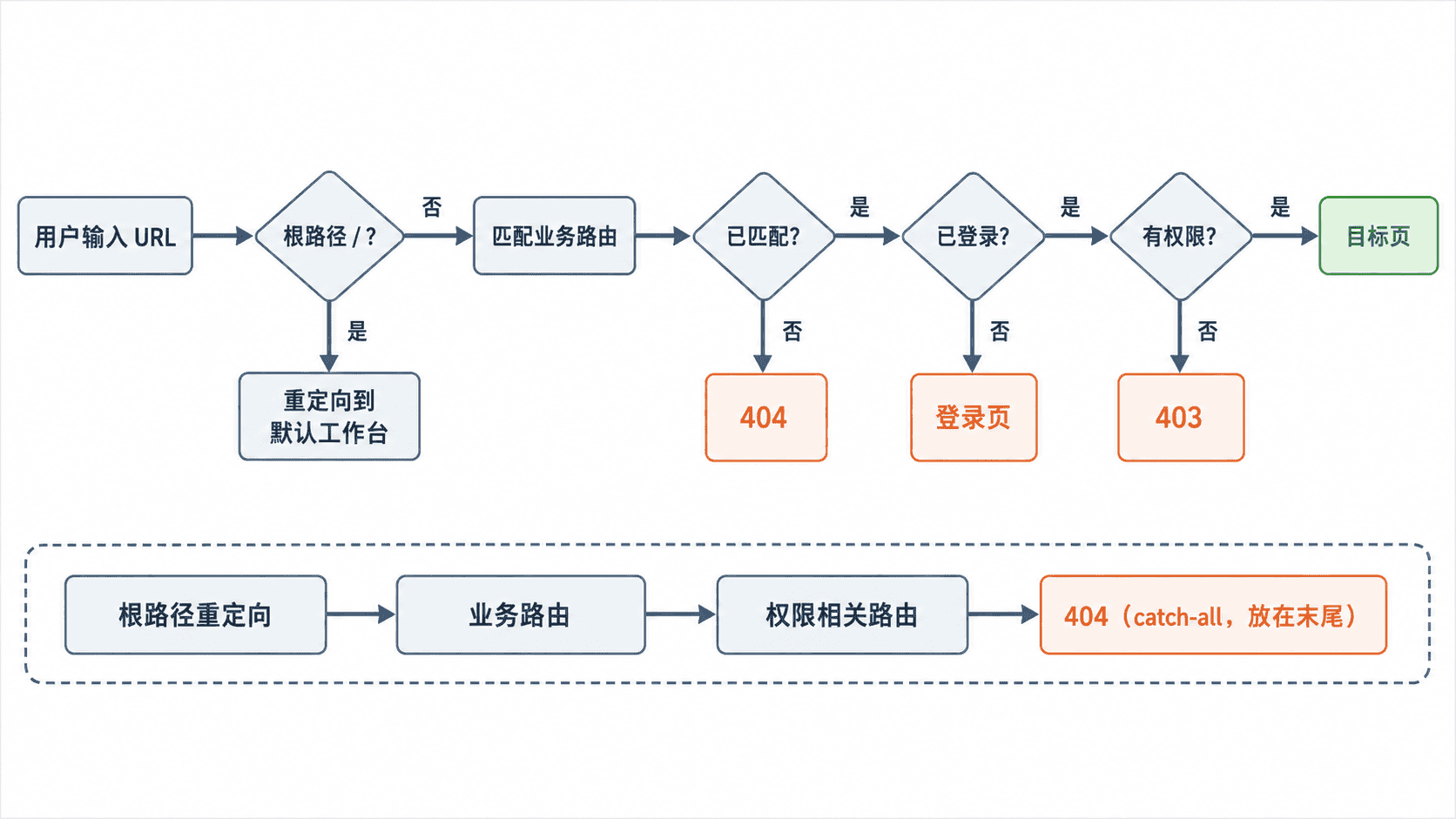
403 表示“地址存在,但当前账号没有访问权”;404 表示“没有任何路由匹配该地址”。两者混用会让用户误判问题,也会给排障增加噪声。
配置默认重定向与兜底页
下面的 src/router/index.ts 是可直接放入现有 Vue 3 项目的路由示例。它依赖 AdminLayout.vue、DashboardPage.vue、LoginPage.vue、ForbiddenPage.vue、NotFoundPage.vue 和 UserList.vue 已存在。
import { createRouter, createWebHistory, type RouteRecordRaw } from "vue-router"

const routes: RouteRecordRaw[] = [
  {
    path: "/login",
    name: "login",
    component: () => import("@/views/LoginPage.vue"),
    meta: { public: true, title: "登录" }
  },
  {
    path: "/",
    component: () => import("@/layouts/AdminLayout.vue"),
    redirect: "/dashboard",
    children: [
      {
        path: "dashboard",
        name: "dashboard",
        component: () => import("@/views/DashboardPage.vue"),
        meta: { title: "首页" }
      },
      {
        path: "system/users",
        name: "user-list",
        component: () => import("@/views/system/UserList.vue"),
        meta: {
          title: "用户管理",
          permission: "system:user:read"
        }
      }
    ]
  },
  {
    path: "/403",
    name: "forbidden",
    component: () => import("@/views/ForbiddenPage.vue"),
    meta: { public: true, title: "无权限" }
  },
  {
    path: "/:pathMatch(.*)*",
    name: "not-found",
    component: () => import("@/views/NotFoundPage.vue"),
    meta: { public: true, title: "页面不存在" }
  }
]

const router = createRouter({
  history: createWebHistory(),
  routes
})

router.beforeEach(to => {
  if (to.meta.public) return true

  const token = sessionStorage.getItem("token")
  if (!token) {
    return {
      name: "login",
      query: { redirect: to.fullPath }
    }
  }

  const required = to.meta.permission as string | undefined
  const permissions = JSON.parse(
    sessionStorage.getItem("permissions") ?? "[]"
  ) as string[]

  if (required && !permissions.includes(required)) {
    return { name: "forbidden", replace: true }
  }

  return true
})

export default router
预期结果
访问 /                     -> 自动进入 /dashboard
访问不存在的 /abc/def      -> 显示 404 页面
未登录访问 /system/users   -> 进入登录页,并保留 redirect 查询参数
已登录但缺少对应权限        -> 显示 403 页面
权限满足                    -> 正常进入用户管理页面
浏览器显示的查询参数可能经过 URL 编码,但 route.query.redirect 读取到的仍是原始目标地址。/:pathMatch(.*)* 必须放在最后,否则它会提前吞掉后续业务路由。
登录后返回原目标页
登录成功后读取 redirect,没有该参数时回到默认首页。这样用户不会因为登录中断而丢失原本要访问的位置。
import { useRoute, useRouter } from "vue-router"

const route = useRoute()
const router = useRouter()

async function handleLoginSuccess(): Promise<void> {
  sessionStorage.setItem("token", "<ID>")
  const target = typeof route.query.redirect === "string"
    ? route.query.redirect
    : "/dashboard"

  await router.replace(target)
}
预期结果
从 /system/users 被送到登录页后,登录成功返回 /system/users。
直接打开登录页并完成登录时,进入 /dashboard。
示例中的 <ID> 代表实际登录接口返回的令牌。生产项目应由认证状态管理模块负责保存令牌和权限,不要在多个页面重复读写存储。
设计可恢复的错误页面
403 页面至少提供“返回上一页”和“返回首页”;404 页面至少显示当前地址无匹配结果,并提供“返回首页”。不要让错误页再次受业务权限限制,否则守卫可能在 403 与登录页之间循环跳转。
联调时建议清空 sessionStorage、分别写入有权限和无权限的权限数组,再访问同一业务地址。若部署在 Nginx 等静态服务器上,还要把未知请求回退到 index.html,否则刷新前端路由时会先被服务器返回 404,前端兜底路由没有机会执行。