
Vue / 系统课时
组织接口模块
组织接口模块
当后台功能从用户列表扩展到角色、菜单和权限时,把所有请求写在一个文件里会迅速失控。本课将按业务域拆分接口、请求类型和公共响应结构,让页面只依赖清晰的模块入口,并能在编译阶段发现参数或字段错误。
学习目标
- 按用户、角色和菜单划分独立接口模块
- 使用 TypeScript 约束请求参数与响应数据
- 建立稳定的导出边界,避免页面直接拼接接口细节
确定模块边界
接口模块应按业务能力拆分,而不是按 HTTP 方法拆分。用户模块负责用户查询与维护,角色模块负责角色数据,菜单模块负责菜单树;分页结构、统一响应等跨业务类型放在公共文件中。推荐目录如下:
text
src/api/
├── http.ts
├── types.ts
├── user/
│   ├── index.ts
│   └── types.ts
├── role/
│   ├── index.ts
│   └── types.ts
└── menu/
    ├── index.ts
    └── types.ts
页面组件只导入对应业务模块,不直接访问 Axios 实例,也不在组件中重复声明接口路径。
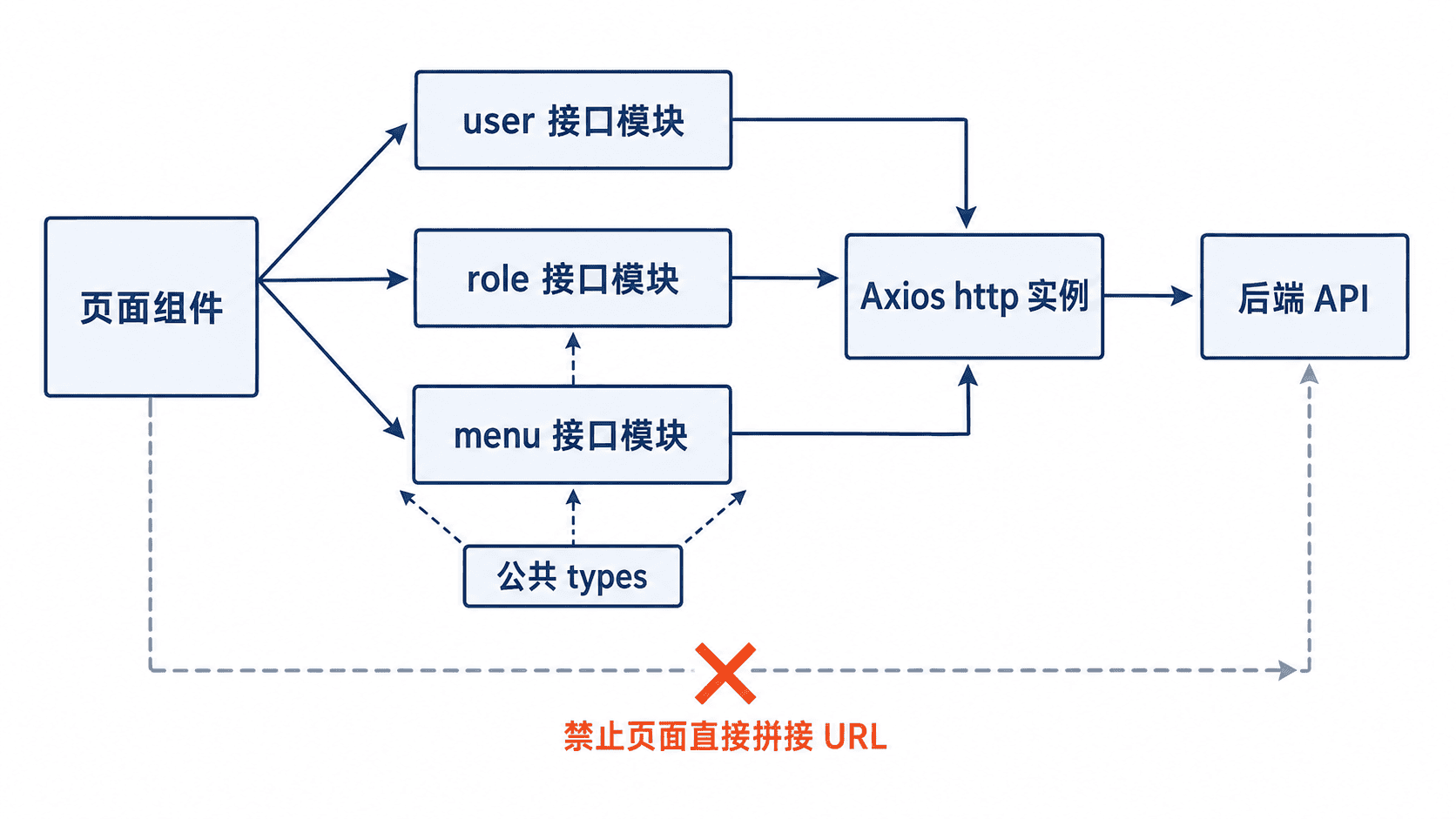
定义公共类型与请求实例
以下是项目文件片段,依赖已安装的 axios 和 Vue 3 TypeScript 工程。请求实例只负责基础地址、超时等通用配置,业务数据类型不应写入该文件。
ts
// src/api/http.ts
import axios from 'axios'

export const http = axios.create({
  baseURL: import.meta.env.VITE_API_BASE_URL,
  timeout: 10_000
})

// src/api/types.ts
export interface ApiResponse<T> {
  code: number
  message: string
  data: T
}

export interface PageQuery {
  page: number
  pageSize: number
}

export interface PageResult<T> {
  list: T[]
  total: number
}
ApiResponse<T> 描述统一响应外壳,PageResult<T> 描述分页数据。具体业务类型继续留在各自模块中,避免公共文件逐渐变成无法维护的“大杂烩”。
建立用户、角色与菜单模块
每个模块同时导出类型和请求函数。函数名表达业务动作,调用方不需要知道 URL、请求方法或响应嵌套层级。
ts
// src/api/user/types.ts
import type { PageQuery } from '../types'

export interface User {
  id: string
  username: string
  displayName: string
  enabled: boolean
}

export interface UserPageQuery extends PageQuery {
  keyword?: string
  roleId?: string
}

export interface CreateUserInput {
  username: string
  displayName: string
  roleIds: string[]
}

// src/api/user/index.ts
import { http } from '../http'
import type { ApiResponse, PageResult } from '../types'
import type { CreateUserInput, User, UserPageQuery } from './types'

export function getUserPage(params: UserPageQuery) {
  return http.get<ApiResponse<PageResult<User>>>('/users', { params })
}

export function createUser(data: CreateUserInput) {
  return http.post<ApiResponse<User>>('/users', data)
}

export type { CreateUserInput, User, UserPageQuery }

// src/api/role/types.ts
export interface Role {
  id: string
  name: string
  code: string
}

// src/api/role/index.ts
import { http } from '../http'
import type { ApiResponse } from '../types'
import type { Role } from './types'

export function getRoleOptions() {
  return http.get<ApiResponse<Role[]>>('/roles/options')
}

export type { Role }

// src/api/menu/types.ts
export interface MenuNode {
  id: string
  parentId: string | null
  name: string
  path: string
  children?: MenuNode[]
}

// src/api/menu/index.ts
import { http } from '../http'
import type { ApiResponse } from '../types'
import type { MenuNode } from './types'

export function getMenuTree() {
  return http.get<ApiResponse<MenuNode[]>>('/menus/tree')
}

export type { MenuNode }
这里保留 Axios 的原始响应,因此页面读取用户列表时使用 response.data.data.list。若项目已在响应拦截器中统一返回业务数据,应同步调整请求实例类型,不能只在运行时改变返回值而保留错误的静态类型。
在页面中消费类型化接口
页面只关心查询条件和业务结果。参数少字段、字段类型错误或访问不存在的响应属性时,TypeScript 会在构建前给出提示。
ts
import { ref } from 'vue'
import { getUserPage, type User } from '@/api/user'

const users = ref<User[]>([])
const total = ref(0)

export async function loadUsers() {
  const response = await getUserPage({
    page: 1,
    pageSize: 20,
    keyword: 'admin'
  })

  users.value = response.data.data.list
  total.value = response.data.data.total
}
预期结果
text
请求参数被约束为 UserPageQuery,响应列表被推断为 User[]。
调用 loadUsers() 后,users 与 total 分别接收分页列表和总数。
执行类型检查
完成拆分后运行类型检查,确认路径别名、导出关系和泛型响应都能正确解析。
bash
npx vue-tsc --noEmit预期输出
text
命令退出码为 0,终端不输出类型错误。若出现“找不到模块”,先检查目录层级与 @ 别名;若响应字段报错,则核对后端真实结构和响应拦截器的返回值,不要用 any 跳过问题。
按自己的节奏,确认真正理解。