
Vue / 系统课时
生成侧边导航
生成侧边导航
本节把路由配置转换为可渲染的侧边菜单树。你将统一定义标题、图标、隐藏状态和外链信息,再通过递归组件处理任意层级菜单与展开状态,避免手工维护一份容易失配的导航配置。
学习目标
- 使用路由元信息描述菜单标题、图标、隐藏项和外链。
- 把嵌套路由递归转换为稳定的菜单数据。
- 实现多级菜单展开、内部跳转与外链打开。
设计路由元信息
菜单只需要读取展示相关字段,不应把权限判断、业务数据和组件实例混入 meta。先扩展 RouteMeta,让 TypeScript 能检查每条菜单路由的字段类型。
ts
// src/types/router.d.ts
import 'vue-router'

declare module 'vue-router' {
  interface RouteMeta {
    title: string
    icon?: string
    hidden?: boolean
    external?: string
  }
}

export {}配置示例中,hidden 用于隐藏详情页等非导航入口,external 表示点击后打开外部地址。图标暂用字符,项目接入图标库后可把它替换为组件键名。
ts
// src/router/routes.ts
import type { RouteRecordRaw } from 'vue-router'

export const routeRecords: RouteRecordRaw[] = [
  {
    path: '/system',
    name: 'system',
    component: () => import('@/layouts/AdminLayout.vue'),
    meta: { title: '系统管理', icon: '⚙' },
    children: [
      {
        path: 'users',
        name: 'system-users',
        component: () => import('@/views/system/UserListView.vue'),
        meta: { title: '用户管理', icon: '👤' }
      },
      {
        path: 'users/:id',
        name: 'system-user-detail',
        component: () => import('@/views/system/UserDetailView.vue'),
        meta: { title: '用户详情', hidden: true }
      }
    ]
  },
  {
    path: '/docs',
    name: 'docs',
    component: () => import('@/views/BlankView.vue'),
    meta: {
      title: '项目文档',
      icon: '↗',
      external: 'https://example.com/docs'
    }
  }
]
递归生成菜单树
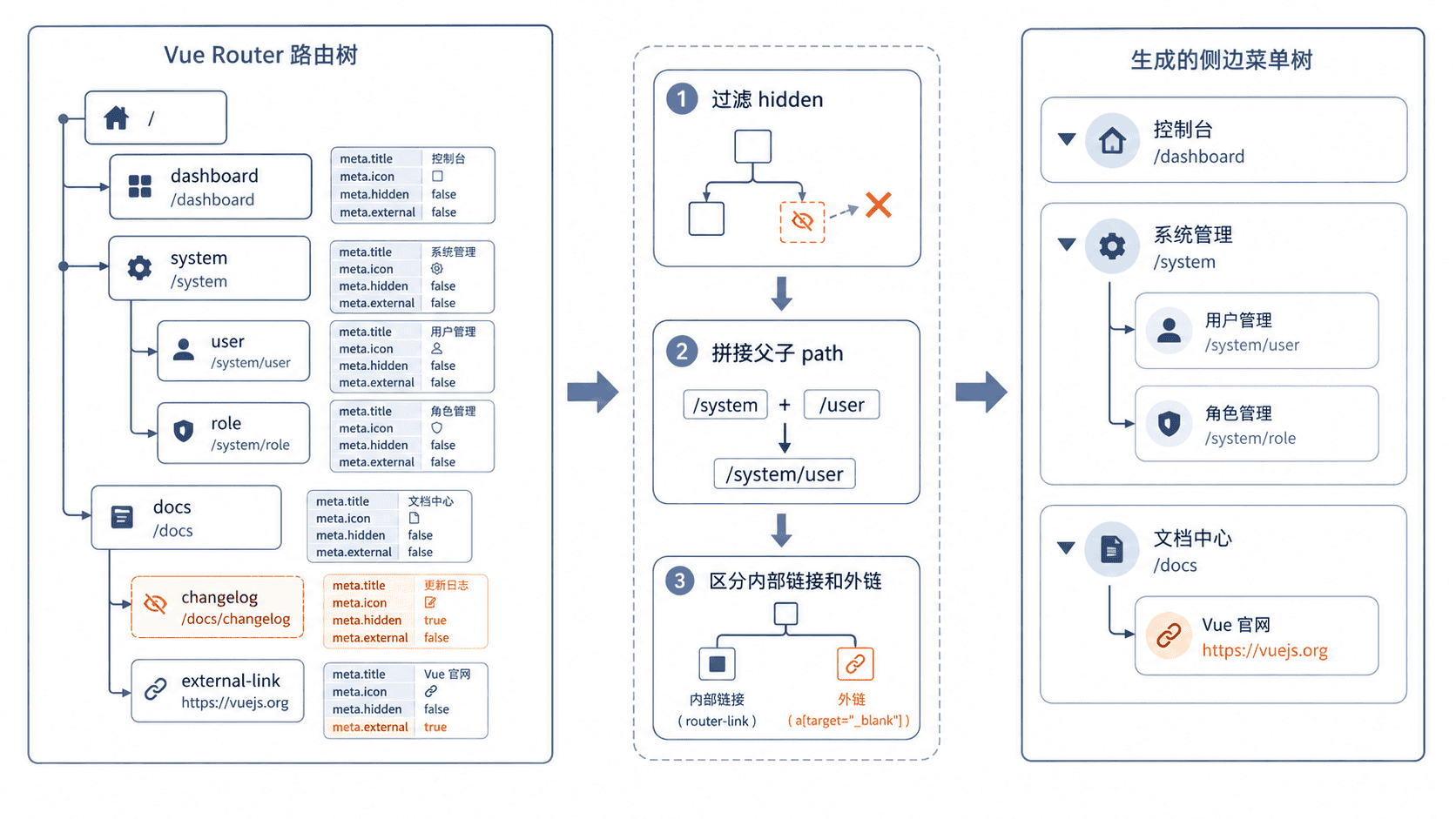
路由记录是树形结构,菜单也应保留相同层级。转换时需要过滤隐藏项、拼接相对路径,并把外链与站内地址拆成两个字段,避免渲染组件反复判断原始路由结构。
ts
// src/utils/menu.ts
import type { RouteRecordRaw } from 'vue-router'

export interface MenuItem {
  key: string
  title: string
  icon?: string
  to?: string
  external?: string
  children?: MenuItem[]
}

function joinPath(parentPath: string, childPath: string): string {
  if (childPath.startsWith('/')) return childPath

  const parent = parentPath.replace(/\/$/, '')
  const child = childPath.replace(/^\//, '')
  return `${parent}/${child}`.replace(/\/+/g, '/') || '/'
}

export function buildMenu(
  routes: RouteRecordRaw[],
  parentPath = ''
): MenuItem[] {
  return routes
    .filter((route) => !route.meta?.hidden)
    .map((route) => {
      const fullPath = joinPath(parentPath, route.path)
      const children = route.children
        ? buildMenu(route.children, fullPath)
        : []

      return {
        key: String(route.name ?? fullPath),
        title: route.meta?.title ?? String(route.name ?? fullPath),
        icon: route.meta?.icon,
        to: route.meta?.external ? undefined : fullPath,
        external: route.meta?.external,
        children: children.length > 0 ? children : undefined
      }
    })
}
预期结果
text
system
└─ system-users -> /system/users
docs             -> https://example.com/docs
system-user-detail 被 hidden 过滤,不出现在菜单中
渲染多级菜单
递归组件负责每一层菜单。父节点保存本层的展开键;有子项时切换展开状态,没有子项时根据 external 或 to 分别渲染外链和 <RouterLink>。
vue
<!-- src/components/SidebarMenuItem.vue -->
<script setup lang="ts">
import { ref } from 'vue'
import type { MenuItem } from '@/utils/menu'

defineOptions({ name: 'SidebarMenuItem' })
defineProps<{ items: MenuItem[] }>()

const openKeys = ref(new Set<string>())

function toggle(key: string): void {
  const next = new Set(openKeys.value)
  next.has(key) ? next.delete(key) : next.add(key)
  openKeys.value = next
}
</script>

<template>
  <ul class="menu-level">
    <li v-for="item in items" :key="item.key">
      <button
        v-if="item.children"
        type="button"
        :aria-expanded="openKeys.has(item.key)"
        @click="toggle(item.key)"
      >
        <span v-if="item.icon">{{ item.icon }}</span>
        {{ item.title }}
      </button>

      <a
        v-else-if="item.external"
        :href="item.external"
        target="_blank"
        rel="noopener noreferrer"
      >
        <span v-if="item.icon">{{ item.icon }}</span>
        {{ item.title }}
      </a>

      <RouterLink v-else :to="item.to ?? '/'">
        <span v-if="item.icon">{{ item.icon }}</span>
        {{ item.title }}
      </RouterLink>

      <SidebarMenuItem
        v-if="item.children && openKeys.has(item.key)"
        :items="item.children"
      />
    </li>
  </ul>
</template>
页面可见效果:点击“系统管理”后展开“用户管理”;点击用户管理进入 /system/users;点击“项目文档”在新标签页打开外链;用户详情路由不会出现在侧边栏。
实际项目还应根据当前 route.matched 自动展开祖先节点。最稳妥的做法是让菜单项的 key 与路由 name 保持一致,再根据匹配记录生成初始展开集合。
按自己的节奏,确认真正理解。