
桌面应用 / 系统课时
用 ListView 显示滚动列表
用 ListView 显示滚动列表
本节解决 QML 中大量同类数据如何高效展示的问题。通过 ListView 将模型数据转换为可滚动列表,并掌握 currentIndex、选中状态、间距和 delegate 复用等关键机制。
学习目标
- 理解 ListView 与模型、delegate 之间的关系
- 掌握滚动列表中的当前项和选中状态管理
- 了解 ListView 的布局参数与 delegate 复用方式
理解 ListView 的工作方式
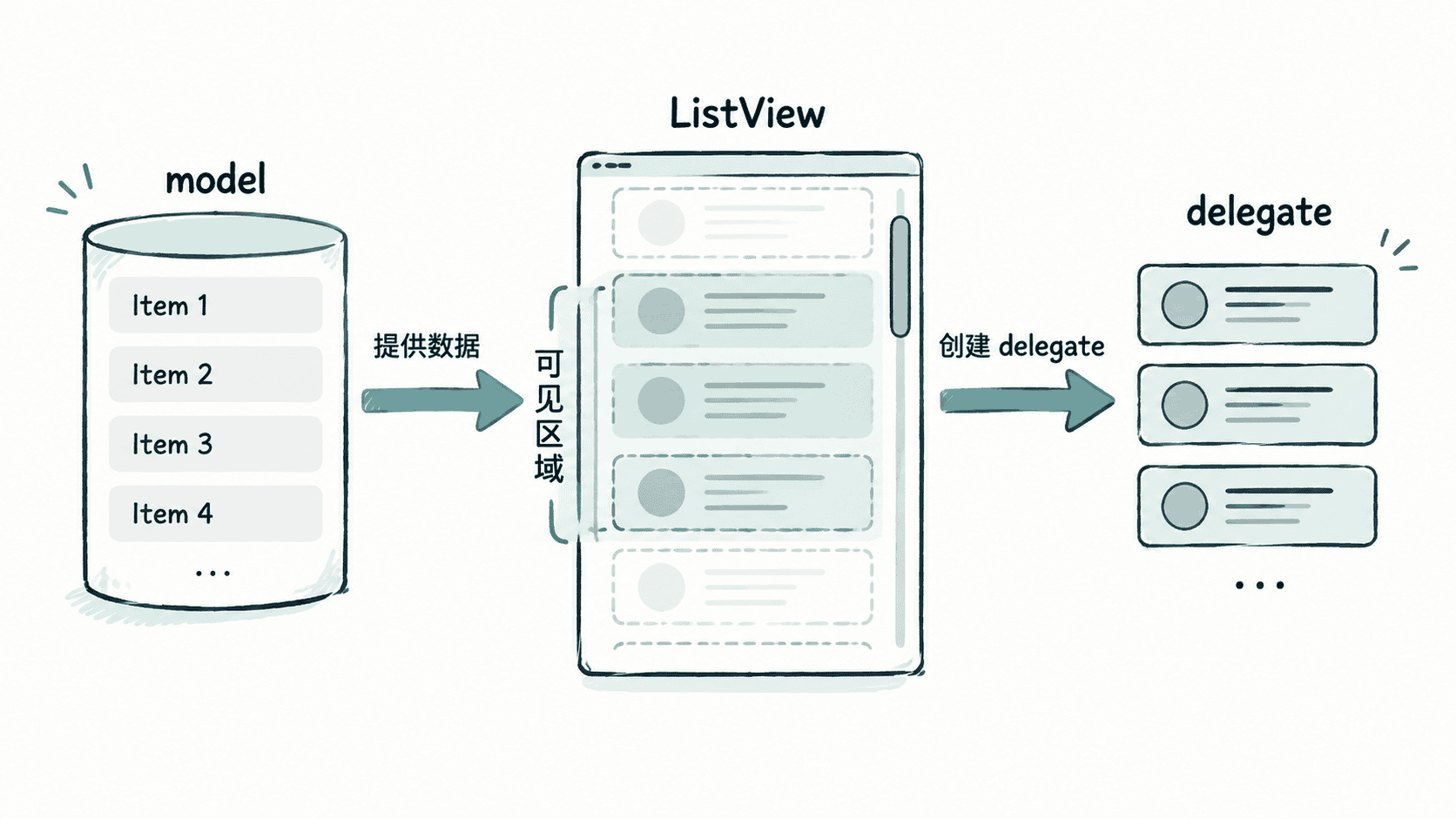
ListView 是 QML 中用于显示线性数据集合的模型视图组件。它不会直接保存每一行数据,而是通过 model 提供数据,通过 delegate 创建每个列表项的界面。
当列表数据很多时,ListView 会根据可见区域创建需要显示的 delegate,而不是一次生成全部项目。这种机制可以降低内存占用,适合消息列表、文件列表、联系人列表等场景。
一个典型的数据流关系如下:
创建一个可滚动列表
ListView 最常见的组合方式是 ListModel + delegate。下面示例创建一个简单联系人列表。
import QtQuick
import QtQuick.Controls

ApplicationWindow {
    width: 360
    height: 480
    visible: true

    ListModel {
        id: contactModel
        ListElement { name: "Alice" }
        ListElement { name: "Bob" }
        ListElement { name: "Carol" }
    }

    ListView {
        anchors.fill: parent
        model: contactModel
        spacing: 8

        delegate: Rectangle {
            width: ListView.view.width
            height: 48
            color: ListView.isCurrentItem ? "#dbeafe" : "white"

            Text {
                anchors.centerIn: parent
                text: model.name
            }

            MouseArea {
                anchors.fill: parent
                onClicked: ListView.view.currentIndex = index
            }
        }
    }
}
预期结果
窗口中显示 Alice、Bob、Carol 三个列表项。
点击某一项后,该项成为当前项,并显示选中背景效果。
管理 currentIndex 和选中状态
ListView 使用 currentIndex 表示当前活动项。它通常与键盘导航、鼠标点击或业务选择状态结合使用。
delegate 中可以通过 ListView.isCurrentItem 判断当前 delegate 是否对应选中项。实际项目中不要把业务状态全部放在 delegate 内部,而应根据需求同步模型数据或外部状态。
常见属性包括:
| 属性 | 作用 |
|---|---|
| currentIndex | 当前选中的模型索引 |
| currentItem | 当前 delegate 对象 |
| spacing | 列表项之间的间距 |
| orientation | 列表方向 |
控制列表布局和复用行为
ListView 默认垂直排列项目,也可以通过 orientation 修改为水平列表。
当 delegate 结构复杂时,应避免在 delegate 中创建大量临时对象或执行耗时逻辑,因为 delegate 会随着滚动不断创建和销毁。
如果列表数据规模较大,可以配合模型角色控制显示内容,只让 delegate 负责界面表达。例如文件浏览器中,模型负责保存文件名、大小和类型,delegate 只负责渲染一行文件信息。
使用 ListView 时的常见问题
如果点击后 currentIndex 没有变化,通常是因为点击事件没有修改 ListView.view.currentIndex,或者 MouseArea 被其他组件覆盖。
如果滚动时出现明显卡顿,需要检查 delegate 是否过重。减少嵌套布局、避免复杂动画,并把计算逻辑移动到模型层,通常可以改善性能。
ListView 适合一维连续数据展示。当数据需要二维排列或卡片式布局时,应考虑使用 GridView。