
智能制造与工业软件 / 系统课时
运行模拟设备并生成温度与运行状态
运行模拟设备并生成温度与运行状态
搭建一台只在本机开放的虚拟工业设备,让 Modbus TCP 和 OPC UA 同时读到温度、运行状态及计数器。完成后可以连续观察数据变化,核对点位地址、数据类型与缩放规则,为后续接入网关提供可重复的测试源。
学习目标
- 启动同时提供 Modbus TCP 与 OPC UA 的本地模拟服务。
- 按 1 秒周期生成温度、运行位与计数器,并定义两种协议的点位映射。
- 使用独立客户端读取、校验数据类型及数值变化。
准备环境与点位映射
使用 Python 3.11,示例固定依赖 pymodbus==3.11.4、asyncua==1.1.8。两个服务仅绑定 127.0.0.1,Modbus TCP 使用 5020(避开通常需要更高权限的 502),OPC UA 使用 4840。在独立测试目录执行:
python -m pip install pymodbus==3.11.4 asyncua==1.1.8
python -c "import pymodbus, asyncua; print('dependencies OK')"
预期结果:安装过程的下载日志可能不同,最后能看到:
dependencies OK定义虚拟设备 Machine01,全部点位由同一轮采样生成:
| 含义 | Modbus TCP 点位(从 0 编址) | OPC UA 变量 | 取值与类型 |
|---|---|---|---|
| 温度 | 输入寄存器 FC04,地址 0 |
Machine01/Temperature |
Modbus UInt16 原值除以 10 得摄氏度;UA Double |
| 运行位 | 离散输入 FC02,地址 0 |
Machine01/Running |
Modbus 1 bit;UA Boolean |
| 计数器 | 输入寄存器 FC04,地址 1 |
Machine01/Counter |
两端均按 UInt16,范围 0~65535 |
这里选只读的离散输入和输入寄存器,而不是把设备状态放进可写线圈或保持寄存器。PyModbus 3.11 的 ModbusDeviceContext 内部会把请求地址加 1,因此代码里的数据块从 1 开始,客户端仍查询 0。
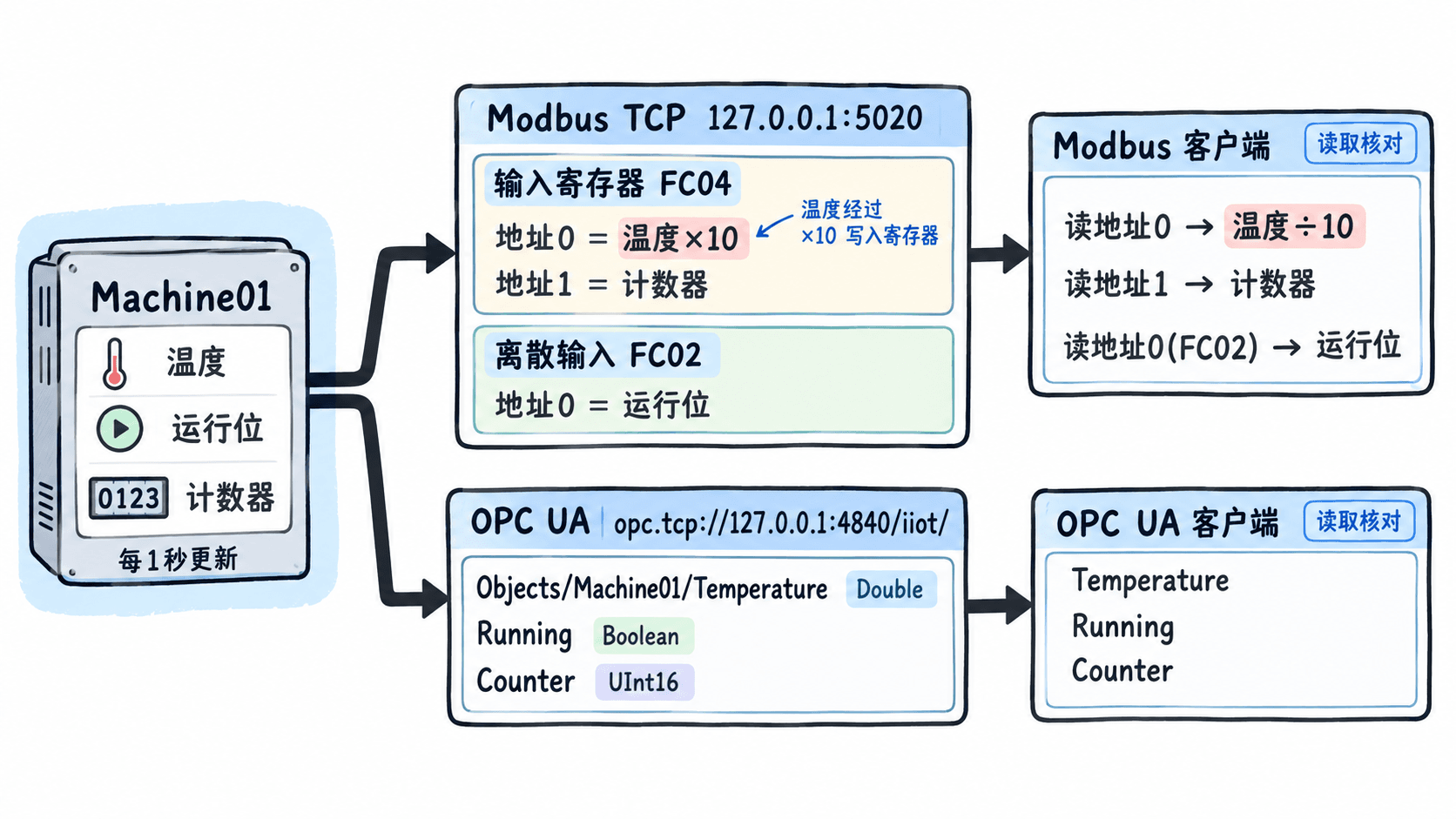
启动双协议模拟设备
把下面完整代码保存为 simulator.py。温度按 25 + 2 × sin(tick / 5) 变化,约在 23~27℃;运行位每 20 秒循环,前 15 秒为真、后 5 秒为假;计数器每秒加 1,达到 65535 后回到 0。脚本把每轮数据分别写入两种协议的数据空间。
import asyncio
import math

from asyncua import Server, ua
from pymodbus.datastore import (
    ModbusDeviceContext, ModbusSequentialDataBlock, ModbusServerContext
)
from pymodbus.server import StartAsyncTcpServer

async def main():
    device = ModbusDeviceContext(
        ir=ModbusSequentialDataBlock(1, [250, 0]),
        di=ModbusSequentialDataBlock(1, [False]),
    )
    context = ModbusServerContext(devices=device, single=True)

    server = Server()
    await server.init()
    server.set_endpoint("opc.tcp://127.0.0.1:4840/iiot/")
    ns = await server.register_namespace("urn:anystack:iiot:sim")
    machine = await server.nodes.objects.add_object(ns, "Machine01")
    temp_node = await machine.add_variable(
        ns, "Temperature", ua.Variant(25.0, ua.VariantType.Double)
    )
    running_node = await machine.add_variable(
        ns, "Running", ua.Variant(False, ua.VariantType.Boolean)
    )
    counter_node = await machine.add_variable(
        ns, "Counter", ua.Variant(0, ua.VariantType.UInt16)
    )

    async def publish():
        tick = 0
        while True:
            tick += 1
            temp = round(25 + 2 * math.sin(tick / 5), 1)
            running = tick % 20 < 15
            count = tick % 65536
            # OPC UA 保留 Double、Boolean、UInt16 数据类型。
            await temp_node.write_value(temp)
            await running_node.write_value(running)
            await counter_node.write_value(ua.Variant(count, ua.VariantType.UInt16))
            # Modbus 输入寄存器传整型,温度以 0.1℃ 为单位。
            device.setValues(4, 0, [round(temp * 10), count])
            device.setValues(2, 0, [running])
            print(f"temp={temp:.1f}C running={running} counter={count}", flush=True)
            await asyncio.sleep(1)

    async with server:
        print("OPC UA: opc.tcp://127.0.0.1:4840/iiot/")
        print("Modbus TCP: 127.0.0.1:5020")
        await asyncio.gather(
            StartAsyncTcpServer(context=context, address=("127.0.0.1", 5020)),
            publish(),
        )

if __name__ == "__main__":
    asyncio.run(main())
运行服务,并保持该终端打开:
python simulator.py预期输出(首轮温度来自给定公式,其他库日志可忽略):
OPC UA: opc.tcp://127.0.0.1:4840/iiot/
Modbus TCP: 127.0.0.1:5020
temp=25.4C running=True counter=1随后每秒增加一条采样日志。Counter 到 65535 后会回绕;这避免把 32 位计数强行塞进一个 16 位 Modbus 寄存器。
独立读取并核对类型
另开终端,将下方代码保存为 check.py。客户端必须真正走 TCP 接口,而不是读取模拟器的 Python 变量:Modbus 用功能码 04 和 02;OPC UA 通过命名空间 URI 查找节点,避免写死可能改变的命名空间索引。
import asyncio

from asyncua import Client
from pymodbus.client import ModbusTcpClient

async def main():
    mb = ModbusTcpClient("127.0.0.1", port=5020)
    if not mb.connect():
        raise ConnectionError("Modbus TCP connection failed")
    try:
        regs = mb.read_input_registers(0, count=2, device_id=1)
        bits = mb.read_discrete_inputs(0, count=1, device_id=1)
        if regs.isError() or bits.isError():
            raise RuntimeError(f"Modbus read failed: {regs}, {bits}")
        print(f"Modbus temperature={regs.registers[0] / 10:.1f}C "
              f"running={bool(bits.bits[0])} counter={regs.registers[1]}")
    finally:
        mb.close()

    async with Client("opc.tcp://127.0.0.1:4840/iiot/") as client:
        ns = await client.get_namespace_index("urn:anystack:iiot:sim")
        for name in ("Temperature", "Running", "Counter"):
            node = await client.nodes.root.get_child(
                f"0:Objects/{ns}:Machine01/{ns}:{name}"
            )
            value = await node.read_value()
            kind = await node.read_data_type_as_variant_type()
            print(f"OPC UA {name}={value} type={kind.name}")

if __name__ == "__main__":
    asyncio.run(main())
执行:
python check.py预期输出格式(<TEMP>、<STATE>、<COUNT> 是动态采样值,而非固定字符串):
Modbus temperature=<TEMP>C running=<STATE> counter=<COUNT>
OPC UA Temperature=<TEMP> type=Double
OPC UA Running=<STATE> type=Boolean
OPC UA Counter=<COUNT> type=UInt16
至少执行两次,中间间隔 2 秒:计数器应增加,温度随公式变化;等待超过 20 秒则能观察运行位的真假切换。由于两个客户端按顺序读取,接近更新边界时两组读数可能相差一轮,不应要求每个数字完全一致。
处理常见问题并验收
| 现象 | 应检查的具体位置 |
|---|---|
| 连接被拒绝 | 确认 simulator.py 仍在运行;端口使用 5020 与 4840,没有被别的进程占用 |
| Modbus 返回非法地址 | 确认使用 FC04 地址 0、1 和 FC02 地址 0;不要把文档中的 30001 直接当作 PDU 地址 |
温度显示为 254 而非 25.4 |
Modbus 读到的是 0.1℃ 整数,须除以 10;UA 的 Double 不再缩放 |
| OPC UA 找不到变量 | 检查 URI urn:anystack:iiot:sim 和路径 Objects/Machine01,不要固定认为命名空间一定是 2 |
验收时记录三个事实:两个端口均能被各自客户端连接;Temperature 为 Double、Running 为 Boolean、Counter 为 UInt16;在多个周期内数据确实变化且 Modbus 温度除以 10 后与 OPC UA 温度近似一致。