
游戏引擎 / 系统课时
处理边界与移动异常
处理边界与移动异常
角色能移动之后,还需要确认它不会穿出关卡范围,不会在松开按键或手指后继续滑行,也不会因帧率变化而忽快忽慢。本课按照可复现的现象定位输入、时间步长和位置约束,并提供一个可直接挂到 Cocos Creator 3.8 二维节点上的安全移动组件。
学习目标
- 根据越界、输入残留和移动速度异常定位故障层。
- 使用
dt、方向归一化与局部矩形裁剪修正基础移动逻辑。 - 验证触控取消、场景停用和前后台切换时的输入清理。
从现象追到真正的原因
越界通常是因为只计算下一帧位置,却没有对允许范围做约束;也可能是把世界坐标的边界直接拿来裁剪局部坐标。松手后仍移动,应优先检查 KEY_UP、TOUCH_END、TOUCH_CANCEL 和组件停用时是否复位,而不是先怀疑动画。
帧率升高就跑得更快,常见原因是每帧直接加固定距离,没有乘以 dt。按 W+D 比单按 W 更快,则是斜向方向 (1,1) 未归一化。先分别复现这三类情况,比同时更改速度和坐标参数更容易找到根因。
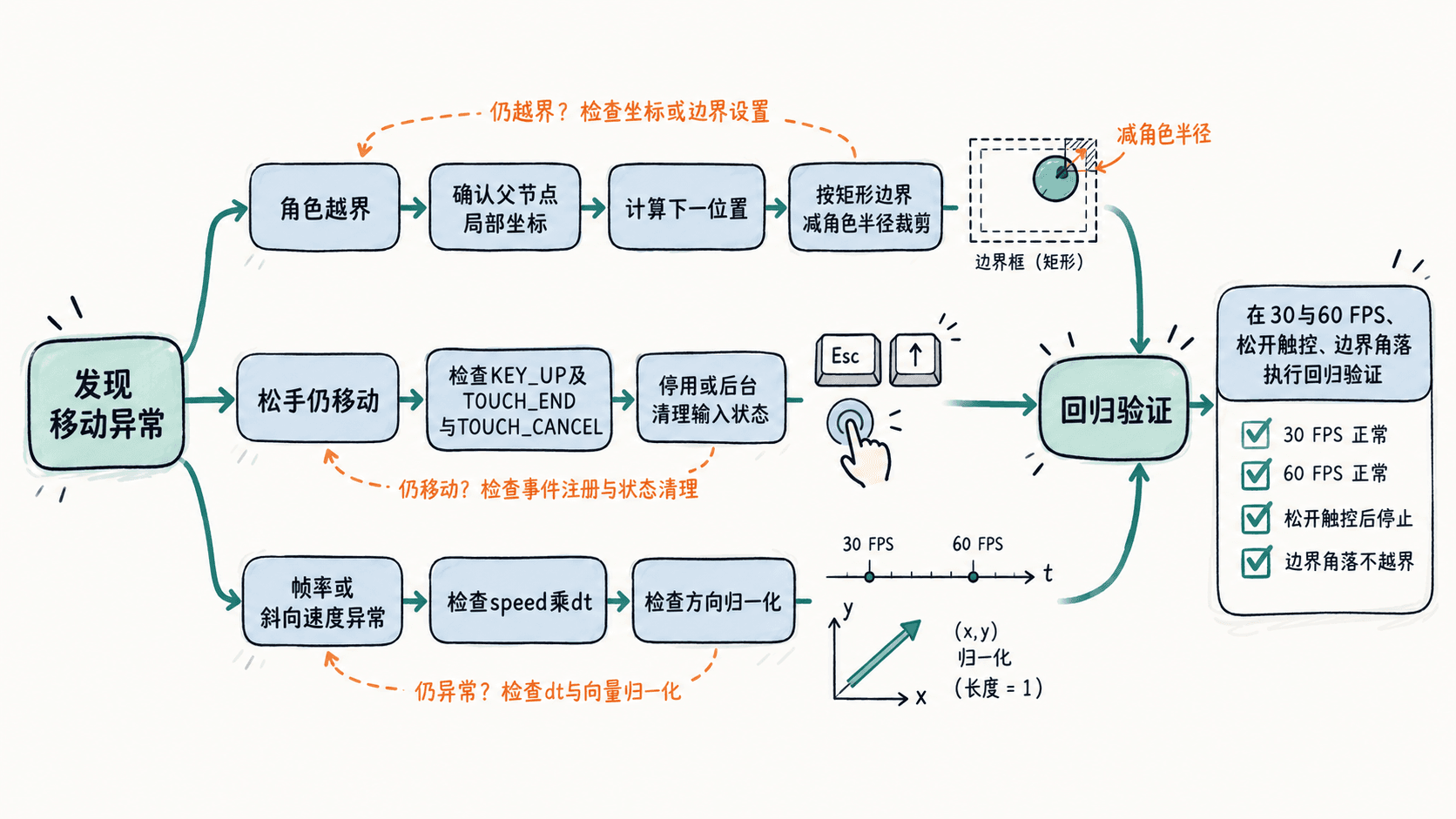
用一个安全移动组件封住三类问题
以下 SafeMover2D.ts 是 Cocos Creator 3.8 工程中的完整组件脚本,挂在 Player 节点上使用。它支持 WASD、方向键及可选触控区,计算位移后统一裁剪位置。示例约定角色与矩形关卡范围使用同一个父节点的局部坐标,且父节点没有额外旋转和非等比缩放。
import {
  _decorator, Component, EventKeyboard, EventTouch,
  game, Game, input, Input, KeyCode, Node, Vec2
} from 'cc';

const { ccclass, property } = _decorator;

@ccclass('SafeMover2D')
export class SafeMover2D extends Component {
  @property(Node) controlPad: Node | null = null;
  @property speed = 240;
  @property halfWidth = 300;
  @property halfHeight = 180;
  @property playerRadius = 16;
  @property dragRadius = 80;

  private readonly held = new Set<KeyCode>();
  private readonly origin = new Vec2();
  private readonly pointer = new Vec2();
  private readonly touchAxis = new Vec2();
  private readonly axis = new Vec2();
  private touchId: number | null = null;

  onEnable() {
    input.on(Input.EventType.KEY_DOWN, this.keyDown, this);
    input.on(Input.EventType.KEY_UP, this.keyUp, this);
    if (this.controlPad) {
      this.controlPad.on(Node.EventType.TOUCH_START, this.touchStart, this);
      this.controlPad.on(Node.EventType.TOUCH_MOVE, this.touchMove, this);
      this.controlPad.on(Node.EventType.TOUCH_END, this.touchEnd, this);
      this.controlPad.on(Node.EventType.TOUCH_CANCEL, this.touchEnd, this);
    }
    game.on(Game.EVENT_HIDE, this.resetInput, this);
  }

  onDisable() {
    input.off(Input.EventType.KEY_DOWN, this.keyDown, this);
    input.off(Input.EventType.KEY_UP, this.keyUp, this);
    if (this.controlPad) {
      this.controlPad.off(Node.EventType.TOUCH_START, this.touchStart, this);
      this.controlPad.off(Node.EventType.TOUCH_MOVE, this.touchMove, this);
      this.controlPad.off(Node.EventType.TOUCH_END, this.touchEnd, this);
      this.controlPad.off(Node.EventType.TOUCH_CANCEL, this.touchEnd, this);
    }
    game.off(Game.EVENT_HIDE, this.resetInput, this);
    this.resetInput(); // 防止再次启用时继承旧输入
  }

  private keyDown(e: EventKeyboard) { this.held.add(e.keyCode); }
  private keyUp(e: EventKeyboard) { this.held.delete(e.keyCode); }

  private touchStart(e: EventTouch) {
    const id = e.getID();
    if (id === null || this.touchId !== null) return;
    this.touchId = id;
    e.getUILocation(this.origin);
    this.touchAxis.set(0, 0);
  }

  private touchMove(e: EventTouch) {
    if (this.touchId === null || e.getID() !== this.touchId) return;
    e.getUILocation(this.pointer);
    const radius = Math.max(1, this.dragRadius);
    const x = (this.pointer.x - this.origin.x) / radius;
    const y = (this.pointer.y - this.origin.y) / radius;
    const length = Math.max(1, Math.hypot(x, y));
    this.touchAxis.set(x / length, y / length);
  }

  private touchEnd(e: EventTouch) {
    if (this.touchId === null || e.getID() !== this.touchId) return;
    this.touchId = null;
    this.touchAxis.set(0, 0);
  }

  resetInput() {
    this.held.clear();
    this.touchId = null;
    this.touchAxis.set(0, 0);
  }

  update(dt: number) {
    if (this.touchId !== null) {
      this.axis.set(this.touchAxis);
    } else {
      const x = Number(this.held.has(KeyCode.KEY_D) || this.held.has(KeyCode.ARROW_RIGHT))
              - Number(this.held.has(KeyCode.KEY_A) || this.held.has(KeyCode.ARROW_LEFT));
      const y = Number(this.held.has(KeyCode.KEY_W) || this.held.has(KeyCode.ARROW_UP))
              - Number(this.held.has(KeyCode.KEY_S) || this.held.has(KeyCode.ARROW_DOWN));
      const length = Math.hypot(x, y);
      this.axis.set(length ? x / length : 0, length ? y / length : 0);
    }

    // 先按秒计算位移,再将角色中心约束在有效局部矩形内
    const limitX = Math.max(0, this.halfWidth - this.playerRadius);
    const limitY = Math.max(0, this.halfHeight - this.playerRadius);
    const pos = this.node.position;
    const x = Math.max(-limitX, Math.min(limitX, pos.x + this.axis.x * this.speed * dt));
    const y = Math.max(-limitY, Math.min(limitY, pos.y + this.axis.y * this.speed * dt));
    this.node.setPosition(x, y, pos.z);
  }
}
预期结果:角色从局部原点开始,以 speed=240 单独向右移动约 0.5 秒,X 接近 120;持续向右最终停在 X=284(300-16),向上最多到 Y=164(180-16)。放开键盘或触控、触控取消、组件停用后不再持续移动。数值会因实际操作时长略有差异。
在场景中进行有控制的回归验证
Player 应处于代表关卡坐标范围的父节点下,初始位置设为 (0,0);矩形半宽、半高根据实际地图填写。如果使用触控,在 Canvas 下放一个带 UITransform 的 ControlPad,并拖入组件的 controlPad 属性;不配置它时仍可用键盘测试。先临时只保留这一个移动脚本,防止多个组件同时改位置。
- 边界测试:按住四个方向与斜角输入,确认角色中心不会超过 X=±284、Y=±164;改变角色尺寸时同步调整
playerRadius。 - 残留测试:按住方向键切出预览窗口、在拖动时移出触控区、停用后重新启用角色,确认输入清零;自定义暂停菜单打开时还应主动调用
resetInput()。 - 帧率测试:在相同起点、相同持续时间下比较 30 FPS 和 60 FPS,未接近边界时位移应近似相等。若差异明显,排查其他脚本有没有按帧叠加位移。
区分矩形约束与真实碰撞
这里裁剪的是角色中心的局部坐标,playerRadius 是为了留出简化的视觉边距,不能精确代替矩形碰撞体、地图形状或多边形关卡边界;父节点坐标不一致时,裁剪值也会失效。对不规则墙体、斜坡和推挤,应改为相应的物理碰撞或角色控制方案,不要一边由刚体求解,一边每帧强行设置同一节点位置。
另外,game.EVENT_HIDE 在网页端不保证覆盖每次失焦,因此输入复位必须同时放在触控取消、组件停用和业务暂停入口。正确的排查顺序是先确认输入是否归零,再确认 dt 和方向长度,最后检查约束坐标系及其他移动脚本;这样才能避免用调小速度掩盖真正的问题。