
游戏引擎 / 系统课时
把输入转换成移动方向
把输入转换成移动方向
键盘事件只说明某个键刚被按下或松开,不能直接代表角色持续移动的意图。本课在 Cocos Creator 3.8 中记录 WASD 与方向键的当前状态,把多键组合合成为二维向量,并避免斜向移动比直线移动更快。
学习目标
- 使用键盘按下、松开事件维护多个按键的持续状态。
- 将水平与竖直输入合成为长度不超过 1 的方向向量。
- 在预览中验证反向抵消、斜向归一化和松键行为。
为什么要记录多个按键
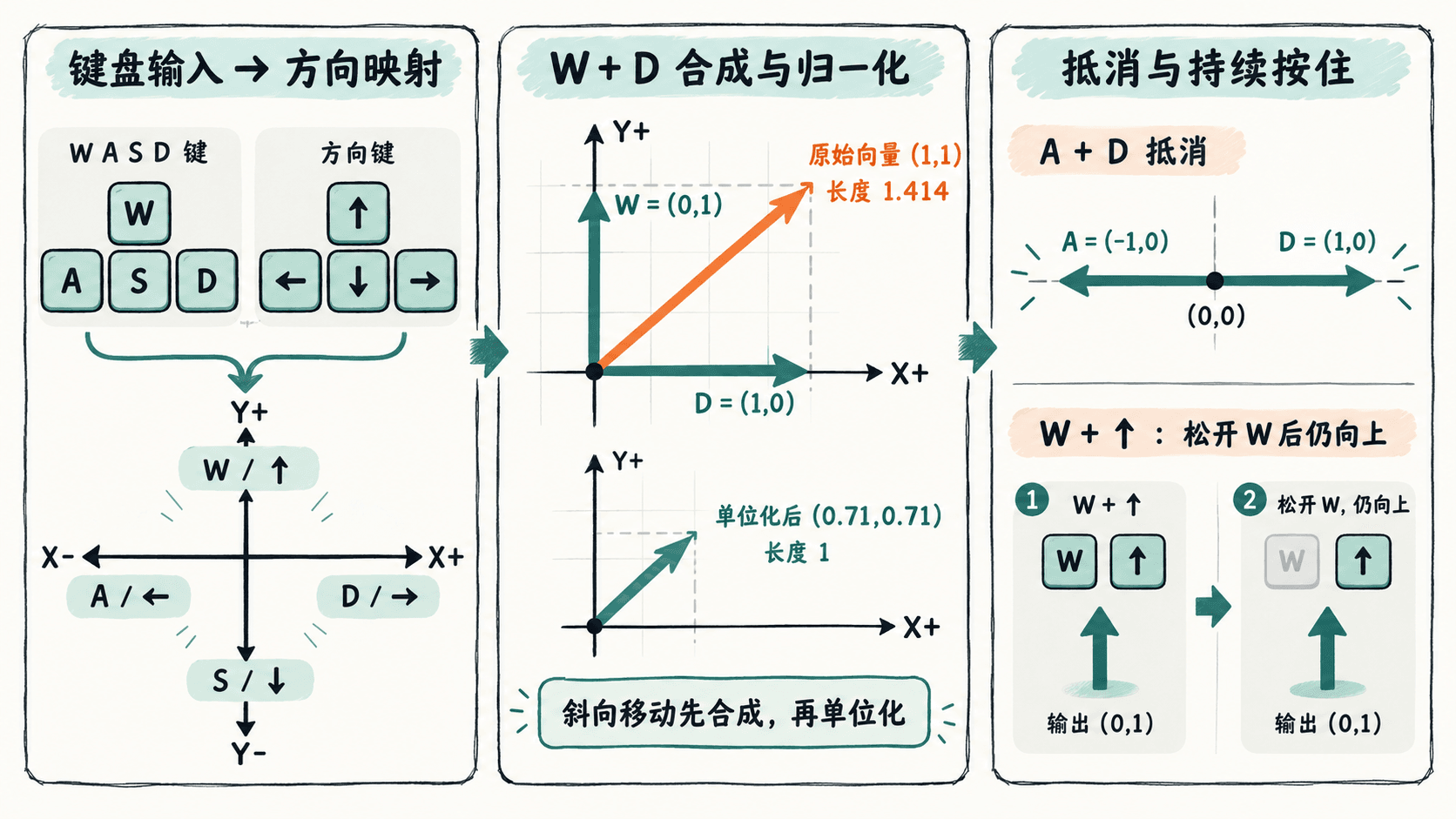
Input.EventType.KEY_DOWN 和 Input.EventType.KEY_UP 分别通知按下和松开。若只保存“最后按下的键”,先按 W 再按 D 就会丢失向上的意图;松开 D 后也无法判断 W 是否仍被按住。
用 Set<KeyCode> 保存当前按住的每一个实体键。每次事件后重新计算方向,而不是直接修改角色位置。这样 W 和上方向键同时按住时,松开 W 也不会把向上的输入错误清零。全局键盘监听注册在 onEnable,在 onDisable 中对应移除,避免组件反复启用后重复响应。
合成方向与处理冲突
约定二维平面 X 轴向右、Y 轴向上:D 或右箭头为 X 正方向,A 或左箭头为 X 负方向;W 或上箭头为 Y 正方向,S 或下箭头为 Y 负方向。两端同时按住则互相抵消。
例如,W+D 先得到 (1, 1),长度约 1.414。如果后续移动直接乘速度,它比 (1, 0) 快约 41%。因此只有在向量长度大于 1 时才归一化;无输入的 (0, 0) 保持不变。
编写可复用的方向组件
在 Cocos Creator 3.8 项目中创建 KeyboardDirection.ts。组件只计算和输出意图,不修改节点位置;getDirection 使用调用方提供的 Vec2,供移动逻辑重复读取而不必每帧创建新对象。
import { _decorator, Component, EventKeyboard, input, Input, KeyCode, Vec2 } from 'cc';

const { ccclass } = _decorator;

@ccclass('KeyboardDirection')
export class KeyboardDirection extends Component {
  private readonly pressed = new Set<KeyCode>();
  private readonly direction = new Vec2();

  onEnable(): void {
    input.on(Input.EventType.KEY_DOWN, this.onKeyDown, this);
    input.on(Input.EventType.KEY_UP, this.onKeyUp, this);
  }

  onDisable(): void {
    input.off(Input.EventType.KEY_DOWN, this.onKeyDown, this);
    input.off(Input.EventType.KEY_UP, this.onKeyUp, this);
    this.pressed.clear();
    this.direction.set(0, 0);
  }

  private onKeyDown(event: EventKeyboard): void {
    this.pressed.add(event.keyCode);
    this.refreshDirection();
  }

  private onKeyUp(event: EventKeyboard): void {
    this.pressed.delete(event.keyCode);
    this.refreshDirection();
  }

  private held(a: KeyCode, b: KeyCode): boolean {
    return this.pressed.has(a) || this.pressed.has(b);
  }

  private refreshDirection(): void {
    const x = Number(this.held(KeyCode.KEY_D, KeyCode.ARROW_RIGHT))
      - Number(this.held(KeyCode.KEY_A, KeyCode.ARROW_LEFT));
    const y = Number(this.held(KeyCode.KEY_W, KeyCode.ARROW_UP))
      - Number(this.held(KeyCode.KEY_S, KeyCode.ARROW_DOWN));

    const oldX = this.direction.x;
    const oldY = this.direction.y;
    this.direction.set(x, y);
    // 单位化斜向输入,避免移动速度额外增加。
    if (this.direction.lengthSqr() > 1) this.direction.normalize();

    // 长按重复触发 KEY_DOWN 时,不重复打印相同方向。
    if (this.direction.x !== oldX || this.direction.y !== oldY) {
      console.log(`direction=(${this.direction.x.toFixed(2)}, ${this.direction.y.toFixed(2)})`);
    }
  }

  public getDirection(out: Vec2): void {
    out.set(this.direction);
  }
}
预期输出:预览画面获得键盘焦点后,依次按下 W、按下 D、松开 D、松开 W,控制台应依次出现:
direction=(0.00, 1.00)
direction=(0.71, 0.71)
direction=(0.00, 1.00)
direction=(0.00, 0.00)
验证多键组合
- 将
KeyboardDirection挂到场景中保持激活的节点,保存场景并启动浏览器预览。 - 点击预览画面使其获得焦点,按上述顺序检查日志;再同时按 A、D,应得到
(0, 0)。 - 同时按 W 和上箭头,只松开 W,方向仍应为
(0, 1);两个键都松开后才归零。
方向向量只描述“往哪里走”,不包含“每秒走多远”。将方向与速度分开,后续才能统一接入键盘、摇杆及不同移动方式。