
服务注册与分布式协调 / 系统课时
使用 Search Attributes 做可见性检索
使用 Search Attributes 做可见性检索
Search Attributes 解决的是“怎样从大量 Workflow 中快速找出一组目标实例”。本节把订单号、租户和业务状态设计成可索引字段,写入 Workflow 可见性元数据,并用 Visibility 查询组合条件定位运行中或已结束的执行。
学习目标
- 区分 Search Attributes、Workflow 输入和普通业务状态的职责
- 注册并在 Workflow 中写入可检索的订单、租户和状态字段
- 使用 Visibility 查询按多个条件筛选 Workflow 集合
设计可检索字段
Search Attributes 是写入 Visibility 的索引元数据,不是业务数据库,也不适合承载大对象。订单号、租户标识和枚举状态通常使用 Keyword,因为运维检索更关心精确匹配;时间、整数等字段则按实际类型注册。
| 字段 | 建议类型 | 典型用途 |
|---|---|---|
OrderId |
Keyword |
精确定位某个订单 Workflow |
TenantId |
Keyword |
按租户筛选执行集合 |
BusinessStatus |
Keyword |
查找待支付、履约中、人工介入等状态 |
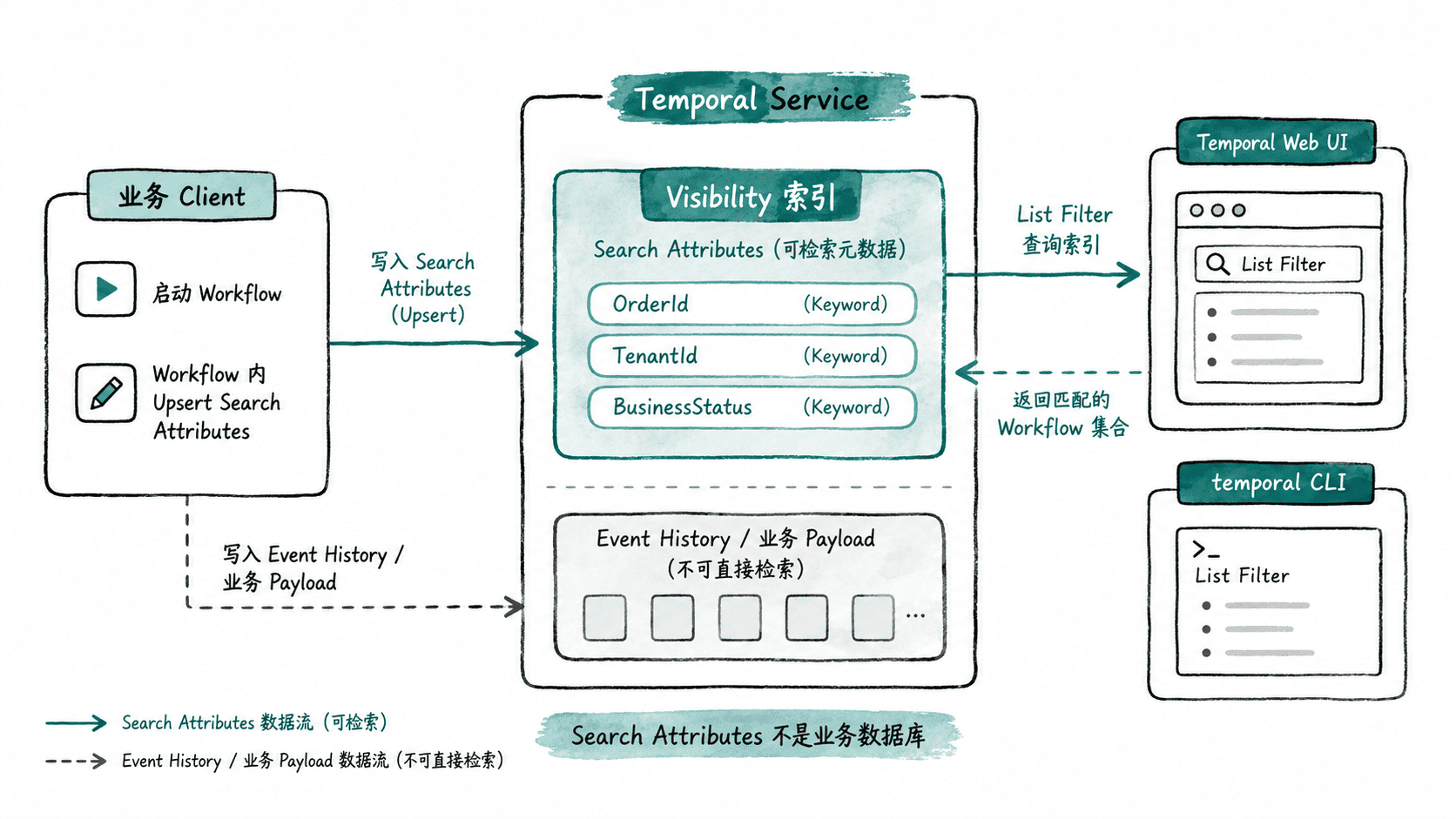
注册并写入字段
自托管环境先注册自定义字段;Temporal Cloud 则应按当前 Namespace 的 Search Attribute 管理方式完成同名字段配置。下面命令适合本地或具备 Operator 权限的环境。
set -e
temporal operator search-attribute create --name OrderId --type Keyword >/dev/null
temporal operator search-attribute create --name TenantId --type Keyword >/dev/null
temporal operator search-attribute create --name BusinessStatus --type Keyword >/dev/null
printf '%s\n' 'search attributes ready'
预期输出:
search attributes ready如果字段已经存在,不要盲目重复创建;先用 temporal operator search-attribute list 核对名称和类型。
在 Workflow 已经运行后,可以在状态变化处更新可检索字段。下面是 Go SDK 的片段示例,依赖当前 Workflow 的 workflow.Context,并假定三个键已在服务端注册。
var (
    orderIDKey = temporal.NewSearchAttributeKeyKeyword("OrderId")
    tenantIDKey = temporal.NewSearchAttributeKeyKeyword("TenantId")
    statusKey = temporal.NewSearchAttributeKeyKeyword("BusinessStatus")
)

func markOrderVisible(ctx workflow.Context, orderID, tenantID, status string) error {
    // 只写运维检索需要的稳定字段,避免把完整订单对象复制进索引。
    return workflow.UpsertTypedSearchAttributes(
        ctx,
        orderIDKey.ValueSet(orderID),
        tenantIDKey.ValueSet(tenantID),
        statusKey.ValueSet(status),
    )
}
调用成功后,新的 Search Attributes 会进入 Visibility;可见性索引更新可能存在短暂延迟,因此不要把“刚写入后立即能搜到”当作业务正确性的判断条件。
用 Visibility 查询缩小范围
检索时优先从选择性高的业务字段开始,再叠加系统字段。例如下面查询定位租户 tenant-a 下仍在运行且处于待支付状态的订单。
temporal workflow list \
  --query 'TenantId = "tenant-a" AND BusinessStatus = "WAITING_PAYMENT" AND ExecutionStatus = "Running"'
预期结果:
<matching Workflow rows for tenant-a and WAITING_PAYMENT>实际 Workflow ID、Run ID、开始时间和表格格式会随环境不同。若要定位单笔订单,可以进一步增加 OrderId = "order-1001";若需要面向业务接口的强一致读取,应查询业务存储或通过 Workflow Query/Update 获取状态,而不是依赖 Visibility。
控制字段基数与生命周期
Search Attributes 的价值来自“能稳定筛选”,不是字段越多越好。优先保留订单号、租户、状态、区域、版本等低到中等基数且经常用于运维过滤的维度;高频变化的大文本、随机请求 ID 和完整错误堆栈会增加索引成本,却很少改善排障效率。
状态字段发生关键迁移时再 Upsert,例如 WAITING_PAYMENT → PAID → FULFILLING。这样既能让值班人员按业务阶段检索,也避免为每个细小进度都写 Visibility。最终目标是:用少量稳定字段把“海量 Workflow”缩小成“可直接检查的一组 Workflow”。