
图形渲染与 Shader / 系统课时
实现自由摄像机
实现自由摄像机
自由摄像机要同时解决“按键移动”和“鼠标转向”两件事,并让不同帧率下的移动速度保持一致。完成后,你会得到一个基于 GLFW 输入、GLM 向量和视图矩阵的第一人称摄像机骨架,可直接接入现有渲染循环。
学习目标
- 使用时间步长控制前后、左右移动,避免帧率影响速度。
- 用鼠标增量更新 yaw、pitch,并重新计算摄像机朝向。
- 用位置和朝向生成每帧使用的视图矩阵。
把移动和转向拆成两条链路
摄像机至少要维护 position、front 和 worldUp。键盘只改变位置;鼠标只改变 yaw、pitch,再由角度重算 front。左右移动方向则由 right = normalize(cross(front, worldUp)) 得到,这样位置更新和朝向更新不会互相污染。
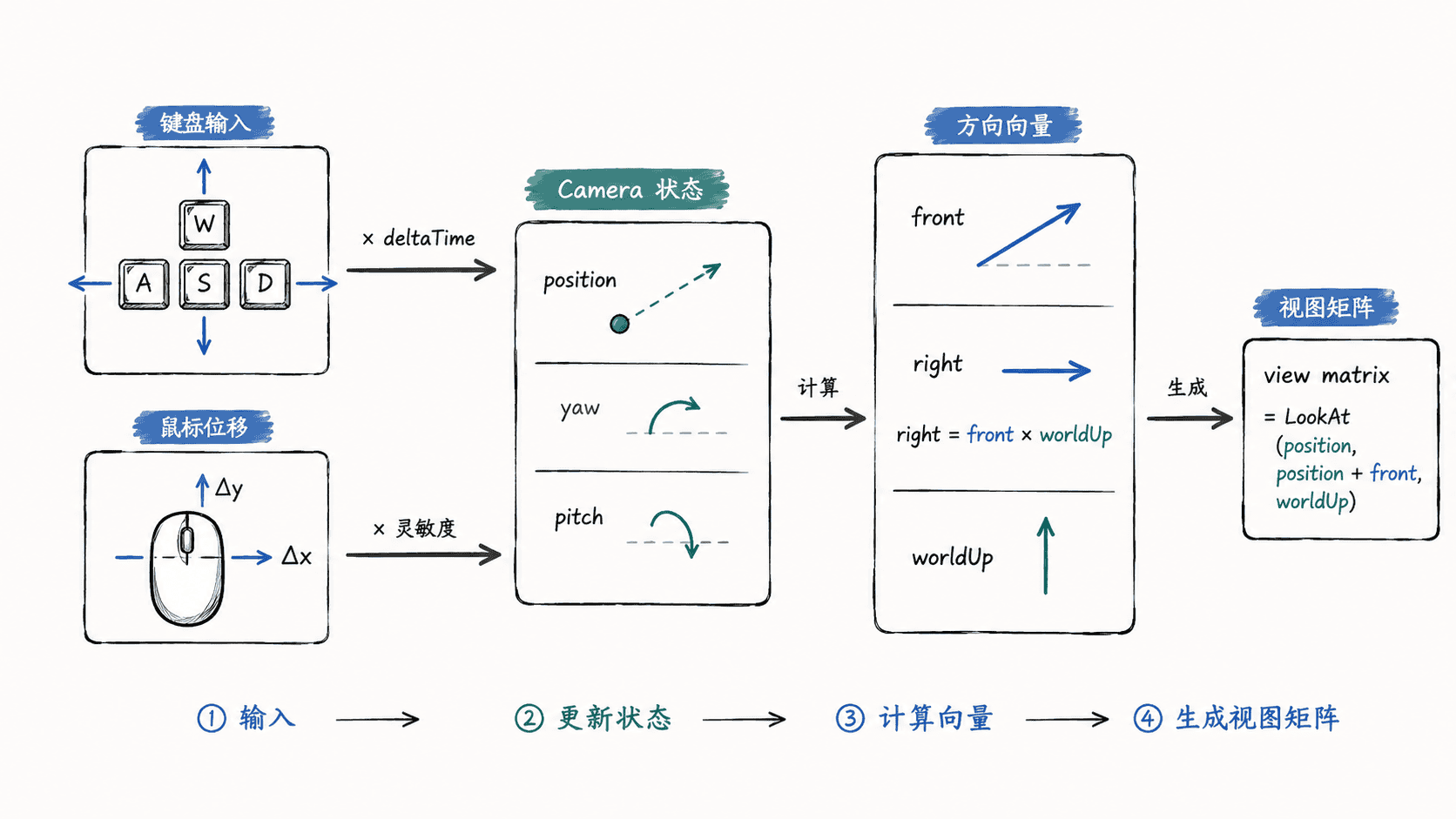
时间步长使用当前帧时间减去上一帧时间:deltaTime = currentFrame - lastFrame。每帧位移量应为 speed * deltaTime,而不是固定常量;否则高帧率机器会在同样真实时间内执行更多次移动更新。
用 GLFW 和 GLM 实现核心逻辑
下面是可独立运行的最小输入程序。它不绘制场景,而是在 GLFW 窗口标题中持续显示摄像机坐标;将 camera.view() 接到你的着色器 view 矩阵后,即可控制真实场景。
#include <GLFW/glfw3.h>
#include <glm/glm.hpp>
#include <glm/gtc/matrix_transform.hpp>
#include <algorithm>
#include <cstdio>
#include <cmath>
#include <iostream>

struct Camera {
    glm::vec3 position{0.0f, 0.0f, 3.0f};
    glm::vec3 front{0.0f, 0.0f, -1.0f};
    glm::vec3 worldUp{0.0f, 1.0f, 0.0f};
    float yaw = -90.0f;
    float pitch = 0.0f;
    float speed = 3.0f;
    float sensitivity = 0.1f;

    void move(GLFWwindow* window, float dt) {
        const float step = speed * dt;
        const glm::vec3 right = glm::normalize(glm::cross(front, worldUp));
        if (glfwGetKey(window, GLFW_KEY_W) == GLFW_PRESS) position += front * step;
        if (glfwGetKey(window, GLFW_KEY_S) == GLFW_PRESS) position -= front * step;
        if (glfwGetKey(window, GLFW_KEY_A) == GLFW_PRESS) position -= right * step;
        if (glfwGetKey(window, GLFW_KEY_D) == GLFW_PRESS) position += right * step;
    }

    void rotate(float dx, float dy) {
        yaw += dx * sensitivity;
        pitch = std::clamp(pitch + dy * sensitivity, -89.0f, 89.0f);
        const glm::vec3 dir{
            std::cos(glm::radians(yaw)) * std::cos(glm::radians(pitch)),
            std::sin(glm::radians(pitch)),
            std::sin(glm::radians(yaw)) * std::cos(glm::radians(pitch))
        };
        front = glm::normalize(dir);
    }

    glm::mat4 view() const {
        return glm::lookAt(position, position + front, worldUp);
    }
};

Camera camera;
bool firstMouse = true;
double lastX = 0.0, lastY = 0.0;

void mouseCallback(GLFWwindow*, double x, double y) {
    if (firstMouse) {
        lastX = x;
        lastY = y;
        firstMouse = false;
        return;
    }
    const float dx = static_cast<float>(x - lastX);
    const float dy = static_cast<float>(lastY - y);
    lastX = x;
    lastY = y;
    camera.rotate(dx, dy);
}

int main() {
    if (!glfwInit()) return 1;
    GLFWwindow* window = glfwCreateWindow(800, 600, "Camera", nullptr, nullptr);
    if (!window) return 1;
    glfwMakeContextCurrent(window);
    glfwSetInputMode(window, GLFW_CURSOR, GLFW_CURSOR_DISABLED);
    glfwSetCursorPosCallback(window, mouseCallback);

    float lastFrame = static_cast<float>(glfwGetTime());
    std::cout << "Camera ready. Hold WASD and move the mouse.\n";

    while (!glfwWindowShouldClose(window)) {
        const float now = static_cast<float>(glfwGetTime());
        const float dt = now - lastFrame;
        lastFrame = now;
        camera.move(window, dt);
        const glm::mat4 view = camera.view();
        (void)view;

        char title[96];
        std::snprintf(title, sizeof(title), "Camera x=%.2f y=%.2f z=%.2f",
                      camera.position.x, camera.position.y, camera.position.z);
        glfwSetWindowTitle(window, title);
        glfwSwapBuffers(window);
        glfwPollEvents();
    }

    glfwDestroyWindow(window);
    glfwTerminate();
    return 0;
}
预期输出
Camera ready. Hold WASD and move the mouse.按住 W/A/S/D 时,窗口标题中的坐标会持续变化;移动鼠标时 front 会随 yaw、pitch 改变。坐标的具体数值取决于输入持续时间和帧间隔,因此实际值会不同。
处理鼠标跳变和俯仰翻转
第一次收到鼠标回调时不要直接计算增量,因为光标初始位置与程序保存的旧位置没有连续关系。示例中的 firstMouse 先建立基准点,可以避免刚捕获鼠标时视角突然跳转。
pitch 必须限制在接近 ±90° 但不等于 ±90° 的范围。达到正负 90° 时,朝向与世界上方向接近平行,叉乘得到的 right 会退化,视角也容易出现翻转。常用限制是 [-89°, 89°]。
接入渲染循环时的检查点
真正渲染场景时,每帧都要在处理输入之后重新取得 camera.view(),再把它上传到当前着色器的 view uniform。若矩阵只在初始化阶段设置一次,位置虽然更新,画面却不会跟着移动。
还要确保同一帧只计算一次 deltaTime,并让所有移动键共享这个值。若想实现“步行摄像机”而不是自由飞行,可在前后移动前把 front.y 清零并重新归一化,这样抬头时按 W 就不会向上飞。