
React / 系统课时
认证中间件
认证中间件
本课实现一个可复用的 Express 认证中间件:它从请求头提取 Bearer 令牌,验证签名与关键声明,把用户身份写入请求上下文,并用一致的 401 响应处理缺失、过期和无效凭证。
学习目标
- 明确认证中间件与业务路由各自的职责
- 正确解析并验证
Authorization请求头中的访问令牌 - 为请求注入类型安全的用户身份并统一处理认证失败
中间件的职责边界
认证中间件位于 HTTP 请求和受保护路由之间。它只回答“请求者是谁、凭证是否可信”,不负责判断用户能否执行某个具体业务动作;角色、资源归属等授权规则应放在后续授权逻辑中。
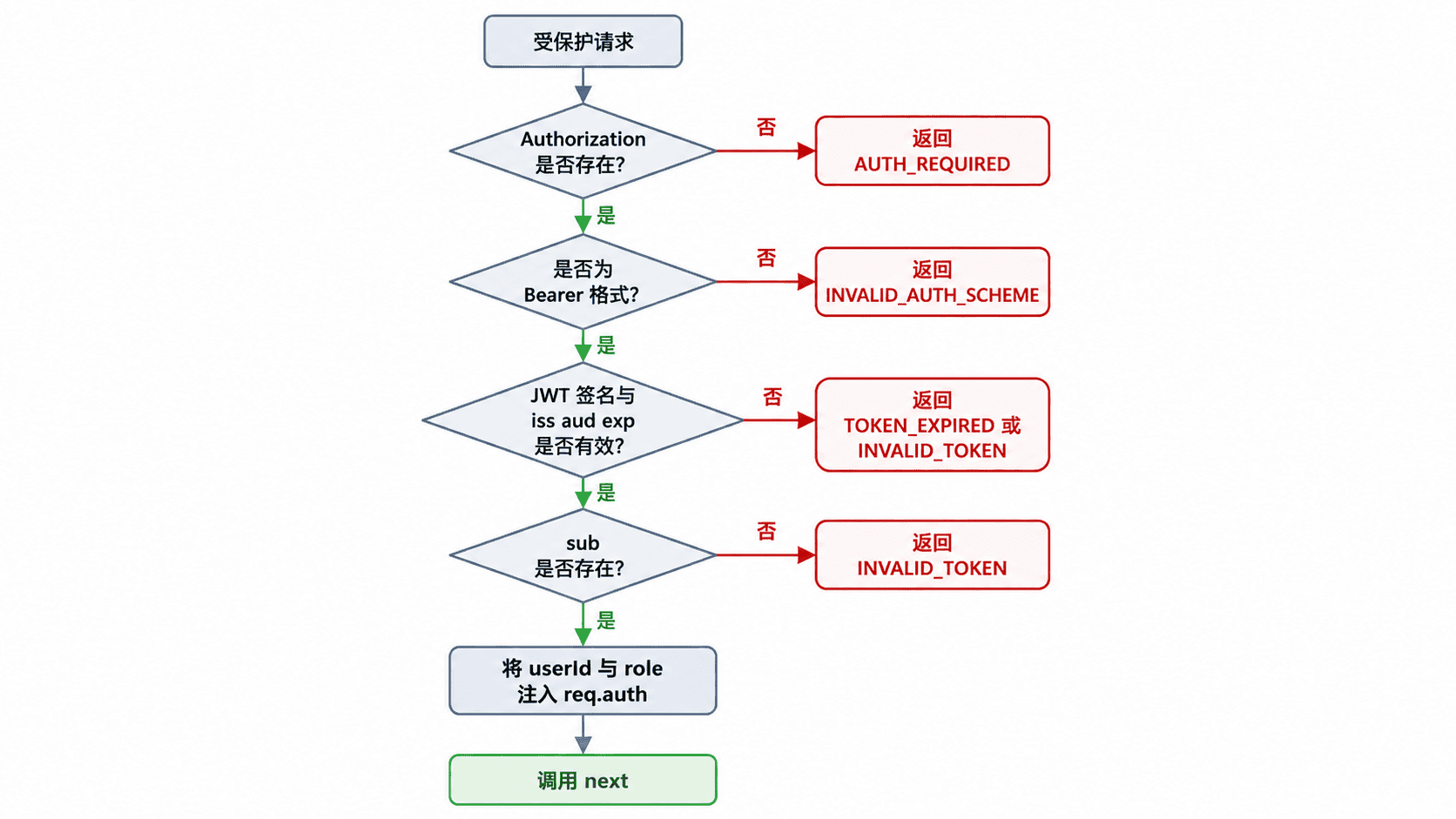
中间件成功时调用 next(),业务处理器只读取 req.auth,不再重复解析令牌。失败时必须立即返回,不能继续执行后面的路由。
统一请求上下文与错误语义
请求上下文至少应包含稳定的用户 ID。角色可以一并注入,但当权限可能实时变化时,关键授权仍应查询服务端数据,避免长期依赖令牌中的旧角色。本例约定以下响应:
- 未提供凭证:
401 AUTH_REQUIRED - 认证方案不是 Bearer:
401 INVALID_AUTH_SCHEME - 令牌已过期:
401 TOKEN_EXPIRED - 签名、格式、签发方或受众无效:
401 INVALID_TOKEN
认证失败使用 401;已经认证但权限不足才使用 403。错误响应不返回底层库的详细异常,避免泄露验证规则。
实现可复用认证中间件
创建项目并安装依赖:
npm init -y
npm install express jsonwebtoken
npm install -D typescript tsx @types/express @types/jsonwebtoken @types/node
预期结果:
依赖安装完成,命令退出码为 0;实际安装包数量可能因版本不同而变化。新建 server.ts:
import express, { type RequestHandler } from "express";
import jwt, {
  JsonWebTokenError,
  TokenExpiredError,
  type JwtPayload,
} from "jsonwebtoken";

declare global {
  namespace Express {
    interface Request {
      auth?: {
        userId: string;
        role?: string;
      };
    }
  }
}

const app = express();
app.use(express.json());

const PORT = 3000;
const JWT_SECRET =
  process.env.JWT_SECRET ?? "dev-only-secret-change-me";
const ISSUER = "react18-fullstack-api";
const AUDIENCE = "react18-fullstack-web";

const authenticate: RequestHandler = (req, res, next) => {
  const authorization = req.header("Authorization");

  if (!authorization) {
    res.status(401).json({
      code: "AUTH_REQUIRED",
      message: "请提供访问令牌",
    });
    return;
  }

  const [scheme, token, extra] = authorization.trim().split(/\s+/);
  if (scheme !== "Bearer" || !token || extra) {
    res.status(401).json({
      code: "INVALID_AUTH_SCHEME",
      message: "认证头格式必须为 Bearer <token>",
    });
    return;
  }

  try {
    const decoded = jwt.verify(token, JWT_SECRET, {
      algorithms: ["HS256"],
      issuer: ISSUER,
      audience: AUDIENCE,
    });

    if (typeof decoded === "string" || !decoded.sub) {
      throw new JsonWebTokenError("missing subject");
    }

    const payload = decoded as JwtPayload;
    // 业务路由只依赖已经验证过的请求上下文。
    req.auth = {
      userId: decoded.sub,
      role: typeof payload.role === "string" ? payload.role : undefined,
    };

    next();
  } catch (error: unknown) {
    if (error instanceof TokenExpiredError) {
      res.status(401).json({
        code: "TOKEN_EXPIRED",
        message: "访问令牌已过期",
      });
      return;
    }

    res.status(401).json({
      code: "INVALID_TOKEN",
      message: "访问令牌无效",
    });
  }
};

// 本地演示登录端点,用于生成与中间件规则一致的令牌。
app.post("/api/auth/login", (req, res) => {
  const { username, password } = req.body as {
    username?: string;
    password?: string;
  };

  if (username !== "alice" || password !== "Passw0rd!") {
    return res.status(401).json({
      code: "INVALID_CREDENTIALS",
      message: "账号或密码错误",
    });
  }

  const accessToken = jwt.sign(
    { role: "USER" },
    JWT_SECRET,
    {
      algorithm: "HS256",
      subject: "u_1001",
      issuer: ISSUER,
      audience: AUDIENCE,
      expiresIn: 15 * 60,
    },
  );

  return res.json({ accessToken });
});

app.get("/api/profile", authenticate, (req, res) => {
  return res.json({
    userId: req.auth!.userId,
    role: req.auth!.role,
  });
});

app.listen(PORT, () => {
  console.log(`API listening on http://localhost:${PORT}`);
});
运行服务:
JWT_SECRET="replace-with-a-long-random-secret" npx tsx server.ts预期输出:
API listening on http://localhost:3000Windows PowerShell 可先设置 $env:JWT_SECRET,再运行同一条 npx tsx server.ts 命令。签发令牌和验证令牌的服务必须使用一致的算法、密钥、iss 与 aud 配置。
验证成功与失败分支
先获取令牌:
curl -s -X POST http://localhost:3000/api/auth/login -H "Content-Type: application/json" -d '{"username":"alice","password":"Passw0rd!"}'预期结果:
{"accessToken":"<ACCESS_TOKEN>"}不携带令牌访问受保护路由:
curl -i http://localhost:3000/api/profile预期结果:
HTTP/1.1 401 Unauthorized

{"code":"AUTH_REQUIRED","message":"请提供访问令牌"}
替换实际令牌后再次访问:
curl -i http://localhost:3000/api/profile -H "Authorization: Bearer <ACCESS_TOKEN>"预期结果:
HTTP/1.1 200 OK

{"userId":"u_1001","role":"USER"}
还应分别测试篡改一个字符、使用错误 iss、使用错误 aud 和等待令牌过期。除过期令牌返回 TOKEN_EXPIRED 外,其余验证失败都应返回 INVALID_TOKEN,且业务路由不会执行。
关键边界与安全检查
只从请求头读取访问令牌,不要把令牌放在 URL 查询参数中,因为 URL 更容易进入浏览器历史、代理日志和监控记录。生产环境必须使用 HTTPS,并确保日志系统不会记录完整 Authorization 值。
req.auth! 之所以安全,是因为该路由已经挂载 authenticate。大型项目可进一步封装受保护路由类型或使用断言函数,减少非空断言的使用。