
React / 系统课时
日志与统一异常处理
日志与统一异常处理
接口出现失败时,最重要的是让客户端收到稳定响应,同时让服务端能沿着同一个请求标识找到完整日志。本课将实现请求 ID、访问日志、业务异常、系统异常和兜底路由,并验证中间件顺序如何决定最终行为。
学习目标
- 能为每次请求生成或透传唯一请求标识
- 能记录方法、路径、状态码和耗时等访问日志
- 能集中区分业务异常与未知系统异常并返回统一响应
中间件链路
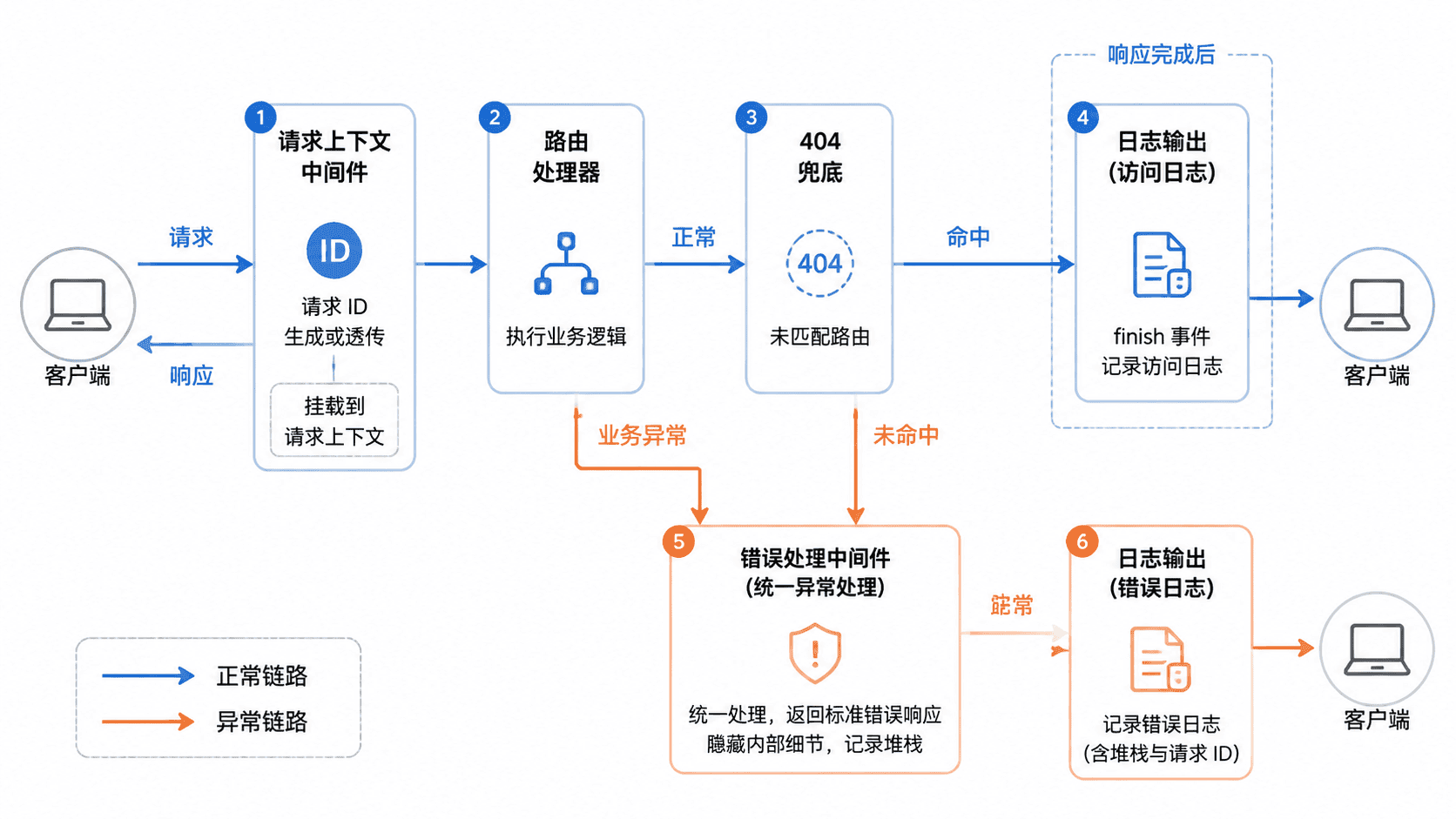
请求日志不能只在进入时打印,否则拿不到最终状态码和完整耗时。更稳妥的做法是先创建请求上下文,再监听响应的 finish 事件记录访问日志;路由抛出的异常交给错误处理中间件,未匹配路由则先转换为受控的 404 业务异常。
完整实现
先初始化项目并安装 Express:
bash
npm init -y
npm install express
预期结果:
text
命令退出码为 0;package.json 的 dependencies 中包含 express。具体版本号与安装包数量可能不同。下面的示例不依赖第三方日志库,先用结构化 JSON 写入标准输出。生产环境可保持字段不变,再替换为 Pino、Winston 或日志采集平台。
js
const express = require('express');
const { randomUUID } = require('node:crypto');

const app = express();
app.use(express.json());

class AppError extends Error {
  constructor(status, code, message, details = null) {
    super(message);
    this.name = 'AppError';
    this.status = status;
    this.code = code;
    this.details = details;
  }
}

function asyncHandler(handler) {
  return (req, res, next) => {
    Promise.resolve(handler(req, res, next)).catch(next);
  };
}

app.use((req, res, next) => {
  // 优先透传上游请求 ID,缺失时再由当前服务生成。
  const requestId = req.get('x-request-id') || randomUUID();
  const startedAt = process.hrtime.bigint();

  req.requestId = requestId;
  res.set('x-request-id', requestId);

  // finish 触发时状态码已经确定,可记录完整访问结果。
  res.on('finish', () => {
    const elapsed = process.hrtime.bigint() - startedAt;
    const durationMs = Number(elapsed) / 1_000_000;

    console.log(JSON.stringify({
      level: 'info',
      requestId,
      method: req.method,
      path: req.originalUrl,
      status: res.statusCode,
      durationMs: Number(durationMs.toFixed(2)),
    }));
  });

  next();
});

app.get('/users/:userId', (req, res) => {
  if (req.params.userId !== '42') {
    throw new AppError(
      404,
      'USER_NOT_FOUND',
      '用户不存在',
      { userId: req.params.userId },
    );
  }

  res.json({
    code: 'OK',
    message: '查询成功',
    data: { userId: 42, name: 'Ada' },
    requestId: req.requestId,
  });
});

app.get('/system-error', asyncHandler(async () => {
  await Promise.resolve();
  throw new Error('database unavailable');
}));

// 所有业务路由之后再注册 404 兜底。
app.use((req, res, next) => {
  next(new AppError(404, 'ROUTE_NOT_FOUND', '接口不存在'));
});

// 错误处理中间件必须包含四个参数并位于中间件链末尾。
app.use((err, req, res, next) => {
  if (res.headersSent) {
    return next(err);
  }

  const knownError = err instanceof AppError;
  const status = knownError ? err.status : 500;
  const code = knownError ? err.code : 'INTERNAL_ERROR';
  const message = knownError ? err.message : '服务器内部错误';
  const data = knownError ? err.details : null;

  console.error(JSON.stringify({
    level: 'error',
    requestId: req.requestId,
    code,
    message: err.message,
    stack: knownError ? undefined : err.stack,
  }));

  return res.status(status).json({
    code,
    message,
    data,
    requestId: req.requestId,
  });
});

const port = Number(process.env.PORT ?? 3000);
app.listen(port, () => {
  console.log(`API listening on http://localhost:${port}`);
});
预期结果:
text
API listening on http://localhost:<PORT><PORT> 默认为 3000。代码中的未知异常原始消息和堆栈只写入服务端日志,不直接返回给客户端。
验证业务异常与系统异常
使用固定的 x-request-id 发送请求,便于对照响应头、响应体和日志:
bash
PORT=3000

curl -i "http://localhost:${PORT}/users/7" \
  -H "x-request-id: demo-request-001"

curl -i "http://localhost:${PORT}/system-error" \
  -H "x-request-id: demo-request-002"
预期输出:
text
HTTP/1.1 404 Not Found
x-request-id: demo-request-001
{"code":"USER_NOT_FOUND","message":"用户不存在","data":{"userId":"7"},"requestId":"demo-request-001"}

HTTP/1.1 500 Internal Server Error
x-request-id: demo-request-002
{"code":"INTERNAL_ERROR","message":"服务器内部错误","data":null,"requestId":"demo-request-002"}
服务端同时会产生结构化日志,耗时与堆栈属于动态值:
text
{"level":"error","requestId":"demo-request-001","code":"USER_NOT_FOUND","message":"用户不存在"}
{"level":"info","requestId":"demo-request-001","method":"GET","path":"/users/7","status":404,"durationMs":<DURATION_MS>}
{"level":"error","requestId":"demo-request-002","code":"INTERNAL_ERROR","message":"database unavailable","stack":"<STACK>"}
{"level":"info","requestId":"demo-request-002","method":"GET","path":"/system-error","status":500,"durationMs":<DURATION_MS>}
<DURATION_MS> 与 <STACK> 每次运行都可能不同。客户端只看到稳定错误码和安全消息,运维人员则可用 requestId 关联错误日志与访问日志。
顺序与安全边界
请求上下文中间件必须位于路由之前,否则异常响应可能没有请求 ID。404 兜底要放在全部业务路由之后,错误处理中间件要放在最后;顺序错误通常会导致路由无法命中、异常未被捕获或响应重复发送。
日志中不应直接记录密码、令牌、银行卡号和完整请求体。对必要字段进行白名单选择或脱敏,并让反向代理、网关和下游服务继续透传 x-request-id,才能形成跨服务调用链。
按自己的节奏,确认真正理解。