
React / 系统课时
封装自定义 Hook
封装自定义 Hook
当组件同时处理异步请求、窗口事件和本地存储时,副作用代码很快会挤占组件主体。本课将把三类逻辑提取为可复用 Hook,并通过明确参数、自动清理和稳定返回值,让组件只保留界面编排。
学习目标
- 判断哪些状态与副作用适合提取为自定义 Hook
- 实现请求、窗口监听和本地存储三个可复用 Hook
- 避免依赖变化、监听泄漏和返回值不稳定等问题
抽取边界与接口设计
自定义 Hook 是以 use 开头、内部可以调用其他 Hook 的普通函数。它复用的是状态逻辑和副作用管理,而不是 JSX。只有当一段逻辑在多个组件重复出现,或已经让当前组件难以阅读时,抽取才真正有价值。
请求逻辑通常包含加载、成功、失败和重试;窗口监听需要注册与清理;本地存储需要初始化、序列化和同步状态。这三类代码都有清晰边界,适合独立封装。
参数应表达 Hook 运行所需的最小输入,例如请求函数、事件类型和存储键。返回值应只暴露调用方真正需要的数据与操作,并尽量保持函数引用稳定,避免下游组件无意义地重新执行副作用。
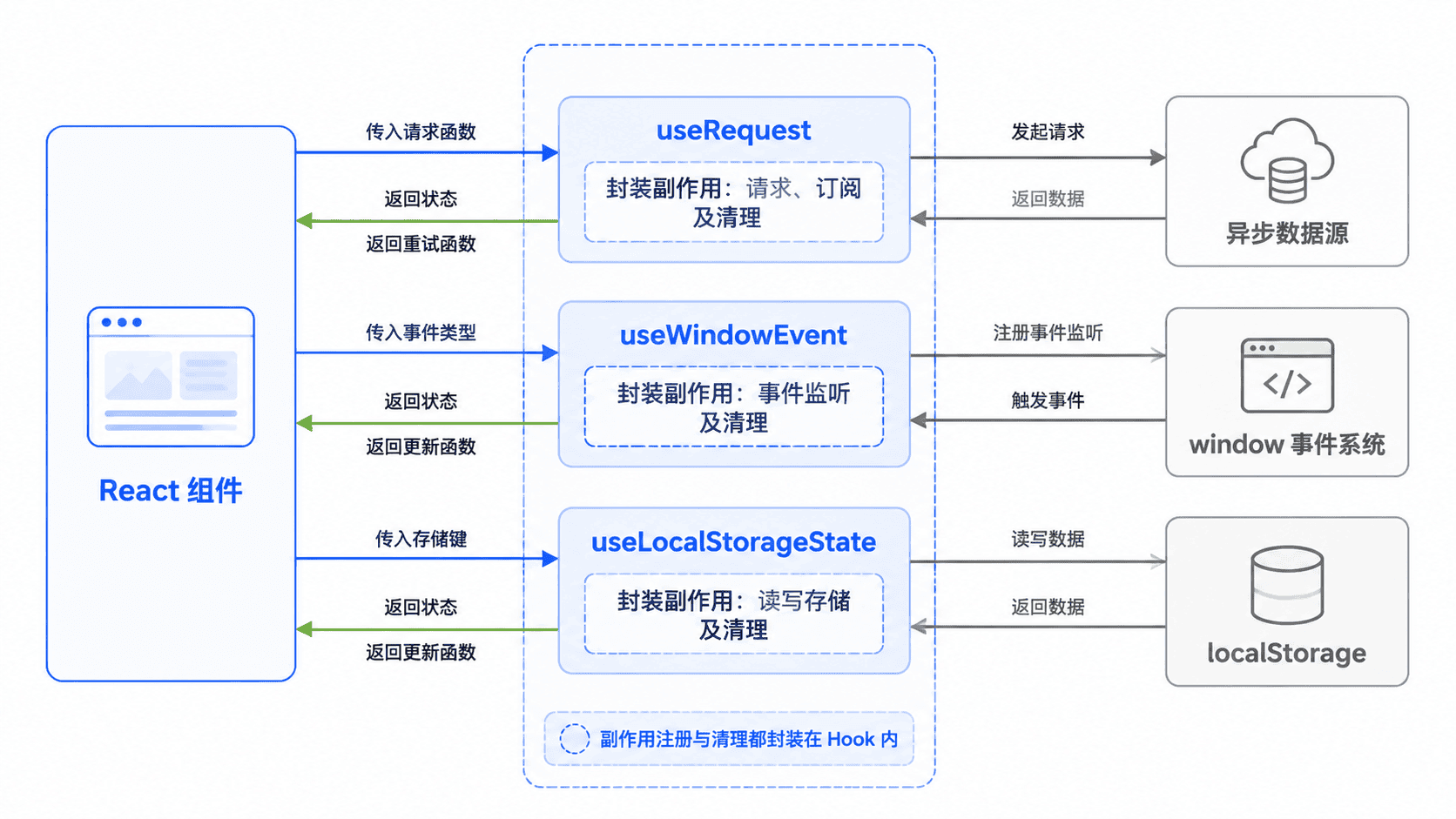
主示例:封装三类副作用
下面代码可直接替换 Vite React TypeScript 项目的 src/App.tsx。useRequest 管理异步状态,useWindowEvent 保证监听自动清理,useLocalStorageState 让组件状态与浏览器存储保持一致。
import {
  useCallback,
  useEffect,
  useMemo,
  useRef,
  useState,
} from 'react';

type RequestState<T> = {
  data: T | null;
  loading: boolean;
  error: string | null;
};

function useRequest<T>(request: () => Promise<T>) {
  const [state, setState] = useState<RequestState<T>>({
    data: null,
    loading: true,
    error: null,
  });

  const execute = useCallback(async () => {
    setState((current) => ({ ...current, loading: true, error: null }));

    try {
      const data = await request();
      setState({ data, loading: false, error: null });
    } catch (error) {
      const message = error instanceof Error ? error.message : '请求失败';
      setState({ data: null, loading: false, error: message });
    }
  }, [request]);

  useEffect(() => {
    void execute();
  }, [execute]);

  return useMemo(
    () => ({ ...state, reload: execute }),
    [state, execute],
  );
}

function useWindowEvent<K extends keyof WindowEventMap>(
  type: K,
  handler: (event: WindowEventMap[K]) => void,
) {
  const handlerRef = useRef(handler);

  useEffect(() => {
    handlerRef.current = handler;
  }, [handler]);

  useEffect(() => {
    const listener = (event: Event) => {
      handlerRef.current(event as WindowEventMap[K]);
    };

    window.addEventListener(type, listener);
    return () => window.removeEventListener(type, listener);
  }, [type]);
}

function useLocalStorageState<T>(key: string, initialValue: T) {
  const [value, setValue] = useState<T>(() => {
    const saved = window.localStorage.getItem(key);

    try {
      return saved === null ? initialValue : (JSON.parse(saved) as T);
    } catch {
      return initialValue;
    }
  });

  const updateValue = useCallback(
    (next: T | ((current: T) => T)) => {
      setValue((current) => {
        const resolved =
          typeof next === 'function'
            ? (next as (value: T) => T)(current)
            : next;

        window.localStorage.setItem(key, JSON.stringify(resolved));
        return resolved;
      });
    },
    [key],
  );

  return [value, updateValue] as const;
}

type Profile = {
  name: string;
  role: string;
};

const loadProfile = () =>
  new Promise<Profile>((resolve) => {
    setTimeout(() => resolve({ name: 'Ada', role: 'Frontend Engineer' }), 400);
  });

export default function App() {
  const { data, loading, error, reload } = useRequest(loadProfile);
  const [theme, setTheme] = useLocalStorageState<'light' | 'dark'>(
    'demo-theme',
    'light',
  );
  const [width, setWidth] = useState(() => window.innerWidth);

  useWindowEvent('resize', () => setWidth(window.innerWidth));

  return (
    <main>
      <h1>自定义 Hook 演示</h1>
      <p>窗口宽度:{width}px</p>
      <p>当前主题:{theme}</p>
      <button
        type="button"
        onClick={() =>
          setTheme((current) => (current === 'light' ? 'dark' : 'light'))
        }
      >
        切换主题
      </button>
      <button type="button" onClick={reload}>
        重新请求
      </button>
      {loading && <p>加载中...</p>}
      {error && <p>错误:{error}</p>}
      {data && <p>用户:{data.name},职位:{data.role}</p>}
    </main>
  );
}
预期结果
页面先显示“加载中...”,约 400 毫秒后显示用户 Ada。
调整浏览器宽度时,页面中的窗口宽度会同步变化。
切换主题后刷新页面,主题值仍会从 localStorage 恢复。
关键边界
useRequest 的请求函数必须保持稳定。示例把 loadProfile 定义在组件外;若请求依赖组件参数,应使用 useCallback 包装,否则函数每次渲染都变化,可能触发重复请求。
事件 Hook 使用 ref 保存最新处理函数,因此不会因回调变化而反复解绑和绑定。真实 HTTP 请求还应配合 AbortController 或请求序号,避免组件卸载后更新状态,也避免较早请求覆盖较晚结果。
本地存储只存在于浏览器环境。服务端渲染时需要先判断 window 是否可用;存储复杂对象时,还应考虑版本升级、字段迁移和容量限制。