
操作系统 / 系统课时
为什么 pipe 读写会阻塞
为什么 pipe 读写会阻塞
管道阻塞不是随机现象,而是由“缓冲区是否有数据、读写端是否仍打开、缓冲区是否还有空间”共同决定。本篇把 read 的等待与 EOF、write 的等待与 SIGPIPE 分开分析,并用一个可运行程序验证三种关键状态。
学习目标
- 判断管道为空时
read是阻塞还是返回 EOF - 理解写端全部关闭为什么会让
read返回0 - 理解无读端时
write的SIGPIPE与EPIPE行为
read 的返回取决于数据和写端
阻塞模式下,read 先看管道缓冲区。如果已有数据,它立即返回可读字节;如果没有数据但仍至少存在一个写端,内核认为未来还可能有数据,因此让读进程睡眠等待。
如果缓冲区已经为空,并且所有写端都关闭了,未来不可能再出现新数据,read 就返回 0。这个 0 不是“暂时没数据”,而是 EOF,表示这条字节流已经结束。
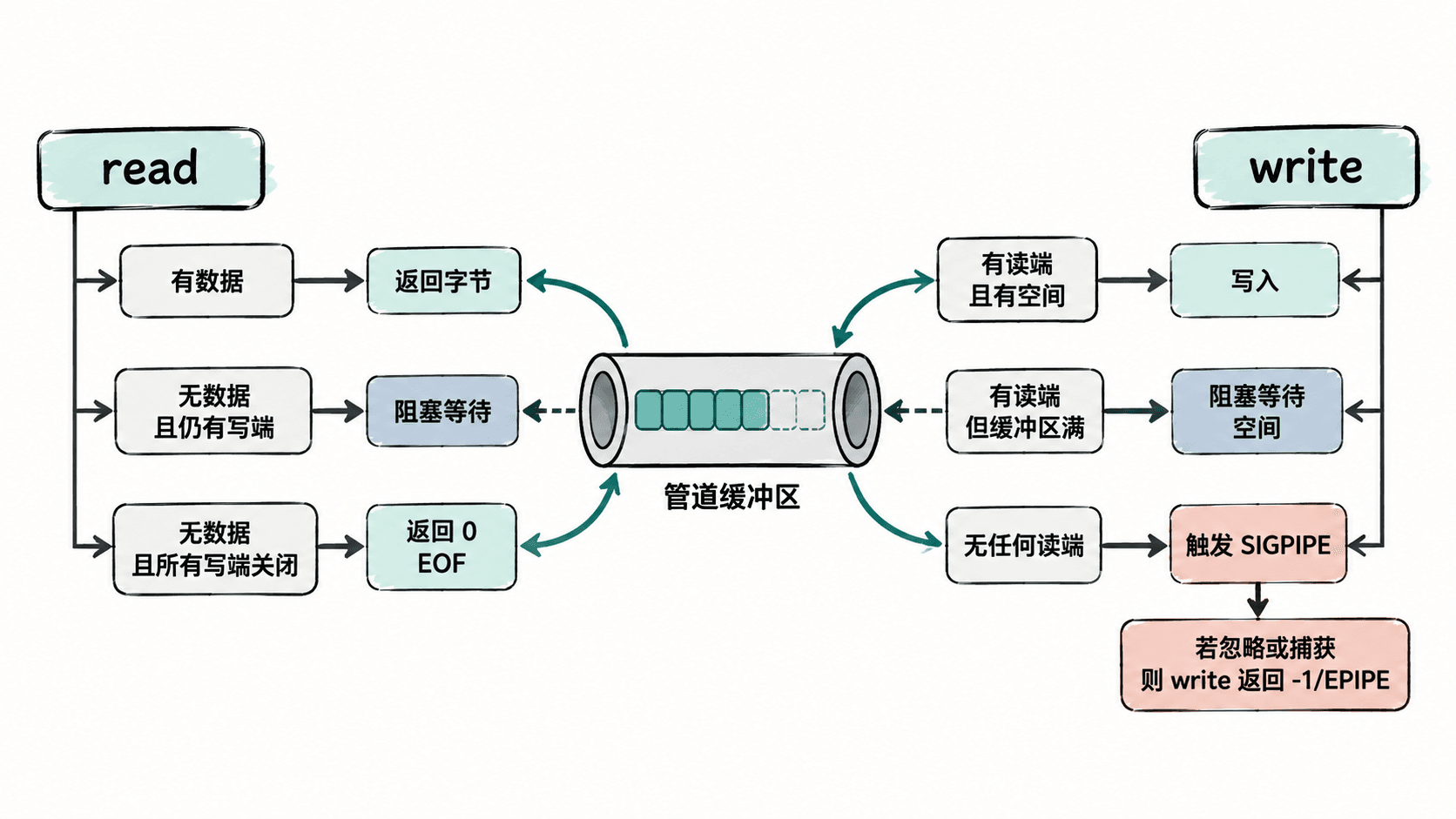
write 的阻塞与无读端行为
只要仍有读端,write 在缓冲区有空间时可以继续写;当管道缓冲区已满时,阻塞模式下的写操作会等待读进程消费数据。缓冲区容量由内核决定,不应把某个固定字节数写死到业务逻辑里。
如果所有读端都已关闭,情况完全不同:内核会向写进程发送 SIGPIPE。默认动作是终止进程;若程序忽略或捕获这个信号,write 会返回 -1,并把 errno 设为 EPIPE。因此“无读端”不是普通的缓冲区满。
用程序验证三种状态
下面的程序提供三个模式:empty-read 演示空管道但仍有写端时阻塞等待;eof 演示没有任何写端时读取 EOF;no-reader 忽略 SIGPIPE 后观察 EPIPE。
#include <errno.h>
#include <signal.h>
#include <stdio.h>
#include <stdlib.h>
#include <string.h>
#include <sys/wait.h>
#include <unistd.h>

static int demo_empty_read(void) {
    int fd[2];
    if (pipe(fd) == -1) {
        perror("pipe");
        return 1;
    }

    pid_t pid = fork();
    if (pid == -1) {
        perror("fork");
        return 1;
    }

    if (pid == 0) {
        close(fd[0]);
        sleep(1);  // 保持写端打开,但暂时不写数据
        if (write(fd[1], "X", 1) == -1) {
            _exit(1);
        }
        close(fd[1]);
        _exit(0);
    }

    close(fd[1]);
    puts("parent: read is waiting for data");
    fflush(stdout);

    char ch;
    ssize_t n = read(fd[0], &ch, 1);
    if (n == -1) {
        perror("read");
        close(fd[0]);
        waitpid(pid, NULL, 0);
        return 1;
    }

    printf("parent: read returned %zd byte(s)\n", n);
    close(fd[0]);
    waitpid(pid, NULL, 0);
    return 0;
}

static int demo_eof(void) {
    int fd[2];
    if (pipe(fd) == -1) {
        perror("pipe");
        return 1;
    }

    close(fd[1]);  // 没有任何写端,且缓冲区为空

    char ch;
    ssize_t n = read(fd[0], &ch, 1);
    printf("read returned %zd (EOF)\n", n);

    close(fd[0]);
    return n == 0 ? 0 : 1;
}

static int demo_no_reader(void) {
    int fd[2];
    if (pipe(fd) == -1) {
        perror("pipe");
        return 1;
    }

    close(fd[0]);  // 所有读端都已关闭
    signal(SIGPIPE, SIG_IGN);

    if (write(fd[1], "X", 1) == -1 && errno == EPIPE) {
        puts("write failed: EPIPE");
        close(fd[1]);
        return 0;
    }

    close(fd[1]);
    return 1;
}

int main(int argc, char *argv[]) {
    if (argc != 2) {
        fprintf(stderr, "usage: %s <empty-read|eof|no-reader>\n", argv[0]);
        return EXIT_FAILURE;
    }

    if (strcmp(argv[1], "empty-read") == 0) {
        return demo_empty_read();
    }
    if (strcmp(argv[1], "eof") == 0) {
        return demo_eof();
    }
    if (strcmp(argv[1], "no-reader") == 0) {
        return demo_no_reader();
    }

    fprintf(stderr, "unknown mode\n");
    return EXIT_FAILURE;
}
预期结果:源码可在 Linux 上由后续命令编译;若编译成功,编译器不会输出错误信息。
cc -Wall -Wextra -O2 pipe_states.c -o pipe_states
./pipe_states empty-read
./pipe_states eof
./pipe_states no-reader
预期输出
parent: read is waiting for data
parent: read returned 1 byte(s)
read returned 0 (EOF)
write failed: EPIPE
排查卡住的管道程序
遇到 read 长时间不返回时,先检查是否真的没有数据,再检查是否还有任意进程持有写端。最常见的错误是 fork 后某个进程忘记关闭继承来的写描述符,导致读取方永远等不到 EOF。
遇到写进程异常退出时,应确认是不是默认 SIGPIPE 动作造成的;如果程序需要自行处理断开的消费者,可以捕获或忽略 SIGPIPE,再根据 write 的 EPIPE 返回值进入错误处理。
判断管道行为时始终同时看三件事:缓冲区状态、读端数量、写端数量。把这三个条件分开后,大多数“为什么卡住”或“为什么突然退出”的现象都能直接定位。