
游戏客户端架构 / 系统课时
搭建游戏场景
搭建游戏场景
本课把规划中的场景清单转换为可运行的对象集合,完成地图尺寸、玩家、障碍、钥匙和出口的装配,并通过控制台结果验证场景是否完整。
学习目标
- 按稳定顺序把场景数据装配为运行时对象
- 区分实体、静态障碍和触发型交互对象
- 用自动检查验证对象数量、坐标与唯一性
明确场景装配顺序
场景搭建不应边读取边执行玩法逻辑。更稳定的顺序是先读取场景描述,再创建对象,随后建立碰撞与交互索引,最后把场景标记为可运行。这样可以避免对象尚未创建完成就参与更新。
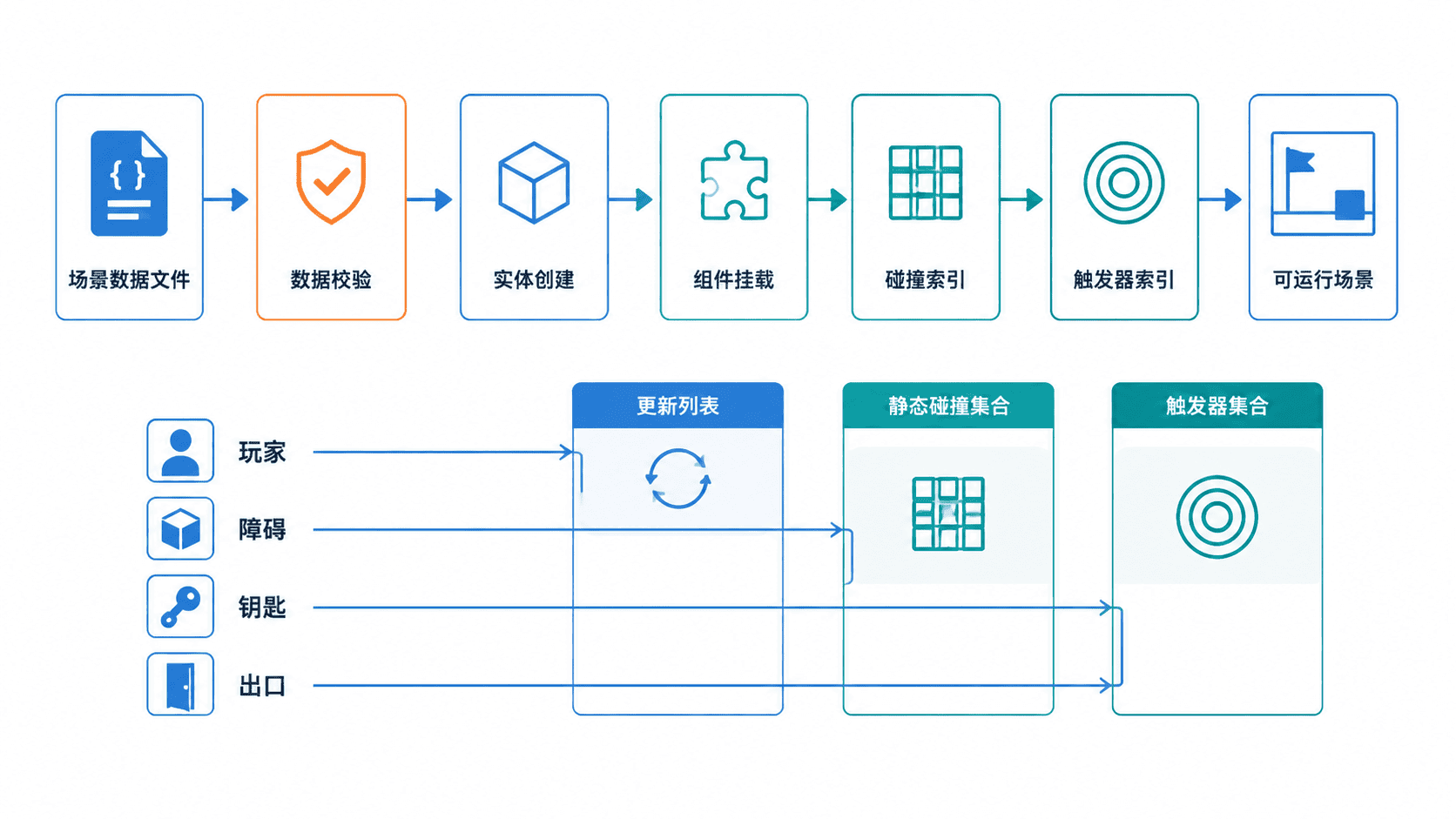
装配阶段必须先检查地图边界和对象 ID。场景中只能有一个玩家,所有对象坐标都要落在地图范围内,交互对象还应保留可启用状态,便于拾取后关闭。
实现场景对象装配
下面的 C++17 示例不依赖具体图形库,先用运行时数据结构验证场景装配。后续接入渲染器时,可以把 Entity 继续扩展为精灵、碰撞体和脚本组件。
cpp
#include <iostream>
#include <stdexcept>
#include <string>
#include <unordered_set>
#include <vector>

struct Vec2 {
    int x;
    int y;
};

enum class EntityType {
    Player,
    Obstacle,
    Key,
    Exit
};

struct EntitySpec {
    std::string id;
    EntityType type;
    Vec2 position;
};

struct Entity {
    std::string id;
    EntityType type;
    Vec2 position;
    bool active{true};
};

struct Scene {
    int width;
    int height;
    std::vector<Entity> entities;
};

Scene buildScene(int width, int height, const std::vector<EntitySpec>& specs) {
    if (width <= 0 || height <= 0) {
        throw std::runtime_error("map size must be positive");
    }

    Scene scene{width, height, {}};
    std::unordered_set<std::string> ids;
    int playerCount = 0;

    for (const EntitySpec& spec : specs) {
        // 在创建运行时对象前完成边界与唯一性校验。
        if (spec.position.x < 0 || spec.position.x >= width ||
            spec.position.y < 0 || spec.position.y >= height) {
            throw std::runtime_error("entity is outside map: " + spec.id);
        }
        if (!ids.insert(spec.id).second) {
            throw std::runtime_error("duplicate entity id: " + spec.id);
        }
        if (spec.type == EntityType::Player) {
            ++playerCount;
        }

        scene.entities.push_back({spec.id, spec.type, spec.position, true});
    }

    // 游戏场景必须且只能包含一个玩家。
    if (playerCount != 1) {
        throw std::runtime_error("scene must contain exactly one player");
    }
    return scene;
}

int main() {
    const std::vector<EntitySpec> specs{
        {"player", EntityType::Player, {2, 2}},
        {"wall-1", EntityType::Obstacle, {6, 4}},
        {"wall-2", EntityType::Obstacle, {6, 5}},
        {"key", EntityType::Key, {8, 3}},
        {"exit", EntityType::Exit, {17, 9}}
    };

    try {
        const Scene scene = buildScene(20, 12, specs);
        std::cout << "scene ready\n";
        std::cout << "map: " << scene.width << "x" << scene.height << "\n";
        std::cout << "entities: " << scene.entities.size() << "\n";
    } catch (const std::exception& error) {
        std::cerr << "scene build failed: " << error.what() << "\n";
        return 1;
    }
    return 0;
}
在装有 C++17 编译器的终端中执行:
bash
g++ -std=c++17 main.cpp -o scene-demo
./scene-demo
预期输出
text
scene ready
map: 20x12
entities: 5
文件名和可执行文件路径可能因环境不同而变化;若使用 Windows,可将编译器命令替换为本机工具链对应命令。
接入碰撞与交互规则
障碍应进入静态碰撞集合,只参与位置阻挡;钥匙和出口应进入触发器集合,只检测重叠而不推开玩家。钥匙被拾取后将 active 设为 false,出口则读取玩家是否持有钥匙。
场景更新顺序建议保持为“输入、移动预测、障碍修正、触发器检测、状态切换”。如果先触发交互再修正碰撞,玩家可能隔着障碍拾取钥匙或错误进入出口。
验收场景完整性
运行时应额外检查玩家数量、重复 ID、越界坐标和缺失交互对象。开发阶段发现错误应立即终止场景加载,不要继续运行一个不完整场景,否则故障会在碰撞或渲染阶段以更难定位的方式出现。
完成装配后,至少验证玩家坐标为 (2, 2)、障碍数量为 2、钥匙与出口均处于启用状态,并确认地图尺寸与规划配置一致。
本课总结
- 场景应经过数据校验、对象创建和索引建立后再进入运行状态
- 障碍负责阻挡,钥匙和出口负责触发,三者不应混用同一种处理方式
- 唯一 ID、地图边界和单玩家约束应在装配阶段直接验证
下一课预告
下一课将把场景对象接入主循环,完成玩家移动、碰撞修正、钥匙拾取和出口胜利判定。
按自己的节奏,确认真正理解。