
计算机网络 / 系统课时
搭一套浏览器与设备实时链路
搭一套浏览器与设备实时链路
这一节把浏览器、WebSocket 服务和模拟设备真正连成一条链路:双方先鉴权,浏览器订阅指定设备,连接通过心跳保持活性,浏览器下发指令后由设备返回确认。完成后可以在本机同时验证路由、断线检测和请求确认是否工作。
学习目标
- 实现浏览器、服务端和模拟设备三方 WebSocket 通信。
- 为连接加入鉴权、心跳、设备订阅和指令确认。
- 用可观察的输出验证正常链路与超时边界。
先定义三方消息约定
示例使用应用层 JSON 消息。连接建立后第一条消息必须是 auth;浏览器鉴权成功后才能 subscribe 和发送 command,设备鉴权成功后才能接收指令。双方都周期性发送 heartbeat,服务端超过 15 秒未收到任何消息就关闭连接。
| 消息类型 | 发送方 | 关键字段 | 作用 |
|---|---|---|---|
auth |
浏览器、设备 | role、token、deviceId |
建立连接身份 |
subscribe |
浏览器 | deviceId |
订阅一个设备 |
command |
浏览器 | requestId、deviceId、payload |
下发控制指令 |
command_ack |
设备 | requestId、deviceId、ok |
确认指令处理结果 |
device_event |
设备 | payload |
向已订阅浏览器推送设备事件 |
heartbeat |
浏览器、设备 | 无必填业务字段 | 刷新连接活跃时间 |
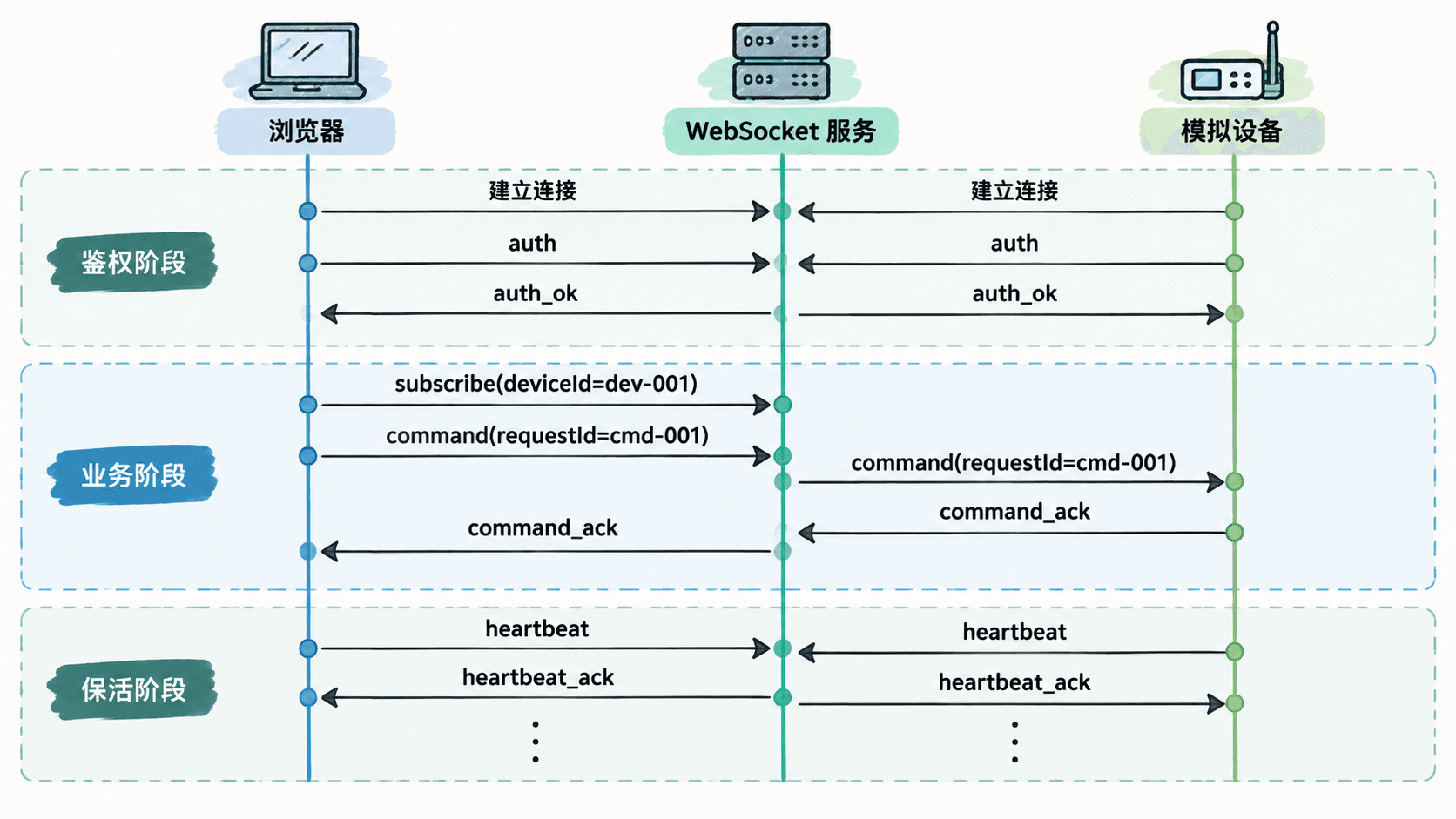
实现 WebSocket 服务
先在空目录安装 ws。下面的命令只验证依赖可被 Node.js 加载,安装过程中的下载日志会因环境不同而不同。
npm init -y >/dev/null 2>&1 && npm install ws@8 >/dev/null 2>&1 && node -e "console.log(typeof require('ws'))"预期输出
function创建 server.js。示例为了便于本机练习使用固定令牌;生产环境应把令牌校验替换成真实身份系统,并使用 wss://。
const WebSocket = require("ws");
const { WebSocketServer } = WebSocket;

const wss = new WebSocketServer({ port: 8080 });
const devices = new Map();
const subscriptions = new Map();
const pending = new Map();

function send(ws, message) {
  if (ws.readyState === WebSocket.OPEN) {
    ws.send(JSON.stringify(message));
  }
}

function closeWith(ws, code, reason) {
  if (ws.readyState === WebSocket.OPEN) {
    ws.close(code, reason);
  }
}

wss.on("connection", (ws) => {
  ws.authed = false;
  ws.role = null;
  ws.deviceId = null;
  ws.lastSeen = Date.now();

  const authTimer = setTimeout(() => {
    if (!ws.authed) closeWith(ws, 4003, "auth timeout");
  }, 5000);

  ws.on("message", (raw) => {
    ws.lastSeen = Date.now();

    let msg;
    try {
      msg = JSON.parse(raw.toString());
    } catch {
      return send(ws, { type: "error", error: "invalid_json" });
    }

    if (!ws.authed) {
      if (msg.type !== "auth") {
        return closeWith(ws, 4003, "auth required");
      }

      const browserOk =
        msg.role === "browser" && msg.token === "browser-token";
      const deviceOk =
        msg.role === "device" &&
        msg.token === "device-token" &&
        typeof msg.deviceId === "string";

      if (!browserOk && !deviceOk) {
        return closeWith(ws, 4003, "auth failed");
      }

      ws.authed = true;
      ws.role = msg.role;
      ws.deviceId = deviceOk ? msg.deviceId : null;
      clearTimeout(authTimer);

      if (ws.role === "device") {
        const old = devices.get(ws.deviceId);
        if (old && old !== ws) closeWith(old, 4002, "device replaced");
        devices.set(ws.deviceId, ws);
      }

      return send(ws, {
        type: "auth_ok",
        role: ws.role,
        deviceId: ws.deviceId
      });
    }

    if (msg.type === "heartbeat") {
      return send(ws, { type: "heartbeat_ack" });
    }

    if (ws.role === "browser" && msg.type === "subscribe") {
      if (typeof msg.deviceId !== "string") {
        return send(ws, { type: "error", error: "deviceId_required" });
      }
      if (!subscriptions.has(msg.deviceId)) {
        subscriptions.set(msg.deviceId, new Set());
      }
      subscriptions.get(msg.deviceId).add(ws);
      return send(ws, {
        type: "subscribed",
        deviceId: msg.deviceId,
        online: devices.has(msg.deviceId)
      });
    }

    if (ws.role === "browser" && msg.type === "command") {
      const { requestId, deviceId, payload } = msg;
      if (!requestId || !deviceId || payload === undefined) {
        return send(ws, { type: "error", error: "invalid_command" });
      }
      if (pending.has(requestId)) {
        return send(ws, { type: "error", error: "duplicate_requestId" });
      }

      const device = devices.get(deviceId);
      if (!device || device.readyState !== WebSocket.OPEN) {
        return send(ws, {
          type: "command_ack",
          requestId,
          deviceId,
          ok: false,
          error: "device_offline"
        });
      }

      const timer = setTimeout(() => {
        pending.delete(requestId);
        send(ws, {
          type: "command_ack",
          requestId,
          deviceId,
          ok: false,
          error: "ack_timeout"
        });
      }, 5000);

      pending.set(requestId, { browser: ws, timer });
      return send(device, { type: "command", requestId, payload });
    }

    if (ws.role === "device" && msg.type === "command_ack") {
      const item = pending.get(msg.requestId);
      if (!item) return;

      clearTimeout(item.timer);
      pending.delete(msg.requestId);
      return send(item.browser, {
        type: "command_ack",
        requestId: msg.requestId,
        deviceId: ws.deviceId,
        ok: msg.ok === true
      });
    }

    if (ws.role === "device" && msg.type === "device_event") {
      const listeners = subscriptions.get(ws.deviceId);
      if (listeners) {
        for (const browser of listeners) {
          send(browser, {
            type: "device_event",
            deviceId: ws.deviceId,
            payload: msg.payload
          });
        }
      }
      return;
    }

    send(ws, { type: "error", error: "unsupported_message" });
  });

  ws.on("close", () => {
    clearTimeout(authTimer);

    if (ws.role === "device" && devices.get(ws.deviceId) === ws) {
      devices.delete(ws.deviceId);
    }

    for (const set of subscriptions.values()) {
      set.delete(ws);
    }

    for (const [requestId, item] of pending.entries()) {
      if (item.browser === ws) {
        clearTimeout(item.timer);
        pending.delete(requestId);
      }
    }
  });
});

setInterval(() => {
  const now = Date.now();
  for (const ws of wss.clients) {
    if (now - ws.lastSeen > 15000) {
      closeWith(ws, 4001, "heartbeat timeout");
    }
  }
}, 3000);

console.log("server listening on ws://127.0.0.1:8080");
预期结果
server listening on ws://127.0.0.1:8080启动模拟设备
创建 device.js。设备鉴权成功后每 5 秒发送一次心跳;收到指令时打印内容并用相同 requestId 返回确认,这个关联键让浏览器能确认自己发出的那一条指令。
const WebSocket = require("ws");

const ws = new WebSocket("ws://127.0.0.1:8080");

ws.on("open", () => {
  ws.send(JSON.stringify({
    type: "auth",
    role: "device",
    token: "device-token",
    deviceId: "dev-001"
  }));

  setInterval(() => {
    if (ws.readyState === WebSocket.OPEN) {
      ws.send(JSON.stringify({ type: "heartbeat" }));
    }
  }, 5000);
});

ws.on("message", (raw) => {
  const msg = JSON.parse(raw.toString());

  if (msg.type === "auth_ok") {
    console.log("device authenticated");
  }

  if (msg.type === "command") {
    console.log("command received", msg.requestId, msg.payload);
    ws.send(JSON.stringify({
      type: "command_ack",
      requestId: msg.requestId,
      ok: true
    }));
    ws.send(JSON.stringify({
      type: "device_event",
      payload: { state: "applied", value: msg.payload.value }
    }));
  }
});

ws.on("close", (code, reason) => {
  console.log("device closed", code, reason.toString());
});
预期结果
device authenticated在第二个终端执行 node device.js 后保持进程运行。此时服务端的 devices 映射中已经存在 dev-001,后续浏览器订阅会得到 online: true。
在浏览器完成订阅与指令确认
打开浏览器开发者工具 Console,在同一段代码中建立连接、鉴权、订阅、发送指令并持续心跳。这里使用浏览器原生 WebSocket,不需要额外库。
const ws = new WebSocket("ws://127.0.0.1:8080");

ws.addEventListener("open", () => {
  ws.send(JSON.stringify({
    type: "auth",
    role: "browser",
    token: "browser-token"
  }));
});

ws.addEventListener("message", (event) => {
  const msg = JSON.parse(event.data);
  console.log(msg);

  if (msg.type === "auth_ok") {
    ws.send(JSON.stringify({
      type: "subscribe",
      deviceId: "dev-001"
    }));

    ws.send(JSON.stringify({
      type: "command",
      requestId: "cmd-001",
      deviceId: "dev-001",
      payload: { action: "set", value: 1 }
    }));

    setInterval(() => {
      if (ws.readyState === WebSocket.OPEN) {
        ws.send(JSON.stringify({ type: "heartbeat" }));
      }
    }, 5000);
  }
});
预期输出
{type: 'auth_ok', role: 'browser', deviceId: null}
{type: 'subscribed', deviceId: 'dev-001', online: true}
{type: 'command_ack', requestId: 'cmd-001', deviceId: 'dev-001', ok: true}
{type: 'device_event', deviceId: 'dev-001', payload: {state: 'applied', value: 1}}
不同浏览器的对象展示格式可能略有差异,但字段和值应一致。模拟设备终端还会看到一条 command received cmd-001 { action: 'set', value: 1 },证明指令经过服务端路由到设备,确认消息返回浏览器,同时订阅链路把设备状态事件推送给浏览器。
验收正常链路与故障边界
先验证正常路径:服务端运行、设备在线、浏览器鉴权成功后,订阅结果应为 online: true,同一 requestId 的 command_ack 应在 5 秒超时前返回。随后停止 device.js,再次从浏览器发送新的 requestId,服务端应立即返回 device_offline,而不是让请求无限等待。
再验证心跳:关闭浏览器中的心跳定时器或让标签页长期停止执行后,服务端会在超过 15 秒未收到消息时以关闭码 4001 和原因 heartbeat timeout 断开连接。生产环境还应补上 TLS、真实令牌校验、速率限制、持久化设备状态和可观测日志,但三方实时链路的核心控制面已经完整:先鉴权,再订阅,再路由,最后用 requestId 对指令确认闭环。