
计算机网络 / 系统课时
退出后怎样彻底清理连接
退出后怎样彻底清理连接
用户退出后,真正要清理的不只是 WebSocket 本身,还包括用户到连接的索引、频道订阅和临时状态。主动退出、令牌失效、服务端踢下线与异常断开都应汇入同一套幂等清理逻辑,才能避免“连接没了,引用还在”的泄漏。
学习目标
- 识别一个 WebSocket 连接退出时必须释放的资源。
- 用幂等清理函数统一处理主动退出、令牌失效和服务端踢下线。
- 通过索引数量与订阅数量验证是否存在残留引用。
清理必须只有一个出口
连接可能因为客户端发送 logout、鉴权令牌失效、管理员踢下线、网络中断或进程主动关闭而结束。危险做法是让每条路径各写一份删除逻辑:某条路径少删一个订阅集合,线上就会出现幽灵订阅或内存持续增长。
更稳妥的结构是让“为什么断开”只负责选择关闭码和原因,真正的资源释放全部进入 cleanup。清理函数必须幂等,因为主动关闭后仍会触发 close 事件,同一个连接可能被清理两次。
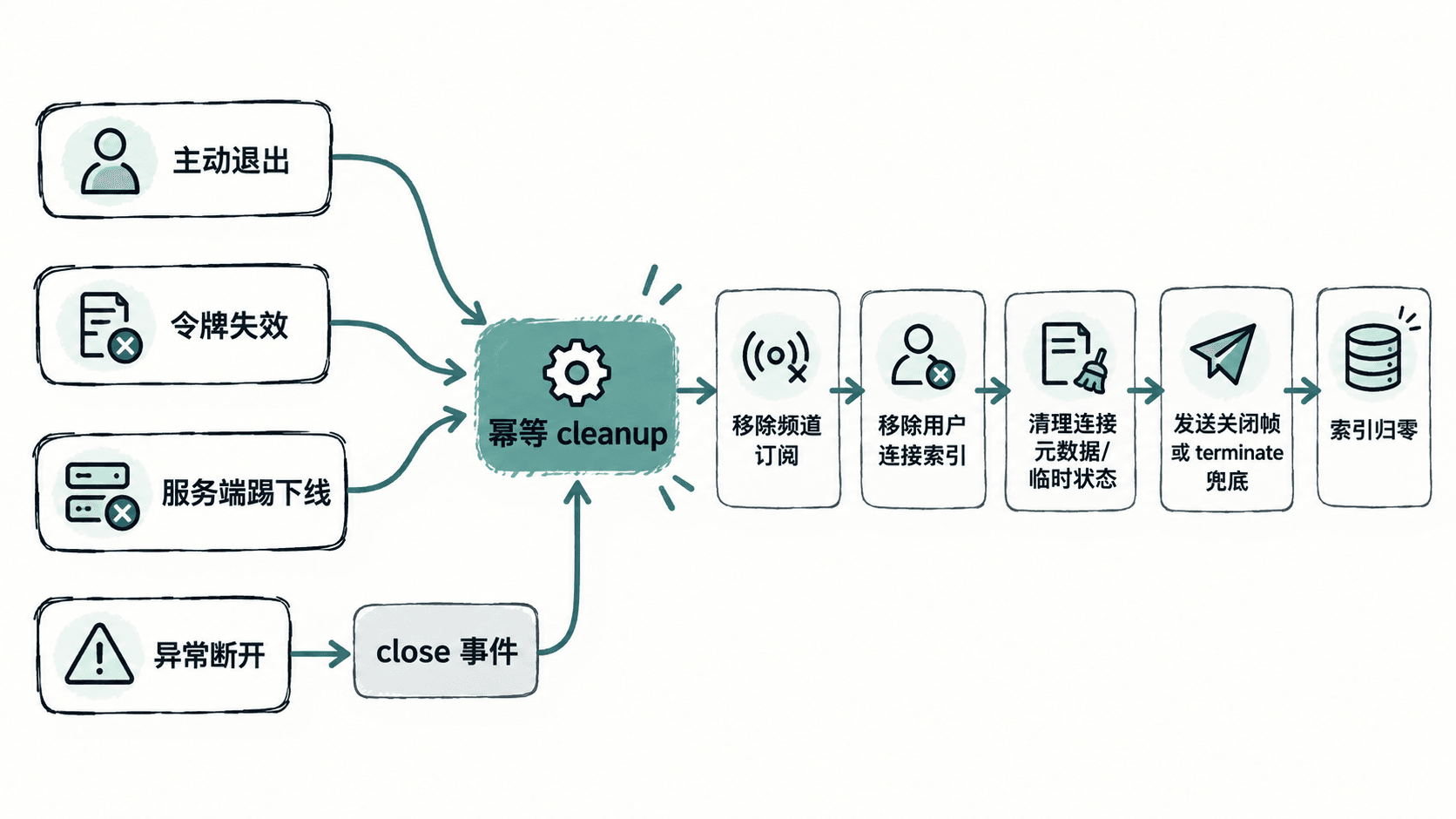
幂等清理要释放哪些引用
至少要检查四类引用:连接元数据、用户到连接的反向索引、频道或房间订阅索引,以及连接级计时器或临时缓存。用户允许多设备在线时,不能因为关闭一个 socket 就直接删除整个用户的共享缓存;应只删除当前连接持有的状态,只有“令牌整体失效”或“踢下该用户全部连接”时才遍历用户索引批量关闭。
下面的 server.js 使用 ws 包启动服务,并自动创建三个测试连接,分别模拟主动退出、令牌失效和服务端踢下线。所有路径最终都调用同一个 closeAndCleanup。
const WebSocket = require('ws');
const { WebSocketServer } = WebSocket;

const PORT = Number(process.env.PORT || 8080);
const wss = new WebSocketServer({ port: PORT });

const connections = new Map();
const byUser = new Map();
const byTopic = new Map();
let subscribedCount = 0;
let clients = [];

function addToIndex(index, key, ws) {
  let set = index.get(key);
  if (!set) {
    set = new Set();
    index.set(key, set);
  }
  set.add(ws);
}

function removeFromIndex(index, key, ws) {
  const set = index.get(key);
  if (!set) return;
  set.delete(ws);
  if (set.size === 0) index.delete(key);
}

// 幂等:同一个 ws 被主动清理和 close 事件再次清理都安全。
function cleanup(ws) {
  const meta = connections.get(ws);
  if (!meta) return false;

  for (const topic of meta.topics) {
    removeFromIndex(byTopic, topic, ws);
  }
  removeFromIndex(byUser, meta.userId, ws);
  connections.delete(ws);

  console.log(`cleanup ${meta.userId}: topics=${meta.topics.size}`);
  return true;
}

function closeAndCleanup(ws, code, reason) {
  if (!cleanup(ws)) return;

  if (ws.readyState === WebSocket.OPEN) {
    ws.close(code, reason);
    // 对端不完成关闭握手时,避免 socket 长时间滞留。
    setTimeout(() => {
      if (ws.readyState !== WebSocket.CLOSED) ws.terminate();
    }, 500).unref();
  } else if (ws.readyState !== WebSocket.CLOSED) {
    ws.terminate();
  }
}

function revokeUser(userId, code, reason) {
  const sockets = [...(byUser.get(userId) || [])];
  for (const ws of sockets) {
    closeAndCleanup(ws, code, reason);
  }
}

function runExitScenarios() {
  clients[0].send(JSON.stringify({ type: 'logout' }));
  revokeUser('u2', 4001, 'token expired');
  revokeUser('u3', 4002, 'server kick');

  setTimeout(() => {
    console.log(`remaining connections=${connections.size}`);
    console.log(`remaining topics=${byTopic.size}`);
    wss.close();
  }, 200);
}

wss.on('connection', (ws, req) => {
  const url = new URL(req.url, 'ws://localhost');
  const userId = url.searchParams.get('userId');
  const token = url.searchParams.get('token');

  if (!userId || token !== `valid-${userId}`) {
    ws.close(1008, 'unauthorized');
    return;
  }

  const meta = { userId, topics: new Set() };
  connections.set(ws, meta);
  addToIndex(byUser, userId, ws);

  ws.on('message', (raw) => {
    const message = JSON.parse(raw.toString());

    if (message.type === 'subscribe' && typeof message.topic === 'string') {
      if (!meta.topics.has(message.topic)) {
        meta.topics.add(message.topic);
        addToIndex(byTopic, message.topic, ws);
        subscribedCount += 1;
        console.log(`subscribed ${userId} -> ${message.topic}`);
        if (subscribedCount === 3) runExitScenarios();
      }
      return;
    }

    if (message.type === 'logout') {
      closeAndCleanup(ws, 1000, 'logout');
    }
  });

  // 异常断开没有机会走业务入口,因此 close 事件仍要兜底。
  ws.on('close', () => cleanup(ws));
});

wss.on('listening', () => {
  console.log(`listening on ${PORT}`);

  clients = ['u1', 'u2', 'u3'].map((userId) => {
    const client = new WebSocket(
      `ws://localhost:${PORT}/?userId=${userId}&token=valid-${userId}`
    );
    client.on('open', () => {
      client.send(JSON.stringify({ type: 'subscribe', topic: 'orders' }));
    });
    return client;
  });
});
预期结果:三个连接都会进入同一个清理函数;主动退出后再次触发 close 时不会重复删除索引,也不会抛错。
触发源只负责决定关闭原因
主动退出通常可以使用标准关闭码 1000。令牌在连接期间失效、账号被禁用或管理员踢下线时,可以在应用约定范围 3000~4999 内使用自定义码,并让客户端根据关闭原因决定是否重新登录。示例中的 4001 与 4002 只是当前应用的约定,不是 WebSocket 标准预定义语义。
关键点是:令牌失效与踢下线往往针对“用户的全部连接”,所以先从 byUser 复制出 socket 集合,再逐个调用统一清理函数。这样即使用户同时开了网页、桌面端和手机端,也不会只关掉其中一个连接。
验收看残留而不是只看 close
将代码保存为 server.js 后运行:
npm init -y >/dev/null
npm install ws >/dev/null
node server.js
预期输出
listening on <PORT>
subscribed <ID> -> orders
subscribed <ID> -> orders
subscribed <ID> -> orders
cleanup <ID>: topics=1
cleanup <ID>: topics=1
cleanup <ID>: topics=1
remaining connections=0
remaining topics=0
其中 <PORT> 与 <ID> 代表实际端口和连接对应的用户标识,三条 cleanup 的先后顺序可能略有不同。验收时最重要的是最后两个计数都为 0;如果连接数归零但频道索引仍非零,说明仍有订阅引用没有释放。