
计算机网络 / 系统课时
一个用户多台设备怎么管理
一个用户多台设备怎么管理
实时系统里,一个用户可能同时登录手机、电脑和网页,同一设备还可能因为刷新或重连出现多个连接。要支持多端在线与定向推送,需要把 userId、deviceId 和 connectionId 分成不同层级,并维护可双向查询、可及时清理的连接索引。
学习目标
- 明确
userId、deviceId、connectionId各自代表什么 - 设计支持用户广播、设备定向和单连接定向的映射关系
- 在断线与重连时正确注册和清理连接
三个标识不要混成一个
userId 表示业务身份,一个用户可以对应多个设备;deviceId 表示客户端实例或设备范围,应由服务端校验其归属,但不能当作认证凭据;connectionId 只表示一次具体 WebSocket 连接,每次重新连接都应生成新的值。
为了同时支持“给用户所有端推送”和“只发给某台设备”,服务端通常至少维护两类索引:按 connectionId 查连接详情,以及按 userId 找到该用户当前的全部连接。若设备级定向很频繁,再增加 userId + deviceId 到连接集合的索引。
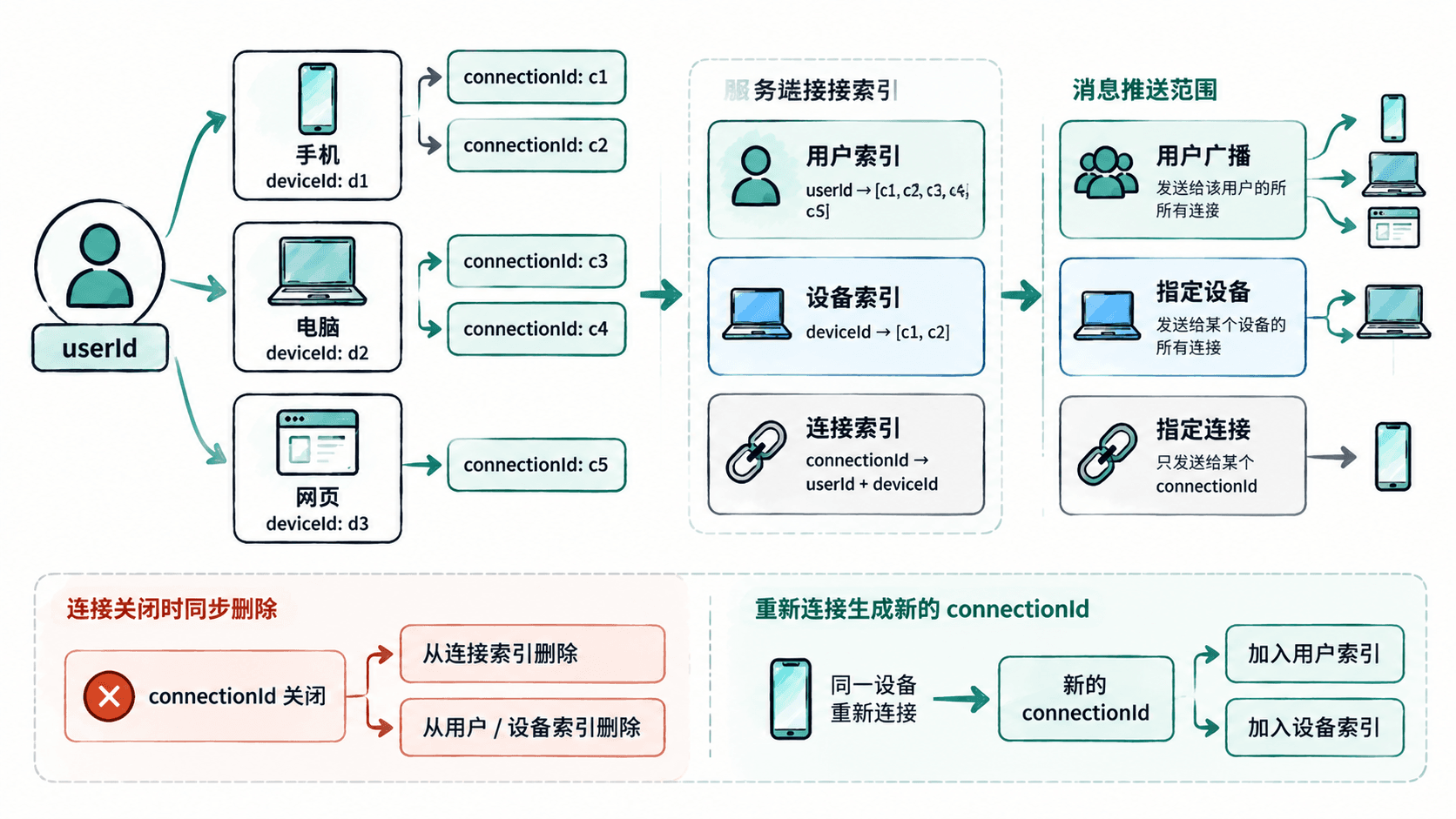
用双向索引管理连接
下面的 Node.js 示例实现一个最小连接注册表。byConnection 负责精确查找,byUser 负责用户级广播;设备定向时在用户连接集合中筛选 deviceId。连接对象这里只保存一个发送函数来模拟推送。
class ConnectionRegistry {
  constructor() {
    this.byConnection = new Map();
    this.byUser = new Map();
  }

  add({ userId, deviceId, connectionId, send }) {
    this.byConnection.set(connectionId, { userId, deviceId, send });

    if (!this.byUser.has(userId)) {
      this.byUser.set(userId, new Set());
    }
    this.byUser.get(userId).add(connectionId);
  }

  remove(connectionId) {
    const item = this.byConnection.get(connectionId);
    if (!item) return;

    this.byConnection.delete(connectionId);
    const ids = this.byUser.get(item.userId);
    ids.delete(connectionId);

    if (ids.size === 0) {
      this.byUser.delete(item.userId);
    }
  }

  sendToUser(userId, payload) {
    for (const connectionId of this.byUser.get(userId) ?? []) {
      this.byConnection.get(connectionId)?.send(payload);
    }
  }

  sendToDevice(userId, deviceId, payload) {
    for (const connectionId of this.byUser.get(userId) ?? []) {
      const item = this.byConnection.get(connectionId);
      if (item?.deviceId === deviceId) item.send(payload);
    }
  }
}

const registry = new ConnectionRegistry();

registry.add({
  userId: "u-1",
  deviceId: "phone",
  connectionId: "c-101",
  send: (msg) => console.log("c-101", msg)
});

registry.add({
  userId: "u-1",
  deviceId: "laptop",
  connectionId: "c-102",
  send: (msg) => console.log("c-102", msg)
});

registry.sendToDevice("u-1", "phone", { type: "notice", text: "仅手机可见" });
registry.sendToUser("u-1", { type: "sync", version: 7 });
registry.remove("c-101");
预期输出
c-101 { type: 'notice', text: '仅手机可见' }
c-101 { type: 'sync', version: 7 }
c-102 { type: 'sync', version: 7 }
如果设备数量和连接数量很大,设备级推送不应每次遍历用户的全部连接,可以增加 userId:deviceId -> Set<connectionId> 的第三个索引,以额外内存换取更直接的设备查询。
重连时先决定连接策略
“同一设备只保留一个连接”并不是通用规则。浏览器多标签页可能合理地产生多个连接,而原生 App 常希望同一设备只有一个活跃连接。实现前应先明确产品策略,再决定新连接到来时是共存、替换旧连接,还是拒绝重复连接。
无论采用哪种策略,旧连接的关闭事件都可能晚于新连接建立。清理时必须按 connectionId 精确删除,不能简单执行“删除这个用户或设备的全部映射”,否则旧连接的迟到关闭事件可能误删新连接。
多节点部署还要补一层路由
单进程内的 Map 只知道当前节点上的连接。部署多个 WebSocket 节点后,用户的手机和电脑可能落在不同实例,用户级广播就需要共享路由信息或消息总线。常见做法是让每个节点只维护本机连接,同时通过 Redis Pub/Sub、Redis Streams、Kafka 等机制把“给用户 u-1 推送”的事件分发到相关节点,再由节点查询本地索引发送。
稳定的多连接管理依赖三个清晰边界:业务身份用 userId,设备范围用 deviceId,一次连接用 connectionId。索引按查询方向设计、关闭按连接精确清理,再配合跨节点路由,才能既支持多端在线,又避免重连和迟到事件破坏映射关系。