
计算机网络 / 系统课时
广播给谁由什么决定
广播给谁由什么决定
广播系统真正困难的不是调用 send,而是先确定“哪些连接有资格收到这条消息”。把用户、组织、房间、主题和业务分组统一抽象为带命名空间的频道,再把授权判断、订阅索引和发送去重分开,可以让推送范围清晰且可验证。
学习目标
- 区分
room、topic、group、用户与组织频道各自承担的语义。 - 用频道命名空间和订阅索引计算广播接收者。
- 在一个事件命中多个频道时避免同一连接被重复发送。
先把广播拆成受众和通道
业务事件不应该直接“遍历所有 WebSocket 再写一堆 if”。更稳定的链路是:业务先解析事件受众,得到一个或多个频道键;订阅层根据频道键找到连接集合;发送层对连接去重后再写入 socket。这样授权规则、业务语义和传输实现不会耦合在一起。
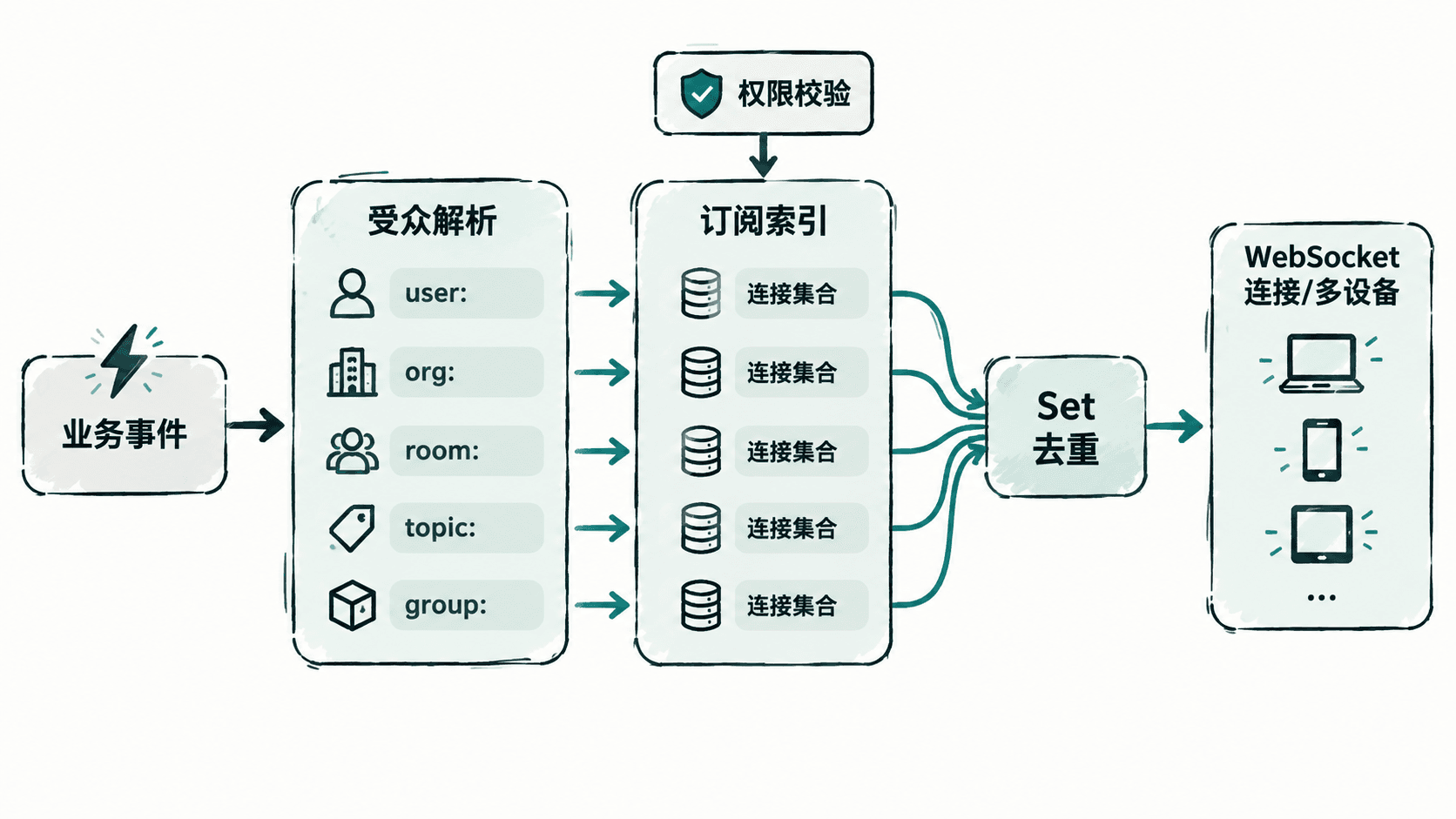
room、topic、group 不应混成同一种含义
| 命名空间 | 谁决定能否订阅 | 适合表达 |
|---|---|---|
user:<id> |
服务端确认当前身份 | 单用户直达消息 |
org:<id> |
组织成员关系 | 租户或组织范围广播 |
room:<id> |
房间成员关系 | 协作房间、会话、对局 |
topic:<name> |
主题 ACL 或公开策略 | 业务事件类别,如部署状态 |
group:<id> |
角色、分组或标签规则 | 运营分组、权限组、实验组 |
这些名称不是协议强制标准,而是应用层约定。重点是让同一个字符串能表达“频道类型 + 业务标识”,并在订阅时做权限校验。例如客户端不能因为知道 org:acme 这个名字,就自动获得组织广播权限。
订阅索引怎样保证不重复发送
下面的 subscription-router.js 不依赖网络库,专门演示广播选择算法。实际接入 ws 时,只要把示例中的连接对象替换成真实 WebSocket 实例即可,因为发送层只依赖 send()。
class SubscriptionIndex {
  constructor(canSubscribe) {
    this.canSubscribe = canSubscribe;
    this.channels = new Map();
    this.users = new Map();
  }

  attach(connection, user) {
    this.users.set(connection, user);
  }

  subscribe(connection, channel) {
    const user = this.users.get(connection);
    if (!user || !this.canSubscribe(user, channel)) {
      throw new Error(`forbidden: ${channel}`);
    }

    let set = this.channels.get(channel);
    if (!set) {
      set = new Set();
      this.channels.set(channel, set);
    }
    set.add(connection);
  }

  publish(channelKeys, event) {
    // 一个连接可能同时属于 room 与 topic,先合并再发送。
    const recipients = new Set();
    for (const key of channelKeys) {
      for (const connection of this.channels.get(key) || []) {
        recipients.add(connection);
      }
    }

    const payload = JSON.stringify(event);
    for (const connection of recipients) {
      connection.send(payload);
    }
    return recipients.size;
  }
}

const publicTopics = new Set(['deploy']);

function canSubscribe(user, channel) {
  const separator = channel.indexOf(':');
  if (separator <= 0) return false;

  const kind = channel.slice(0, separator);
  const id = channel.slice(separator + 1);

  if (kind === 'user') return id === user.id;
  if (kind === 'org') return user.orgs.has(id);
  if (kind === 'room') return user.rooms.has(id);
  if (kind === 'group') return user.groups.has(id);
  if (kind === 'topic') return publicTopics.has(id);
  return false;
}

function connection(name) {
  return {
    send(payload) {
      console.log(`${name} <- ${payload}`);
    }
  };
}

const index = new SubscriptionIndex(canSubscribe);
const alice = connection('alice');
const bob = connection('bob');
const carol = connection('carol');

index.attach(alice, {
  id: 'u1',
  orgs: new Set(['acme']),
  rooms: new Set(['incident-42']),
  groups: new Set(['ops'])
});
index.attach(bob, {
  id: 'u2',
  orgs: new Set(['acme']),
  rooms: new Set(['incident-42']),
  groups: new Set()
});
index.attach(carol, {
  id: 'u3',
  orgs: new Set(),
  rooms: new Set(),
  groups: new Set(['release-watchers'])
});

index.subscribe(alice, 'room:incident-42');
index.subscribe(alice, 'topic:deploy');
index.subscribe(bob, 'room:incident-42');
index.subscribe(carol, 'topic:deploy');

const delivered = index.publish(
  ['room:incident-42', 'topic:deploy'],
  { type: 'deploying', room: 'incident-42' }
);
console.log(`delivered=${delivered}`);预期结果:alice 同时订阅两个命中的频道,但由于发送前按连接去重,只会收到一次消息。
运行命令:
node subscription-router.js预期输出
alice <- {"type":"deploying","room":"incident-42"}
bob <- {"type":"deploying","room":"incident-42"}
carol <- {"type":"deploying","room":"incident-42"}
delivered=3
发布时先解析受众再命中连接
事件到频道的映射应留在业务层。例如“给某组织所有在线成员”可以解析为 org:<id>,“只通知一个用户的所有设备”可以解析为 user:<id>,“某个协作房间的成员再加上关注部署主题的人”则可以同时产生 room:<id> 与 topic:<name>。订阅索引只负责把这些键转换为连接集合,不需要理解事件含义。
多设备场景还要先明确去重单位。上面的 Set 按“连接”去重,因此同一用户的手机和网页如果都在线,会各收到一次;如果业务要求每个用户只处理一次,就应先按用户 ID 选一个连接或改为用户级投递,而不是依赖 socket 级去重。广播给谁最终由“业务受众规则 + 订阅权限 + 当前在线连接”共同决定。